It is currently Mon Aug 17, 2026 4:21 am


All times are UTC - 5 hours [ DST ]


Post new topic Reply to topic  [ 33 posts ]  Go to page Previous  1, 2
Author Message
 Post subject: Re: IMAGE SCALING
PostPosted: Tue Jun 18, 2019 2:32 pm  (#21) 
Offline
Administrator
User avatar

Joined: Aug 10, 2012
Posts: 14156
Location: Native to NYC living in Arizona, Gimp 2.8 - 3.0, Win 11 PC.
gimper66 wrote:
YES THAT WORKS ALSO,but the tool that I am looking for was very easy to work with


[ Image ]

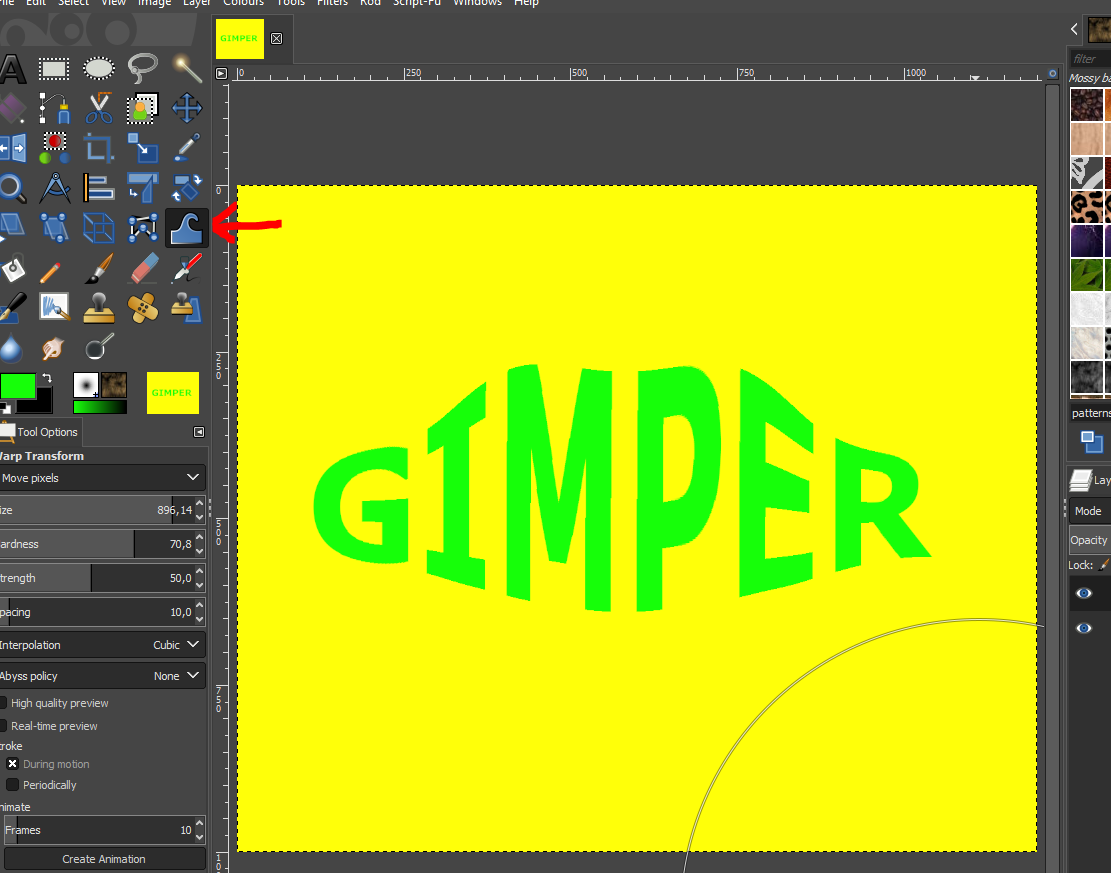
Not sure what you mean?
However,
if you are referring to the IWarp Tool,
which was at Filter>Distorts>IWarp in the Gimp 2.8 version.
The new Warp Transform Tool has replaced it,
in the Gimp 2.10 version.

Image

_________________
Image
"A wise man learns more from a foolish question than a fool can learn from a wise answer"
Image


Top
 Post subject: Re: IMAGE SCALING
PostPosted: Tue Jun 18, 2019 2:42 pm  (#22) 
Offline
GimpChat Member
User avatar

Joined: Apr 26, 2014
Posts: 3820
Location: belgium
Image


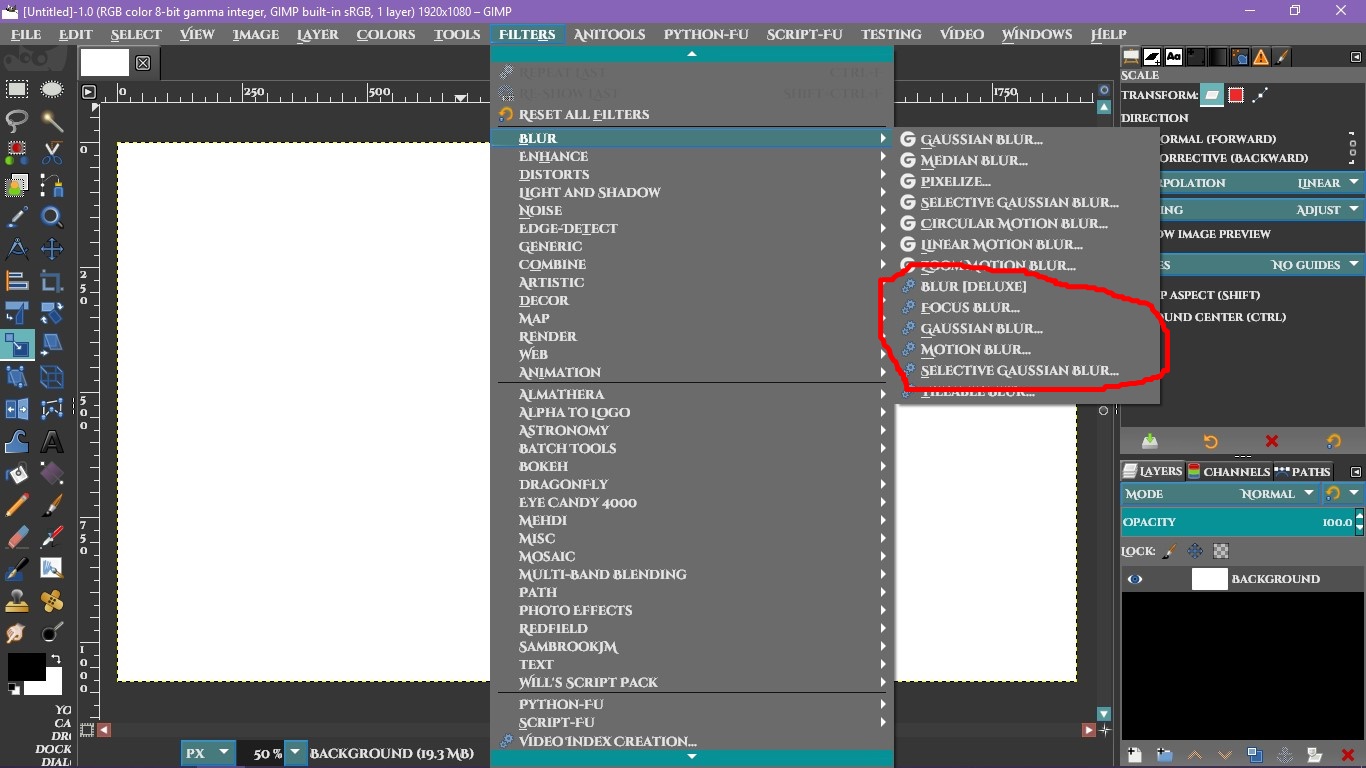
as you can see, that is not present either
I'm afraid I'll still have a lot of work with scripts and plug-ins


Top
 Post subject: Re: IMAGE SCALING
PostPosted: Tue Jun 18, 2019 2:47 pm  (#23) 
Offline
Administrator
User avatar

Joined: Aug 10, 2012
Posts: 14156
Location: Native to NYC living in Arizona, Gimp 2.8 - 3.0, Win 11 PC.
gimper66 wrote:
[ Image ]

as you can see, that is not present either

My screenshot,
showing the IWarp Tool.
Which was at Filter>Distorts>IWarp in the Gimp 2.8 version.
Was taken of the Gimp 2.8 version.
Not the new Gimp 2.10 version.

_________________
Image
"A wise man learns more from a foolish question than a fool can learn from a wise answer"
Image


Top
 Post subject: Re: IMAGE SCALING
PostPosted: Tue Jun 18, 2019 2:57 pm  (#24) 
Offline
GimpChat Member

Joined: Mar 04, 2011
Posts: 2612
Wallace you have the patience of a saint.

I wonder if the OP means the Curve-Bend plugin. That is still there.

Image

Of course things change and new tools come in. Ofnuts ofn-bend-path.py plugin is as good as any.
https://sourceforge.net/projects/gimp-p ... p/download

Image


Top
 Post subject: Re: IMAGE SCALING
PostPosted: Tue Jun 18, 2019 3:02 pm  (#25) 
Offline
GimpChat Member
User avatar

Joined: Apr 26, 2014
Posts: 3820
Location: belgium
Wallace wrote:
gimper66 wrote:
[ Image ]

as you can see, that is not present either

My screenshot,
showing the IWarp Tool.
Which was at Filter>Distorts>IWarp in the Gimp 2.8 version.
Was taken of the Gimp 2.8 version.
Not the new Gimp 2.10 version.

you still have that filter?
maybe I can place the filter in my filters file folder


Top
 Post subject: Re: IMAGE SCALING
PostPosted: Tue Jun 18, 2019 3:25 pm  (#26) 
Offline
GimpChat Member
User avatar

Joined: May 17, 2014
Posts: 1568
Gimper66, ik zie de curve bend ook op jouw screenshot, onder wind met de blauwe tandwieltjes staat curve bend...
Jij hebt het ook in jouw Gimp 2.10


Gimper66, I see the curve bend also on your screenshot, below wind with the blue gears is curve bend ...
You also have it in your Gimp 2.10

_________________
Ella's gallery - YouTube


Top
 Post subject: Re: IMAGE SCALING
PostPosted: Tue Jun 18, 2019 3:40 pm  (#27) 
Offline
Administrator
User avatar

Joined: Aug 10, 2012
Posts: 14156
Location: Native to NYC living in Arizona, Gimp 2.8 - 3.0, Win 11 PC.
gimper66 wrote:
you still have that filter?
maybe I can place the filter in my filters file folder

I still have Gimp 2.8 version installed, Not 2.10 version.
However,
I have multiple Gimp Portable versions,
which I use as reference.

_________________
Image
"A wise man learns more from a foolish question than a fool can learn from a wise answer"
Image


Top
 Post subject: Re: IMAGE SCALING
PostPosted: Tue Jun 18, 2019 3:51 pm  (#28) 
Offline
GimpChat Member

Joined: Mar 04, 2011
Posts: 2612
gimper66 wrote:
Wallace wrote:
gimper66 wrote:
[ Image ]

as you can see, that is not present either

My screenshot,
showing the IWarp Tool.
Which was at Filter>Distorts>IWarp in the Gimp 2.8 version.
Was taken of the Gimp 2.8 version.
Not the new Gimp 2.10 version.

you still have that filter?
maybe I can place the filter in my filters file folder


The Gimp 2.10 warp tool is essentially the same as the old iWarp tool with the advantage it works directly on the canvas instead of in a small window.

However, pulled from a Gimp 2.8 and attached the iwarp.exe plugin. Unzip and put in your Gimp 2.10 profile plug-ins folder. Seems to work OK but no guarantees.

Image


Attachments:
iwarp.exe.zip [34 KiB]
Downloaded 157 times
Top
 Post subject: Re: IMAGE SCALING
PostPosted: Tue Jun 18, 2019 4:33 pm  (#29) 
Offline
Administrator
User avatar

Joined: Aug 10, 2012
Posts: 14156
Location: Native to NYC living in Arizona, Gimp 2.8 - 3.0, Win 11 PC.
rich2005 wrote:
Wallace you have the patience of a saint.

;)
I remember the time,
when it was I,
who was trying everyone's patience,
here on Gimp Chat and on other Gimp forums.
It's all worth the effort,
if the end goal is ultimately achieved.

This isn't to say,
that my patience is being tested in any way.

:hi5

_________________
Image
"A wise man learns more from a foolish question than a fool can learn from a wise answer"
Image


Top
 Post subject: Re: IMAGE SCALING
PostPosted: Wed Jun 19, 2019 1:34 am  (#30) 
If you take a plugin from the old 2.8 version: C:\Program Files\GIMP 2\lib\gimp\2.0\plug-ins and put it on the Gimp 2.10 plugins Profile folder: C:\Users\YourName\AppData\Roaming\GIMP\2.10\plug-ins, It work.
Before I installed the Gimp 2.10 version, I heard that some plugins from the 2.8 version were omitted and I save some from the 2.8 version.

These are the plugins and they still work in Gimp 2.10:
1. IWarp
2. Curve Bend
3 All the Blur plugins
4.Blinds

Image

Image


Top
 Post subject: Re: IMAGE SCALING
PostPosted: Wed Jun 19, 2019 2:55 am  (#31) 
Offline
GimpChat Member
User avatar

Joined: Apr 26, 2014
Posts: 3820
Location: belgium
my problem is that just about everything was cleared from my last 2.8 when i switched to 2.10
through my own fault I had cleared my Backup 2.8
therefore always my question about these scripts & plug-ins etc …
greetings from Belgium,gimper66


Top
 Post subject: Re: IMAGE SCALING
PostPosted: Wed Jun 19, 2019 3:52 am  (#32) 
Offline
GimpChat Member

Joined: Mar 04, 2011
Posts: 2612
gimper66 wrote:
my problem is that just about everything was cleared from my last 2.8 when i switched to 2.10through my own fault I had cleared my Backup 2.8 therefore always my question about these scripts & plug-ins etc …


That was unfortunate, however look on it as a benefit. Now you can start off with a clean Gimp 2.10 and add just the scripts and plugins you feel you need. I have a large collection of scripts and plugins, but not that many are actually installed. One script and 20 plugins, a couple of those I could live without.

Make a list of what is required and someone will help you out.

It is worth spending some time exploring Gimp 2.10 because it does have increased functionality compared with Gimp 2.8. The Warp / iWarp is one example, the new Warp is so much better. The majority of tools now use GEGL and act directly on the image canvas. The GEGL tools have a 'G' showing. From the 'Artistic' menu

Attachment:
gegl.jpg
gegl.jpg [ 13.11 KiB | Viewed 2214 times ]


I have been using Gimp since version 2.2 and there is always something new to learn. Especially true with Gimp 2.10


Top
 Post subject: Re: IMAGE SCALING
PostPosted: Wed Jun 19, 2019 4:27 am  (#33) 
Offline
GimpChat Member

Joined: Apr 09, 2018
Posts: 1888
Location: France
Gimper66 :wvy
When you have found a Gimp that works according to your desires, you could consider using an imager (for example Macrium reflect which is free) and image your PC every week or as soon as you make a major change on your PC and more save on at least 2 supports.
A restoration is done in a few minutes and can find his PC as it was before the problem. :)

_________________
Les parfums, les couleurs et les sons se répondent.Baudelaire (Les fleurs du mal)
2.10.36/(Samj) Gimp 2.10.38 OS Windows 10 Home 64 bits


Top
Post new topic Reply to topic  [ 33 posts ]  Go to page Previous  1, 2

All times are UTC - 5 hours [ DST ]


* Login  


Powered by phpBB3 © phpBB Group