It is currently Wed Aug 12, 2026 5:33 am


All times are UTC - 5 hours [ DST ]


Post new topic Reply to topic  [ 11 posts ] 
Author Message
 Post subject: Piles of Photos
PostPosted: Tue Feb 08, 2011 9:47 am  (#1) 
Offline
Global Moderator
User avatar

Joined: May 16, 2010
Posts: 16158
There is actually a filter for this here
http://registry.gimp.org/node/24847
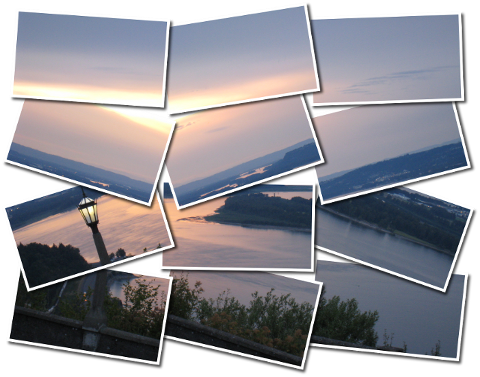
I have always liked this photo pile effect.
I ran it once 4 rows and 3 col - made the bg image and bg white layer invisible - flattened image
Then ran the script again with 4 rows 2 col - saved image with Riot half size as PNG flattened
Image

_________________
Image


Share on Facebook Share on Twitter Share on Orkut Share on Digg Share on MySpace Share on Delicious Share on Technorati
Top
 Post subject: Re: Piles of Photos
PostPosted: Tue Feb 08, 2011 9:52 am  (#2) 
Offline
GimpChat Member
User avatar

Joined: Jul 04, 2010
Posts: 2253
Location: Retired Moderator Slowly Returning to the Living.
I most definitely have to try this one out!!!

_________________
Artists aren't crazy! We're eccentric! ~G.M. Ross

Image

My Sigs = My Photos
Check out my work at http://www.flickr.com/photos/photomastergreg.


Top
 Post subject: Re: Piles of Photos
PostPosted: Tue Feb 08, 2011 10:04 am  (#3) 
Offline
GimpChat Member
User avatar

Joined: Jul 04, 2010
Posts: 2253
Location: Retired Moderator Slowly Returning to the Living.
It is a sweet filter! I love it. I stacked the results of several together to give it the stacked look.


Attachments:
Colorful Frames Pile.jpg
Colorful Frames Pile.jpg [ 447.66 KiB | Viewed 3268 times ]

_________________
Artists aren't crazy! We're eccentric! ~G.M. Ross

Image

My Sigs = My Photos
Check out my work at http://www.flickr.com/photos/photomastergreg.
Top
 Post subject: Re: Piles of Photos
PostPosted: Tue Feb 08, 2011 4:34 pm  (#4) 
Offline
GimpChat Member
User avatar

Joined: Oct 06, 2010
Posts: 4050
The thing I love about this script is that it leaves the layers for you to manipulate it further if you wish.

Funny thing is, I have been making these manually for quite some time and had this py file loaded and didn't even notice or remember that I had it. All that work, hahaha... thanks Rod for sharing! :)

Image

_________________
"In order to attain the impossible, one must attempt the absurd."
~ Miguel de Cervantes


Top
 Post subject: Re: Piles of Photos
PostPosted: Tue Feb 08, 2011 6:02 pm  (#5) 
Offline
GimpChat Member
User avatar

Joined: Apr 07, 2010
Posts: 14182
I have this script downloaded and installed in plugins but I can't find it in Gimp. Could some one point me in the direction Please. Of coarse maybe it didn't go into Gimp...... :gaah

_________________
Image


Top
 Post subject: Re: Piles of Photos
PostPosted: Tue Feb 08, 2011 6:47 pm  (#6) 
Offline
GimpChat Member
User avatar

Joined: Jul 04, 2010
Posts: 2253
Location: Retired Moderator Slowly Returning to the Living.
Filters > Decor > Pile's Photos

We had another script that did something similar, that we talked about here on GC. Now I have to find it again!

_________________
Artists aren't crazy! We're eccentric! ~G.M. Ross

Image

My Sigs = My Photos
Check out my work at http://www.flickr.com/photos/photomastergreg.


Top
 Post subject: Re: Piles of Photos
PostPosted: Tue Feb 08, 2011 7:09 pm  (#7) 
Offline
GimpChat Member
User avatar

Joined: Apr 07, 2010
Posts: 14182
thanks PM, I have the plugin but it didn't make it to Gimp. dang.....

I think the other one you are talking about is filters > map > wrap (bitmap (bucket) You used that to make that beautiful Xmas pic.

_________________
Image


Top
 Post subject: Re: Piles of Photos
PostPosted: Tue Feb 08, 2011 7:15 pm  (#8) 
Offline
GimpChat Member
User avatar

Joined: Oct 19, 2010
Posts: 376
Location: North Central Ohio, USA
Greg,
I think you might be thinking of Photo Mosaic (Filters > Artistic > Photo Mosaic).

_________________
Life Truth: #12
My cat is a worst typist than I am.


Top
 Post subject: Re: Piles of Photos
PostPosted: Wed Feb 09, 2011 8:22 am  (#9) 
Offline
Former Member
User avatar

Joined: Nov 17, 2010
Posts: 618
Location: Rockford, IL
I prefer doing this manually, it's nice, and will be helpful in the future though, thanks for the link (remind me to get this)


Top
 Post subject: Re: Piles of Photos
PostPosted: Wed Feb 09, 2011 10:04 pm  (#10) 
Offline
GimpChat Member
User avatar

Joined: Jul 04, 2010
Posts: 2253
Location: Retired Moderator Slowly Returning to the Living.
Bob63 wrote:
Greg,
I think you might be thinking of Photo Mosaic (Filters > Artistic > Photo Mosaic).

Yup! That was the one! I knew I wasn't imagining it!

_________________
Artists aren't crazy! We're eccentric! ~G.M. Ross

Image

My Sigs = My Photos
Check out my work at http://www.flickr.com/photos/photomastergreg.


Top
 Post subject: Re: Piles of Photos
PostPosted: Thu Feb 10, 2011 9:02 am  (#11) 
Offline
Global Moderator
User avatar

Joined: May 16, 2010
Posts: 16158
The one thing i love about this filter is it will create a whole other image leaving the original alone.
Image

What would be a nice addition to the script would be able to set the border width and height separate from the inside image so you could make the images look like the old instant Polaroids. :)

Image

_________________
Image


Top
Post new topic Reply to topic  [ 11 posts ] 

All times are UTC - 5 hours [ DST ]


* Login  


Powered by phpBB3 © phpBB Group