It is currently Wed Aug 26, 2026 9:28 am


All times are UTC - 5 hours [ DST ]


Post new topic Reply to topic  [ 23 posts ]  Go to page 1, 2  Next
Author Message
 Post subject: Warp transform tool
PostPosted: Sun Mar 10, 2019 5:05 am  (#1) 
Offline
GimpChat Member
User avatar

Joined: Apr 26, 2014
Posts: 3823
Location: belgium
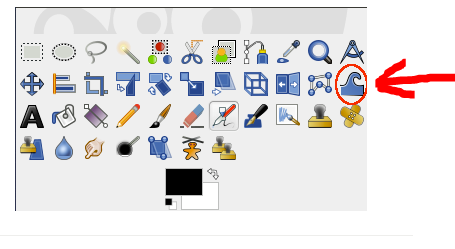
Image


can someone send me the Warp transform tool script.
I work with gimp 2.8
it is apparently a new tool that maybe only works with 2.10, so I'm not sure if it can work with 2.8
I hope it works with 2.8
Thanks in advance,gimper


Share on Facebook Share on Twitter Share on Orkut Share on Digg Share on MySpace Share on Delicious Share on Technorati
Top
 Post subject: Re: Warp transform tool
PostPosted: Sun Mar 10, 2019 6:13 am  (#2) 
Offline
Global Moderator
User avatar

Joined: Apr 01, 2012
Posts: 8463
Location: On the other side of your screen
Warp Transform is a GEGL based brush-like tool which replaces the old iWarp filter and works directly on the image, on real things instead of a tiny preview window. You can use an erase mode to partially remove warping you applied. You have available options to adapt strength and size of warping.

You may need one from another person using 2.8 as well. I think GEGL is in 2.10 only

_________________
Image
Free Fun Photo Editing & resources
Poems from the Lord
Gimp Newby
Gimp version 3.2.4 and GMIC-Qt 4.0.2 OS :- Windows 10 Home 64


Top
 Post subject: Re: Warp transform tool
PostPosted: Sun Mar 10, 2019 7:59 am  (#3) 
Offline
GimpChat Member

Joined: Sep 20, 2016
Posts: 293
Warp Transform is not a tool but a filter in 2.8, called IWarp
you can find it under "Distorts"

as Sallyanne pointed out: in 2.10 its an improved version with GEGL based on-cavas performance


Top
 Post subject: Re: Warp transform tool
PostPosted: Sun Mar 10, 2019 8:20 am  (#4) 
Offline
GimpChat Member
User avatar

Joined: Apr 26, 2014
Posts: 3823
Location: belgium
Konstantin wrote:
Warp Transform is not a tool but a filter in 2.8, called IWarp
you can find it under "Distorts"

as Sallyanne pointed out: in 2.10 its an improved version with GEGL based on-cavas performance


Konstantin, I know what Iwarp is and that it is under Distors.

Image

but as you can see, there is also a warp transform tool and that's what I'm looking for

I only fear that it does not work with gimp 2.8 version

but thanks for your quick response,gimper


Top
 Post subject: Re: Warp transform tool
PostPosted: Sun Mar 10, 2019 11:43 am  (#5) 
Since you have Gimp 2.8, If you use the IWarp plugin; Have a selection on the little sphere and use the IWarp plugin. On the option check "Grow" and slide both lever to the Max and click 5 times. it will give you the same result as the "Warp Transform tool". "No biggie".


Top
 Post subject: Re: Warp transform tool
PostPosted: Sun Mar 10, 2019 4:22 pm  (#6) 
Offline
Script Coder
User avatar

Joined: Oct 25, 2010
Posts: 4812
The tools aren't plugins or scripts, they are part of the core code. If you want a new tool in 2.10, you have to use 2.10.

_________________
Image


Top
 Post subject: Re: Warp transform tool
PostPosted: Mon Mar 11, 2019 6:52 am  (#7) 
Offline
GimpChat Member
User avatar

Joined: Apr 26, 2014
Posts: 3823
Location: belgium
Pocholo wrote:
Since you have Gimp 2.8, If you use the IWarp plugin; Have a selection on the little sphere and use the IWarp plugin. On the option check "Grow" and slide both lever to the Max and click 5 times. it will give you the same result as the "Warp Transform tool". "No biggie".


Image


thanks Pocholo,
I have done the editing as you have described with the above result.
I think it's okay the enlarged text is now clearly visible behind the magnifying glass.
Greetings gimper


Top
 Post subject: Re: Warp transform tool
PostPosted: Mon Mar 11, 2019 6:59 am  (#8) 
Offline
GimpChat Member
User avatar

Joined: Jan 20, 2013
Posts: 14831
Location: roma, italy
Well done ! (except the signature)

_________________
"Where am I ?"


Top
 Post subject: Re: Warp transform tool
PostPosted: Mon Mar 11, 2019 7:00 am  (#9) 
Offline
GimpChat Member
User avatar

Joined: Apr 26, 2014
Posts: 3823
Location: belgium
ofnuts wrote:
The tools aren't plugins or scripts, they are part of the core code. If you want a new tool in 2.10, you have to use 2.10.

yes ofnuts I know,I will have to change to 2.10
I'm only afraid that many scripts that are now in my gimp2.8 will no longer work properly
I only have my desktop computer,I should have a second computer to be sure :hehe :hehe


Top
 Post subject: Re: Warp transform tool
PostPosted: Mon Mar 11, 2019 8:07 am  (#10) 
Offline
GimpChat Member
User avatar

Joined: May 17, 2014
Posts: 1568
gimper66 wrote:
yes ofnuts I know,I will have to change to 2.10
I'm only afraid that many scripts that are now in my gimp2.8 will no longer work properly
I only have my desktop computer,I should have a second computer to be sure :hehe :hehe


You don't need an extra computer, Gimper. Just a memory stick.
I still have Gimp 2.8 on my laptop and samj portable 2.10 on a stick. I can use both.

_________________
Ella's gallery - YouTube


Top
 Post subject: Re: Warp transform tool
PostPosted: Mon Mar 11, 2019 11:11 am  (#11) 
Offline
GimpChat Member
User avatar

Joined: May 10, 2013
Posts: 1436
Location: Finland
You don't need second computer nor a stick. Portable can be used from same drive without any issues.
Hey, is the crystal ball in post #4 from some tutorial? I didn't see it in the tutorials index but would like to test.


Top
 Post subject: Re: Warp transform tool
PostPosted: Tue Mar 12, 2019 1:27 am  (#12) 
Offline
GimpChat Member

Joined: May 12, 2015
Posts: 4693
See if this one will help.
https://www.youtube.com/watch?v=gyghcg5vHpg


Top
 Post subject: Re: Warp transform tool
PostPosted: Tue Mar 12, 2019 5:59 am  (#13) 
Offline
GimpChat Member
User avatar

Joined: Apr 26, 2014
Posts: 3823
Location: belgium
Image


https://www.youtube.com/watch?v=gyghcg5vHpg
I made the picture with the link tutorial that Pat posted here.
the tutorial is made with gimp2.10 !!
so I made the effect of the glass sphere with
filters-distors-Iwarp because I still work with gimp2.8


I think it worked out well,
gimper


Top
 Post subject: Re: Warp transform tool
PostPosted: Tue Mar 12, 2019 8:32 am  (#14) 
Offline
GimpChat Member
User avatar

Joined: May 17, 2014
Posts: 1568
Nidhogg wrote:
You don't need second computer nor a stick. Portable can be used from same drive without any issues.


Once again, wrong information by me ...

_________________
Ella's gallery - YouTube


Top
 Post subject: Re: Warp transform tool
PostPosted: Tue Mar 12, 2019 9:54 am  (#15) 
Offline
GimpChat Member
User avatar

Joined: May 10, 2013
Posts: 1436
Location: Finland
Thanks for YT link Pat & Gimper66. Will try out, I liked how the ball looked in the #4 post.
@Ella Louise, it's no biggie if you didn't know it.


Top
 Post subject: Re: Warp transform tool
PostPosted: Tue Mar 12, 2019 1:53 pm  (#16) 
Nidhogg wrote:
You don't need second computer nor a stick. Portable can be used from same drive without any issues.
Hey, is the crystal ball in post #4 from some tutorial? I didn't see it in the tutorials index but would like to test.


Nidhogg, I found one Gimp 2.10 tutorial like that on Deviantart.


Top
 Post subject: Re: Warp transform tool
PostPosted: Tue Mar 12, 2019 4:10 pm  (#17) 
Offline
GimpChat Member

Joined: May 12, 2015
Posts: 4693
Pocholo, which deviant has the tutorial on Deviantart?


Top
 Post subject: Re: Warp transform tool
PostPosted: Tue Mar 12, 2019 4:59 pm  (#18) 
Offline
Administrator
User avatar

Joined: Aug 10, 2012
Posts: 14175
Location: Native to NYC living in Arizona, Gimp 2.8 - 3.0, Win 11 PC.
Pat625 wrote:
Pocholo, which deviant has the tutorial on Deviantart?

The tutorial was by conbagui,
who has been banned from Gimp Chat.
Sorry,
but we no longer allow anything by him,
here on Gimp Chat.


* * *

Here is a link to the original tutorial,
which was created back in 2007 by Aaron.
Photoshop Glass Ball Tutorial (Faking the Lens Effect in 2D)

_________________
Image
"A wise man learns more from a foolish question than a fool can learn from a wise answer"
Image


Top
 Post subject: Re: Warp transform tool
PostPosted: Tue Mar 12, 2019 11:27 pm  (#19) 
Offline
GimpChat Member
User avatar

Joined: May 10, 2013
Posts: 1436
Location: Finland
Thanks for the link Wallace. It's for PS but I'll convert the process for Gimp.
Me thinks the drop shadow needs to be fixed.


Top
 Post subject: Re: Warp transform tool
PostPosted: Tue Mar 12, 2019 11:35 pm  (#20) 
Offline
Administrator
User avatar

Joined: Aug 10, 2012
Posts: 14175
Location: Native to NYC living in Arizona, Gimp 2.8 - 3.0, Win 11 PC.
Nidhogg wrote:
Thanks for the link Wallace. It's for PS but I'll convert the process for Gimp.
Me thinks the drop shadow needs to be fixed.

That's cool and thank you Nidhogg.
IMHO,
You're a Gimp Chat member of significant standing.
Who I think,
would be gracious enough to give credit where it's due,
and not pass it off as your own original work/idea.

_________________
Image
"A wise man learns more from a foolish question than a fool can learn from a wise answer"
Image


Top
Post new topic Reply to topic  [ 23 posts ]  Go to page 1, 2  Next

All times are UTC - 5 hours [ DST ]


* Login  


Powered by phpBB3 © phpBB Group