It is currently Tue Aug 11, 2026 12:45 pm


All times are UTC - 5 hours [ DST ]


Post new topic Reply to topic  [ 4 posts ] 
Author Message
 Post subject: GIMP Composition Book Replica (quick render)
PostPosted: Fri May 30, 2025 6:25 pm  (#1) 
Offline
Administrator
User avatar

Joined: Aug 10, 2012
Posts: 14151
Location: Native to NYC living in Arizona, Gimp 2.8 - 3.0, Win 11 PC.
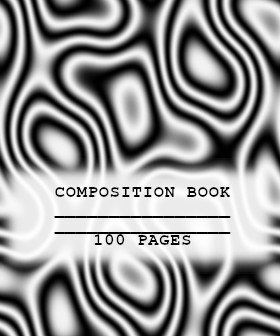
The pattern or texture was started with a layer full of white .
Not much time was spent on this image, perhaps but a few minutes.
With the exception of creating the label.
This was a simple and quick render.
The idea I had was to try and replicate this familiar looking book quickly and most of all it's pattern.
First Solid Noise
then Difference Clouds
and Threshold
to arrive at this final look.

Attachment:
.png
.png [ 79.77 KiB | Viewed 17397 times ]


There must be other ways of making this pattern?
Feel free to create your own "quick",
or not so quick, :hehe .GIMP composition book replica,
and tell us how you arrived at your pattern.
Good Luck and Happy Gimping!
:paint

_________________
Image
"A wise man learns more from a foolish question than a fool can learn from a wise answer"
Image


Share on Facebook Share on Twitter Share on Orkut Share on Digg Share on MySpace Share on Delicious Share on Technorati
Top
 Post subject: Re: GIMP Composition Book Replica (quick render)
PostPosted: Mon Jun 09, 2025 7:32 am  (#2) 
Offline
Global Moderator
User avatar

Joined: Apr 01, 2012
Posts: 8455
Location: On the other side of your screen
Didn't see this earlier on
I did this with just the sinus pattern. Then added a transparent layer to add text on. filled an area with white - reduced opacity and added text.
Image

_________________
Image
Free Fun Photo Editing & resources
Poems from the Lord
Gimp Newby
Gimp version 3.2.4 and GMIC-Qt 4.0.2 OS :- Windows 10 Home 64


Top
 Post subject: Re: GIMP Composition Book Replica (quick render)
PostPosted: Mon Jun 09, 2025 11:23 am  (#3) 
Offline
Administrator
User avatar

Joined: Aug 10, 2012
Posts: 14151
Location: Native to NYC living in Arizona, Gimp 2.8 - 3.0, Win 11 PC.
sallyanne wrote:
Didn't see this earlier on
I did this with just the sinus pattern. Then added a transparent layer to add text on. filled an area with white - reduced opacity and added text.
[ Image ]

Nice one sallyanne!
:paint


Here I created a more detailed composition book.
Using just Solid Noise on a black layer.

Attachment:
File comment: Scaled layer, copied to clipboard
Screenshot (2697).png
Screenshot (2697).png [ 240.61 KiB | Viewed 17245 times ]


Scaled down the layer and copied to clipboard and this to fill the layer.

Attachment:
File comment: Fill Layer with clipboard pattern
Screenshot (2700).png
Screenshot (2700).png [ 388.19 KiB | Viewed 17245 times ]


Then Threshold to create that familiar looking pattern.

Attachment:
File comment: Run Threshold
Screenshot (2698).png
Screenshot (2698).png [ 262.92 KiB | Viewed 17245 times ]


Here's the final render and the xcf file.

Attachment:
File comment: Compo Book
compo_book_wallace.png
compo_book_wallace.png [ 221.07 KiB | Viewed 17245 times ]

Attachment:
File comment: Compo Book xcf file
compo_book.xcf [2.96 MiB]
Downloaded 3108 times

_________________
Image
"A wise man learns more from a foolish question than a fool can learn from a wise answer"
Image


Top
 Post subject: Re: GIMP Composition Book Replica (quick render)
PostPosted: Mon Jun 09, 2025 8:15 pm  (#4) 
Offline
Global Moderator
User avatar

Joined: Apr 01, 2012
Posts: 8455
Location: On the other side of your screen
If you want to do a similar pattern, then Rorshach alone in Gmic will do it

By the way - I love your book binding~ how do you do that?

_________________
Image
Free Fun Photo Editing & resources
Poems from the Lord
Gimp Newby
Gimp version 3.2.4 and GMIC-Qt 4.0.2 OS :- Windows 10 Home 64


Top
Post new topic Reply to topic  [ 4 posts ] 

All times are UTC - 5 hours [ DST ]


* Login  


Powered by phpBB3 © phpBB Group