It is currently Tue Nov 17, 2026 11:55 pm


All times are UTC - 5 hours [ DST ]


Post new topic Reply to topic  [ 49 posts ]  Go to page Previous  1, 2, 3  Next
Author Message
 Post subject: Re: Free True Type Fonts For Use With Gimp
PostPosted: Mon Mar 17, 2014 8:50 am  (#21) 
Offline
GimpChat Member
User avatar

Joined: Apr 07, 2010
Posts: 14182
Thank you Bob, glad to see you posting again. I will look into it. I use Fedora 19 at the moment.

EDIT: just yum installed it, thanks :bigthup

_________________
Image


Top
 Post subject: Re: Free True Type Fonts For Use With Gimp
PostPosted: Mon Mar 17, 2014 9:14 am  (#22) 
Offline
GimpChat Member
User avatar

Joined: Oct 19, 2010
Posts: 376
Location: North Central Ohio, USA
Molly,

Just a head's up: I have over 4k (yes, 4 thousand) fonts installed so my font management software is slow to load. One of these days I really need to clean house!

Regards,
Bob

_________________
Life Truth: #12
My cat is a worst typist than I am.


Top
 Post subject: Re: Free True Type Fonts For Use With Gimp
PostPosted: Mon Mar 17, 2014 1:08 pm  (#23) 
Offline
GimpChat Member

Joined: Dec 27, 2012
Posts: 393
Location: England
molly wrote:
I guess I don't have a font manager. I typed it in Search and it said not found.
Anyway, I guess I will just have to put up with it the same as everyone. Takes quite a while to sift through them all if you want to look for one that suits what you are working on.


You might have already sorted this, but if not, you can use the addoncollection manager to load fonts and keep them separate from the default fonts. I think I remember that you set up the manager for brushes, if an ini file is added then the manager can be used for fonts as well. I can post a run through of how I set my one up if it's needed.

_________________
Image

DeviantArt gallery


Top
 Post subject: Re: Free True Type Fonts For Use With Gimp
PostPosted: Mon Mar 17, 2014 1:35 pm  (#24) 
Offline
GimpChat Member
User avatar

Joined: Apr 07, 2010
Posts: 14182
I have the brushes one that ofnuts modified and works great but I didn't do any of the other ones. I wouldn't know which ones are default or which I added over the years so I would probably mess it up.

_________________
Image


Top
 Post subject: Re: Free True Type Fonts For Use With Gimp
PostPosted: Mon Mar 17, 2014 3:35 pm  (#25) 
Offline
GimpChat Member
User avatar

Joined: Nov 16, 2011
Posts: 5127
Location: Metro Vancouver, BC
Caz wrote:
You might have already sorted this, but if not, you can use the addoncollection manager to load fonts and keep them separate from the default fonts. I think I remember that you set up the manager for brushes, if an ini file is added then the manager can be used for fonts as well. I can post a run through of how I set my one up if it's needed.
addoncollection manager will not control system fonts loading at Gimp startup, that was the problem.

_________________
Image
Gimp 2.8.18, Linux, median user
Gimp Chat Tutorials Index
Spirit Bear (Kermode)


Top
 Post subject: Re: Free True Type Fonts For Use With Gimp
PostPosted: Mon Mar 17, 2014 4:25 pm  (#26) 
Offline
GimpChat Member
User avatar

Joined: Apr 07, 2010
Posts: 14182
Aren't the system fonts and the default fonts the same thing?

_________________
Image


Top
 Post subject: Re: Free True Type Fonts For Use With Gimp
PostPosted: Mon Mar 17, 2014 4:35 pm  (#27) 
Offline
GimpChat Member
User avatar

Joined: Nov 16, 2011
Posts: 5127
Location: Metro Vancouver, BC
in this case yes but system relates to OS, default can relate to many thing.

_________________
Image
Gimp 2.8.18, Linux, median user
Gimp Chat Tutorials Index
Spirit Bear (Kermode)


Top
 Post subject: Re: Free True Type Fonts For Use With Gimp
PostPosted: Wed Jun 04, 2014 6:52 am  (#28) 
Offline
GimpChat Member

Joined: May 26, 2014
Posts: 53
What free program do you use to make custom fonts usable in your pc? I have plenty of fonts made but I can't use it the same way I type here.


Top
 Post subject: Re: Free True Type Fonts For Use With Gimp
PostPosted: Wed Jun 04, 2014 7:44 am  (#29) 
Offline
GimpChat Member
User avatar

Joined: Oct 19, 2010
Posts: 376
Location: North Central Ohio, USA
You don't need special software to use the font(s), but they do need to be installed so that the OS and the applications know they exist. The method depends on your operating system.

For Linux variations, copy the font file to the directory /home/<username>/.fonts. If it does not exist you can create it. If you cannot see the directory in your file manager press Ctrl+H to show hidden directories. Placing the font file here should allow your user to make use of the new fonts. If you need them for multiple users on the same device the process is a little different.

For Windows, you should be able to right-click on the font file and select install from the shortcut menu.

You may need to close and re-open the application that you want to use the font in, as many apps generate a font cache at startup.

_________________
Life Truth: #12
My cat is a worst typist than I am.


Top
 Post subject: Re: Free True Type Fonts For Use With Gimp
PostPosted: Thu Jun 05, 2014 3:45 am  (#30) 
Offline
GimpChat Member

Joined: May 26, 2014
Posts: 53
Bob63 wrote:
You don't need special software to use the font(s), but they do need to be installed so that the OS and the applications know they exist. The method depends on your operating system.

For Linux variations, copy the font file to the directory /home/<username>/.fonts. If it does not exist you can create it. If you cannot see the directory in your file manager press Ctrl+H to show hidden directories. Placing the font file here should allow your user to make use of the new fonts. If you need them for multiple users on the same device the process is a little different.

For Windows, you should be able to right-click on the font file and select install from the shortcut menu.

You may need to close and re-open the application that you want to use the font in, as many apps generate a font cache at startup.

I made my own fonts so its not the downloadables on the internet. I made them out of fun since I can't find font the same as what I made. I did try fontforge but it suddenly crashed before I can load all letters. I made them also to avoid something like this viewtopic.php?f=4&t=10445\\ ;)


Top
 Post subject: Re: Free True Type Fonts For Use With Gimp
PostPosted: Thu Jun 05, 2014 5:37 am  (#31) 
Offline
GimpChat Member
User avatar

Joined: Oct 19, 2010
Posts: 376
Location: North Central Ohio, USA
I understand.

You haven't said here but it would be helpful to know what OS you are using. I've experimented a little bit with FontForge on Linux, not at all on Windows. I do know that FontForge can make usable fonts. Perhaps your question(s) can be better answered through the FontForge website's FAQ or wiki?

Edit: I don't want to take up too much board space on a non-Gimp topic, but I'll work with you as much as I can.

_________________
Life Truth: #12
My cat is a worst typist than I am.


Top
 Post subject: Re: Free True Type Fonts For Use With Gimp
PostPosted: Sat Jun 07, 2014 5:11 am  (#32) 
Offline
GimpChat Member

Joined: May 26, 2014
Posts: 53
It's for an Ubuntu 12+ and a Windows 8

I'm not sure if I'm saying it right but I guess I'm asking for a True Type Font (?) if that's what the .ttf means. Whatever goes as long as I can use the fonts.

Thanks


Top
 Post subject: Re: Free True Type Fonts For Use With Gimp
PostPosted: Sat Jun 07, 2014 7:16 am  (#33) 
Offline
GimpChat Member
User avatar

Joined: Oct 19, 2010
Posts: 376
Location: North Central Ohio, USA
Do you know why FontForge crashed? Which OS were you running it on? If on Linux, try running it from a terminal (in Linux). You may be missing a library that FF needs to run, and the terminal will display messages that are not visible when running the application from it's start menu item.

If it crashed because you tried to get it to do something it's not designed to do, then there may be a problem with your font design. In that case I strongly recommend taking the time to read the manual.

_________________
Life Truth: #12
My cat is a worst typist than I am.


Top
 Post subject: Re: Free True Type Fonts For Use With Gimp
PostPosted: Wed Jun 11, 2014 3:07 am  (#34) 
Offline
GimpChat Member

Joined: May 26, 2014
Posts: 53
I was trying to copy-paste the font from MS Paint to FF but it says FF stopped working.


Top
 Post subject: Re: Free True Type Fonts For Use With Gimp
PostPosted: Wed Jun 11, 2014 10:02 am  (#35) 
Offline
GimpChat Member
User avatar

Joined: Oct 19, 2010
Posts: 376
Location: North Central Ohio, USA
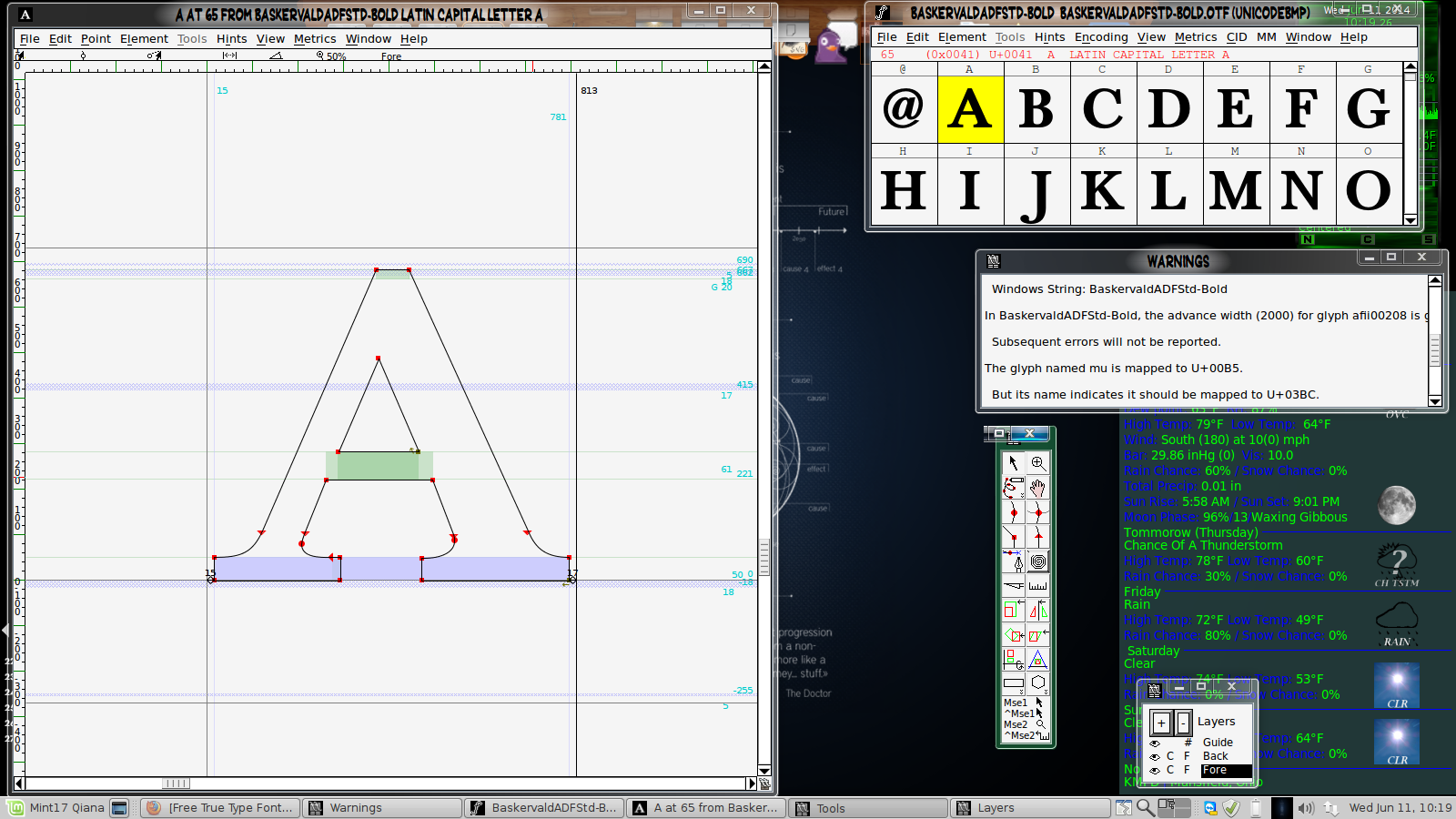
I'm not sure if you are aware of this (and if you are, sorry in advance for repeating), but Truetype/Opentype characters are made up of paths. This means that you will need to re-create your characters in Inkscape or a similar path editing program - or you could make them directly in FF.

To see this, open any font in FF. Choose a character and double-click. This will open a window that displays the outline of the character.Image
I personally have never created a font, so I don't know the steps. I am confident that there are tutorials available on the web, should you need assistance.

When you use pixel-painting programs (Gimp, MS Paint, etc), a "font" created would be similar to a bitmap font, which is different than Truetype/OpenType vector fonts that can be manipulated in FontForge.

There is software available that can convert bitmap fonts to vector (Google is your friend! :hehe ). In my opinion, vector type fonts are far superior to bitmap fonts. Why? Vector type fonts can be scaled up/down and the only "jaggies" produced come from the monitor pixels.

_________________
Life Truth: #12
My cat is a worst typist than I am.


Top
 Post subject: Re: Free True Type Fonts For Use With Gimp
PostPosted: Sun Oct 12, 2014 8:25 pm  (#36) 
Offline
GimpChat Member

Joined: Oct 08, 2014
Posts: 37
Bob63 wrote:
You don't need special software to use the font(s), but they do need to be installed so that the OS and the applications know they exist. The method depends on your operating system.

For Linux variations, copy the font file to the directory /home/<username>/.fonts. If it does not exist you can create it. If you cannot see the directory in your file manager press Ctrl+H to show hidden directories. Placing the font file here should allow your user to make use of the new fonts. If you need them for multiple users on the same device the process is a little different.


Hello Bob63,

by default in the .gimp folder there is a folder named Fonts, /home/<username>/.gimp-2.8/fonts/ I extracted the zip file and copy/paste to this folder, on opening Gimp the fonts are in the font list, and they function when I typed some text for testing.
Is it likely this will cause problems in Gimp and I need to also copy the fonts to the OS .fonts folder, or is it okay in only the Gimp font folder ?
I will only be using the fonts in Gimp etc.
I am using Linux Lite 2.0.

Thank You to everyone who posted the fonts.

_________________
Some think inside the box, others think outside the box.
I think, what box ~ why limit yourself.


Top
 Post subject: Re: Free True Type Fonts For Use With Gimp
PostPosted: Sun Oct 12, 2014 9:15 pm  (#37) 
Offline
GimpChat Member
User avatar

Joined: Nov 16, 2011
Posts: 5127
Location: Metro Vancouver, BC
If you only need these fonts in Gimp your good to go right now. No need to add them to your system unless you need them in other programs. If you do want to use these font with other programs I would recommend using a Font manager rather than mixing them with your system fonts.

_________________
Image
Gimp 2.8.18, Linux, median user
Gimp Chat Tutorials Index
Spirit Bear (Kermode)


Top
 Post subject: Re: Free True Type Fonts For Use With Gimp
PostPosted: Sun Oct 12, 2014 10:24 pm  (#38) 
Offline
GimpChat Member

Joined: Oct 08, 2014
Posts: 37
Thank You Odinbc :)
I can add the others in tomorrow now.

_________________
Some think inside the box, others think outside the box.
I think, what box ~ why limit yourself.


Top
 Post subject: Re: Free True Type Fonts For Use With Gimp
PostPosted: Mon Jan 02, 2017 12:02 am  (#39) 
Offline
GimpChat Member
User avatar

Joined: Dec 30, 2016
Posts: 12
GnuTux wrote:


Ahh I use this one alot for my fonts.

_________________
Image


Top
 Post subject: Re: Free True Type Fonts For Use With Gimp
PostPosted: Fri Feb 24, 2017 5:47 am  (#40) 
Offline
GimpChat Member

Joined: Feb 24, 2017
Posts: 13
Can you tell me how to add new fonts into Gimp? I thought I knew how based on when I added brushes in quite a while back.
I downloaded a pack, then unzipped it and transferred the files over to my Gimp program file....going into "32" then "etc" then "Fonts". Then I restarted Gimp itself....but still nothing is showing up.
Any help would be appreciated.
I don't know if I would see your reply right away on here.....but I'll keep looking.

Time is of the essence as I'm trying to make "Save The Date" invites for my daughter's wedding.

Also, do you know where I can get some really great comic book fonts? Their wedding is Harley Quinn and Deadpool themed so that's what I'm making the Save the Date's with, along with a comic book appearance.

Thanks for all your help.


Top
Post new topic Reply to topic  [ 49 posts ]  Go to page Previous  1, 2, 3  Next

All times are UTC - 5 hours [ DST ]


* Login  


Powered by phpBB3 © phpBB Group