It is currently Fri Oct 09, 2026 6:12 pm


All times are UTC - 5 hours [ DST ]


Post new topic Reply to topic  [ 620 posts ]  Go to page Previous  1 ... 10, 11, 12, 13, 14, 15, 16 ... 31  Next
Author Message
 Post subject: Re: Environment Map Sharing Thread (Spherical)
PostPosted: Sun Aug 10, 2014 9:39 pm  (#241) 
Offline
Retired Staff
User avatar

Joined: May 22, 2008
Posts: 6946
Location: Somewhere in GIMP
Using the Bevel Reflect script plus the 3D Extrusion script. Fun :hehe
Image

_________________
Image
World War IV will be fought with sticks and stones. - Albert Einstein


Top
 Post subject: Re: Environment Map Sharing Thread (Spherical)
PostPosted: Sun Aug 10, 2014 10:06 pm  (#242) 
Offline
GimpChat Member
User avatar

Joined: Dec 08, 2013
Posts: 1088
Thanks Oregonian.

_________________
Image


Top
 Post subject: Re: Environment Map Sharing Thread (Spherical)
PostPosted: Mon Aug 11, 2014 12:13 am  (#243) 
Offline
Script Coder
User avatar

Joined: Feb 18, 2011
Posts: 4826
Location: Bendigo Vic. Australia
3D extrusion works well with the output
Image

_________________
Image
No matter how much you push the envelope, it'll still be stationery.


Top
 Post subject: Re: Environment Map Sharing Thread (Spherical)
PostPosted: Mon Aug 11, 2014 12:53 am  (#244) 
Offline
GimpChat Member
User avatar

Joined: Dec 08, 2013
Posts: 1088
A very stylish out of bounds Graechan.

_________________
Image


Top
 Post subject: Re: Environment Map Sharing Thread (Spherical)
PostPosted: Mon Aug 11, 2014 2:38 am  (#245) 
Offline
GimpChat Member
User avatar

Joined: Dec 08, 2013
Posts: 1088
Some maps from the GnuTux gardens' :mrgreen: Those beloved tomatoes!


Attachments:
BRL-EarlyGirl1a+90.png
BRL-EarlyGirl1a+90.png [ 192.9 KiB | Viewed 2398 times ]
SEM-EarlyGirl2a1+90.png
SEM-EarlyGirl2a1+90.png [ 208.72 KiB | Viewed 2399 times ]
GraPai-EarlyGirl2a+orig.jpg
GraPai-EarlyGirl2a+orig.jpg [ 136.54 KiB | Viewed 2399 times ]

_________________
Image


Last edited by SysTemX on Mon Aug 11, 2014 5:46 am, edited 1 time in total.
Top
 Post subject: Re: Environment Map Sharing Thread (Spherical)
PostPosted: Mon Aug 11, 2014 5:06 am  (#246) 
Offline
GimpChat Member
User avatar

Joined: Dec 08, 2013
Posts: 1088
Something for anybody who is interested :)


Attachments:
GC-SphereRotation.png
GC-SphereRotation.png [ 535 KiB | Viewed 2387 times ]

_________________
Image
Top
 Post subject: Re: Environment Map Sharing Thread (Spherical)
PostPosted: Mon Aug 11, 2014 6:07 am  (#247) 
Offline
GimpChat Member
User avatar

Joined: Dec 08, 2013
Posts: 1088
:)


Attachments:
BRL-Cygnus.png
BRL-Cygnus.png [ 446.56 KiB | Viewed 2373 times ]

_________________
Image
Top
 Post subject: Re: Environment Map Sharing Thread (Spherical)
PostPosted: Mon Aug 11, 2014 6:21 am  (#248) 
Offline
Retired Staff
User avatar

Joined: May 22, 2008
Posts: 6946
Location: Somewhere in GIMP
SysTemX, those are great. Nice job. :yes

Just used Bevel Reflect on this one. :ffy
Image

_________________
Image
World War IV will be fought with sticks and stones. - Albert Einstein


Top
 Post subject: Re: Environment Map Sharing Thread (Spherical)
PostPosted: Mon Aug 11, 2014 6:30 am  (#249) 
Offline
GimpChat Member
User avatar

Joined: Dec 08, 2013
Posts: 1088
Thank you Oregonian.
Ilike that one, the purple haze shadow? sixties style.
I have to say AlphaToLogo was always my favored BRL.
Anybody for a WallyBlock :) sorry Wallace :roll:

The middle image has a color to alpha.


Attachments:
BRL-Palette1294a.png
BRL-Palette1294a.png [ 527.75 KiB | Viewed 2343 times ]
GraPai-EarlyGirl2a+orig.png
GraPai-EarlyGirl2a+orig.png [ 499.66 KiB | Viewed 2349 times ]
BRL-IcedWallyBlock.png
BRL-IcedWallyBlock.png [ 389.01 KiB | Viewed 2364 times ]

_________________
Image


Last edited by SysTemX on Mon Aug 11, 2014 9:36 am, edited 1 time in total.
Top
 Post subject: Re: Environment Map Sharing Thread (Spherical)
PostPosted: Mon Aug 11, 2014 9:08 am  (#250) 
Offline
GimpChat Founder
User avatar

Joined: May 22, 2008
Posts: 5241
Location: Gimpville
Wow! Nice results. Extruding the ouput from BRL can yield some interesting results.

Image

I never would have thought about sampling gradients from those tomatoes but it actually turned out well. :hehe

_________________
“If you reach for the stars, you just might land on a decently sized hill.” - Stuart Hill


Top
 Post subject: Re: Environment Map Sharing Thread (Spherical)
PostPosted: Mon Aug 11, 2014 9:14 am  (#251) 
Offline
GimpChat Member
User avatar

Joined: Dec 08, 2013
Posts: 1088
I have benn doing that for a very long time. I just did not realize that it was not common practice.
That is stunning. No wonder you get the big bucks ;-}


Attachments:
BRL-Palette1294aExtr.png
BRL-Palette1294aExtr.png [ 544.02 KiB | Viewed 2353 times ]

_________________
Image
Top
 Post subject: Re: Environment Map Sharing Thread (Spherical)
PostPosted: Mon Aug 11, 2014 11:30 am  (#252) 
Offline
Retired Staff
User avatar

Joined: May 22, 2008
Posts: 6946
Location: Somewhere in GIMP
SysTemX wrote:
Something for anybody who is interested :)

Two great tips here, SysTX. They bear repeating. I'm doing them in plain text so they are more easily read.
SysTemX wrote:
Observing the placement in the text in relation to the colors in the sphere, it is possible to manipulate the blend by rotating the sphere using the ROTATE TOOL. Resave the sphere under a new name and re-run Bevel Reflect Logo and use the new sphere.
You can also change the colors of the sphere by selecting a gradient you prefer and using COLORS>MAP>GRADIENT-MAP.
;-} SysTemX

_________________
Image
World War IV will be fought with sticks and stones. - Albert Einstein


Top
 Post subject: Re: Environment Map Sharing Thread (Spherical)
PostPosted: Mon Aug 11, 2014 12:12 pm  (#253) 
Offline
GimpChat Founder
User avatar

Joined: May 22, 2008
Posts: 5241
Location: Gimpville
Rotating a map that has been transformed into sphere will also change the lighting direction, as mentioned in this post by he4rty. As he4rty suggested, I added map rotation (light direction) and specular highlight intensity to the map generation section of BRL, as demonstrated here.

So, not only does the reflected results change when the map is rotated, if there are lighting effects, such as those created by mapping to a sphere, those change as well, allowing you control the direction of the lighting. :bigthup

_________________
“If you reach for the stars, you just might land on a decently sized hill.” - Stuart Hill


Top
 Post subject: Re: Environment Map Sharing Thread (Spherical)
PostPosted: Mon Aug 11, 2014 3:08 pm  (#254) 
Offline
Retired Staff
User avatar

Joined: May 22, 2008
Posts: 6946
Location: Somewhere in GIMP
More fun. :mrgreen:
Image

_________________
Image
World War IV will be fought with sticks and stones. - Albert Einstein


Top
 Post subject: Re: Environment Map Sharing Thread (Spherical)
PostPosted: Mon Aug 11, 2014 3:14 pm  (#255) 
Offline
GimpChat Member
User avatar

Joined: Mar 10, 2014
Posts: 845
more more fun

Image

font Templett
map from gradient #13 by Solanskii

Image


Last edited by Marcello on Mon Aug 11, 2014 7:50 pm, edited 1 time in total.

Top
 Post subject: Re: Environment Map Sharing Thread (Spherical)
PostPosted: Mon Aug 11, 2014 3:19 pm  (#256) 
Offline
GimpChat Member
User avatar

Joined: Aug 30, 2012
Posts: 2174
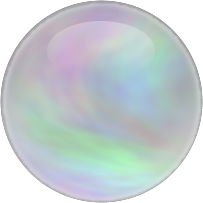
Been playing with some maps, then remembered this script I have called Soap Bubble, I ran the script but unchecked the merge layer options so I could crop the top layer "Outer Shade" then merged layers and cropped image and saved.
I chose a nice chunky font called "Keep on Trukin" but first used the Random Font Text Script to give the appearance of a more floaty font, I then ran the alpha to logo version of the Bevel reflect Logo Script and finally went colour>auto>colour enhance.

Here is the Map
Image

Here are my results
Image

Here is the script, although it is tag as 2.6, I have it running in 2.8 with no known issue.

http://gimpscripts.com/2011/10/soap-bubble/

_________________
Image


Top
 Post subject: Re: Environment Map Sharing Thread (Spherical)
PostPosted: Mon Aug 11, 2014 3:27 pm  (#257) 
Offline
Retired Staff
User avatar

Joined: May 22, 2008
Posts: 6946
Location: Somewhere in GIMP
he4rty wrote:
Been playing with some maps, then remembered this script I have called Soap Bubble, I ran the script but unchecked the merge layer options so I could crop the top layer "Outer Shade" then merged layers and cropped image and saved.


What a nice result. Great idea. :jumpclap

_________________
Image
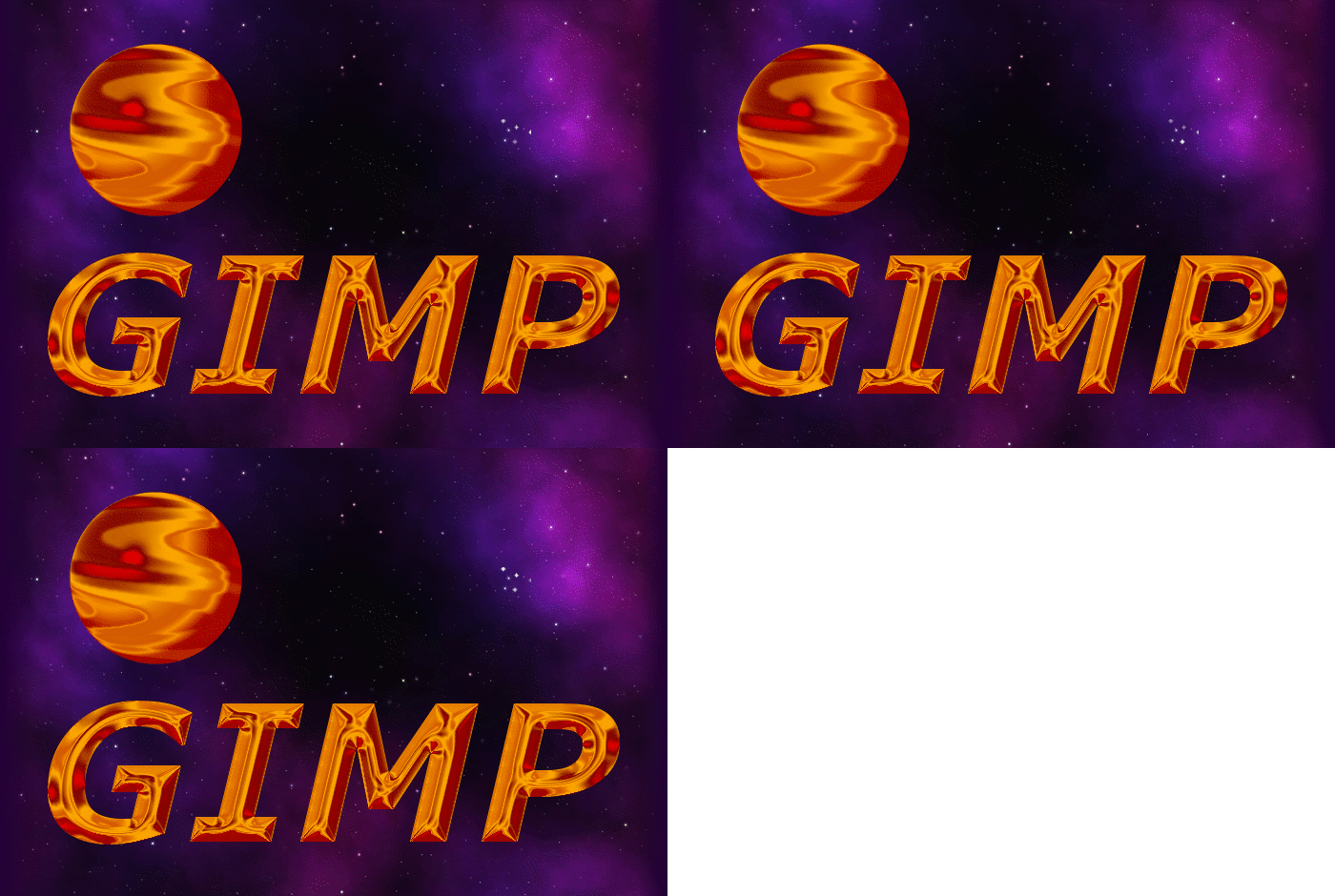
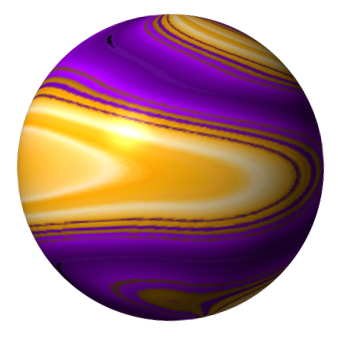
World War IV will be fought with sticks and stones. - Albert Einstein


Top
 Post subject: Re: Environment Map Sharing Thread (Spherical)
PostPosted: Mon Aug 11, 2014 3:36 pm  (#258) 
Offline
GimpChat Member
User avatar

Joined: Apr 07, 2010
Posts: 14182
Thats really cool he4rty.

_________________
Image


Top
 Post subject: Re: Environment Map Sharing Thread (Spherical)
PostPosted: Mon Aug 11, 2014 3:40 pm  (#259) 
Offline
GimpChat Founder
User avatar

Joined: May 22, 2008
Posts: 5241
Location: Gimpville
Nice results from everyone! :yes

This is a sharing thread so remember to post your maps, preferably as an attachment with a transparent background. :hehe

Here's one done from a variation of O's fiery map.

Image

One thing I've noticed is that if the map is too bright or overly saturated, the results can be a little washed out. Example's below.

Image
Image

_________________
“If you reach for the stars, you just might land on a decently sized hill.” - Stuart Hill


Top
 Post subject: Re: Environment Map Sharing Thread (Spherical)
PostPosted: Mon Aug 11, 2014 4:46 pm  (#260) 
Offline
Administrator
User avatar

Joined: Aug 10, 2012
Posts: 14236
Location: Native to NYC living in Arizona, Gimp 2.8 - 3.0, Win 11 PC.
SysTemX wrote:
I have benn doing that for a very long time. I just did not realize that it was not common practice.
That is stunning. No wonder you get the big bucks ;-}


That's quite a remarkable looking emap you made there SX.
I made a few renders with it; and the results were stellar. Sorry I didn't post them, but I was trying to copy your results using that Thunderbay font. So they all looked like what you've already posted. With only slight variations.

Nice! It's a keeper for sure. :bigthup

_________________
Image
"A wise man learns more from a foolish question than a fool can learn from a wise answer"
Image


Top
Post new topic Reply to topic  [ 620 posts ]  Go to page Previous  1 ... 10, 11, 12, 13, 14, 15, 16 ... 31  Next

All times are UTC - 5 hours [ DST ]


* Login  


Powered by phpBB3 © phpBB Group