It is currently Wed Aug 05, 2026 6:50 pm


All times are UTC - 5 hours [ DST ]


Post new topic Reply to topic  [ 33 posts ]  Go to page 1, 2  Next
Author Message
 Post subject: Adding gradient shapes
PostPosted: Sat May 21, 2011 5:33 pm  (#1) 
Offline
GimpChat Member
User avatar

Joined: Oct 07, 2010
Posts: 439
Location: home/Nixnine/.gimp-2.0/scripts/nixnine.scm
Is it possible to add more gradient shapes? I have tried to locate the files for the standard gradient shapes but have had no luck. Anyone have any ideas as to if this can be done and where to do it?

Thanks,
Nixnine

_________________
I refuse to be confused, but am often confused at this refusal.


Share on Facebook Share on Twitter Share on Orkut Share on Digg Share on MySpace Share on Delicious Share on Technorati
Top
 Post subject: Re: Adding gradient shapes
PostPosted: Sat May 21, 2011 6:27 pm  (#2) 
Offline
Global Moderator
User avatar

Joined: May 16, 2010
Posts: 16149
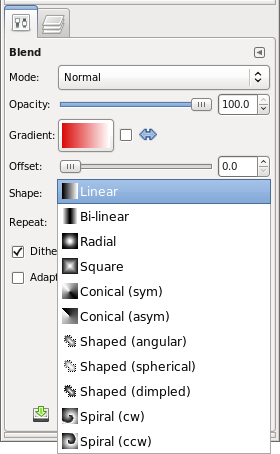
That's a good question.Even though Gimp provides 11 shapes in the gradient dialog, it would be interesting to know how to add more. :)

_________________
Image


Top
 Post subject: Re: Adding gradient shapes
PostPosted: Sun May 22, 2011 12:47 pm  (#3) 
Offline
GimpChat Member
User avatar

Joined: Apr 30, 2010
Posts: 1937
Location: Missouri
I'm not sure what you mean about shapes. if you mean just simple gradients, sure, you can make or download them from lots of places. I must not be understanding the question.

_________________
Image
The last time I kept an open mind,
my brain fell out and the dog grabbed it.
Now it's full of dirt, toothmarks, and dog slobber.
No more open minds or dogs for me.


Top
 Post subject: Re: Adding gradient shapes
PostPosted: Sun May 22, 2011 1:14 pm  (#4) 
Offline
Retired Staff
User avatar

Joined: May 22, 2008
Posts: 6946
Location: Somewhere in GIMP
Gms9810 wrote:
I'm not sure what you mean about shapes.
I think he means the shapes down in the gradient toolbox options.

Image

_________________
Image
World War IV will be fought with sticks and stones. - Albert Einstein


Top
 Post subject: Re: Adding gradient shapes
PostPosted: Sun May 22, 2011 2:06 pm  (#5) 
Offline
Global Moderator
User avatar

Joined: May 16, 2010
Posts: 16149
Yes the 11 shapes like radial and linear and the rest in the drop down dialog. :)

_________________
Image


Top
 Post subject: Re: Adding gradient shapes
PostPosted: Mon May 23, 2011 12:13 pm  (#6) 
Offline
GimpChat Member
User avatar

Joined: Oct 07, 2010
Posts: 439
Location: home/Nixnine/.gimp-2.0/scripts/nixnine.scm
Yes, that's what I mean. I saw in another program -- can't remember which -- some cool gradient shapes and was just wondering. I mean everything else in gimp is customizable, why not this. Anyway, if anyone knows, cool.

_________________
I refuse to be confused, but am often confused at this refusal.


Top
 Post subject: Re: Adding gradient shapes
PostPosted: Mon May 23, 2011 2:01 pm  (#7) 
Offline
Script Coder
User avatar

Joined: Apr 23, 2010
Posts: 1553
Location: not from Guildford after all
nixnine wrote:
Yes, that's what I mean. I saw in another program -- can't remember which -- some cool gradient shapes and was just wondering. I mean everything else in gimp is customizable, why not this. Anyway, if anyone knows, cool.

What other shapes would there be? And in what way would supporting such predefined shapes produce a result different from making a selection of that shape and using one of the "Shaped" choices from the drop-down?

_________________
Any sufficiently primitive technology is indistinguishable from a rock.


Top
 Post subject: Re: Adding gradient shapes
PostPosted: Mon May 23, 2011 2:23 pm  (#8) 
Offline
GimpChat Member

Joined: Apr 12, 2010
Posts: 5870
i believe is not, not without modyfying the code that in this case will comport recompile gimp

on the other hand maybe a enancement proposal ,with a patch adding more shapes may be accepted

BTW i opening a new , somehow connected topic :
there is only another shape of gradient i would find useful:
From Selection Edges to Center , maybe something alike is possible iif not with the gradient tool with a plugin or maybe a script

In case of the selection would be a prefect square a similar gradient will be eqivalent to a square gradient starting from the center and till the half point of one of the sides

in case of a circolar selection would be equivalent to a radial gradient starting from the center till a point on the circonfrence

and in a similar way for other polygons or star shapes:
the gradient should be calcolated from the point of the edge closer to the center
The full range of the gradient should be displayed along that line.
and for the others will be the same stretched according to the distance from the center.

_________________
My 3D Gallery on Deviantart http://photocomix2.deviantart.com/
Main gallery http://www.flickriver.com/photos/photocomix-mandala/
Mandala and simmetry http://www.flickriver.com/photos/photocomix_mandala/

Image

Mrs Wilbress


Top
 Post subject: Re: Adding gradient shapes
PostPosted: Mon May 23, 2011 2:33 pm  (#9) 
Offline
GimpChat Member
User avatar

Joined: Oct 06, 2010
Posts: 4050
I was thinking the same thing saulgoode just asked. Not that I am against new gradient shapes. I was trying to think of what other options I could use by having new shapes offered.

_________________
"In order to attain the impossible, one must attempt the absurd."
~ Miguel de Cervantes


Top
 Post subject: Re: Adding gradient shapes
PostPosted: Mon May 23, 2011 2:44 pm  (#10) 
Offline
GimpChat Member

Joined: Apr 12, 2010
Posts: 5870
i was clear or is needed a mock up ?
again i really don't think the gradient tool should be modifyed to add a similar option

but a will be nice for a script or a plugin,
basically will fill with a gradient any shape , or at least shapes as polygons, stars and similar

The shape should correspond to a selection , a channel ,or a closed path

for the gradient filling:
from the point on the shape edge closer to the center to the center:
the gradient should be applied in its full range
from the point on the shape most far from the center
the same the gradient should be applied in its full range
so will be a line as the first but strecthed proportionally to the distance

and so on till complete the filling,

Do something alike manually is a hell of work but a plugin should do it

Maybe the WrapMap script may be modified to fill with a gradient ?

@Mahvin i see only now your reply

is my idea " From Selection Edges to Center " clear or i should try a mock up ?
again i don't think can be a gradient tool option , ... in case i would see more as option for Selection and Path.

I mean "adapt to any shape" is the only shape option i really miss, anyway something similar require the shape be the
selection (or a channel)

_________________
My 3D Gallery on Deviantart http://photocomix2.deviantart.com/
Main gallery http://www.flickriver.com/photos/photocomix-mandala/
Mandala and simmetry http://www.flickriver.com/photos/photocomix_mandala/

Image

Mrs Wilbress


Last edited by PhotoComix on Mon May 23, 2011 2:59 pm, edited 2 times in total.

Top
 Post subject: Re: Adding gradient shapes
PostPosted: Mon May 23, 2011 2:55 pm  (#11) 
Offline
GimpChat Member
User avatar

Joined: Oct 06, 2010
Posts: 4050
I'd need to see any proposed (new) shapes for the light to come on. There are numerous geometric shapes not in use now, but I'm more interested in what effect a new shape would produce in order for me to want to use it.

Since I can't implement it on my own, someone would need to create a mock up.

_________________
"In order to attain the impossible, one must attempt the absurd."
~ Miguel de Cervantes


Top
 Post subject: Re: Adding gradient shapes
PostPosted: Mon May 23, 2011 3:07 pm  (#12) 
Offline
GimpChat Member

Joined: Apr 12, 2010
Posts: 5870
sorry if i wrote some nonsence:
wrapmap could already fill shapes with a gradient...

and that was the only type of gradient fill that i was missing for the rest i found the gradient shapes more then sufficent

_________________
My 3D Gallery on Deviantart http://photocomix2.deviantart.com/
Main gallery http://www.flickriver.com/photos/photocomix-mandala/
Mandala and simmetry http://www.flickriver.com/photos/photocomix_mandala/

Image

Mrs Wilbress


Top
 Post subject: Re: Adding gradient shapes
PostPosted: Mon May 23, 2011 3:11 pm  (#13) 
Offline
Script Coder
User avatar

Joined: Oct 25, 2010
Posts: 4812
mahvin wrote:
I'd need to see any proposed (new) shapes for the light to come on. There are numerous geometric shapes not in use now, but I'm more interested in what effect a new shape would produce in order for me to want to use it.

Since I can't implement it on my own, someone would need to create a mock up.
Elliptical...

PhotoComix wrote:
sorry if i wrote some nonsence:
wrapmap could already fill shapes with a gradient...

and that was the only type of gradient fill that i was missing for the rest i found the gradient shapes more then sufficent
Wrapmap is a kludge :) A nice kludge, but a kludge...

_________________
Image


Top
 Post subject: Re: Adding gradient shapes
PostPosted: Mon May 23, 2011 3:12 pm  (#14) 
Offline
GimpChat Member
User avatar

Joined: Oct 06, 2010
Posts: 4050
I was thinking that last night when I read this post, that (WrapMap) could perform this function. I just didn't relate to it as a gradient shape (even though it can be used in that way).

Ofnuts: I can stretch radial gradients. Can also use Waves with gradient mapping.

_________________
"In order to attain the impossible, one must attempt the absurd."
~ Miguel de Cervantes


Last edited by mahvin on Mon May 23, 2011 3:25 pm, edited 1 time in total.

Top
 Post subject: Re: Adding gradient shapes
PostPosted: Mon May 23, 2011 3:18 pm  (#15) 
Offline
GimpChat Member

Joined: Apr 12, 2010
Posts: 5870
ofnuts wrote:
Wrapmap is a kludge :) A nice kludge, but a kludge...


here ,i must agree : :lol
so ...any hope for a dedicated "Fill Shape with Gradient" script, were the shape may be a closed path, a selection or a channel? :geek

_________________
My 3D Gallery on Deviantart http://photocomix2.deviantart.com/
Main gallery http://www.flickriver.com/photos/photocomix-mandala/
Mandala and simmetry http://www.flickriver.com/photos/photocomix_mandala/

Image

Mrs Wilbress


Top
 Post subject: Re: Adding gradient shapes
PostPosted: Mon May 23, 2011 3:45 pm  (#16) 
Offline
Retired Staff
User avatar

Joined: May 22, 2008
Posts: 6946
Location: Somewhere in GIMP
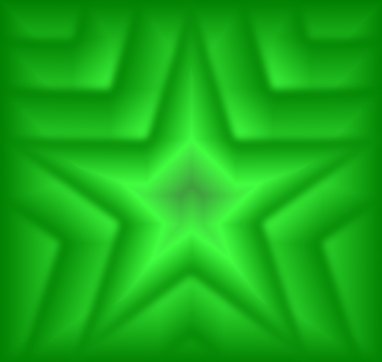
I was just diddling around trying to make a star-shape gradient. This is by no means anything very good.

Image

_________________
Image
World War IV will be fought with sticks and stones. - Albert Einstein


Top
 Post subject: Re: Adding gradient shapes
PostPosted: Mon May 23, 2011 4:28 pm  (#17) 
Offline
GimpChat Member

Joined: Apr 12, 2010
Posts: 5870
Maybe gmic may do it ?
http://www.flickr.com/groups/gmic/discu ... 665255989/

_________________
My 3D Gallery on Deviantart http://photocomix2.deviantart.com/
Main gallery http://www.flickriver.com/photos/photocomix-mandala/
Mandala and simmetry http://www.flickriver.com/photos/photocomix_mandala/

Image

Mrs Wilbress


Top
 Post subject: Re: Adding gradient shapes
PostPosted: Mon May 23, 2011 4:30 pm  (#18) 
Offline
Retired Staff
User avatar

Joined: May 22, 2008
Posts: 6946
Location: Somewhere in GIMP
PhotoComix wrote:

That sounds like a great possibility, PhotoComix.

_________________
Image
World War IV will be fought with sticks and stones. - Albert Einstein


Top
 Post subject: Re: Adding gradient shapes
PostPosted: Mon May 23, 2011 4:33 pm  (#19) 
Offline
Script Coder
User avatar

Joined: Oct 25, 2010
Posts: 4812
mahvin wrote:
I was thinking that last night when I read this post, that (WrapMap) could perform this function. I just didn't relate to it as a gradient shape (even though it can be used in that way).
On the back of my head there is a successor to WrapMap that takes real gradients :)

mahvin wrote:
Ofnuts: I can stretch radial gradients. Can also use Waves with gradient mapping.
Yes but the result isn't as accurate and practical as getting an elliptical gradient right away.

_________________
Image


Top
 Post subject: Re: Adding gradient shapes
PostPosted: Mon May 23, 2011 4:37 pm  (#20) 
Offline
Script Coder
User avatar

Joined: Apr 23, 2010
Posts: 1553
Location: not from Guildford after all
PhotoComix wrote:
so ...any hope for a dedicated "Fill Shape with Gradient" script, were the shape may be a closed path, a selection or a channel?

One can already perform a shaped gradient fill of the selection. Is a script really necessary to perform a "Select From Path" or "Replace selection with channel"?

_________________
Any sufficiently primitive technology is indistinguishable from a rock.


Top
Post new topic Reply to topic  [ 33 posts ]  Go to page 1, 2  Next

All times are UTC - 5 hours [ DST ]


* Login  


Powered by phpBB3 © phpBB Group