It is currently Fri Aug 07, 2026 3:23 pm


All times are UTC - 5 hours [ DST ]


Post new topic Reply to topic  [ 30 posts ]  Go to page 1, 2  Next
Author Message
 Post subject: GIMP site for photographers.
PostPosted: Mon Jul 18, 2011 11:17 am  (#1) 
Offline
GimpChat Member
User avatar

Joined: Sep 24, 2010
Posts: 12825
Someone at DPR's Retouch forum shared this particular site with us. I never ran across this particular site before and looked through some of the tuts and thought they would be a good resource to share here too. :)

http://www.gimpforphotos.com/index.html

_________________
Lyle

Psalm 109:8

Image


Share on Facebook Share on Twitter Share on Orkut Share on Digg Share on MySpace Share on Delicious Share on Technorati
Top
 Post subject: Re: GIMP site for photographers.
PostPosted: Mon Jul 18, 2011 11:22 am  (#2) 
Offline
GimpChat Founder
User avatar

Joined: May 22, 2008
Posts: 5241
Location: Gimpville
Looks like it has potential. I see that it's only been up for 3 months. That's probably why we've never heard of it.

_________________
“If you reach for the stars, you just might land on a decently sized hill.” - Stuart Hill


Top
 Post subject: Re: GIMP site for photographers.
PostPosted: Mon Jul 18, 2011 11:29 am  (#3) 
Offline
Retired Staff
User avatar

Joined: May 22, 2008
Posts: 6946
Location: Somewhere in GIMP
Great find, Lyle! Full of really good tutorials. Have it bookmarked.

I love the webmaster's statement. :hehe
Image

_________________
Image
World War IV will be fought with sticks and stones. - Albert Einstein


Top
 Post subject: Re: GIMP site for photographers.
PostPosted: Mon Jul 18, 2011 11:29 am  (#4) 
Offline
GimpChat Member
User avatar

Joined: Sep 24, 2010
Posts: 12825
You know that I'm embarassed to say I never played with the color wheel rotation mapping. lol I can see a lot of fun with this one. Also, do like some of the b/w tuts too. :)

_________________
Lyle

Psalm 109:8

Image


Top
 Post subject: Re: GIMP site for photographers.
PostPosted: Mon Jul 18, 2011 4:53 pm  (#5) 
Offline
Retired Staff
User avatar

Joined: May 22, 2008
Posts: 6946
Location: Somewhere in GIMP
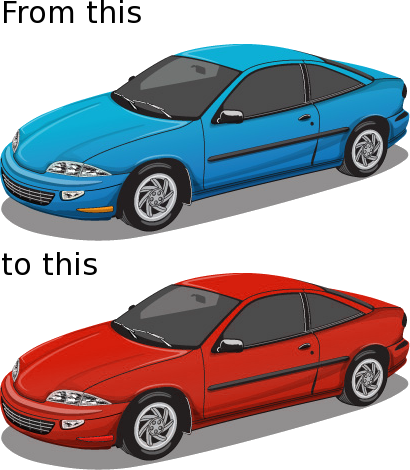
I did his color rotation tutorial. I didn't even know that tool was available. Changed the color of a car. It took hardly any time at all.

Image

_________________
Image
World War IV will be fought with sticks and stones. - Albert Einstein


Top
 Post subject: Re: GIMP site for photographers.
PostPosted: Mon Jul 18, 2011 5:16 pm  (#6) 
Offline
Script Coder
User avatar

Joined: Oct 25, 2010
Posts: 4812
Oregonian wrote:
I did his color rotation tutorial. I didn't even know that tool was available. Changed the color of a car. It took hardly any time at all.

Image

Use a brush in Hue mode would have worked too. And with a narrower color selection you could have kept the blinkers :)

I have yet to find out how the saturation control works on that tool.

_________________
Image


Top
 Post subject: Re: GIMP site for photographers.
PostPosted: Mon Jul 18, 2011 5:20 pm  (#7) 
Offline
GimpChat Member
User avatar

Joined: Apr 18, 2011
Posts: 620
Location: New York
lylejk wrote:
You know that I'm embarassed to say I never played with the color wheel rotation mapping. lol I can see a lot of fun with this one. Also, do like some of the b/w tuts too. :)

holy smokes, I've never used this feature either!

I'll have to try it! :coolthup

_________________
Ubuntu 24.04.1, Kernel i686, 6.8.0-52-generic
python3 v3.12.3 ----- GIMP - ver 2.10.38


Top
 Post subject: Re: GIMP site for photographers.
PostPosted: Mon Jul 18, 2011 6:38 pm  (#8) 
Offline
Retired Staff
User avatar

Joined: May 22, 2008
Posts: 6946
Location: Somewhere in GIMP
ofnuts wrote:
Use a brush in Hue mode would have worked too. And with a narrower color selection you could have kept the blinkers :)

I have yet to find out how the saturation control works on that tool.


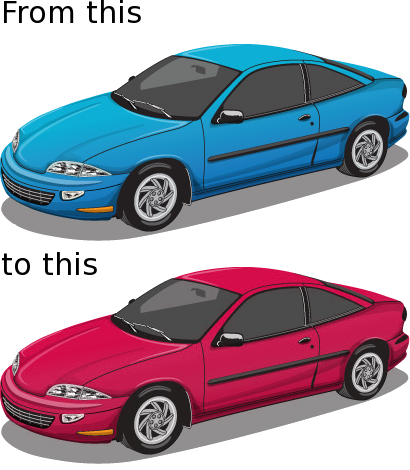
I did it again after selecting around the blinker with the paths tool and inverting the selection. Same here about the saturation control. I need to explore it more.

Here's what the gimp 2.6 manual says about it: http://docs.gimp.org/2.6/en/plug-in-rotate-colormap.html

Image

_________________
Image
World War IV will be fought with sticks and stones. - Albert Einstein


Top
 Post subject: Re: GIMP site for photographers.
PostPosted: Mon Jul 18, 2011 6:46 pm  (#9) 
Offline
GimpChat Member
User avatar

Joined: Mar 02, 2011
Posts: 1850
Location: Michigan
whats that funky black stuff under the Blue one?

_________________
Image
I'm back I think


Top
 Post subject: Re: GIMP site for photographers.
PostPosted: Mon Jul 18, 2011 7:19 pm  (#10) 
Offline
Retired Staff
User avatar

Joined: May 22, 2008
Posts: 6946
Location: Somewhere in GIMP
These are fun! Addictive. :hehe

Image

_________________
Image
World War IV will be fought with sticks and stones. - Albert Einstein


Top
 Post subject: Re: GIMP site for photographers.
PostPosted: Mon Jul 18, 2011 7:39 pm  (#11) 
Offline
Retired Staff
User avatar

Joined: May 22, 2008
Posts: 6946
Location: Somewhere in GIMP
Willy wrote:
whats that funky black stuff under the Blue one?
Wilber was painting with black and his brush dribbled. After I posted that I figured someone would ask about it but it wasn't worth fixing and renaming the picture and uploading it again.

_________________
Image
World War IV will be fought with sticks and stones. - Albert Einstein


Top
 Post subject: Re: GIMP site for photographers.
PostPosted: Mon Jul 18, 2011 8:10 pm  (#12) 
Offline
GimpChat Member
User avatar

Joined: Apr 07, 2010
Posts: 14182
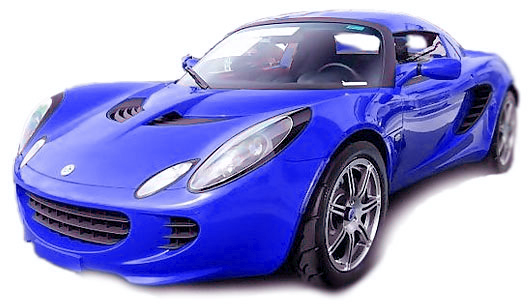
I just had to try it too, when I should be in bed reading. I went from red to blue.....
ImageImage
Boy Willy, you sure are observant. with those little black dots. Doncha know those kinds of cars drip oil.....

_________________
Image


Top
 Post subject: Re: GIMP site for photographers.
PostPosted: Mon Jul 18, 2011 8:11 pm  (#13) 
Offline
Retired Staff
User avatar

Joined: May 22, 2008
Posts: 6946
Location: Somewhere in GIMP
:clap :jumpclap Cool, molly!

_________________
Image
World War IV will be fought with sticks and stones. - Albert Einstein


Top
 Post subject: Re: GIMP site for photographers.
PostPosted: Mon Jul 18, 2011 8:43 pm  (#14) 
Offline
GimpChat Member
User avatar

Joined: Sep 24, 2010
Posts: 12825
That is cool Molly. I'm just so mad that I never discovered this cool tool and never seen anyone ever use it or when they included it in GIMP. Hidden nuggets like this is what still perks my interest in GIMP though; always learning something new w.r.t. GIMP. :)

_________________
Lyle

Psalm 109:8

Image


Top
 Post subject: Re: GIMP site for photographers.
PostPosted: Tue Jul 19, 2011 11:24 am  (#15) 
Offline
GimpChat Member
User avatar

Joined: Jun 04, 2011
Posts: 254
finally! a gimp site that specializes in my style of art.
thanks lylejk

_________________
Image


Top
 Post subject: Re: GIMP site for photographers.
PostPosted: Tue Jul 19, 2011 11:39 am  (#16) 
Offline
GimpChat Member
User avatar

Joined: Apr 07, 2010
Posts: 14182
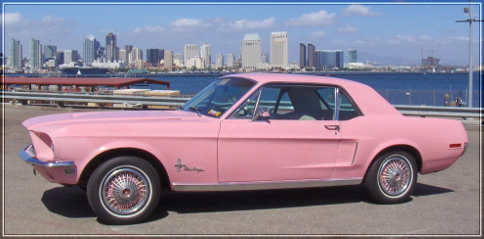
I just have one more, I promise.
Image Image

_________________
Image


Top
 Post subject: Re: GIMP site for photographers.
PostPosted: Tue Jul 19, 2011 7:50 pm  (#17) 
Offline
GimpChat Member
User avatar

Joined: Apr 30, 2010
Posts: 1937
Location: Missouri
Thanks, that will provide a lot of reading. I've wanted to learn to do color rotation.

_________________
Image
The last time I kept an open mind,
my brain fell out and the dog grabbed it.
Now it's full of dirt, toothmarks, and dog slobber.
No more open minds or dogs for me.


Top
 Post subject: Re: GIMP site for photographers.
PostPosted: Tue Jul 19, 2011 8:11 pm  (#18) 
Offline
GimpChat Member
User avatar

Joined: Mar 02, 2011
Posts: 1850
Location: Michigan
Gms9810 wrote:
Thanks, that will provide a lot of reading. I've wanted to learn to do color rotation.

gms I love your new sig quotey thing

_________________
Image
I'm back I think


Top
 Post subject: Re: GIMP site for photographers.
PostPosted: Tue Jul 19, 2011 8:49 pm  (#19) 
Offline
Retired Staff
User avatar

Joined: May 22, 2008
Posts: 6946
Location: Somewhere in GIMP
I'm wearing that website out. This is GND Filter Simulation. It adds just the right amount of blended color to the sky to make the photo more interesting.

Image


The tutorial is here.
GND Filter Simulation

Stock photo from travelearth.com

_________________
Image
World War IV will be fought with sticks and stones. - Albert Einstein


Top
 Post subject: Re: GIMP site for photographers.
PostPosted: Wed Jul 20, 2011 1:29 am  (#20) 
Offline
GimpChat Member
User avatar

Joined: Apr 30, 2010
Posts: 1937
Location: Missouri
Willy wrote:
Gms9810 wrote:
Thanks, that will provide a lot of reading. I've wanted to learn to do color rotation.

gms I love your new sig quotey thing
thanks, i was thinking it was a bit too long but i guess it's ok.

_________________
Image
The last time I kept an open mind,
my brain fell out and the dog grabbed it.
Now it's full of dirt, toothmarks, and dog slobber.
No more open minds or dogs for me.


Top
Post new topic Reply to topic  [ 30 posts ]  Go to page 1, 2  Next

All times are UTC - 5 hours [ DST ]


* Login  


Powered by phpBB3 © phpBB Group