It is currently Fri Sep 25, 2026 3:26 pm


All times are UTC - 5 hours [ DST ]


Post new topic Reply to topic  [ 22 posts ]  Go to page 1, 2  Next
Author Message
 Post subject: Image Links?[SOLVED FINALLY]
PostPosted: Fri Jul 10, 2015 2:45 am  (#1) 
Offline
Administrator
User avatar

Joined: Aug 10, 2012
Posts: 14209
Location: Native to NYC living in Arizona, Gimp 2.8 - 3.0, Win 11 PC.
Dose GC support image links?
If so, what is the html code that's used to create an image link?

_________________
Image
"A wise man learns more from a foolish question than a fool can learn from a wise answer"
Image


Last edited by Wallace on Fri Jul 10, 2015 12:26 pm, edited 3 times in total.

Share on Facebook Share on Twitter Share on Orkut Share on Digg Share on MySpace Share on Delicious Share on Technorati
Top
 Post subject: Re: Image Links?
PostPosted: Fri Jul 10, 2015 3:20 am  (#2) 
Offline
Script Coder
User avatar

Joined: Jun 22, 2010
Posts: 1171
Location: Here and there
If you mean, does GC support embedding images from other places, then yes, using the img tag:
Image

Although quite a lot of sites (including GC) don't allow deep-linking of their images, so I've made mine above into a link to the supporting web-site, by wrapping the url tag round the img tag:
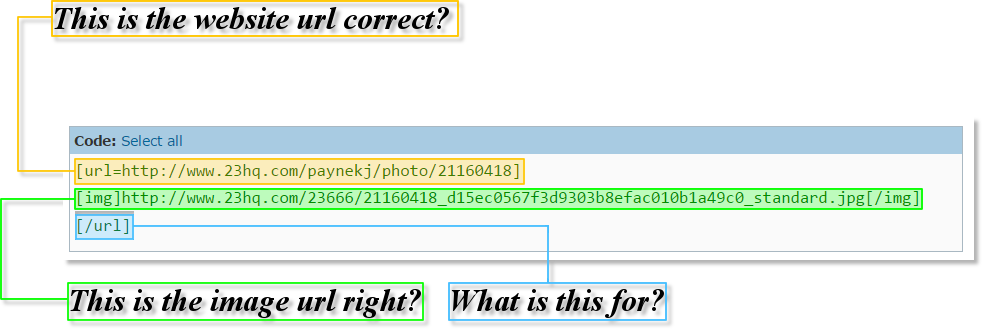
[url=http://www.23hq.com/paynekj/photo/21160418]
[img]http://www.23hq.com/23666/21160418_d15ec0567f3d9303b8efac010b1a49c0_standard.jpg[/img]
[/url]


Kevin


Top
 Post subject: Re: Image Links?
PostPosted: Fri Jul 10, 2015 3:49 am  (#3) 
Offline
Administrator
User avatar

Joined: Aug 10, 2012
Posts: 14209
Location: Native to NYC living in Arizona, Gimp 2.8 - 3.0, Win 11 PC.
paynekj wrote:
If you mean, does GC support embedding images from other places, then yes, using the img tag:
[ Image ]

Although quite a lot of sites (including GC) don't allow deep-linking of their images, so I've made mine above into a link to the supporting web-site, by wrapping the url tag round the img tag:
[url=http://www.23hq.com/paynekj/photo/21160418]
[img]http://www.23hq.com/23666/21160418_d15ec0567f3d9303b8efac010b1a49c0_standard.jpg[/img]
[/url]


Kevin

Aren't there suppose to be boarders around the image, to show that it isn't just a png or a jpg?

So say I had an image on my computer and wanted to use it as a link to something. How would I do that?

_________________
Image
"A wise man learns more from a foolish question than a fool can learn from a wise answer"
Image


Top
 Post subject: Re: Image Links?
PostPosted: Fri Jul 10, 2015 4:03 am  (#4) 
Offline
Script Coder
User avatar

Joined: Jun 22, 2010
Posts: 1171
Location: Here and there
Wallace wrote:

Aren't there suppose to be boarders around the image, to show that it isn't just a png or a jpg?

So say I had an image on my computer and wanted to use it as a link to something. How would I do that?


You would have to upload it to a web-site somewhere - usually an image sharing website (I use 23.com, other alternatives are available; Flickr, Instagram etc: https://en.wikipedia.org/wiki/List_of_p ... g_websites)

When it's uploaded and is publicly accessible, you should then be able to link to it.

However - re-reading your comment makes we wonder if you're asking an entirely different question. Are you asking if you can make a link on your computer - i.e. nothing to do with GC at all?

Kevin


Top
 Post subject: Re: Image Links?
PostPosted: Fri Jul 10, 2015 4:13 am  (#5) 
Offline
Script Coder
User avatar

Joined: Dec 27, 2014
Posts: 508
Wallace wrote:
So say I had an image on my computer and wanted to use it as a link to something. How would I do that?

It sounds to me like you're confusing concepts here.

An image displayed in a page on a web-browser can be made into a link to some other website or a different page/section on the same website - but that is under the control of the HTML document which defines the web-page, and hence under the control of whoever authors the HTML and uploads it to the server in question.

What you're describing sounds more like a desktop shortcut - ie. you want to be able to click on an image on your desktop and have it take you to some pre-designated web-page. Is that it?


Top
 Post subject: Re: Image Links?
PostPosted: Fri Jul 10, 2015 4:33 am  (#6) 
Offline
Administrator
User avatar

Joined: Aug 10, 2012
Posts: 14209
Location: Native to NYC living in Arizona, Gimp 2.8 - 3.0, Win 11 PC.
jontait2 wrote:
Wallace wrote:
So say I had an image on my computer and wanted to use it as a link to something. How would I do that?

It sounds to me like you're confusing concepts here.

An image displayed in a page on a web-browser can be made into a link to some other website or a different page/section on the same website - but that is under the control of the HTML document which defines the web-page, and hence under the control of whoever authors the HTML and uploads it to the server in question.

What you're describing sounds more like a desktop shortcut - ie. you want to be able to click on an image on your desktop and have it take you to some pre-designated web-page. Is that it?

No, I want to create links here on GC using images, that when you click on them they take you to whatever the link is for on the interweb.

Also, I have these questions about the code.
Image

_________________
Image
"A wise man learns more from a foolish question than a fool can learn from a wise answer"
Image


Top
 Post subject: Re: Image Links?
PostPosted: Fri Jul 10, 2015 4:56 am  (#7) 
Offline
Script Coder
User avatar

Joined: Jun 22, 2010
Posts: 1171
Location: Here and there
Yes it is the website url
Yes it is the image url

"What is this for?"
You have started a [url] tag and GC then considers everything that follows to be clickable and will send you to that url. Therefore you need something to tell GC that you want to stop making everything clickable and the [ /url] does that - it could be called a closing tag.

Kevin


Top
 Post subject: Re: Image Links?
PostPosted: Fri Jul 10, 2015 5:54 am  (#8) 
Offline
Administrator
User avatar

Joined: Aug 10, 2012
Posts: 14209
Location: Native to NYC living in Arizona, Gimp 2.8 - 3.0, Win 11 PC.
paynekj wrote:
Yes it is the website url
Yes it is the image url

"What is this for?"
You have started a [url] tag and GC then considers everything that follows to be clickable and will send you to that url. Therefore you need something to tell GC that you want to stop making everything clickable and the [ /url] does that - it could be called a closing tag.

Kevin

Okay, thanks Kevin. :bigthup
So I need to use, [code][/code] and place everything in between that, right?

_________________
Image
"A wise man learns more from a foolish question than a fool can learn from a wise answer"
Image


Top
 Post subject: Re: Image Links?
PostPosted: Fri Jul 10, 2015 6:01 am  (#9) 
Offline
Script Coder
User avatar

Joined: Jun 22, 2010
Posts: 1171
Location: Here and there
Wallace wrote:
Okay, thanks Kevin. :bigthup
So I need to use, [code][/code] and place everything in between that, right?


No.

The code tags STOP GC from changing the [ url] tags into actual links. We use them to show the code, without GC formatting them.

Kevin


Top
 Post subject: Re: Image Links?
PostPosted: Fri Jul 10, 2015 7:25 am  (#10) 
Offline
Administrator
User avatar

Joined: Aug 10, 2012
Posts: 14209
Location: Native to NYC living in Arizona, Gimp 2.8 - 3.0, Win 11 PC.
paynekj wrote:
No.

The code tags STOP GC from changing the [ url] tags into actual links. We use them to show the code, without GC formatting them.

Kevin

Got it. :mrgreen:

_________________
Image
"A wise man learns more from a foolish question than a fool can learn from a wise answer"
Image


Top
 Post subject: Re: Image Links?
PostPosted: Fri Jul 10, 2015 8:56 am  (#11) 
Offline
GimpChat Member
User avatar

Joined: Sep 24, 2010
Posts: 12846
I know GC use to be able to link an image to an address, but somehow that feature got broke a few years back (hence I usually just post link of hirez above a lower rez image). :)

_________________
Lyle

Psalm 109:8

Image


Top
 Post subject: Re: Image Links?
PostPosted: Fri Jul 10, 2015 9:50 am  (#12) 
Offline
Administrator
User avatar

Joined: Aug 10, 2012
Posts: 14209
Location: Native to NYC living in Arizona, Gimp 2.8 - 3.0, Win 11 PC.
lylejk wrote:
I know GC use to be able to link an image to an address, but somehow that feature got broke a few years back (hence I usually just post link of hirez above a lower rez image). :)

Really, I didn't know that.

_________________
Image
"A wise man learns more from a foolish question than a fool can learn from a wise answer"
Image


Top
 Post subject: Re: Image Links?
PostPosted: Fri Jul 10, 2015 10:25 am  (#13) 
Offline
GimpChat Founder
User avatar

Joined: May 22, 2008
Posts: 5241
Location: Gimpville
I don't believe anything has broken. The ability to create a clickable image has always been available and is still working. The correct BBcode is as paynekj has already outlined.

For example, this clickable text:

Wallace Profile

is created using the following BBcode.

[url=http://gimpchat.com/memberlist.php?mode=viewprofile&u=2101]Wallace Profile[/url]


To create a clickable image, just replace the text "Wallace Profile" with an image tag .

Image

is created using the following BBcode:

[url=http://gimpchat.com/memberlist.php?mode=viewprofile&u=2101][img]http://gimpchat.com/download/file.php?avatar=2101_1431179468.png[/img][/url]

_________________
“If you reach for the stars, you just might land on a decently sized hill.” - Stuart Hill


Top
 Post subject: Re: Image Links?
PostPosted: Fri Jul 10, 2015 10:41 am  (#14) 
Offline
Administrator
User avatar

Joined: Aug 10, 2012
Posts: 14209
Location: Native to NYC living in Arizona, Gimp 2.8 - 3.0, Win 11 PC.
GnuTux wrote:
I don't believe anything has broken. The ability to create a clickable image has always been available and is still working. The correct BBcode is as paynekj has already outlined.

For example, this clickable text:

Wallace Profile

is created using the following BBcode.

[url=http://gimpchat.com/memberlist.php?mode=viewprofile&u=2101]Wallace Profile[/url]


To create a clickable image, just replace the text "Wallace Profile" with an image tag .

[ Image ]

is created using the following BBcode:

[url=http://gimpchat.com/memberlist.php?mode=viewprofile&u=2101][img]http://gimpchat.com/download/file.php?avatar=2101_1431179468.png[/img][/url]

What does the code look like before the information is placed in it?
Does it look like this below?

[url][/url]

Maybe I'm thick and just don't get it. :oops:

_________________
Image
"A wise man learns more from a foolish question than a fool can learn from a wise answer"
Image


Top
 Post subject: Re: Image Links?
PostPosted: Fri Jul 10, 2015 11:20 am  (#15) 
Offline
GimpChat Member
User avatar

Joined: Nov 16, 2011
Posts: 5127
Location: Metro Vancouver, BC
Wallace wrote:
What does the code look like before the information is placed in it?
Does it look like this below?

[url][/url]

Maybe I'm thick and just don't get it. :oops:
Almost, this is the basic code you need.
[url=][/url]

Then add a URL to make it a link.
[url=http://gimpchat.com/]text or image[/url]

_________________
Image
Gimp 2.8.18, Linux, median user
Gimp Chat Tutorials Index
Spirit Bear (Kermode)


Top
 Post subject: Re: Image Links?
PostPosted: Fri Jul 10, 2015 11:40 am  (#16) 
Offline
Script Coder
User avatar

Joined: Dec 27, 2014
Posts: 508
Upload the image in the usual way. That will generate a line in your post which looks something like:
[img]http://gimpchat.com/files/nnnn_zzzzzzz.png[/img]

Then just put:
[url=http://some-website.com]
before it and:
[/url]
after it.
To leave something like this:
[url=http://some-website.com][img]http://gimpchat.com/files/nnnn_zzzzzzz.png[/img][/url]


Top
 Post subject: Re: Image Links?
PostPosted: Fri Jul 10, 2015 11:46 am  (#17) 
Offline
Administrator
User avatar

Joined: Aug 10, 2012
Posts: 14209
Location: Native to NYC living in Arizona, Gimp 2.8 - 3.0, Win 11 PC.
jontait2 wrote:
Upload the image in the usual way. That will generate a line in your post which looks something like:
[img]http://gimpchat.com/files/nnnn_zzzzzzz.png[/img]


Then just put: before it and: after it.
To leave something like this:
[ Image ]

The links you posted don't seem to work. :mrgreen:

I don't know why I'm having such a difficult time understanding this? :oops:

Image

_________________
Image
"A wise man learns more from a foolish question than a fool can learn from a wise answer"
Image


Top
 Post subject: Re: Image Links?
PostPosted: Fri Jul 10, 2015 11:47 am  (#18) 
Offline
GimpChat Member
User avatar

Joined: Sep 24, 2010
Posts: 12846
GnuTux wrote:
I don't believe anything has broken. The ability to create a clickable image has always been available and is still working. The correct BBcode is as paynekj has already outlined.

For example, this clickable text:

Wallace Profile

is created using the following BBcode.

[url=http://gimpchat.com/memberlist.php?mode=viewprofile&u=2101]Wallace Profile[/url]


To create a clickable image, just replace the text "Wallace Profile" with an image tag .

[ Image ]

is created using the following BBcode:

[url=http://gimpchat.com/memberlist.php?mode=viewprofile&u=2101][img]http://gimpchat.com/download/file.php?avatar=2101_1431179468.png[/img][/url]


I know I've tried this in the recent past for Flickr but it didn't work. Will try again on a future submission Tux. :)

_________________
Lyle

Psalm 109:8

Image


Top
 Post subject: Re: Image Links?
PostPosted: Fri Jul 10, 2015 11:55 am  (#19) 
Offline
GimpChat Founder
User avatar

Joined: May 22, 2008
Posts: 5241
Location: Gimpville
@Wallace

You just uploaded this image

Image

and displayed it in the post using this code.

[img]http://gimpchat.com/files/2101_63494917.jpg[/img]


Suppose you want that image to link to: http://google.com

Just add

[url=http://google.com]

before the image code and

[/url]

after the image code.

So the full code becomes:

[url=http://google.com][img]http://gimpchat.com/files/2101_63494917.jpg[/img][/url]

Which gives you the clickable image.

Image

:bigthup

_________________
“If you reach for the stars, you just might land on a decently sized hill.” - Stuart Hill


Top
 Post subject: Re: Image Links?
PostPosted: Fri Jul 10, 2015 12:01 pm  (#20) 
Offline
Administrator
User avatar

Joined: Aug 10, 2012
Posts: 14209
Location: Native to NYC living in Arizona, Gimp 2.8 - 3.0, Win 11 PC.
I think I've got it now... :oops:
Image
Thanks for all your explanations you guys. :bigthup

_________________
Image
"A wise man learns more from a foolish question than a fool can learn from a wise answer"
Image


Top
Post new topic Reply to topic  [ 22 posts ]  Go to page 1, 2  Next

All times are UTC - 5 hours [ DST ]


* Login  


Powered by phpBB3 © phpBB Group