It is currently Mon Oct 26, 2026 4:18 pm


All times are UTC - 5 hours [ DST ]


Post new topic Reply to topic  [ 35 posts ]  Go to page Previous  1, 2
Author Message
 Post subject: Re: top of my screen turned black
PostPosted: Wed Jul 30, 2014 6:41 pm  (#21) 
Offline
GimpChat Member
User avatar

Joined: Apr 07, 2010
Posts: 14182
I have never downloaded a firefox theme. I have been using it around 15 years and didn't even know there were more themes. How do I do that Wallace?

Never mind, I found it. It worked, I have a new theme and I don't care for it but tomorrow, I will browse and pick out a better one. Thank you guys.

_________________
Image


Top
 Post subject: Re: top of my screen turned black
PostPosted: Wed Jul 30, 2014 6:46 pm  (#22) 
Offline
Administrator
User avatar

Joined: Aug 10, 2012
Posts: 14247
Location: Native to NYC living in Arizona, Gimp 2.8 - 3.0, Win 11 PC.
molly wrote:
I have never downloaded a firefox theme. I have been using it around 15 years and didn't even know there were more themes. How do I do that Wallace?

Also did you try to click on More in the default appearance theme?
When I do this in my firefox I'm able to enable the default theme
.

Firefox Theme Add-ons
https://addons.mozilla.org/en-US/firefo ... and-coming

_________________
Image
"A wise man learns more from a foolish question than a fool can learn from a wise answer"
Image


Top
 Post subject: Re: top of my screen turned black
PostPosted: Wed Jul 30, 2014 6:53 pm  (#23) 
Offline
GimpChat Member
User avatar

Joined: Nov 16, 2011
Posts: 5127
Location: Metro Vancouver, BC
For starters look for Solid Themes. Hover your mouse over a theme preview. When you see one you like add to Firefox. Themes are easy to manage from Tools | Add-ons | Appearance.

_________________
Image
Gimp 2.8.18, Linux, median user
Gimp Chat Tutorials Index
Spirit Bear (Kermode)


Top
 Post subject: Re: top of my screen turned black
PostPosted: Wed Jul 30, 2014 6:55 pm  (#24) 
Offline
GimpChat Member
User avatar

Joined: Jan 15, 2013
Posts: 133
Well it's strange what happened, seemingly out of nowhere. Maybe you had an update to something and didn't notice.
Anyway, It sounds like you found a work-around.
My last suggestion was to try changing some of these settings. (see image)

Other than that, you could try changing the themes in your desktop window manager. If you are using gnome, you should have a listing in your menu for "Settings Manager". Open that and go to "Window Manager". There you can select different themes and see what you get. This shouldn't effect anything "inside" Firefox, but only the surrounding window with the minimize buttons and such.

Good luck whatever happens. Just ask if you need more help.

Cheers. :)


Attachments:
ff-about.config.jpg
ff-about.config.jpg [ 57.38 KiB | Viewed 1629 times ]

_________________
Gimp 2.8.16
Arch Linux - XFCE 4.12
Some of my work.
Top
 Post subject: Re: top of my screen turned black
PostPosted: Wed Jul 30, 2014 6:58 pm  (#25) 
Offline
GimpChat Member
User avatar

Joined: Apr 07, 2010
Posts: 14182
I got myself a nice pale blue-gray one I like very much but the black bar is still at the top but I guess I can live with that, I have to hover the buttons on top right in order to see what they are
Image


Thanks Akovia and Wallace

_________________
Image


Top
 Post subject: Re: top of my screen turned black
PostPosted: Wed Jul 30, 2014 7:00 pm  (#26) 
Offline
Administrator
User avatar

Joined: Aug 10, 2012
Posts: 14247
Location: Native to NYC living in Arizona, Gimp 2.8 - 3.0, Win 11 PC.
Firefox Classic Gray Theme...
https://addons.mozilla.org/en-US/firefo ... ssic-gray/

_________________
Image
"A wise man learns more from a foolish question than a fool can learn from a wise answer"
Image


Top
 Post subject: Re: top of my screen turned black
PostPosted: Wed Jul 30, 2014 7:09 pm  (#27) 
Offline
GimpChat Founder
User avatar

Joined: May 22, 2008
Posts: 5241
Location: Gimpville
The titlebars in Firefox should take on the colors of the theme of your current desktop, unless you override that with a custom Firefox theme. It appears you only have the default Firefox theme installed.

What is the color of the titlebar on the other apps on your system? Can you post an example of one of those?

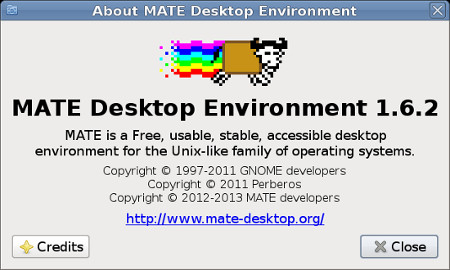
Are you sure you are in MATE? Maybe you booted to another desktop, like Gnome3. You can check by going to System/About MATE and you'll see this..

Image

If you are in MATE, you can change your desktop themes via:
System/Preferences/Look and Feel/Appearance.

_________________
“If you reach for the stars, you just might land on a decently sized hill.” - Stuart Hill


Top
 Post subject: Re: top of my screen turned black
PostPosted: Wed Jul 30, 2014 7:10 pm  (#28) 
Offline
GimpChat Member
User avatar

Joined: Nov 16, 2011
Posts: 5127
Location: Metro Vancouver, BC
molly wrote:
I got myself a nice pale blue-gray one I like very much but the black bar is still at the top but I guess I can live with that, I have to hover the buttons on top right in order to see what they are
[ Image ]


Thanks Akovia and Wallace
If your top bar is black and it wasn't before it most likely a system not a Firefox issue. I asked before and might have missed your reply but is this only in Firefox or have you tried other programs?
:ninja

_________________
Image
Gimp 2.8.18, Linux, median user
Gimp Chat Tutorials Index
Spirit Bear (Kermode)


Top
 Post subject: Re: top of my screen turned black
PostPosted: Wed Jul 30, 2014 7:19 pm  (#29) 
Offline
GimpChat Member
User avatar

Joined: Apr 07, 2010
Posts: 14182
I will do all these things in the morning tux and Odin. I just closed down my PC.
You are correct, I added a theme but I still have the black bar so it is not fixed. I will post my results in the morning. Thank you

_________________
Image


Top
 Post subject: Re: top of my screen turned black
PostPosted: Thu Jul 31, 2014 5:14 am  (#30) 
Offline
GimpChat Member
User avatar

Joined: Apr 07, 2010
Posts: 14182
:tyspin All fixed guys. I changed it through system > preferences in Mate.
Tux I have been in MATE all along so I still don't know what happened, maybe the same thing as the antialising and that I get kicked off GC a couple times a day, I have to keep signing in.
All kinds of silly things happening.
Image

Image

_________________
Image


Top
 Post subject: Re: top of my screen turned black
PostPosted: Thu Jul 31, 2014 5:26 am  (#31) 
Offline
Administrator
User avatar

Joined: Aug 10, 2012
Posts: 14247
Location: Native to NYC living in Arizona, Gimp 2.8 - 3.0, Win 11 PC.
molly wrote:
:tyspin All fixed guys. I changed it through system > preferences in Mate.
Tux I have been in MATE all along so I still don't know what happened, maybe the same thing as the antialising and that I get kicked off GC a couple times a day, I have to keep signing in.
All kinds of silly things happening.
[ Image ]

[ Image ]

That great Molly. :bigthup
I was having an issue too, but solved it as well. Now I'm dealing with another Gimp issue, but I think I've already came up with the answer.

_________________
Image
"A wise man learns more from a foolish question than a fool can learn from a wise answer"
Image


Top
 Post subject: Re: top of my screen turned black[SOLVED] thanks guys
PostPosted: Thu Jul 31, 2014 6:27 am  (#32) 
Offline
GimpChat Member
User avatar

Joined: Apr 07, 2010
Posts: 14182
Thanks wallace,I saw your issues, good for you, getting them solved, I believe one of them was a keyboard issue getting it to work with your app.

_________________
Image


Top
 Post subject: Re: top of my screen turned black[SOLVED] thanks guys
PostPosted: Thu Jul 31, 2014 8:39 am  (#33) 
Offline
Administrator
User avatar

Joined: Aug 10, 2012
Posts: 14247
Location: Native to NYC living in Arizona, Gimp 2.8 - 3.0, Win 11 PC.
molly wrote:
Thanks wallace,I saw your issues, good for you, getting them solved, I believe one of them was a keyboard issue getting it to work with your app.

Sure thing Molly.
It wasn't a keyboard issue, it was me being a humungous doofus issue. :oops:

_________________
Image
"A wise man learns more from a foolish question than a fool can learn from a wise answer"
Image


Top
 Post subject: Re: top of my screen turned black[SOLVED] thanks guys
PostPosted: Thu Jul 31, 2014 9:02 am  (#34) 
Offline
GimpChat Member
User avatar

Joined: Apr 07, 2010
Posts: 14182
:geek

_________________
Image


Top
 Post subject: Re: top of my screen turned black[SOLVED] thanks guys
PostPosted: Thu Jul 31, 2014 10:24 am  (#35) 
Offline
Administrator
User avatar

Joined: Aug 10, 2012
Posts: 14247
Location: Native to NYC living in Arizona, Gimp 2.8 - 3.0, Win 11 PC.
molly wrote:
:geek

:hehe

_________________
Image
"A wise man learns more from a foolish question than a fool can learn from a wise answer"
Image


Top
Post new topic Reply to topic  [ 35 posts ]  Go to page Previous  1, 2

All times are UTC - 5 hours [ DST ]


* Login  


Powered by phpBB3 © phpBB Group