It is currently Wed Oct 28, 2026 2:06 am


All times are UTC - 5 hours [ DST ]


Post new topic Reply to topic  [ 95 posts ]  Go to page Previous  1, 2, 3, 4, 5  Next
Author Message
 Post subject: Re: My monior is still shutting down every day [Unsolved]
PostPosted: Tue Sep 02, 2014 5:50 pm  (#41) 
Offline
GimpChat Member
User avatar

Joined: Sep 24, 2010
Posts: 12853
Your monitor, being vga, is showing it's age Molly. I can 100% tell you that it's color is not only uncalibrated, but off and impossible to calibrate properly. It's time to splurge (hate to tell you this, but I just did; lol). When you do get an HDMI/DVI monitor, makes sure it uses IPS technology (mine is currently a DELL 2209wa {uses eIPS technology}). Not much good for gamers (some are though), but astronomically better for retouching and computer art. :)

_________________
Lyle

Psalm 109:8

Image


Top
 Post subject: Re: My monior is still shutting down every day [Unsolved]
PostPosted: Tue Sep 02, 2014 5:52 pm  (#42) 
Offline
GimpChat Founder
User avatar

Joined: May 22, 2008
Posts: 5241
Location: Gimpville
Lyle, that monitor has a DVI Digital connector on it. Not sure if the computer has a DVI out, though. It probably does.

_________________
“If you reach for the stars, you just might land on a decently sized hill.” - Stuart Hill


Top
 Post subject: Re: My monior is still shutting down every day [Unsolved]
PostPosted: Tue Sep 02, 2014 6:07 pm  (#43) 
Offline
GimpChat Member
User avatar

Joined: Apr 07, 2010
Posts: 14182
I am not a gamer Lyle so that is no problem. All I want is it to turn on in the morning when I boot up. I am happy with its performance other than that. I know I am going to get shot down for this but I hate those silly games.

_________________
Image


Top
 Post subject: Re: My monior is still shutting down every day [Unsolved]
PostPosted: Tue Sep 02, 2014 6:17 pm  (#44) 
Offline
GimpChat Member
User avatar

Joined: Sep 24, 2010
Posts: 12853
Ahh; OK. Well, then I hope, for one thing, that Molly has a video card with DVI output and second, has a DVI cable. VGA is Win98 technology (well it is). HDMI would be better, but my monitor doesn't have this ability (and yes, after 5 years, I'm actually thinking about getting a new one; still, I'm cheap and it's still good enough, but come Christmas, I want great. lol). :)

_________________
Lyle

Psalm 109:8

Image


Top
 Post subject: Re: My monior is still shutting down every day [Unsolved]
PostPosted: Wed Sep 03, 2014 7:10 am  (#45) 
Offline
GimpChat Member
User avatar

Joined: Apr 07, 2010
Posts: 14182
Ok, when I turned my pc on this morning, the screen came up white. I clicked on it with the mouse, then everything was fine. It seems to me that this may take two or three days to see how it goes before I run out and look for a DVI cable.

_________________
Image


Top
 Post subject: Re: My monior is still shutting down every day [Unsolved]
PostPosted: Wed Sep 03, 2014 10:37 am  (#46) 
Offline
GimpChat Founder
User avatar

Joined: May 22, 2008
Posts: 5241
Location: Gimpville
So, it came up without you having to unplug the monitor. That's good news!

Did you check to see if your computer has a DVI out? Considering you'll get a more crisp picture, you might want to go DVI, even if it continues to work.

_________________
“If you reach for the stars, you just might land on a decently sized hill.” - Stuart Hill


Top
 Post subject: Re: My monior is still shutting down every day [Unsolved]
PostPosted: Wed Sep 03, 2014 10:53 am  (#47) 
Offline
GimpChat Member
User avatar

Joined: Apr 07, 2010
Posts: 14182
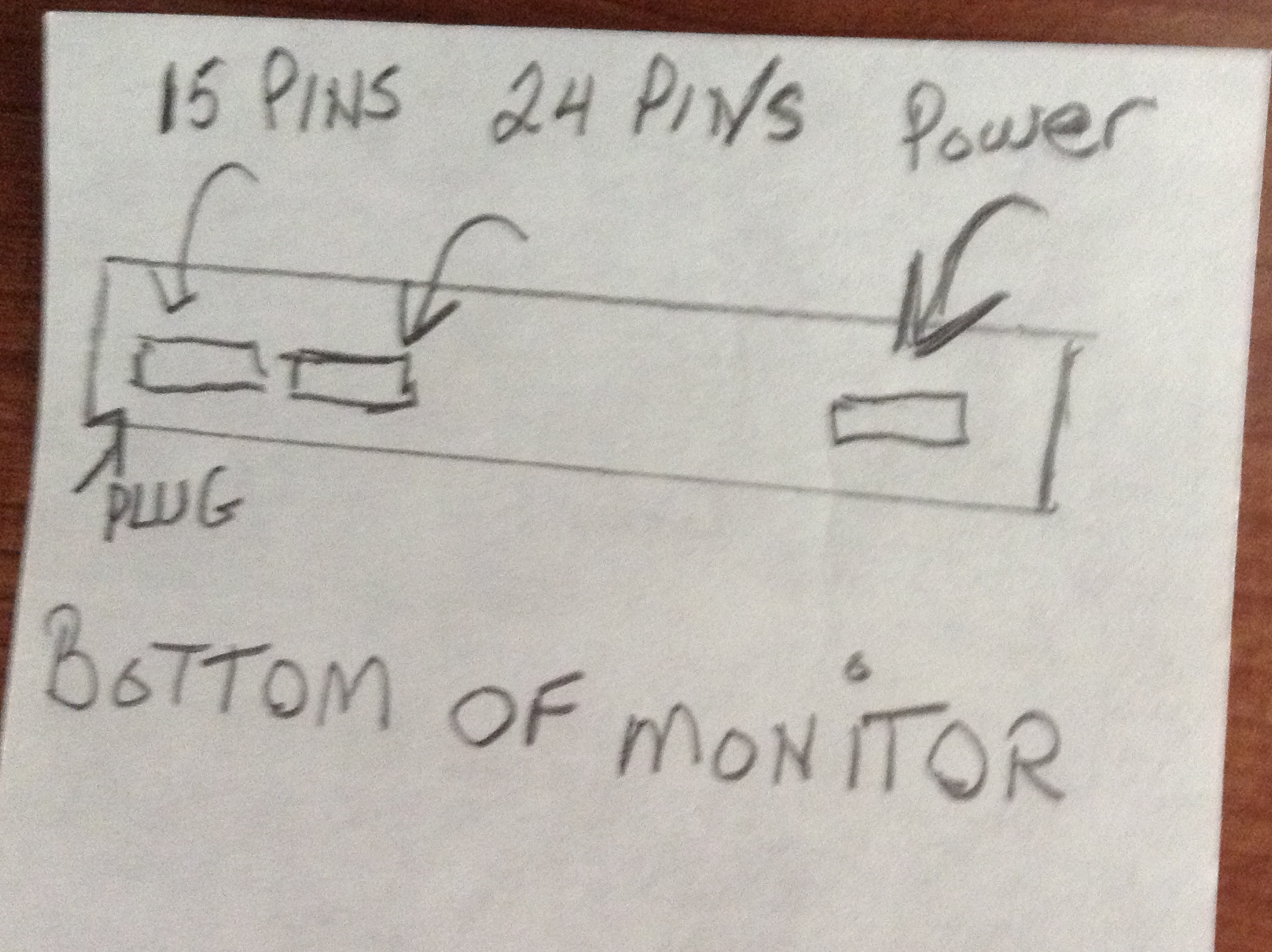
I was just looking up DVI cords. If I understand correctly, this is what the bottom of my monitor looks like. The power cord is plugged into the port by itself and on the other end there are two ports, one is for 15 pins and the other one for 24. The cable I now have is plugged into the 15 pin and the other is empty.
It said on the specs that it doesn't support analog video, only supports digital video signal. I don't understand all that stuff.
So, do I just go to BestBuy or anywhere that sells cables and ask for a DVI cord? If I do that, will the other end of the cable be compatible with mine.
Image

_________________
Image


Top
 Post subject: Re: My monior is still shutting down every day [Unsolved]
PostPosted: Wed Sep 03, 2014 11:38 am  (#48) 
Offline
GimpChat Founder
User avatar

Joined: May 22, 2008
Posts: 5241
Location: Gimpville
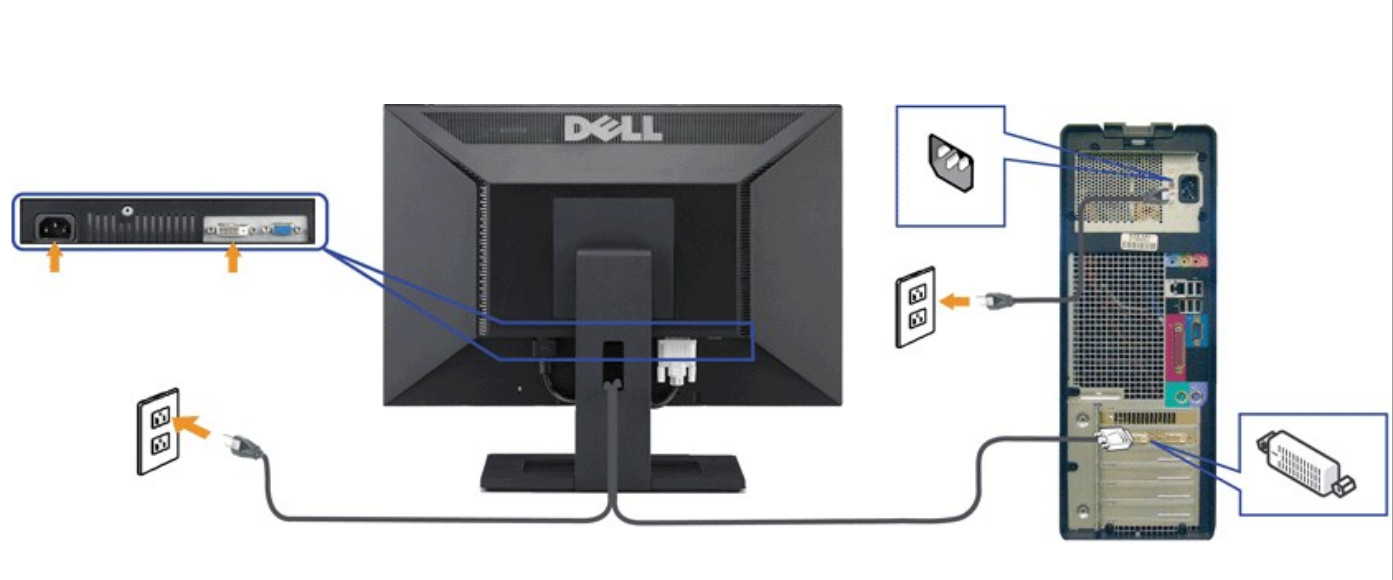
You would connect one end of the DVI cable to the DVI port on the back of computer (female) and the other end of the DVI cable to the DVI port on the back of the monitor (female). Standard DVI cables are male on each end. DVI is a digital connection.

Just disconnect the VGA cable from the PC and the monitor and set it aside. The DVI cable replaces the VGA cable. You don't really need both. VGA is an analog connection.

You can get the cable locally or order online, say from Amazon. You can buy a Dell brand DVI cable from Amazon for around $5.00 plus shipping. I wouldn't pay more than $10-$12 for a DVI cable. Sometimes the local stores have a huge price markup..

Image

_________________
“If you reach for the stars, you just might land on a decently sized hill.” - Stuart Hill


Top
 Post subject: Re: My monior is still shutting down every day [Unsolved]
PostPosted: Wed Sep 03, 2014 11:48 am  (#49) 
Offline
GimpChat Member
User avatar

Joined: Apr 07, 2010
Posts: 14182
Thank you Tux, I will probably get that tomorrow. My wheels aren't here right now grrrr.

_________________
Image


Top
 Post subject: Re: My monior is still shutting down every day [Unsolved]
PostPosted: Wed Sep 03, 2014 11:52 am  (#50) 
Offline
Script Coder
User avatar

Joined: Apr 23, 2010
Posts: 1553
Location: not from Guildford after all
molly wrote:
So, do I just go to BestBuy or anywhere that sells cables and ask for a DVI cord? If I do that, will the other end of the cable be compatible with mine.


http://www.bestbuy.com/site/dynex-6-5-s ... 8844765332

Though your monitor should have come with both a blue VGA cable and a white DVI cable, so check your junk drawer.

_________________
Any sufficiently primitive technology is indistinguishable from a rock.


Top
 Post subject: Re: My monior is still shutting down every day [Unsolved]
PostPosted: Wed Sep 03, 2014 11:54 am  (#51) 
Offline
GimpChat Member
User avatar

Joined: Apr 07, 2010
Posts: 14182
lol, I don't ever remember seeing two Saul, but I will check. I have several junk places. thank you.
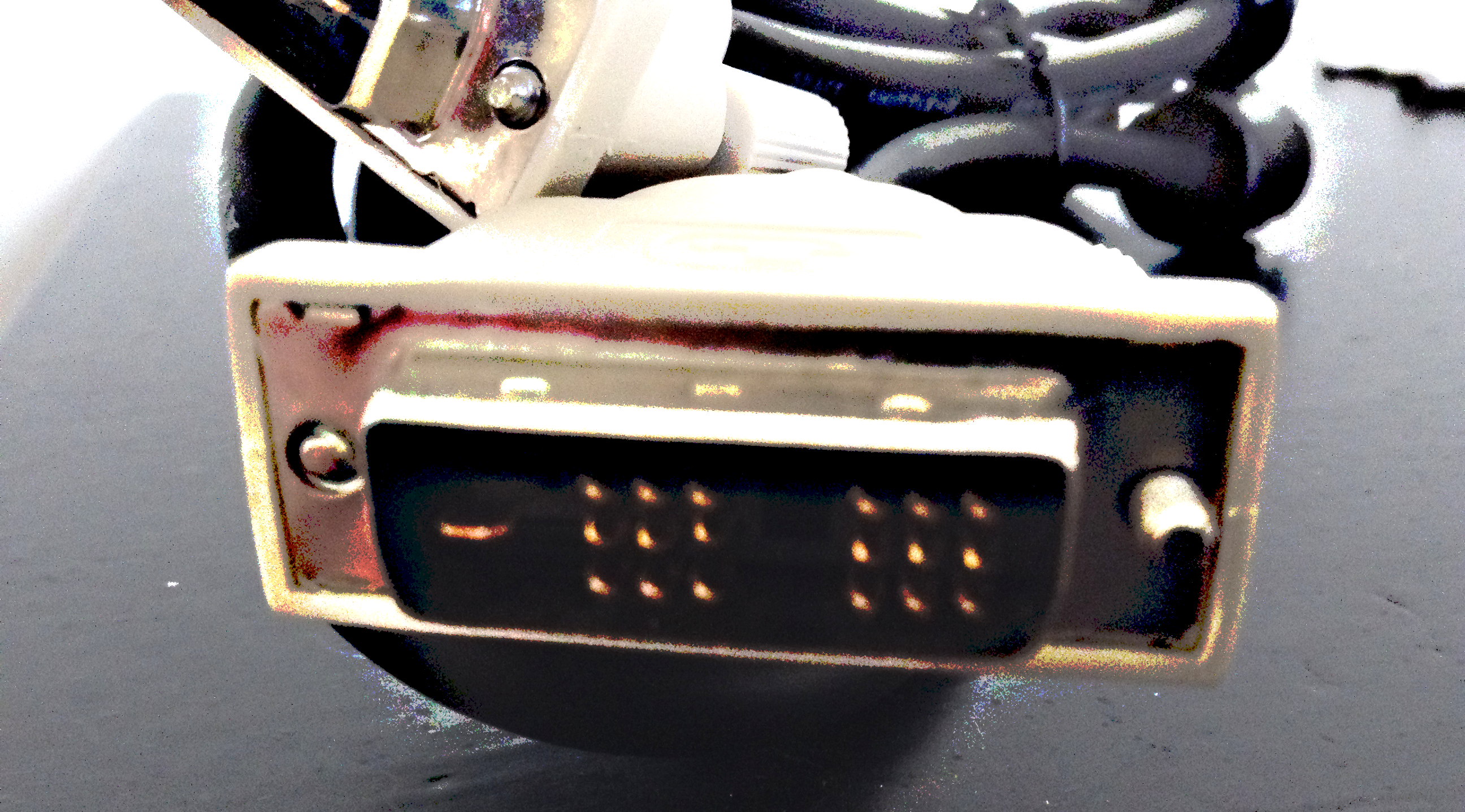
@Saul, I found this package that was never opened and I have no idea where it came from. It is a black cord with two white ends, BUT both ends only have 18 pins, 2 sets of 9, which won't work on my monitor, The one here is 24 pins. Nice try.
Image

_________________
Image


Top
 Post subject: Re: My monior is still shutting down every day [Unsolved]
PostPosted: Wed Sep 03, 2014 12:14 pm  (#52) 
Offline
Administrator
User avatar

Joined: Aug 10, 2012
Posts: 14250
Location: Native to NYC living in Arizona, Gimp 2.8 - 3.0, Win 11 PC.
Using a DVI cable instead of the VGA cable is a good suggestion.
If this works, you will know that the VGA connection on the monitor is not working properly. It's an inexpensive troubleshooting solution. If this works you won't have to get a new monitor and you'll have a better picture.

_________________
Image
"A wise man learns more from a foolish question than a fool can learn from a wise answer"
Image


Top
 Post subject: Re: My monior is still shutting down every day [Unsolved]
PostPosted: Wed Sep 03, 2014 12:40 pm  (#53) 
Offline
GimpChat Member
User avatar

Joined: Apr 07, 2010
Posts: 14182
I posted in the post above a pic of the one I just found but wrong amount of holes.. what a pain, I think I will go back to water colors and knitting.
This is a picture I just took of where I would plug in in.
Image
It is upside down.

_________________
Image


Top
 Post subject: Re: My monior is still shutting down every day [Unsolved]
PostPosted: Wed Sep 03, 2014 12:50 pm  (#54) 
Offline
GimpChat Founder
User avatar

Joined: May 22, 2008
Posts: 5241
Location: Gimpville
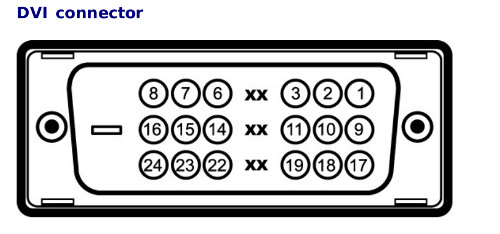
Molly, that does look like the correct DVI cable. It should work fine. These are the pins it uses.

Image

Saul was right about you already having one. You just never connected it. :hehe

_________________
“If you reach for the stars, you just might land on a decently sized hill.” - Stuart Hill


Top
 Post subject: Re: My monior is still shutting down every day [Unsolved]
PostPosted: Wed Sep 03, 2014 1:01 pm  (#55) 
Offline
GimpChat Member
User avatar

Joined: Apr 07, 2010
Posts: 14182
Tux, the place where I would plug it in has 24 holes with no divisions, the one I found has two sets of nine like the one you are showing.

_________________
Image


Top
 Post subject: Re: My monior is still shutting down every day [Unsolved]
PostPosted: Wed Sep 03, 2014 1:05 pm  (#56) 
Offline
GimpChat Founder
User avatar

Joined: May 22, 2008
Posts: 5241
Location: Gimpville
Those middle holes are not used. The cable doesn't even have pins to connect into those holes so the cable should fit right into the connector.

_________________
“If you reach for the stars, you just might land on a decently sized hill.” - Stuart Hill


Top
 Post subject: Re: My monior is still shutting down every day [Unsolved]
PostPosted: Wed Sep 03, 2014 1:10 pm  (#57) 
Offline
GimpChat Member
User avatar

Joined: Apr 07, 2010
Posts: 14182
:oops: ok, I will give it a try. :oops: and get back to you.

_________________
Image


Top
 Post subject: Re: My monior is still shutting down every day [Unsolved]
PostPosted: Wed Sep 03, 2014 1:23 pm  (#58) 
Offline
GimpChat Member
User avatar

Joined: Apr 07, 2010
Posts: 14182
ok, I just changed the cable, so far it works. I also reset it to DVI

_________________
Image


Top
 Post subject: Re: My monior is still shutting down every day [Unsolved]
PostPosted: Wed Sep 03, 2014 1:29 pm  (#59) 
Offline
GimpChat Founder
User avatar

Joined: May 22, 2008
Posts: 5241
Location: Gimpville
:bigthup Did you disconnect the VGA?

_________________
“If you reach for the stars, you just might land on a decently sized hill.” - Stuart Hill


Top
 Post subject: Re: My monior is still shutting down every day [Unsolved]
PostPosted: Wed Sep 03, 2014 1:33 pm  (#60) 
Offline
GimpChat Member
User avatar

Joined: Apr 07, 2010
Posts: 14182
Yes, I took it right out, then I went to monitor settings and changed it to DVI from VGA

I just finished my kindergarten techie course.

_________________
Image


Top
Post new topic Reply to topic  [ 95 posts ]  Go to page Previous  1, 2, 3, 4, 5  Next

All times are UTC - 5 hours [ DST ]


* Login  


Powered by phpBB3 © phpBB Group