It is currently Fri Oct 16, 2026 6:14 pm


All times are UTC - 5 hours [ DST ]


Post new topic Reply to topic  [ 96 posts ]  Go to page Previous  1, 2, 3, 4, 5  Next
Author Message
 Post subject: Re: Rootkit removal
PostPosted: Tue Jun 05, 2012 8:14 pm  (#41) 
Offline
GimpChat Member
User avatar

Joined: Mar 23, 2012
Posts: 7388
Location: Göteborg at last!
Cheers I've sent the Data via PM.


Top
 Post subject: Re: Rootkit removal
PostPosted: Tue Jun 05, 2012 8:18 pm  (#42) 
Offline
GimpChat Member
User avatar

Joined: Apr 07, 2010
Posts: 14182
good luck erisian, hope it gets solved for you. off to the sac to finish my book.

_________________
Image


Top
 Post subject: Re: Rootkit removal
PostPosted: Tue Jun 05, 2012 8:19 pm  (#43) 
Offline
GimpChat Member
User avatar

Joined: Mar 23, 2012
Posts: 7388
Location: Göteborg at last!
Nitey nite Mo. Have a good read.


Top
 Post subject: Re: Rootkit removal
PostPosted: Tue Jun 05, 2012 10:07 pm  (#44) 
Offline
GimpChat Member

Joined: Jul 11, 2010
Posts: 349
I wouldn't limit myself to only rootkit testing. You have not defined how you determined it is a rootkit. Other forms of malware can also exhibit similar problems.


Top
 Post subject: Re: Rootkit removal
PostPosted: Wed Jun 06, 2012 4:11 pm  (#45) 
Offline
GimpChat Member
User avatar

Joined: Mar 23, 2012
Posts: 7388
Location: Göteborg at last!
bilbo9955 wrote:
I wouldn't limit myself to only rootkit testing. You have not defined how you determined it is a rootkit. Other forms of malware can also exhibit similar problems.


My mobile broadband stick started to refuse to recognize itself and terminated abnormally. I managed somehow to get around this but when I ran AVG it showed 4 files that were corrupted by a hidden object and the report contained "Abnormal termination". It suggested rebooting to enable removal of the object but the object kept reappearing. Running Rootkit revealer showed two keys that contained embedded nulls but gave no means to remove them. I ran Avast both normally and boottime and it revealed nothing at all. I found nothing in Avast to suggest it scans for rootkits anyway. Malwarebytes insist that you give them email details before you can download and I hate sites that remove your right to choose. Gmer picked up some stuff but again I didn't know what to remove or how. I am going to try kaspersky rescue disk but other than that I'm at a loss.


Top
 Post subject: Re: Rootkit removal
PostPosted: Thu Jun 07, 2012 2:22 pm  (#46) 
Offline
GimpChat Member
User avatar

Joined: Mar 23, 2012
Posts: 7388
Location: Göteborg at last!
I tried kaspersky rescue ISO but because of my dual boot system, it brought up some kind of menu related to GRUB. Ran Malwarebytes which discovered a toolbar installer and an adware downloader but didn't find the Rootkits discovered by AVG.

Image


Top
 Post subject: Re: Rootkit removal
PostPosted: Thu Jun 07, 2012 2:37 pm  (#47) 
Offline
GimpChat Member
User avatar

Joined: Apr 07, 2010
Posts: 14182
Quote:
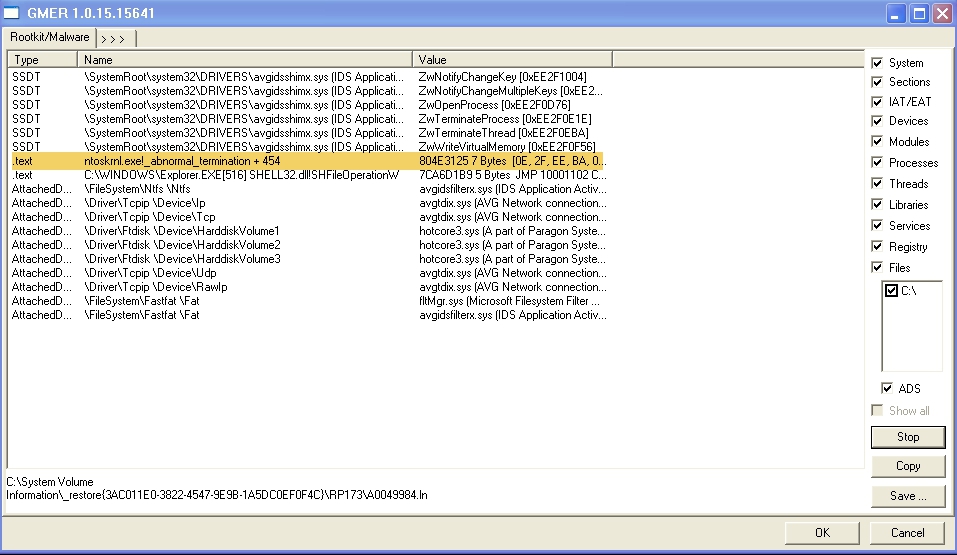
Gmer picked up some stuff but again I didn't know what to remove or how.

Is there any way you can post the stuff Gmer picked up? Maybe someone on here might know what it is.
Silly question but do you have "show hidden files" checked?

_________________
Image


Top
 Post subject: Re: Rootkit removal
PostPosted: Thu Jun 07, 2012 3:06 pm  (#48) 
Offline
GimpChat Member
User avatar

Joined: Sep 24, 2010
Posts: 12851
What computer make do you have Erisian (or was it a custom built)? Again, if you have a DELL, and you backed up your files, you can press ctrl F11 on boot and it will re-image your main partition with the default DELL install. If you have a HP, you can try just F11 on boot to get similar result (note, I'm not happy with eMachines/Gateway recovery routine; you need to have your disk available if so for re-install). Again, you need to back up your data first before doing this. If indeed your system is custom built, if you don't have your installer CD then indeed it will be time to install Linux.

_________________
Lyle

Psalm 109:8

Image


Top
 Post subject: Re: Rootkit removal
PostPosted: Thu Jun 07, 2012 4:55 pm  (#49) 
Offline
GimpChat Member
User avatar

Joined: Mar 23, 2012
Posts: 7388
Location: Göteborg at last!
I have my CD just not a bootable CD drive. Linux I can at least install from USB stick. My problem with complete Linux will be adding credit to my mobile broadband. I rely on its EXE software. Might be that a new PC is called for. Anyway Gmer is thorough but I don't know what to do with the results. I've highlighted the bit that AVG picked up.

Image

Edit: Forgot to mention my PC is Dell.


Top
 Post subject: Re: Rootkit removal
PostPosted: Thu Jun 07, 2012 5:35 pm  (#50) 
Offline
GimpChat Member
User avatar

Joined: Mar 23, 2012
Posts: 7388
Location: Göteborg at last!
Will ctrl F11 still work if my recovery partition is gone? If so, will I need to re-install Windows using this method?


Top
 Post subject: Re: Rootkit removal
PostPosted: Thu Jun 07, 2012 7:40 pm  (#51) 
Offline
GimpChat Member
User avatar

Joined: Sep 24, 2010
Posts: 12851
Not if your recovery partition is truly hosed Erisian. I assume you already tried to do ctrl F11 during boot. Looks like if you don't have your OS disks, then Linux is your future but if you really still want to keep XP, I bet if you contact DELL they will sell you recovery disks for your system at a better then cost then you think (even eMachine recovery disk was like $20 as I recall my boss telling me; not sure about Dell). Still, XP is yesterday's OS. If you have a dual core processor (some of the later XP systems shipped with dual core processors), you could go to a true 64-bit OS with Linux. Bet you it will work fine with a Gig of RAM too. I actually have my 64-bit VM run on 768MBytes of RAM (carry over from the 32-bit Linux install and I've not upgraded it; now that I just checked, I might change it now to 2Gs. lol) and it works quite well and spiffy, but all I've really done with it is browse since I've not installed GIMP since I've upgraded to the 64-bit OS. :)

_________________
Lyle

Psalm 109:8

Image


Top
 Post subject: Re: Rootkit removal
PostPosted: Thu Jun 07, 2012 7:47 pm  (#52) 
Offline
GimpChat Member
User avatar

Joined: Mar 23, 2012
Posts: 7388
Location: Göteborg at last!
My recovery partition was obliterated after I tried installing Ubuntu once and GRUB was split by the partition. Not knowing at the time how to fix my MBR, I formatted the whole drive and reinstalled Windows. Linux was going to be my future anyway but I need to get a few things sorted out before I remove Windows. The rootkit doesn't seem to be causing any more havoc at the moment so I'm gritting my teeth and getting on with it but with a bit of luck you'll be seeing me online either with Fedora14 or with Lubuntu very shortly.


Top
 Post subject: Re: Rootkit removal
PostPosted: Thu Jun 07, 2012 8:04 pm  (#53) 
Offline
GimpChat Member
User avatar

Joined: Sep 24, 2010
Posts: 12851
I had forgotten that my XP VM also only had 768MBytes (my original Win7 system only had 2Gs so kept the VM conservative at that time and never upgraded my memory settings). Well, now even my XP VM has 2Gs now; much spiffier. lol

I guess you had you XP OS disk at that time Erisian. If you lived near here, I could let you borrow mine. If you have a friend with an XP CD, you can still use the XP license at the back of your system to install XP; may or may not have to call an 800 number which gets you connected to Microsoft's support in India to activate. lol

I had access to DELL recovery CDs at my last job so it wasn't an issue to install XP then. Anyway, take care Erisian; you will probably like Linux better anyway, and, again, if you have a dualcore processor, you can install Ubuntu 64-bit. :)

_________________
Lyle

Psalm 109:8

Image


Top
 Post subject: Re: Rootkit removal
PostPosted: Thu Jun 07, 2012 8:49 pm  (#54) 
Offline
GimpChat Member
User avatar

Joined: Mar 23, 2012
Posts: 7388
Location: Göteborg at last!
The problem with win is I have an install CD but no bootable CD drive. If it's possible to make an external CD drive bootable then we're on. I just need to know how.


Top
 Post subject: Re: Rootkit removal
PostPosted: Thu Jun 07, 2012 9:11 pm  (#55) 
Offline
GimpChat Member
User avatar

Joined: Sep 24, 2010
Posts: 12851
Oh; OK. You first need to go into your bias. Press F2 (or is it F4; again, it's been a few years now so try F2 first and if that doesn't work, then try F4 the next time) key when you first start to boot. You will get to the bias menu and you can then choose the boot order. So long as your CDR can read CDs, then it will be able to boot from the CD too. Once you are able to boot from CD, you will get into the OS setup and if I was you, I would first delete all partitions then create a Primary partition before installing the OS. Hope that helps Erisian. :)

_________________
Lyle

Psalm 109:8

Image


Top
 Post subject: Re: Rootkit removal
PostPosted: Thu Jun 07, 2012 9:22 pm  (#56) 
Offline
GimpChat Member
User avatar

Joined: Jan 20, 2012
Posts: 583
PS if you set a bios password it can ONLY BE 7 chars long. and Write it down. Don't make the same mistake I did ;(

_________________


"In the face of adversity, there's three things: fly, freeze or fight; We're choosing to fight..."- Guy Boucher, Tampa Bay Lighting Head Coach


Top
 Post subject: Re: Rootkit removal
PostPosted: Thu Jun 07, 2012 9:40 pm  (#57) 
Offline
GimpChat Member
User avatar

Joined: Sep 24, 2010
Posts: 12851
You reminded me of something Z. If you have a laptop, it probably won't work, but, if you have a PC, if you can't get into BIOS because of password protection, just remove the CMOS battery (PC unplugged) for around 5 or so minutes (I usually short the battery contacts too not that it actually speeds the process; lol) and then place the battery back in and your BIOS will be reset (and no password either). :)

_________________
Lyle

Psalm 109:8

Image


Top
 Post subject: Re: Rootkit removal
PostPosted: Thu Jun 07, 2012 9:52 pm  (#58) 
Offline
GimpChat Member
User avatar

Joined: Apr 07, 2010
Posts: 14182
wow, I didn't know that Lyle.

_________________
Image


Top
 Post subject: Re: Rootkit removal
PostPosted: Thu Jun 07, 2012 10:03 pm  (#59) 
Offline
GimpChat Member
User avatar

Joined: Sep 24, 2010
Posts: 12851
May not work in newer model PCs Molly (but my bet is it will). Laptops use additional security features so this may (but likely not) work for laptops. Also, much more difficult to get to the battery in laptops anyway. :)

_________________
Lyle

Psalm 109:8

Image


Top
 Post subject: Re: Rootkit removal
PostPosted: Fri Jun 08, 2012 8:55 am  (#60) 
Offline
GimpChat Member

Joined: Jul 11, 2010
Posts: 349
If you have a non-bootable windows CD and also a floppy, the Microsoft website has a floppy image that you can use to boot off the floppy to the cd.


Top
Post new topic Reply to topic  [ 96 posts ]  Go to page Previous  1, 2, 3, 4, 5  Next

All times are UTC - 5 hours [ DST ]


* Login  


Powered by phpBB3 © phpBB Group