It is currently Tue Oct 27, 2026 8:40 am


All times are UTC - 5 hours [ DST ]


Post new topic Reply to topic  [ 9 posts ] 
Author Message
 Post subject: Soap Bubble Nebula
PostPosted: Tue Jan 13, 2015 11:20 am  (#1) 
Offline
Retired Staff
User avatar

Joined: May 22, 2008
Posts: 6946
Location: Somewhere in GIMP
This is one of the most awesome images I've seen at APOD

http://apod.nasa.gov/apod/ap150113.html

_________________
Image
World War IV will be fought with sticks and stones. - Albert Einstein


Share on Facebook Share on Twitter Share on Orkut Share on Digg Share on MySpace Share on Delicious Share on Technorati
Top
 Post subject: Re: Soap Bubble Nebula
PostPosted: Tue Jan 13, 2015 11:40 am  (#2) 
Offline
GimpChat Member
User avatar

Joined: Apr 08, 2010
Posts: 5420
Location: Northwest Ohio
something exploded so symmetrically!


Top
 Post subject: Re: Soap Bubble Nebula
PostPosted: Tue Jan 13, 2015 1:44 pm  (#3) 
Offline
GimpChat Member
User avatar

Joined: Nov 16, 2011
Posts: 5127
Location: Metro Vancouver, BC
I love NASA photos.
Something to explore,
openFITS - Create 3-Color Chandra Images from Raw Data

_________________
Image
Gimp 2.8.18, Linux, median user
Gimp Chat Tutorials Index
Spirit Bear (Kermode)


Top
 Post subject: Re: Soap Bubble Nebula
PostPosted: Tue Jan 13, 2015 2:52 pm  (#4) 
Offline
Retired Staff
User avatar

Joined: May 22, 2008
Posts: 6946
Location: Somewhere in GIMP
Odinbc wrote:
I've attached my Chandra results still in layers as an xcf file. The layer modes are still screen.

I can't make the different layers in different colors and have them all show up as different colors in the top image. I used Testing/Photocomix/Smooth for the smoothing.


Attachments:
casa_0.5-1.5keV.xcf [4.8 MiB]
Downloaded 156 times

_________________
Image
World War IV will be fought with sticks and stones. - Albert Einstein
Top
 Post subject: Re: Soap Bubble Nebula
PostPosted: Tue Jan 13, 2015 4:55 pm  (#5) 
Offline
GimpChat Member
User avatar

Joined: Nov 16, 2011
Posts: 5127
Location: Metro Vancouver, BC
Did you rename and order them accordingly?
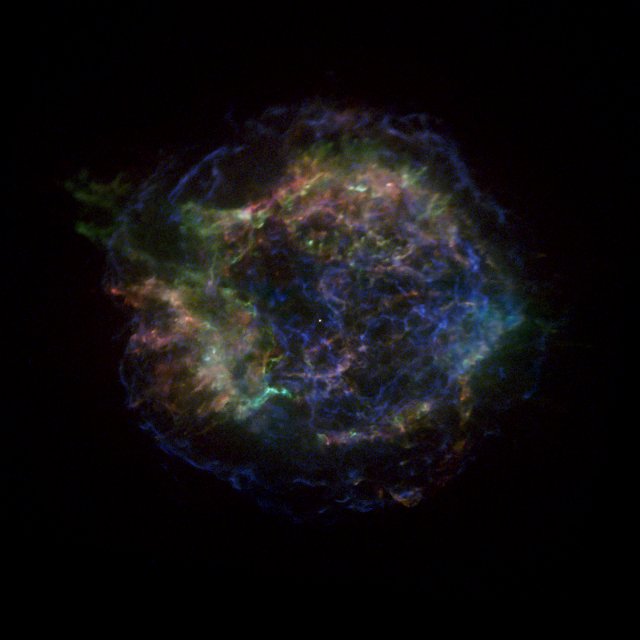
Cas A 4.0-6.0 keV (hard) Fits File [4.0 MB]
Cas A 1.5-3.0 keV (medium) Fits File [4.0 MB]
Cas A 0.5-1.5 keV (soft) Fits File [4.0 MB]

My Colorized settings
Hue: 240, 120, 0 (top down)
Saturation: 100
Lightness: -50

Mine is not identical to the Harvard image but shows distinct color.
As you can see from the noise, I was quite aggressive with gamma Levels.
Image


Attachments:
casa_0.5-1.5keV-obc.xcf.bz2 [841.89 KiB]
Downloaded 136 times

_________________
Image
Gimp 2.8.18, Linux, median user
Gimp Chat Tutorials Index
Spirit Bear (Kermode)
Top
 Post subject: Re: Soap Bubble Nebula
PostPosted: Tue Jan 13, 2015 6:17 pm  (#6) 
Offline
Retired Staff
User avatar

Joined: May 22, 2008
Posts: 6946
Location: Somewhere in GIMP
Odinbc wrote:
Did you rename and order them accordingly?
Yes. Download my xcf file and you can see that I did.

I started with the bottom, colored it red, used the recommended sat and lightness.

And went on from there.

_________________
Image
World War IV will be fought with sticks and stones. - Albert Einstein


Top
 Post subject: Re: Soap Bubble Nebula
PostPosted: Tue Jan 13, 2015 6:21 pm  (#7) 
Offline
GimpChat Member
User avatar

Joined: Nov 16, 2011
Posts: 5127
Location: Metro Vancouver, BC
The one I attached in my last post was done from scratch.
I had downloaded yours but didn't notice the colourization so I just started with the original 3 .fits and did a new one.

_________________
Image
Gimp 2.8.18, Linux, median user
Gimp Chat Tutorials Index
Spirit Bear (Kermode)


Top
 Post subject: Re: Soap Bubble Nebula
PostPosted: Tue Jan 13, 2015 6:38 pm  (#8) 
Offline
Retired Staff
User avatar

Joined: May 22, 2008
Posts: 6946
Location: Somewhere in GIMP
Opened yours. Still playing with mine. What in G'MIC did you use? Only anistropic smoothing one I could find was Testing / Ronounours / Smooth

_________________
Image
World War IV will be fought with sticks and stones. - Albert Einstein


Top
 Post subject: Re: Soap Bubble Nebula
PostPosted: Tue Jan 13, 2015 7:08 pm  (#9) 
Offline
GimpChat Member
User avatar

Joined: Nov 16, 2011
Posts: 5127
Location: Metro Vancouver, BC
Oregonian wrote:
Opened yours. Still playing with mine. What in G'MIC did you use? Only anistropic smoothing one I could find was Testing / Ronounours / Smooth
Repair / Smooth [anisotropic]

_________________
Image
Gimp 2.8.18, Linux, median user
Gimp Chat Tutorials Index
Spirit Bear (Kermode)


Top
Post new topic Reply to topic  [ 9 posts ] 

All times are UTC - 5 hours [ DST ]


* Login  


Powered by phpBB3 © phpBB Group