It is currently Wed Oct 28, 2026 1:56 am


All times are UTC - 5 hours [ DST ]


Post new topic Reply to topic  [ 20 posts ] 
Author Message
 Post subject: themes
PostPosted: Wed Mar 16, 2011 6:30 am  (#1) 
Offline
GimpChat Member
User avatar

Joined: Apr 30, 2010
Posts: 1937
Location: Missouri
I liked gimpthemes 1.0 for windows but is there anything like it for Linux? I really liked some of the dark themes. I've been googling myself senseless and have been lurking in the Mint forum but haven't found a satisfactory answer.

_________________
Image
The last time I kept an open mind,
my brain fell out and the dog grabbed it.
Now it's full of dirt, toothmarks, and dog slobber.
No more open minds or dogs for me.


Share on Facebook Share on Twitter Share on Orkut Share on Digg Share on MySpace Share on Delicious Share on Technorati
Top
 Post subject: Re: themes
PostPosted: Wed Mar 16, 2011 8:16 am  (#2) 
Offline
Global Moderator
User avatar

Joined: May 16, 2010
Posts: 16213
Last i heard there was some kind of development for a plug-in to create themes on the fly through GTK or pixbuf, or their was supposed to be
Doesn't linux have more theme options? Grab the windows version and just use the themes folders and write them into your gtkrc, that's all the program (themes 1.0 does).
I could upload all the themes folders if you would like? I think they will work on windows or linux.


Top
 Post subject: Re: themes
PostPosted: Wed Mar 16, 2011 8:24 am  (#3) 
Offline
Global Moderator
User avatar

Joined: May 16, 2010
Posts: 16213
Here you go
you will find these themes inside the zip
Image


Attachments:
Themes for Gimp.zip [193.46 KiB]
Downloaded 179 times
Top
 Post subject: Re: themes
PostPosted: Wed Mar 16, 2011 12:09 pm  (#4) 
Offline
GimpChat Member
User avatar

Joined: Apr 30, 2010
Posts: 1937
Location: Missouri
I tried that and it didn't work, I checked in the Mint forum and another person tried it and it didn't work for them either. That doesn't make sense to me so I'm going to do it again this evening. last night when i tried i was zombie tired and full of drugs so i might not have done it right or put them in the wrong place in Linux. Common sense says it should work.

_________________
Image
The last time I kept an open mind,
my brain fell out and the dog grabbed it.
Now it's full of dirt, toothmarks, and dog slobber.
No more open minds or dogs for me.


Top
 Post subject: Re: themes
PostPosted: Wed Mar 16, 2011 12:32 pm  (#5) 
Offline
GimpChat Member
User avatar

Joined: Apr 30, 2010
Posts: 1937
Location: Missouri
Update, I have them in the right place now. They're listed in the themes when I go to preferences but regardless of which one I try to use nothing changes. I tried restarting Gimp thinkng that might be necessary but to no avail. Woe is me.

_________________
Image
The last time I kept an open mind,
my brain fell out and the dog grabbed it.
Now it's full of dirt, toothmarks, and dog slobber.
No more open minds or dogs for me.


Top
 Post subject: Re: themes
PostPosted: Wed Mar 16, 2011 12:49 pm  (#6) 
Offline
GimpChat Member

Joined: Apr 12, 2010
Posts: 5870
all gtk themes should work there is a gnome webside witgh hundreds of them, but the problem may be that the themes require also the engine to be installed..
as example theme x, y, z, y may require the X engine, other the Y engine
replace letters with the real names

Only big difference Linux /Win in windows change theme will change only the gimp look, in linux may change the look of everything or at least of a lot of programs

_________________
My 3D Gallery on Deviantart http://photocomix2.deviantart.com/
Main gallery http://www.flickriver.com/photos/photocomix-mandala/
Mandala and simmetry http://www.flickriver.com/photos/photocomix_mandala/

Image

Mrs Wilbress


Top
 Post subject: Re: themes
PostPosted: Wed Mar 16, 2011 3:53 pm  (#7) 
Offline
GimpChat Member
User avatar

Joined: Apr 30, 2010
Posts: 1937
Location: Missouri
Hmmm, ok thanks, I'll research it some more.

_________________
Image
The last time I kept an open mind,
my brain fell out and the dog grabbed it.
Now it's full of dirt, toothmarks, and dog slobber.
No more open minds or dogs for me.


Top
 Post subject: Re: themes
PostPosted: Wed Mar 16, 2011 10:00 pm  (#8) 
Offline
Global Moderator
User avatar

Joined: May 16, 2010
Posts: 16213
That's probably why the exe comes with a binary for windows then.I thought it was just an engine to write to the gtkrc file.
Thanks PC. :)

Gms9810 did you try to just add the path to the theme in Edit/Pref and then write the theme in the gtkr manually?
If that doesn't work add the theme path in Edit/Pref then delete the gtkrc file.Restart Gimp.Then you may still need to select the theme and restart Gimp again.

Overwriting the gtkrc file should do it though.


Top
 Post subject: Re: themes
PostPosted: Thu Mar 17, 2011 8:30 am  (#9) 
Offline
GimpChat Member
User avatar

Joined: Apr 30, 2010
Posts: 1937
Location: Missouri
Rod wrote:
That's probably why the exe comes with a binary for windows then.I thought it was just an engine to write to the gtkrc file.
Thanks PC. :)

Gms9810 did you try to just add the path to the theme in Edit/Pref and then write the theme in the gtkr manually?
If that doesn't work add the theme path in Edit/Pref then delete the gtkrc file.Restart Gimp.Then you may still need to select the theme and restart Gimp again.

Overwriting the gtkrc file should do it though.

I tried putting them in a folder that I made and that didn't work so I put them in he folder already listed in the prefs. I don't know how to do the stuff with the gtkrc file.

_________________
Image
The last time I kept an open mind,
my brain fell out and the dog grabbed it.
Now it's full of dirt, toothmarks, and dog slobber.
No more open minds or dogs for me.


Top
 Post subject: Re: themes
PostPosted: Thu Mar 17, 2011 8:50 am  (#10) 
Offline
Global Moderator
User avatar

Joined: May 16, 2010
Posts: 16213
You probably need the engine for them anyways Gms9810.
I didn't realize the binary was for more than just writing to the rc files.

Sorry

Still GTK should recognize them. I bet there is a way around it somehow.
I do not use your system though so no way for me to test and upload a good working install for you.
Someone with your platform will have to do it for you.


Top
 Post subject: Re: themes
PostPosted: Thu Mar 17, 2011 10:57 am  (#11) 
Offline
GimpChat Member
User avatar

Joined: Oct 29, 2010
Posts: 711
Location: Netherlands
Gms9810
I have this in /etc/gimp/2.0/gtkrc

# pixmap_path "<dir 1>:<dir 2>:<dir 3>:..."
#
# include "rc-file"
#
# style <name> [= <name>]
# {
# <option>
# }
#
# widget <widget_set> style <style_name>
# class <widget_class_set> style <style_name>
#
# You can add your own GIMP-specific GTK styles here.


#
# Adjust the size of previews in plug-in dialogs:
#
style "gimp-large-preview"
{
GimpPreview::size = 256
}

# class "GimpPreview" style "gimp-large-preview"


#
# Change the dock separator DND highlight color:
#
style "gimp-red-separator-style"
{
bg[SELECTED] = "#aa2448"
}

# widget "*gimp-dock-separator*" style "gimp-red-separator-style"


I unzipped the gtk files, better read what is in them.
To make life easier install "mc" to browse files.
For instance unzipping a file is simply put the mc cursor over it and hitting enter.
Hope this gets you going.
Gerard.

_________________
Gentoo Linux always up-to-date.
Kernel-3.17.4 Python-2.7.8/3.3.5
Gimp-2.8.14

I use Linux only.
And Virtualbox with Win 7


Top
 Post subject: Re: themes
PostPosted: Fri Mar 18, 2011 2:39 am  (#12) 
Offline
Global Moderator
User avatar

Joined: May 16, 2010
Posts: 16213
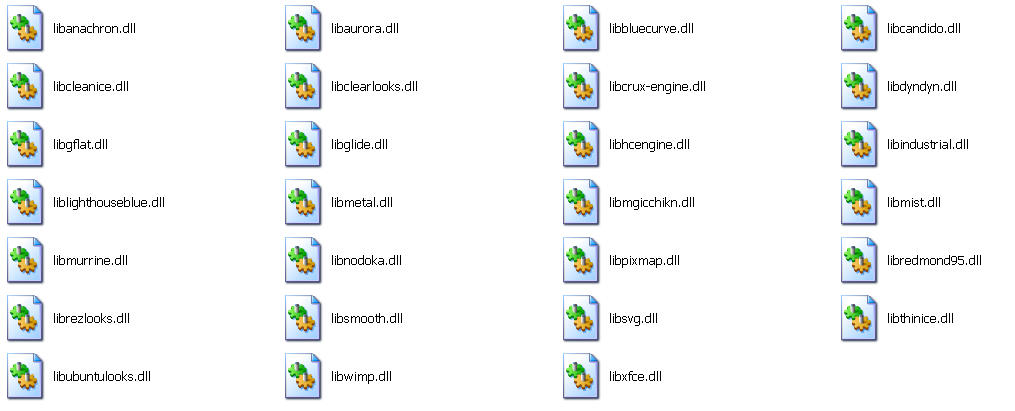
I have a sneaky feeling these dll files have a lot to do with running the theme engines for each theme.
Image

These are all found in the engines folder after installing themes 1.0 :)
I am not entirely sure if these dll files will work in Linux.I attached them in a zip.
They go in - C:\Program Files\GIMP-2.0\lib\gtk-2.0\2.10.0\engines in windows xp not sure where they would go in Linux but most likely the same folder.


Attachments:
File comment: Theme program dynamic link libraries
Theme-DLLs.zip [819.8 KiB]
Downloaded 152 times
Top
 Post subject: Re: themes
PostPosted: Fri Mar 18, 2011 2:57 am  (#13) 
Offline
GimpChat Member
User avatar

Joined: Oct 29, 2010
Posts: 711
Location: Netherlands
Dll's for Windows will not work in Linux.
I d/led them and checked the contents.
They are Windows executables which will only work through Wine in Linux.
Gerard.

_________________
Gentoo Linux always up-to-date.
Kernel-3.17.4 Python-2.7.8/3.3.5
Gimp-2.8.14

I use Linux only.
And Virtualbox with Win 7


Top
 Post subject: Re: themes
PostPosted: Fri Mar 18, 2011 3:30 am  (#14) 
Offline
Global Moderator
User avatar

Joined: May 16, 2010
Posts: 16213
Argh - sorry gerard82 :\


Top
 Post subject: Re: themes
PostPosted: Fri Mar 18, 2011 4:19 am  (#15) 
Offline
GimpChat Member

Joined: Apr 12, 2010
Posts: 5870
Quote:
I am not entirely sure if these dll files will work in Linux.I attached them in a zip.
They go in - C:\Program Files\GIMP-2.0\lib\gtk-2.0\2.10.0\engines in windows xp not sure where they would go in Linux but most likely the same folder.


They even may work in theory,
but any attempt to run in Linux a native Linux desktop thank to Window dll loaded by Wine :hehe would provoke in all linux entusiast a endless series of jokes and sarcasm :rofl ...i believe would became as a myth or a urban legend and bring if not respect at least a huge notoriety in the Unix word to the project leader and all his staff

and maybe even a Nobel Prize ( for the Goofest Hack of the New Millenium )

################################################

Please no any pun intended i'm a bit hight now (mostly because sleepless from 48 h ) i imagined the faces of many Unix geeks in front to a similar hack ...and the idea was just too funny for me

i tryed to Google for the first engine but i only found a rpm version http://rpm.pbone.net/index.php3/stat/4/ ... 6.rpm.html
and that peculiar engine is marked as obsolete

i find some for ubuntu http://packages.ubuntu.com/lucid/x11/gt ... nes-aurora

gtk-engine and libgtk-engine ( may be possible keyword for search

_________________
My 3D Gallery on Deviantart http://photocomix2.deviantart.com/
Main gallery http://www.flickriver.com/photos/photocomix-mandala/
Mandala and simmetry http://www.flickriver.com/photos/photocomix_mandala/

Image

Mrs Wilbress


Top
 Post subject: Re: themes
PostPosted: Fri Mar 18, 2011 6:23 am  (#16) 
Offline
GimpChat Member
User avatar

Joined: Oct 29, 2010
Posts: 711
Location: Netherlands
For confirmed Windows users:
Windows executables can only run in Linux through an emulator (Wine = WindowsEmulator).
Directory structure is very different too.
Linux is a clone of Unix, a very professional OS written by professionals.

What follows is the directory structure of Linux.
Some distro's may deviate a little from what follows.
/bin: system only software
/boot: kernel + booting software (grub or lilo)
/dev: devices (mostly hardware)
/etc: system wide configuration files + init software.
/home: here user(s) files including private configs.
/lib: system libraries (comparable to dll's in Windows;most not for user programs)
/media: empty until you pop in a USB stick or a cd.
/mnt: cd/dvd and other media manually "mounted".
/opt: optional user software usually proprietary stuff like Flash.
/proc: process info used system wide.
/root: sysadmin's "home".
/sbin: software mostly used by the system like fsck = filesystemcheck.
/sys: status of system processes.
/tmp: temporary stuff like opening a pdf from internet for reading,emptied on reboot.
/usr: user installed software including libs and files like themes etc.
/var: log files and a lot more.
This is of course not a complete list.

What makes Linux so safe is the way a user's program is run.
When you start a program as user it is loaded into RAM and the rights are changed to the user's rights.
IOW that program can never change anything outside the user's rights.
An intruder can only change things to which the user is entitled,nothing else.
Gerard.

_________________
Gentoo Linux always up-to-date.
Kernel-3.17.4 Python-2.7.8/3.3.5
Gimp-2.8.14

I use Linux only.
And Virtualbox with Win 7


Top
 Post subject: Re: themes
PostPosted: Fri Mar 18, 2011 12:11 pm  (#17) 
Offline
Global Moderator
User avatar

Joined: May 16, 2010
Posts: 16213
Interesting setup :)
Thanks for explaining it in detail.

PC maybe you should get some sleep :lol


Top
 Post subject: Re: themes
PostPosted: Sat Mar 19, 2011 7:19 am  (#18) 
Offline
Global Moderator
User avatar

Joined: May 16, 2010
Posts: 16213
Try this website - http://sourceforge.net/userapps/mediawi ... =Downloads
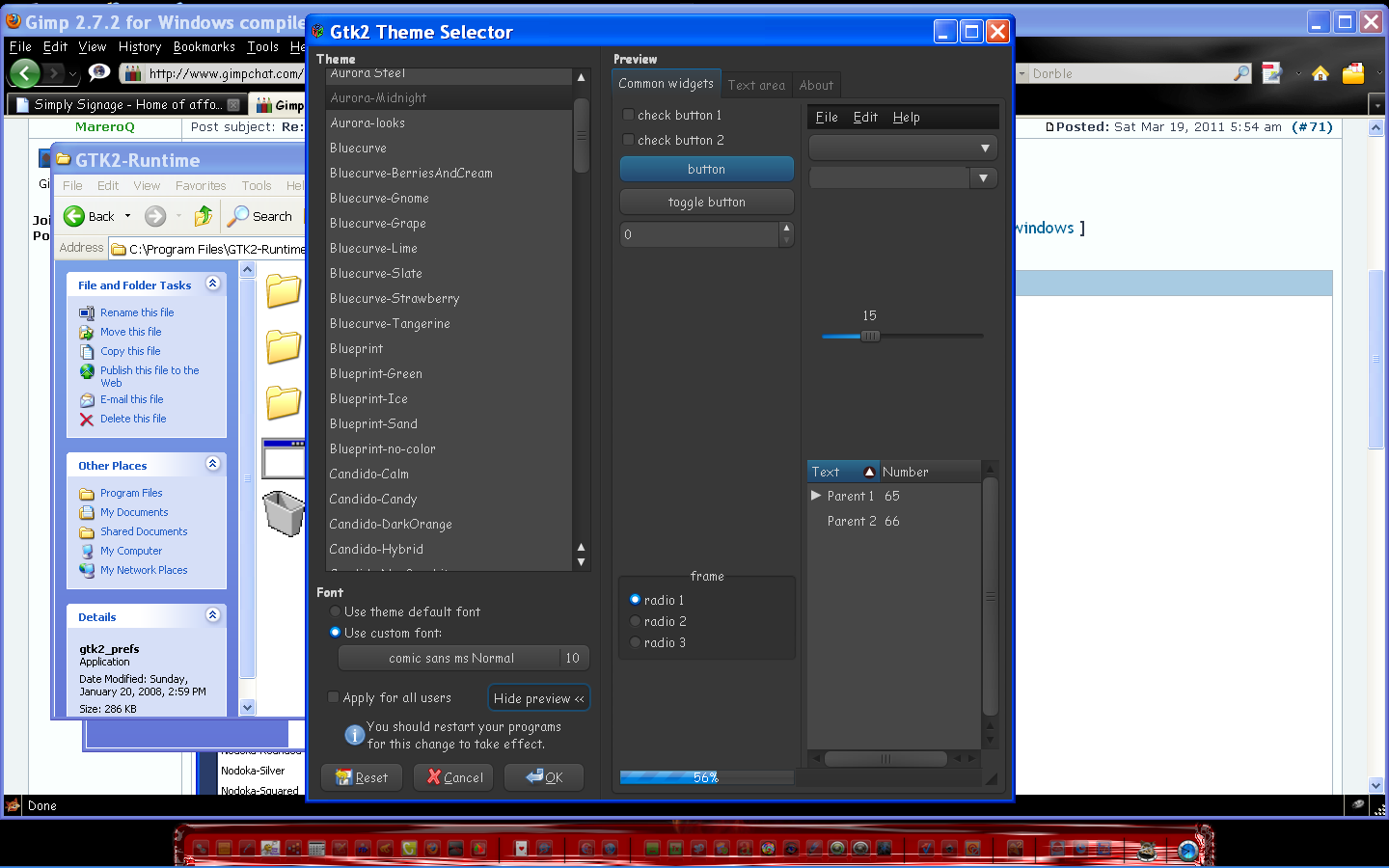
They may have the platform install you need i am not sure though.I think this is it?
http://downloads.sourceforge.net/gtk-wi ... m?download
If they do, uninstall GTK runtimes first and re-install theirs so you avoid conflicts.
Then install the themes package.
Image


Top
 Post subject: Re: themes
PostPosted: Sat Mar 19, 2011 7:25 am  (#19) 
Offline
Global Moderator
User avatar

Joined: May 16, 2010
Posts: 16213
You may want to check and make sure you do not already have it installed in Linux distros.
Look in GTK runtimes folder for gtk2_prefs program.


Top
 Post subject: Re: themes
PostPosted: Tue Jun 09, 2015 12:26 am  (#20) 
Offline
New Member

Joined: Jun 08, 2015
Posts: 1
ok - and where do i finde Themesnfor Mac?


Top
Post new topic Reply to topic  [ 20 posts ] 

All times are UTC - 5 hours [ DST ]


* Login  


Powered by phpBB3 © phpBB Group