It is currently Sat Oct 24, 2026 3:08 pm


All times are UTC - 5 hours [ DST ]


Post new topic Reply to topic  [ 6 posts ] 
Author Message
 Post subject: Photo Palette
PostPosted: Tue May 21, 2013 1:55 am  (#1) 
Offline
GimpChat Member
User avatar

Joined: Aug 30, 2012
Posts: 2174
So I've not been around much, one of the reasons is I just a got a new phone, Its a window 8 phone so I've been spending my time browsing apps and settings things up and just generally seeing how quick I can kill the battery.

Anyway whilst browsing the apps came across this little gem, not sure if its available for the other platforms but I would thinks it could be or they might offer something similar.

The app allows you to take a picture which it then converts into a 5 colour palette, sounds like fun to me.

PhotoPalette

Managed to create this picture using a photo editing app

Image

And yes that is me.

_________________
Image


Share on Facebook Share on Twitter Share on Orkut Share on Digg Share on MySpace Share on Delicious Share on Technorati
Top
 Post subject: Re: Photo Palette
PostPosted: Tue May 21, 2013 11:24 am  (#2) 
Offline
GimpChat Member
User avatar

Joined: Nov 16, 2011
Posts: 5127
Location: Metro Vancouver, BC
Too many phone apps are definitely time and battery killers.

_________________
Image
Gimp 2.8.18, Linux, median user
Gimp Chat Tutorials Index
Spirit Bear (Kermode)


Top
 Post subject: Re: Photo Palette
PostPosted: Tue May 21, 2013 4:15 pm  (#3) 
Offline
GimpChat Member
User avatar

Joined: Apr 08, 2010
Posts: 5420
Location: Northwest Ohio
I love apps, I would like to find one...free of course...that would let me use my iPad as a tablet to draw on or import a pic, and use filters. Sort of a simple version of a gimp type program.


Top
 Post subject: Re: Photo Palette
PostPosted: Tue May 21, 2013 6:51 pm  (#4) 
Offline
GimpChat Member
User avatar

Joined: Nov 16, 2011
Posts: 5127
Location: Metro Vancouver, BC
For free, simple and easy sketching in iPad have a look at either Paper (by Fifty Three), it only comes with a pen tool or SketchBook Express (by Autodesk) with a few more tools including (3) layers.

_________________
Image
Gimp 2.8.18, Linux, median user
Gimp Chat Tutorials Index
Spirit Bear (Kermode)


Top
 Post subject: Re: Photo Palette
PostPosted: Tue May 21, 2013 8:46 pm  (#5) 
he4rty wrote:
...Anyway whilst browsing the apps came across this little gem, not sure if its available for the other platforms but I would thinks it could be or they might offer something similar.

The app allows you to take a picture which it then converts into a 5 colour palette, sounds like fun to me...

Hi Hearty,
Nice find. :bigthup

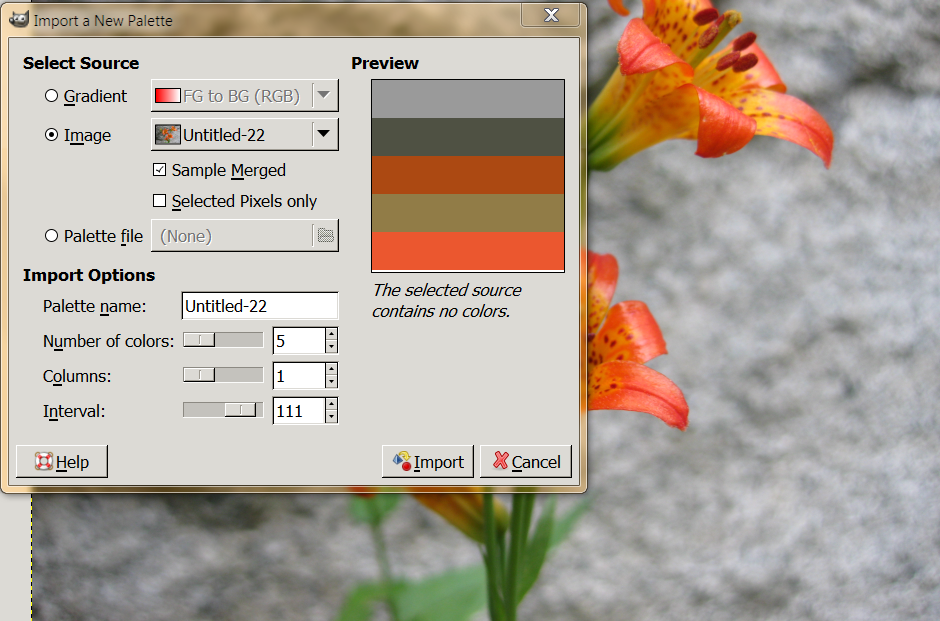
Of course you would already know that Gimp can reduce an image to a limited number of colors and save that palette.
(Open an Image, 'right click' any of your existing Palettes, then choose 'Import Palette')
Image


Top
 Post subject: Re: Photo Palette
PostPosted: Wed May 22, 2013 1:41 am  (#6) 
Offline
GimpChat Member
User avatar

Joined: Aug 30, 2012
Posts: 2174
fluffybunny wrote:
Hi Hearty,
Nice find. :bigthup

Of course you would already know that Gimp can reduce an image to a limited number of colors and save that palette.
(Open an Image, 'right click' any of your existing Palettes, then choose 'Import Palette')
Image[/color]


No, I don't recall that feature but I shall have a look, I've used the one under colours, where you get a long strip of colours opened as a new image.

_________________
Image


Top
Post new topic Reply to topic  [ 6 posts ] 

All times are UTC - 5 hours [ DST ]


* Login  


Powered by phpBB3 © phpBB Group