It is currently Sat Oct 24, 2026 12:25 pm


All times are UTC - 5 hours [ DST ]


Post new topic Reply to topic  [ 10 posts ] 
Author Message
 Post subject: Can't find an installed package [SOLVED]
PostPosted: Thu Mar 06, 2014 6:43 pm  (#1) 
Offline
GimpChat Member
User avatar

Joined: Apr 07, 2010
Posts: 14182
I want to format a USB and I yum installed gpart and it went in okay and I have done all kinds of searches for it and can't find it. I did the yum install gpart. Anyone out there know where I should look? thank you
[molly@localhost ~]$ su -
Password:
[root@localhost ~]# yum install gpart
Loaded plugins: langpacks, refresh-packagekit
Resolving Dependencies
--> Running transaction check
---> Package gpart.x86_64 0:0.1h-18.fc19 will be installed
--> Finished Dependency Resolution

Dependencies Resolved

================================================================================
Package        Arch            Version                  Repository        Size
================================================================================
Installing:
gpart          x86_64          0.1h-18.fc19             updates           43 k

Transaction Summary
================================================================================
Install  1 Package

Total download size: 43 k
Installed size: 78 k
Is this ok [y/d/N]: y
Downloading packages:
gpart-0.1h-18.fc19.x86_64.rpm                              |  43 kB   00:00     
Running transaction check
Running transaction test
Transaction test succeeded
Running transaction
  Installing : gpart-0.1h-18.fc19.x86_64                                    1/1
  Verifying  : gpart-0.1h-18.fc19.x86_64                                    1/1

Installed:
  gpart.x86_64 0:0.1h-18.fc19                                                   

Complete!
[root@localhost ~]#

_________________
Image


Share on Facebook Share on Twitter Share on Orkut Share on Digg Share on MySpace Share on Delicious Share on Technorati
Top
 Post subject: Re: Can't find an installed package
PostPosted: Thu Mar 06, 2014 6:51 pm  (#2) 
Offline
GimpChat Founder
User avatar

Joined: May 22, 2008
Posts: 5241
Location: Gimpville
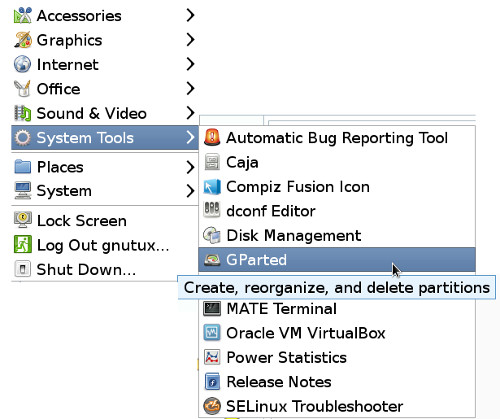
In MATE, it can normally be found under System Tools. In Gnome3, you can just type Gpart in the apps search bar and it should appear.

You can always open a terminal and enter gparted. :)

_________________
“If you reach for the stars, you just might land on a decently sized hill.” - Stuart Hill


Top
 Post subject: Re: Can't find an installed package
PostPosted: Thu Mar 06, 2014 6:54 pm  (#3) 
Offline
GimpChat Member
User avatar

Joined: Apr 07, 2010
Posts: 14182
Thank you Tux. The only place I didn't look. ya might know. :oops:
Edit: I tried gparted and it said there wasn't any of them. I googled to find out how to get it in Fedora 19 and they gave the command yum install gpart. Are they both something different? or do I use another command instead of yum install

_________________
Image


Top
 Post subject: Re: Can't find an installed package
PostPosted: Thu Mar 06, 2014 6:55 pm  (#4) 
Offline
GimpChat Founder
User avatar

Joined: May 22, 2008
Posts: 5241
Location: Gimpville
Just noticed you entered gpart. You are looking for gparted.

gpart and gparted are not the same app. gpart is used to recover corrupt partitions. gparted is the Gnome Partition Editor.

_________________
“If you reach for the stars, you just might land on a decently sized hill.” - Stuart Hill


Top
 Post subject: Re: Can't find an installed package
PostPosted: Thu Mar 06, 2014 6:59 pm  (#5) 
Offline
GimpChat Member
User avatar

Joined: Apr 07, 2010
Posts: 14182
This is what I get when I type in gparted
[molly@localhost ~]$ su -
Password:
[root@localhost ~]# yum install gparted
Loaded plugins: langpacks, refresh-packagekit
Package gparted-0.16.1-2.fc19.x86_64 already installed and latest version
Nothing to do
[root@localhost ~]#

_________________
Image


Top
 Post subject: Re: Can't find an installed package
PostPosted: Thu Mar 06, 2014 7:07 pm  (#6) 
Offline
GimpChat Founder
User avatar

Joined: May 22, 2008
Posts: 5241
Location: Gimpville
Looks like it's already installed.

Image

Alternately, you can just open a terminal and enter: gparted

_________________
“If you reach for the stars, you just might land on a decently sized hill.” - Stuart Hill


Top
 Post subject: Re: Can't find an installed package
PostPosted: Thu Mar 06, 2014 7:13 pm  (#7) 
Offline
GimpChat Member
User avatar

Joined: Apr 07, 2010
Posts: 14182
yes mine shows exactly like that. It has my head messed up so much now' trying to screw around with my brain I guess, what is left of it.
When I first tried it, I was told no package available for gparted. tried again a few more times, then I googled and found a site that told me to yum install gpart, I did that and it went right in.
SO, why is it called gparted in my System tools and it is called gpart in my terminal where I installed it? Anyway, I got it now and I will mess with it in the morning when my brain gets back to normal.
Thank you Tux

_________________
Image


Top
 Post subject: Re: Can't find an installed package [SOLVED]
PostPosted: Thu Mar 06, 2014 7:16 pm  (#8) 
Offline
GimpChat Founder
User avatar

Joined: May 22, 2008
Posts: 5241
Location: Gimpville
gpart and gparted are not the same app. gpart is used to recover corrupt partitions. gparted is the Gnome Partition Editor. You must have installed both. :hehe

_________________
“If you reach for the stars, you just might land on a decently sized hill.” - Stuart Hill


Top
 Post subject: Re: Can't find an installed package [SOLVED]
PostPosted: Thu Mar 06, 2014 7:16 pm  (#9) 
Offline
GimpChat Member
User avatar

Joined: Apr 07, 2010
Posts: 14182
If I did, I only see the one
Image

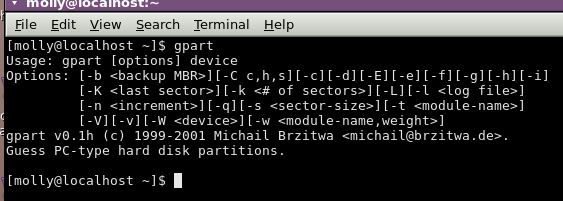
what I get when I type gpart in terminal
Image

_________________
Image


Top
 Post subject: Re: Can't find an installed package [SOLVED]
PostPosted: Thu Mar 06, 2014 7:43 pm  (#10) 
Offline
GimpChat Founder
User avatar

Joined: May 22, 2008
Posts: 5241
Location: Gimpville
There is no GUI for gpart. gpart is a command line app, so it won't show up in the GUI menu.

_________________
“If you reach for the stars, you just might land on a decently sized hill.” - Stuart Hill


Top
Post new topic Reply to topic  [ 10 posts ] 

All times are UTC - 5 hours [ DST ]


* Login  


Powered by phpBB3 © phpBB Group