It is currently Thu Aug 06, 2026 4:14 pm


All times are UTC - 5 hours [ DST ]


Post new topic Reply to topic  [ 8 posts ] 
Author Message
 Post subject: Create a "Button Pressed Down" effect?
PostPosted: Fri Apr 04, 2014 6:55 pm  (#1) 
Offline
New Member

Joined: Apr 04, 2014
Posts: 1
Hey guys!
How can I create an effect in Gimp which would make a shape look pressed down, like a button.
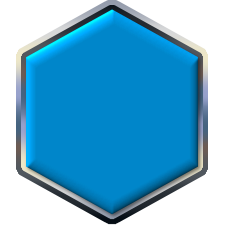
Here is my button template:
Image

Applying a light effect or simply making it darker doesn't really look very nice... :/
I'd also like to make the corners a bit rounder if it's not too hard.

I'm also open for html/css solutions.

I hope you can help me out.
Thanks in advance. :)


Last edited by froipy on Fri Apr 04, 2014 7:06 pm, edited 1 time in total.

Share on Facebook Share on Twitter Share on Orkut Share on Digg Share on MySpace Share on Delicious Share on Technorati
Top
 Post subject: Re: Create a "Button Pressed Down" effect?
PostPosted: Fri Apr 04, 2014 7:06 pm  (#2) 
Offline
Administrator
User avatar

Joined: Aug 10, 2012
Posts: 14145
Location: Native to NYC living in Arizona, Gimp 2.8 - 3.0, Win 11 PC.
froipy wrote:
Hey guys!
How can I create an effect in Gimp which would make a shape look pressed down, like a button.
Here is my button template:
[ Image ]

Applying a light effect or simply making it darker doesn't really look very nice... :/
I'd also like to make the corners a bit rounder if it's not too hard.

I hope you can help me out.
Thanks in advance. :)

You could try this effect...
www.youtube.com Video from : www.youtube.com

_________________
Image
"A wise man learns more from a foolish question than a fool can learn from a wise answer"
Image


Top
 Post subject: Re: Create a "Button Pressed Down" effect?
PostPosted: Fri Apr 04, 2014 8:25 pm  (#3) 
Offline
GimpChat Member
User avatar

Joined: Nov 16, 2011
Posts: 5127
Location: Metro Vancouver, BC
A couple of quick ones.
1. G'MIC plug-in | Lights and shadows | Dodge and burn
2. Filters | Map | Map Object (defaults)

Image

Adjust the lighting to your purpose.

You could also just go with simple CSS border-style (double, groove, ridge or inset, outset).
{
border-width:5px;
border-style:groove;
}

_________________
Image
Gimp 2.8.18, Linux, median user
Gimp Chat Tutorials Index
Spirit Bear (Kermode)


Top
 Post subject: Re: Create a "Button Pressed Down" effect?
PostPosted: Sat Apr 05, 2014 12:46 am  (#4) 
Offline
Script Coder
User avatar

Joined: Feb 18, 2011
Posts: 4826
Location: Bendigo Vic. Australia
There is a great written tutorial from Draconian that could help you How to make 3D Push buttons

_________________
Image
No matter how much you push the envelope, it'll still be stationery.


Top
 Post subject: Re: Create a "Button Pressed Down" effect?
PostPosted: Sat Apr 05, 2014 4:48 am  (#5) 
Offline
Script Coder

Joined: Apr 10, 2011
Posts: 532
An interesting question, and one I've had lots of chance to practice solving recently.

There's several ways to accomplish this, it all depends on what kind of button you want to make. What's the surface like, grungy? Smooth? Shiny? Plasticky? What's the light direction? If you're making buttons for a UI (which is likely...), you'll want the light source to be consistent accross all lighting elements. Most of the time you can pretty much get away with using the "standard light direction", which is diagonally from the top left corner. It's pretty much standard in UI design.

Anyway... in order for the button metaphor to make sense, your button should have some kind of 3d-effect going on, otherwise it's just a clickable UI element and you can pretty much just forget "pressed down" and have the clicked state be just whatever looks good, like maybe a colour/lightness change.

If you want to go with a 3d-style button thing, I think you can start with a bevel on the edges. Keep it subtle, too strong beveling looks cheesy and cheap. Add a linear gradient, it'll look more stylish than a radial one. Then for the pressed down version, make the shadow of the bevel stronger, and the light weaker, add some shading overlay that makes the overall colour very slightly darker. If you want to be fancy, make the overlay also a gradient, so that the top part is darkened more than the bottom. This increases the 3d-effect.

A nice additional touch: make the text/images in the button go 1px down when pressed. That does wonders for the "pressed down" effect. Easy to do in CSS with the "padding" property.

Example imagery:

Attachment:
reset_inactive.png
reset_inactive.png [ 1.16 KiB | Viewed 30240 times ]
Attachment:
reset_active.png
reset_active.png [ 1.17 KiB | Viewed 30240 times ]


Top
 Post subject: Re: Create a "Button Pressed Down" effect?
PostPosted: Sat Apr 05, 2014 10:38 am  (#6) 
Offline
GimpChat Member

Joined: Aug 27, 2010
Posts: 491
"Pressed down" can mean so many things. Not certain specifically what effect you're looking to achieve.
Here are a couple of quick concepts.

Image
Image


Top
 Post subject: Re: Create a "Button Pressed Down" effect?
PostPosted: Thu May 15, 2014 9:29 pm  (#7) 
Offline
GimpChat Member
User avatar

Joined: May 15, 2014
Posts: 20
Wallace wrote:
froipy wrote:
Hey guys!
How can I create an effect in Gimp which would make a shape look pressed down, like a button.
Here is my button template:

Applying a light effect or simply making it darker doesn't really look very nice... :/
I'd also like to make the corners a bit rounder if it's not too hard.

I hope you can help me out.
Thanks in advance. :)

You could try this effect...


This is actually my video! Unfortunately, i cannot post external links, but I have made an updated version of this. If you would like, I can make an even better version of this if you are still interested. I could also show how to easily do it in just a few lines of CSS if interested. I know this thread is a bit old but if the interest is there I can deliver.


Top
 Post subject: Re: Create a "Button Pressed Down" effect?
PostPosted: Thu May 15, 2014 11:42 pm  (#8) 
Offline
GimpChat Member
User avatar

Joined: Nov 16, 2011
Posts: 5127
Location: Metro Vancouver, BC
Go for it Wyrlor.

_________________
Image
Gimp 2.8.18, Linux, median user
Gimp Chat Tutorials Index
Spirit Bear (Kermode)


Top
Post new topic Reply to topic  [ 8 posts ] 

All times are UTC - 5 hours [ DST ]


* Login  


Powered by phpBB3 © phpBB Group