It is currently Thu Aug 06, 2026 5:46 pm


All times are UTC - 5 hours [ DST ]


Post new topic Reply to topic  [ 8 posts ] 
Author Message
 Post subject: slicing and dicing
PostPosted: Tue Aug 13, 2013 11:36 pm  (#1) 
Offline
GimpChat Member

Joined: Nov 09, 2012
Posts: 134
Ello all. I have not attempted to slice in gimp 2.8 yet. I am going to be doing so tomorow but have a question about it. In PS, they have what we call user slices. Those are the ones that are editable by the user. IE, you fist use the slice tool to slice up the image you want, then you use the slice select tool to select slices that have been made and resize them if they overlap other slices. If any of the slices were created by the auto feature, you have the ability to right click and make that auto slice a user slice. its pretty simple in PS. You can also edit the slice to take you to a website or email people or name the slice or even pick the target for the website IE new window. the other options are to be able to select a slice and tell it to be no image so it does not save it. Is it the same in the gimp 2.8?

here is a video describing what i am asking. haha.

http://www.youtube.com/watch?v=Ya168HNqwFs

thanks


Share on Facebook Share on Twitter Share on Orkut Share on Digg Share on MySpace Share on Delicious Share on Technorati
Top
 Post subject: Re: slicing and dicing
PostPosted: Wed Aug 14, 2013 12:41 am  (#2) 
Offline
GimpChat Founder
User avatar

Joined: May 22, 2008
Posts: 5241
Location: Gimpville
Hi LT,

GIMP includes a couple of python scripts (or plug-ins, if you will) that can assist with website creation.

You can Slice up images in GIMP using guides (FIlters/Web/Slice). The script will generate an HTML snippet, which you can then edit and add to your webpage. GIMP also includes a pretty good Image Map Editor, if you prefer to go that route.

_________________
“If you reach for the stars, you just might land on a decently sized hill.” - Stuart Hill


Top
 Post subject: Re: slicing and dicing
PostPosted: Wed Aug 14, 2013 1:14 am  (#3) 
Offline
GimpChat Member
User avatar

Joined: Nov 16, 2011
Posts: 5127
Location: Metro Vancouver, BC
Another suggestion, the Guillotine command slices up the current image, based on the image's guides.
Image | Transform | Guillotine

_________________
Image
Gimp 2.8.18, Linux, median user
Gimp Chat Tutorials Index
Spirit Bear (Kermode)


Top
 Post subject: Re: slicing and dicing
PostPosted: Wed Aug 14, 2013 7:03 am  (#4) 
Offline
Global Moderator
User avatar

Joined: May 16, 2010
Posts: 16150
Try Namo Image Slicer. (Windows 32 bit) - Stand Alone Program
Image

Attachment:
File comment: Namo Image Slicer setup
nis-setup.zip [1.19 MiB]
Downloaded 584 times

_________________
Image


Top
 Post subject: Re: slicing and dicing
PostPosted: Wed Aug 14, 2013 12:26 pm  (#5) 
Offline
GimpChat Member

Joined: Nov 09, 2012
Posts: 134
hmm, all very interesting posts. ill have to test out the stand alon program. Im just used to PS so making the transition to gimp 2.8 is difficult. I tried to make the transition 6 years ago but could not stand the gimp at that point in time. it was way to hard to understand but now with 2.8, it seems easier. haha. easier but still a hard transition to make from PS to gimp. BUT it is worth it. I have made some awesome awesome stuff with gimp, inkscape and scribes. I mean, people are actually coming to me for training in the stuff and i have referred them here to the forums as well.

ok so let me see if i understand correctly; in the gimp, you first would slice up the images and then use the image map editor to add url's and what not by drawing the polygons?

Is there any way to streamline it? IE, make the slice, right click said slice and then fill in options?

If not, how bout a custom script that when i select slice from the tool bar, it opens it up in that namo image slicer program?

i am just trying to stream line everything so i dont have to slice and then draw polygons everywhere for links. UNLESS i am miss understanding the correct procedure to do this.

thanks


Top
 Post subject: Re: slicing and dicing
PostPosted: Wed Aug 14, 2013 1:14 pm  (#6) 
Offline
Global Moderator
User avatar

Joined: May 16, 2010
Posts: 16150
LT72884 wrote:
hmm, all very interesting posts. ill have to test out the stand alon program. Im just used to PS so making the transition to gimp 2.8 is difficult. I tried to make the transition 6 years ago but could not stand the gimp at that point in time. it was way to hard to understand but now with 2.8, it seems easier. haha. easier but still a hard transition to make from PS to gimp. BUT it is worth it. I have made some awesome awesome stuff with gimp, inkscape and scribes. I mean, people are actually coming to me for training in the stuff and i have referred them here to the forums as well.

ok so let me see if i understand correctly; in the gimp, you first would slice up the images and then use the image map editor to add url's and what not by drawing the polygons?

Is there any way to streamline it? IE, make the slice, right click said slice and then fill in options?

If not, how bout a custom script that when i select slice from the tool bar, it opens it up in that namo image slicer program?

i am just trying to stream line everything so i dont have to slice and then draw polygons everywhere for links. UNLESS i am miss understanding the correct procedure to do this.

thanks

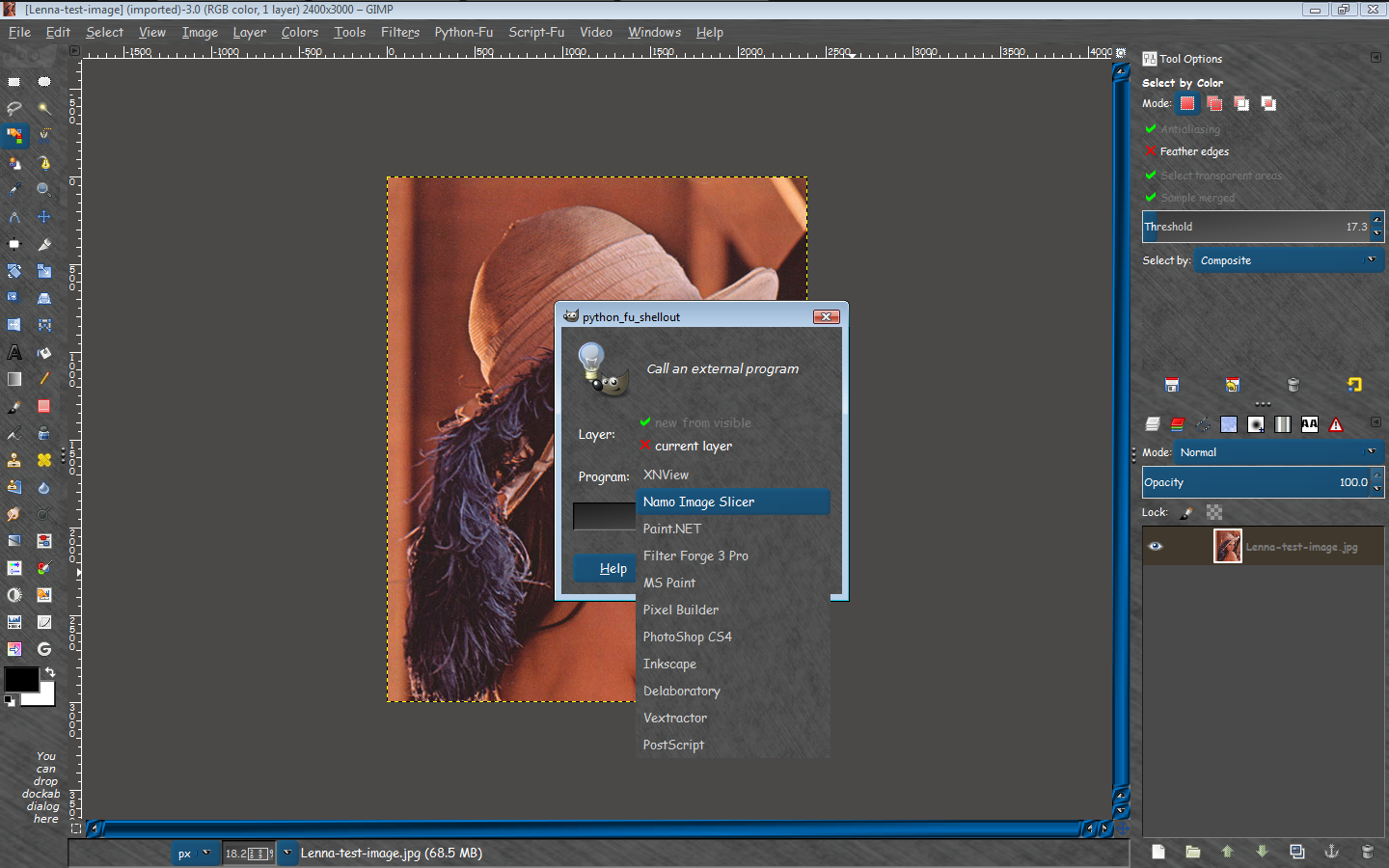
I ran a test to see if Shellout will export an image into Namo Image Slicer. I couldn't see why that wouldn't work.
Then you could create/or open your image in GIMP, run Filters>Shellout and export to Namo.
Image

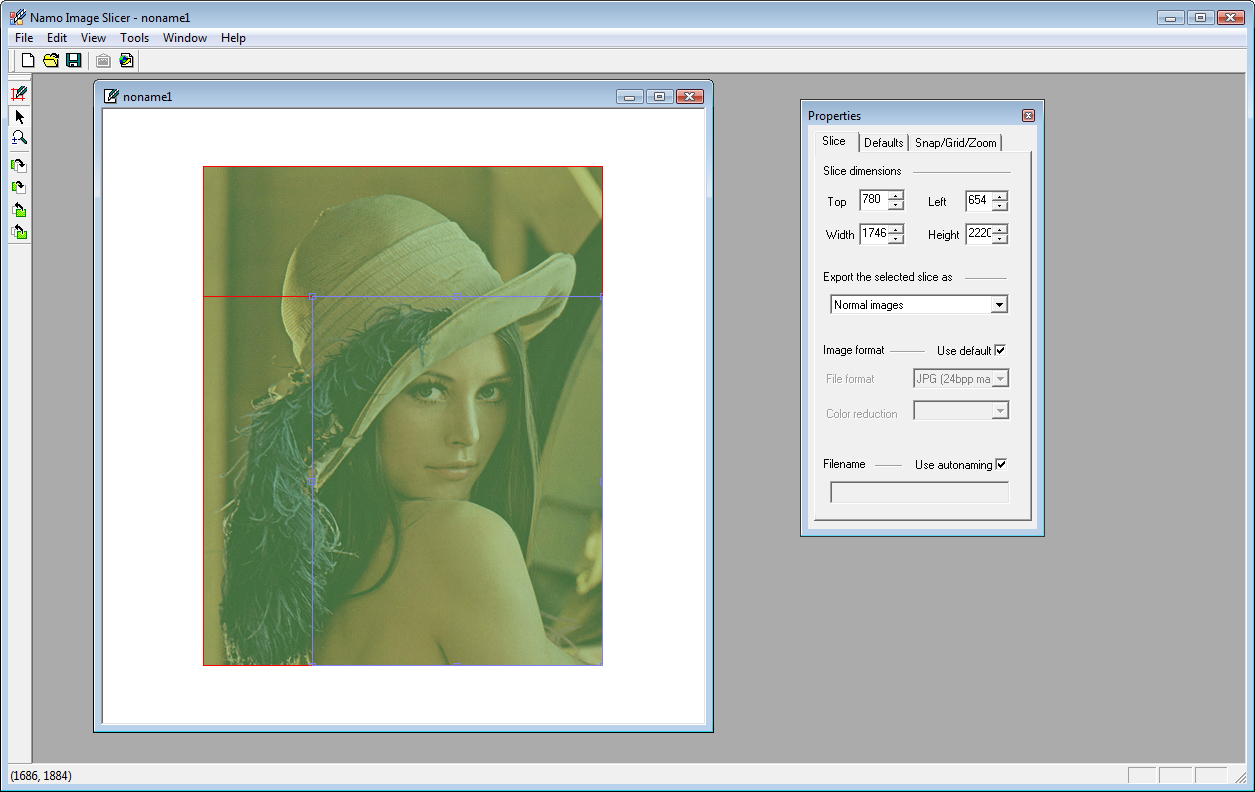
Unfortunately it doesn't work because the software (Namo), asks for a new file then IMPORT an image for editing to HTML format.

So in a nutshell you are better off just using GIMP to create the web page. Then open Namo, create a new file and import the GIMP image for web editing.
Image

_________________
Image


Top
 Post subject: Re: slicing and dicing
PostPosted: Fri Aug 16, 2013 8:35 pm  (#7) 
Offline
GimpChat Member

Joined: Nov 09, 2012
Posts: 134
well dang. thanks for doing that expierment for me. to bad it does not work, but i bet soon or one day there will be a plugin or a way to do it

thanks a ton guys

time to experiement now


Top
 Post subject: Re: slicing and dicing
PostPosted: Fri Aug 16, 2013 8:37 pm  (#8) 
Offline
Global Moderator
User avatar

Joined: May 16, 2010
Posts: 16150
LT72884 wrote:
well dang. thanks for doing that expierment for me. to bad it does not work, but i bet soon or one day there will be a plugin or a way to do it

thanks a ton guys

time to experiement now


Oh i am still working on it. :lol :bigthup

_________________
Image


Top
Post new topic Reply to topic  [ 8 posts ] 

All times are UTC - 5 hours [ DST ]


* Login  


Powered by phpBB3 © phpBB Group

