It is currently Thu Aug 06, 2026 4:17 pm


All times are UTC - 5 hours [ DST ]


Post new topic Reply to topic  [ 24 posts ]  Go to page Previous  1, 2
Author Message
 Post subject: Re: How to restore the photo with more black color
PostPosted: Mon Oct 02, 2023 1:40 am  (#21) 
Offline
GimpChat Member

Joined: Sep 29, 2023
Posts: 40
Hi all,

Lot of thanks for your advice and your assistance.

Sorry I'm confused here because of many valuable suggestions. I consider going back to my original step scanning film negatives. I have done it at the beginning, having full knowlege converting film negatives to digital images on computer

Camera - Samsung Gallaxy S22 Ultra mobile phone
Light box - Samaung 10" notepad
PC - AMD 8-core CPU with 32G RAM onboard
OS - Ubuntu 22.04 desktop
Fixture - built on broken furniture

The camera can be either connected to PC via USB cable or via WiFI. PC takes full control on shooting. Scanned image can be stored either on mobile phone or directly on PC. Film negatives are mounted on platic film frame removed from my Epson scanner.

This setup worked for me seamlessly in the past. The only drawback is no labelling on film folders and some of images scanned I have to guess where thery were captured.

But the advantage is less aftermath editing work. First I will check the condition of all my film negatives. They are well packed in boxes and stored on shelves. I have exceeding a thousand film negatives.

Should finally I decide going the film negative route I'll build a new PC with AMD 16-core CPU and 64G RAM on board. My PC is connected to a 32" 4K Dell display.

Regards


Top
 Post subject: Re: How to restore the photo with more black color
PostPosted: Mon Oct 02, 2023 12:15 pm  (#22) 
Offline
GimpChat Member
User avatar

Joined: May 24, 2021
Posts: 859
Location: SEA - South East Asia
Another simple way is to go to the top menu Colors > Auto > White Balance,
then go to Colors > Hue-Saturation..., on that window > lower the saturation slider as needed

Image

then play with the contrast Colors > Brightness-Contrast... if you want more dark/contrasted image.

_________________
Patrice


Top
 Post subject: Re: How to restore the photo with more black color
PostPosted: Tue Oct 03, 2023 9:26 am  (#23) 
Offline
GimpChat Member

Joined: Sep 29, 2023
Posts: 40
PixLab wrote:
Another simple way is to go to the top menu Colors > Auto > White Balance,
then go to Colors > Hue-Saturation..., on that window > lower the saturation slider as needed

[ Image ]

then play with the contrast Colors > Brightness-Contrast... if you want more dark/contrasted image.

Hi PixLab,

Thanks for your help.

Would it be possible making the bricks more clear ?

Regards


Top
 Post subject: Re: How to restore the photo with more black color
PostPosted: Tue Oct 03, 2023 12:38 pm  (#24) 
Offline
GimpChat Member
User avatar

Joined: May 24, 2021
Posts: 859
Location: SEA - South East Asia
satimis wrote:
Hi PixLab,

Thanks for your help.

Would it be possible making the bricks more clear ?

Regards


Yes, for example once you did the Hue-saturation select the wall (here I just used the rectangle select tool), then redo a Hue-saturation, but this time select the blue color and increase lightness

Attachment:
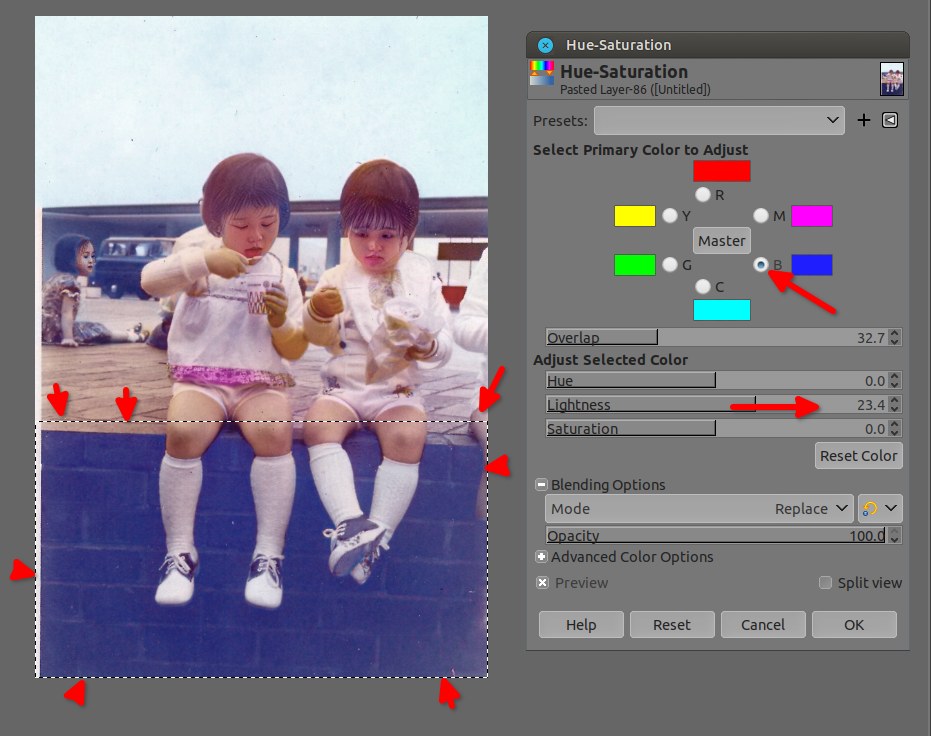
screenshot_20231004-013349.jpg
screenshot_20231004-013349.jpg [ 111.43 KiB | Viewed 3374 times ]


But there is plenty methods, like using the curves (Colors > Curves) or the Levels (Color > Levels), or even something stupid like "Rotate Colors" (Colors > Map > Rotate Colors...) to get a lighter blue/cyan, you just need to select carefully the wall to not change the color of the shoes like I did in the example below ;)

Attachment:
screenshot_20231004-014313.jpg
screenshot_20231004-014313.jpg [ 124.66 KiB | Viewed 3374 times ]

_________________
Patrice


Top
Post new topic Reply to topic  [ 24 posts ]  Go to page Previous  1, 2

All times are UTC - 5 hours [ DST ]


* Login  


Powered by phpBB3 © phpBB Group