It is currently Wed Sep 23, 2026 11:45 am


All times are UTC - 5 hours [ DST ]


Post new topic Reply to topic  [ 22 posts ]  Go to page 1, 2  Next
Author Message
 Post subject: Photo enhancement request
PostPosted: Wed Sep 23, 2015 4:49 am  (#1) 
Offline
GimpChat Member
User avatar

Joined: Mar 18, 2011
Posts: 283
Location: Lusaka, Zambia
Hi,

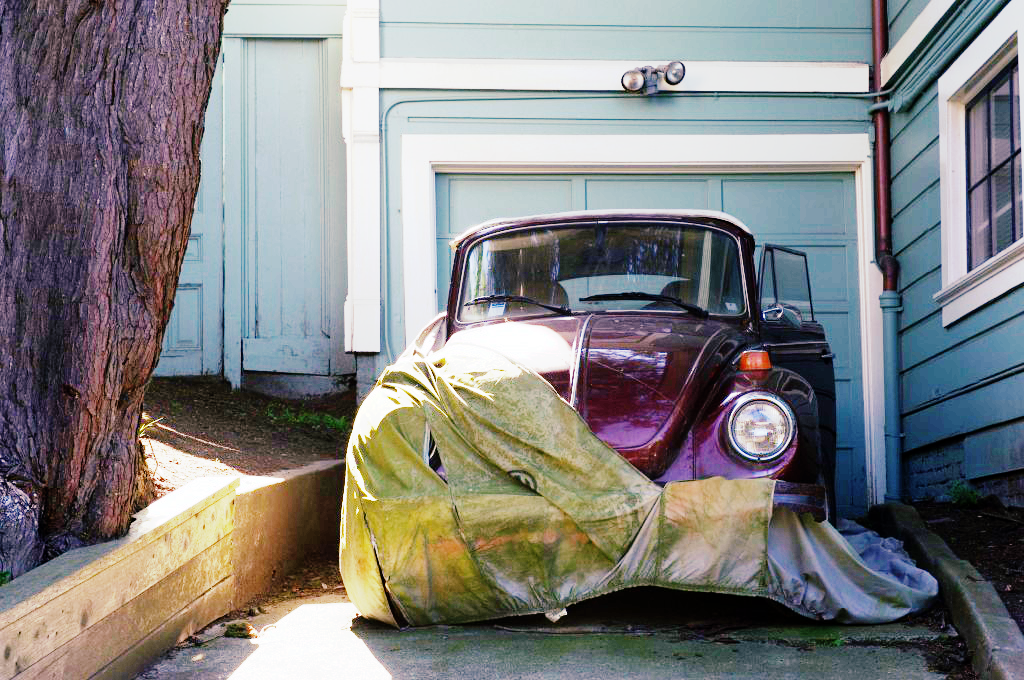
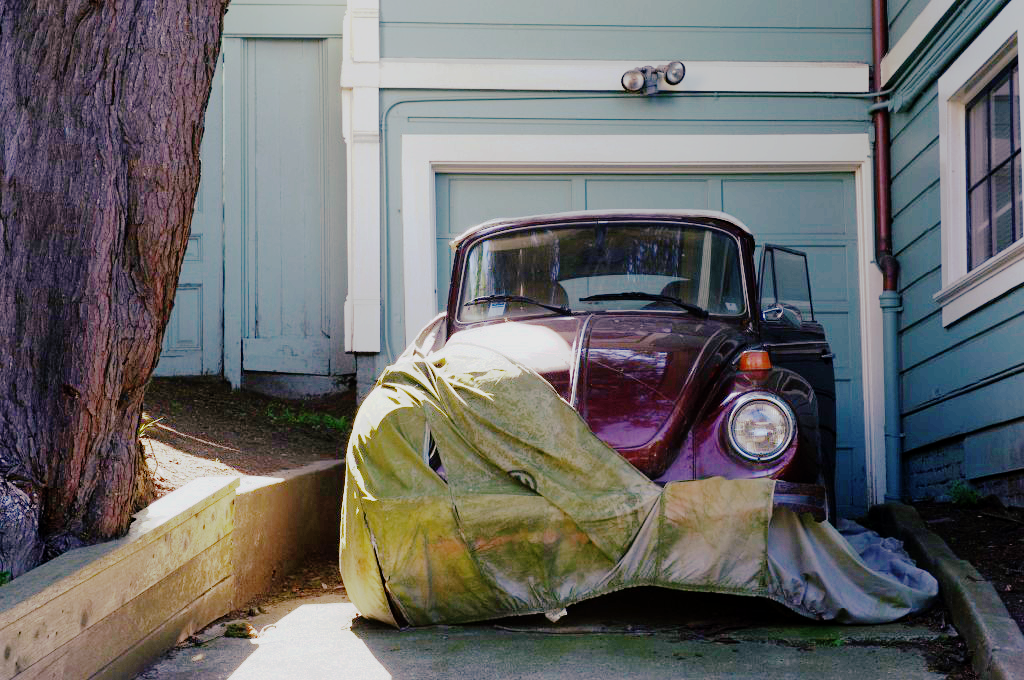
Let's light up a photograph using Gimp only from the first photograph to the second one below.

Happy Gimping.


Attachments:
File comment: From this
beetle_01-1024x680.jpg
beetle_01-1024x680.jpg [ 121.5 KiB | Viewed 5554 times ]

File comment: To this
beetle_02-1024x680.jpg
beetle_02-1024x680.jpg [ 209.08 KiB | Viewed 5554 times ]
Share on Facebook Share on Twitter Share on Orkut Share on Digg Share on MySpace Share on Delicious Share on Technorati
Top
 Post subject: Re: Photo enhancement request
PostPosted: Wed Sep 23, 2015 5:58 am  (#2) 
Offline
GimpChat Member
User avatar

Joined: Nov 15, 2014
Posts: 875
A couple of attempts from me, using the saulgoode luminosity masks to limit the effects to certain brightness regions.

david.


Attachments:
beetle_04-1024x680.jpg
beetle_04-1024x680.jpg [ 153.03 KiB | Viewed 5517 times ]
beetle_03-1024x680.jpg
beetle_03-1024x680.jpg [ 151.47 KiB | Viewed 5517 times ]
Top
 Post subject: Re: Photo enhancement request
PostPosted: Wed Sep 23, 2015 6:19 am  (#3) 
Offline
Global Moderator
User avatar

Joined: Apr 01, 2012
Posts: 8471
Location: On the other side of your screen
1 attempt from me just using the equalize filter. Pity it doesn't have settings to change
Image

_________________
Image
Free Fun Photo Editing & resources
Poems from the Lord
Gimp Newby
Gimp version 3.2.4 and GMIC-Qt 4.0.2 OS :- Windows 10 Home 64


Top
 Post subject: Re: Photo enhancement request
PostPosted: Wed Sep 23, 2015 6:23 am  (#4) 
Offline
Administrator
User avatar

Joined: Aug 10, 2012
Posts: 14207
Location: Native to NYC living in Arizona, Gimp 2.8 - 3.0, Win 11 PC.
Here's my try...
Attachment:
beetle_wallace-1024x680.jpg
beetle_wallace-1024x680.jpg [ 121.5 KiB | Viewed 5502 times ]

Attachment:
bug-1024x680.png
bug-1024x680.png [ 1.23 MiB | Viewed 5502 times ]

_________________
Image
"A wise man learns more from a foolish question than a fool can learn from a wise answer"
Image


Top
 Post subject: Re: Photo enhancement request
PostPosted: Wed Sep 23, 2015 6:25 am  (#5) 
Offline
GimpChat Member
User avatar

Joined: Mar 18, 2011
Posts: 283
Location: Lusaka, Zambia
Thanx for your feedback.

Here is my result also. I only used the Adjust Color Levels:

The original work from https://home.regit.org/2012/04/doing-mi ... -and-gimp/

Cheers.


Attachments:
img1.jpg
img1.jpg [ 156.71 KiB | Viewed 5502 times ]
Top
 Post subject: Re: Photo enhancement request
PostPosted: Wed Sep 23, 2015 6:29 am  (#6) 
Offline
GimpChat Member
User avatar

Joined: Jan 20, 2013
Posts: 14835
Location: roma, italy
only using LumaInvert
(deleted, duplicated insert..., see below)

_________________
"Where am I ?"


Last edited by dinasset on Wed Sep 23, 2015 7:09 am, edited 1 time in total.

Top
 Post subject: Re: Photo enhancement request
PostPosted: Wed Sep 23, 2015 6:29 am  (#7) 
Offline
Global Moderator
User avatar

Joined: Apr 01, 2012
Posts: 8471
Location: On the other side of your screen
I also tried equalize shadow in G'MIC. The other is gimp's auto under colour.
Image

_________________
Image
Free Fun Photo Editing & resources
Poems from the Lord
Gimp Newby
Gimp version 3.2.4 and GMIC-Qt 4.0.2 OS :- Windows 10 Home 64


Top
 Post subject: Re: Photo enhancement request
PostPosted: Wed Sep 23, 2015 6:30 am  (#8) 
Offline
GimpChat Member
User avatar

Joined: Jan 20, 2013
Posts: 14835
Location: roma, italy
only using LumaInvert
Attachment:
beetle_01-1024x680_GIMPlumainvert.jpg
beetle_01-1024x680_GIMPlumainvert.jpg [ 150.08 KiB | Viewed 5500 times ]

_________________
"Where am I ?"


Top
 Post subject: Re: Photo enhancement request
PostPosted: Wed Sep 23, 2015 6:55 am  (#9) 
Offline
Global Moderator
User avatar

Joined: Apr 01, 2012
Posts: 8471
Location: On the other side of your screen
In this one I added curves after equalize to bring the highlights on the white especially down
Image

_________________
Image
Free Fun Photo Editing & resources
Poems from the Lord
Gimp Newby
Gimp version 3.2.4 and GMIC-Qt 4.0.2 OS :- Windows 10 Home 64


Top
 Post subject: Re: Photo enhancement request
PostPosted: Wed Sep 23, 2015 7:16 am  (#10) 
Offline
Script Coder
User avatar

Joined: Oct 25, 2010
Posts: 4812
Everybody failed to reproduce the weird halos in the model picture :)

_________________
Image


Top
 Post subject: Re: Photo enhancement request
PostPosted: Wed Sep 23, 2015 7:24 am  (#11) 
Offline
GimpChat Member
User avatar

Joined: Mar 18, 2011
Posts: 283
Location: Lusaka, Zambia
Thank you all for sharing your pressures time with me here.

:jumpclap :tyspin :gimp

Joseph


Top
 Post subject: Re: Photo enhancement request
PostPosted: Wed Sep 23, 2015 8:27 am  (#12) 
Offline
GimpChat Member
User avatar

Joined: Sep 24, 2010
Posts: 12845
So long as using G'MIC isn't cheating, I did it all in GIMP. Not a pretty result though. Thanks for the challenged play Joseph. :)


Attachments:
beetle_01-1024x680.jpg
beetle_01-1024x680.jpg [ 429.54 KiB | Viewed 3831 times ]

_________________
Lyle

Psalm 109:8

Image
Top
 Post subject: Re: Photo enhancement request
PostPosted: Wed Sep 23, 2015 10:44 am  (#13) 
Offline
GimpChat Member
User avatar

Joined: Nov 16, 2011
Posts: 5127
Location: Metro Vancouver, BC
Another go.
Image Image
Decompose to LAB, L - Unsharp Mask, A/B - Curves, Recompose
G'MIC - Contrast swiss mask, output New Layer, Screen

Image
w/ G'MIC - Blur [glow] Lab [lightness]

_________________
Image
Gimp 2.8.18, Linux, median user
Gimp Chat Tutorials Index
Spirit Bear (Kermode)


Top
 Post subject: Re: Photo enhancement request
PostPosted: Wed Sep 23, 2015 1:02 pm  (#14) 
Offline
GimpChat Member
User avatar

Joined: Aug 16, 2012
Posts: 4271
Location: Göteborg, Sweden
very nice results, i think! i wasn't too fond of what ofnuts called "weird halos" in the model pictures, but it still seems like a fun challenge to try and reproduce them - if i have the time i'lll give this a try. it would be fun to just try and make look good according to my own tastes too, since it's not my style of picture at all.

_________________


Top
 Post subject: Re: Photo enhancement request
PostPosted: Thu Sep 24, 2015 3:56 am  (#15) 
Offline
GimpChat Member
User avatar

Joined: Mar 18, 2011
Posts: 283
Location: Lusaka, Zambia
Hi,

Fantastic finishing there Odinbc !

Happy Gimping.

:gimp

Joseph


Top
 Post subject: Re: Photo enhancement request
PostPosted: Thu Sep 24, 2015 5:04 am  (#16) 
Offline
GimpChat Member
User avatar

Joined: Sep 24, 2010
Posts: 12845
Odin; that's a fantastic result. :)

_________________
Lyle

Psalm 109:8

Image


Top
 Post subject: Re: Photo enhancement request
PostPosted: Thu Sep 24, 2015 4:47 pm  (#17) 
Offline
GimpChat Member
User avatar

Joined: Sep 24, 2010
Posts: 12845
Definitely, curves is the way to go. Decided to also do some cloning/healing work as well to get rid of the bright area. :)


Attachments:
anothertry.jpg
anothertry.jpg [ 340.04 KiB | Viewed 3756 times ]

_________________
Lyle

Psalm 109:8

Image
Top
 Post subject: Re: Photo enhancement request
PostPosted: Thu Sep 24, 2015 5:07 pm  (#18) 
Offline
GimpChat Member
User avatar

Joined: Nov 16, 2011
Posts: 5127
Location: Metro Vancouver, BC
Looks good Lyle.

_________________
Image
Gimp 2.8.18, Linux, median user
Gimp Chat Tutorials Index
Spirit Bear (Kermode)


Top
 Post subject: Re: Photo enhancement request
PostPosted: Thu Sep 24, 2015 10:01 pm  (#19) 
Offline
GimpChat Member
User avatar

Joined: Jun 02, 2013
Posts: 2090
Curves, local contrast enhancement, sharpen, with the slightest bit of color tweaking.

Image

Image

_________________
Image


Top
 Post subject: Re: Photo enhancement request
PostPosted: Fri Sep 25, 2015 6:49 am  (#20) 
Offline
Global Moderator
User avatar

Joined: Apr 01, 2012
Posts: 8471
Location: On the other side of your screen
Brilliant Lyle. Don't miss the burnt out part of the hood at all.

_________________
Image
Free Fun Photo Editing & resources
Poems from the Lord
Gimp Newby
Gimp version 3.2.4 and GMIC-Qt 4.0.2 OS :- Windows 10 Home 64


Top
Post new topic Reply to topic  [ 22 posts ]  Go to page 1, 2  Next

All times are UTC - 5 hours [ DST ]


* Login  


Powered by phpBB3 © phpBB Group