It is currently Wed Oct 07, 2026 9:56 am


All times are UTC - 5 hours [ DST ]


Post new topic Reply to topic  [ 1444 posts ]  Go to page Previous  1 ... 33, 34, 35, 36, 37, 38, 39 ... 73  Next
Author Message
 Post subject: Re: For lovers of photography
PostPosted: Tue Jul 05, 2016 7:05 am  (#701) 
Offline
GimpChat Member
User avatar

Joined: Nov 15, 2014
Posts: 876
I'm early with my homework today!

The city view: I tidied up the foreground - removed the sign, the floodlights, the crane and the person on the left. (We can't have people spoiling photographs!)
Then I created a layer mask so that I could subdue the foreground. M Luminosity Mask for the remainder, with an "S" curve. Intensified colours and wavelet sharpening.

The church, with the gold against the white marble, is glorious!
I couldn't decide whether or not it was better with perspective correction - when corrected we lose so much of the picture, but as an architectural subject really needs correct perspective. I have done it both ways and others can comment as to which they prefer.

In both cases, DDD Luminosity Mask to brighten a few small dark areas, L Luminosity Mask with a peculiar curve to try to bring out the detail of the marble and also the glow of the gold. Followed by quite a lot of wavelet sharpening.

david.


Attachments:
city_view.JPG
city_view.JPG [ 574.38 KiB | Viewed 1342 times ]
church.jpg
church.jpg [ 1.36 MiB | Viewed 1342 times ]
church1.JPG
church1.JPG [ 883.05 KiB | Viewed 1342 times ]
Top
 Post subject: Re: For lovers of photography
PostPosted: Tue Jul 05, 2016 7:35 am  (#702) 
Offline
GimpChat Member
User avatar

Joined: Jan 20, 2013
Posts: 14835
Location: roma, italy
iarga wrote:
Dinasset, I like your first merry-go-round. The nice thing here is to spot the differences. Did you only use the unsharp mask for details? Which unsharp mask did you use? from GIMP or G'MIC? Your edges are much cleaner. Did you use also a kind of noise reduction here, with this picture? So I want to learn something here:

left: dinasset, right: me.
[ Image ]


I used Gimp unsharp mask filter (as usually I do)

_________________
"Where am I ?"


Top
 Post subject: Re: For lovers of photography
PostPosted: Tue Jul 05, 2016 7:55 am  (#703) 
Offline
GimpChat Member
User avatar

Joined: Jan 20, 2013
Posts: 14835
Location: roma, italy
my try on the first image

- duplicate, gimp unsharp mask (twice), multiply mode
- new from visible, gaussian blur 10 but with a layer mask with a bilateral B&W gradient to avoid blur on central stripe, screen mode

Attachment:
IMG_4358-dn1.JPG
IMG_4358-dn1.JPG [ 516.81 KiB | Viewed 1339 times ]

_________________
"Where am I ?"


Top
 Post subject: Re: For lovers of photography
PostPosted: Tue Jul 05, 2016 8:05 am  (#704) 
Offline
GimpChat Member
User avatar

Joined: Jan 20, 2013
Posts: 14835
Location: roma, italy
..and on the second image

- duplicate, gimp unsharp mask 0.75, hardlight mode, opacity at 75%
- new layer, filled with a B&W gradient to emphasize the central area, multiply mode

Attachment:
IMG_4108-dn1.JPG
IMG_4108-dn1.JPG [ 462.51 KiB | Viewed 1337 times ]

_________________
"Where am I ?"


Top
 Post subject: Re: For lovers of photography
PostPosted: Tue Jul 05, 2016 11:28 am  (#705) 
Offline
GimpChat Member
User avatar

Joined: Mar 01, 2014
Posts: 14202
Location: Spain, Aragón
You boys are very quick on your homework apart from getting great results. :bigthup
I followed many steps from you, Dinasset, but not all ;)


Attachments:
IMG_4108-levelled-Dinasset steps-vignette.JPG
IMG_4108-levelled-Dinasset steps-vignette.JPG [ 630.76 KiB | Viewed 1330 times ]
IMG_4358-wavelet sharpening-mask + gradient bilinear - blurred layer - duplicate layer at overlay mode.JPG
IMG_4358-wavelet sharpening-mask + gradient bilinear - blurred layer - duplicate layer at overlay mode.JPG [ 542.47 KiB | Viewed 1330 times ]

_________________
Image

Gimp 2.10.36 (samj) portable _ OS Windows 10 Home_ 64bits
Don’t be afraid to start over. It’s a new chance to rebuild what you want.
Top
 Post subject: Re: For lovers of photography
PostPosted: Tue Jul 05, 2016 11:54 am  (#706) 
Offline
GimpChat Member
User avatar

Joined: Mar 28, 2016
Posts: 312
Location: Netherlands
Some alchemy with blue :puzzled :


Attachments:
IMG_4108_some_alchemy_with_blue.JPG
IMG_4108_some_alchemy_with_blue.JPG [ 989.46 KiB | Viewed 1325 times ]
Top
 Post subject: Re: For lovers of photography
PostPosted: Tue Jul 05, 2016 2:52 pm  (#707) 
Offline
GimpChat Member
User avatar

Joined: Mar 01, 2014
Posts: 14202
Location: Spain, Aragón
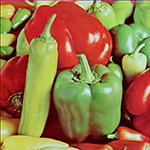
iarga, what a surprising result you did! How did you do that? I see that you removed the golden part of the decoration from the bottom part in a clear way. :) Is that a new filter in GMIC? Thank you iarga.
_________________
Image

Gimp 2.10.36 (samj) portable _ OS Windows 10 Home_ 64bits
Don’t be afraid to start over. It’s a new chance to rebuild what you want.


Top
 Post subject: Re: For lovers of photography
PostPosted: Tue Jul 05, 2016 3:14 pm  (#708) 
Offline
GimpChat Member
User avatar

Joined: Jun 30, 2016
Posts: 16
Uh oh.... I guess I should have looked at page 71 instead of editing a photo from page 1! :roll:

I liked the image of the park and wanted to play around with the gegl c2g script, blending modes, and the large radius unsharp mask trick I learned from David


Attachments:
DSC_0408.JPG
DSC_0408.JPG [ 3.95 MiB | Viewed 1315 times ]
Top
 Post subject: Re: For lovers of photography
PostPosted: Tue Jul 05, 2016 4:33 pm  (#709) 
Offline
GimpChat Member
User avatar

Joined: Mar 28, 2016
Posts: 312
Location: Netherlands
Issabella, my goal was to change the decoration on the bottom. I wanted to change the blue color into gold. It is not quite to my liking, because the dark parts still have some purple in it. But I spotted it after I had posted it here. :oops: If I was a little bit carefully, the purple was also like the darker parts of the gold. But alchemy is a fraud, so the blue didn't want to change in gold for real. :hehe

If you look at your original photo, you see differences in saturation of the ornaments already. The ornaments on the top are more saturated then the ornaments on the bottom.

I used G'MIC>Customize CLUT filter. Also a noise reduction filter, tone mapping filters and detail filters. With all editing, the differences already present, can now be seen more clearly, I think. Maybe the editing did unintentionally desaturate the lower ornaments. So I didn't deliberately remove the golden color of the decoration. ;)


Top
 Post subject: Re: For lovers of photography
PostPosted: Tue Jul 05, 2016 11:50 pm  (#710) 
Offline
Global Moderator
User avatar

Joined: Oct 02, 2014
Posts: 5062
Location: Sydney Australia
I'm still playing with the dragon, which reminded me of a place I was working at in Kuala Lumpur back in the 80s; so with some license from Issabella, here is my last offering before I go AWOL for a while ...

Image

_________________
Image

Respect should be offered freely but hard earned


Top
 Post subject: Re: For lovers of photography
PostPosted: Wed Jul 06, 2016 1:07 am  (#711) 
Offline
GimpChat Member
User avatar

Joined: Mar 01, 2014
Posts: 14202
Location: Spain, Aragón
AKMusician, you came with a nice clear result. I like it. Feel free to do any photography you like. This thread is for all of us to practise and learn. By the way, nice your new avatar. :bigthup
Iarga, thank you so much for your answer. You are very expert in photography and I like your results a lot. :tyspin
OMG, how pretty your dragons in your glassy outcome. I like fire in their mouths. :bigthup

_________________
Image

Gimp 2.10.36 (samj) portable _ OS Windows 10 Home_ 64bits
Don’t be afraid to start over. It’s a new chance to rebuild what you want.


Top
 Post subject: Re: For lovers of photography
PostPosted: Wed Jul 06, 2016 2:03 am  (#712) 
Offline
GimpChat Member
User avatar

Joined: Nov 15, 2014
Posts: 876
AKMusician,
I think you may have suggested a good idea. Perhaps all of us should go back to the early photographs. From what I have learned in the previous 71 pages I am sure I would do things very differently - and welcome to this thread.

OMG,
Great ideas as always. Don't be missing for too long! (Although I shall disappear for some time in a couple of weeks.)

david.


Top
 Post subject: Re: For lovers of photography
PostPosted: Wed Jul 06, 2016 4:35 am  (#713) 
Offline
Global Moderator
User avatar

Joined: Oct 02, 2014
Posts: 5062
Location: Sydney Australia
David - thank you for your kind words; but let me just have one more post before my plane leaves ( :roll: ) ... my first real attempt to 'improve' an image using some of what I have seen here plus some 'gut feel'. GMIC freaky details, B/W overlays of original, a mask to highlight and focus on the centre of the picture, similar for the art work on the balcony, some healing and cloning to get rid of the lights et al ...

Image

_________________
Image

Respect should be offered freely but hard earned


Top
 Post subject: Re: For lovers of photography
PostPosted: Wed Jul 06, 2016 6:55 am  (#714) 
Offline
GimpChat Member
User avatar

Joined: Jan 20, 2013
Posts: 14835
Location: roma, italy
one curiosity and thus one question for Issabella:
the Church was decorated fully in gold or not?
I see a lot of interpretations removing a large amount of gold, but IMO gold is the characteristics of those kind of decorations...

_________________
"Where am I ?"


Top
 Post subject: Re: For lovers of photography
PostPosted: Wed Jul 06, 2016 8:42 am  (#715) 
Offline
GimpChat Member
User avatar

Joined: Mar 28, 2016
Posts: 312
Location: Netherlands
Gold:
Image
;)

(And gold light wall behind painting :) )

edit: I add a gradient from gray to light blue (grain merge), to make the color of the top a bit colder.
edit 2: now with the values of my first one.


Top
 Post subject: Re: For lovers of photography
PostPosted: Wed Jul 06, 2016 11:11 am  (#716) 
Offline
GimpChat Member
User avatar

Joined: Jan 20, 2013
Posts: 14835
Location: roma, italy
very good IMO, iarga

_________________
"Where am I ?"


Top
 Post subject: Re: For lovers of photography
PostPosted: Wed Jul 06, 2016 2:28 pm  (#717) 
Offline
GimpChat Member
User avatar

Joined: Mar 01, 2014
Posts: 14202
Location: Spain, Aragón
Sorry for my delay in answering, Dinasset. This beautiful church "Madre Deus" Lisbon is with gold decoration completely.
OMG, thanks for your contribution.
iarga, your second outcome is really beautiful.
David, do you prefer to revisit our posted photos to do new tries? :)

_________________
Image

Gimp 2.10.36 (samj) portable _ OS Windows 10 Home_ 64bits
Don’t be afraid to start over. It’s a new chance to rebuild what you want.


Top
 Post subject: Re: For lovers of photography
PostPosted: Wed Jul 06, 2016 5:13 pm  (#718) 
Offline
GimpChat Member
User avatar

Joined: Mar 12, 2016
Posts: 198
Location: Illinois, USA
It sure is a beautiful church !
I tried this method by Akros post #19 from this thread >
gimpchat.com Make your images POP
1-Open your image
2-Duplicate it (name it Blur)
3-On the duplicate select: filters>blur>gaussian blur
"add enough blur to where you start losing the lines, but can still see the general shapes of the image."
4-Once you have the blur, set the layer mode to Grain Extract.
5-Do Layer - New from visible

Now you have 3 layers. (Original, Blur, Visible).

6-In top layer (Visible) set mode to Grain merge.
7-In layer "Blur" change mode to Overlay, e brinque com a opacidade se desejar.
8-Then merge the layers and save as a .png file


Attachments:
IMG_4108.JPG
IMG_4108.JPG [ 635.07 KiB | Viewed 1324 times ]

_________________
Image
Top
 Post subject: Re: For lovers of photography
PostPosted: Thu Jul 07, 2016 12:29 am  (#719) 
Offline
GimpChat Member
User avatar

Joined: Jan 20, 2013
Posts: 14835
Location: roma, italy
nice result, Tom

_________________
"Where am I ?"


Top
 Post subject: Re: For lovers of photography
PostPosted: Thu Jul 07, 2016 2:09 am  (#720) 
Offline
GimpChat Member
User avatar

Joined: Nov 15, 2014
Posts: 876
Issabella,
A few times I have tried new techniques I have learnt on previous photographs, just to see what difference it makes. I'm rather busy at the moment and in about two weeks I will go away on holiday. When I return I may go through this thread to see if any of the photographs need re-visiting!

Now I have been looking again at your beautiful church picture, and after dinasset's comment about the gold, I decided I must have another try.

I created a mask to reduce the brightness of the lights - I overdid it and now some of them have dark halos - next time.....
Mask DD to brighten the darkest areas and MM with a suitable curve to bring out the marble and the gold. So far similar to last time.

We have mixed colour sources in the photograph. The upper part is lit by artificial light - quite yellow. The lower part by daylight - bluish - making the gold look dull.
I created a new layer filled with pure yellow, FFFF00, in overlay mode. Added a gradient from top to bottom and then reduced the opacity until I achieved a reasonable match for the colours of the marble at the top and bottom.

I increased saturation and sharpened the image. I am not sure that this was the correct technique, but would welcome comments and criticism!

david.


Attachments:
church3.JPG
church3.JPG [ 818.32 KiB | Viewed 1308 times ]
Top
Post new topic Reply to topic  [ 1444 posts ]  Go to page Previous  1 ... 33, 34, 35, 36, 37, 38, 39 ... 73  Next

All times are UTC - 5 hours [ DST ]


* Login  


Powered by phpBB3 © phpBB Group