It is currently Sat Aug 15, 2026 2:12 am


All times are UTC - 5 hours [ DST ]


Post new topic Reply to topic  [ 6 posts ] 
Author Message
 Post subject: color enhancements
PostPosted: Thu Sep 25, 2014 10:54 pm  (#1) 
Offline
GimpChat Member
User avatar

Joined: Apr 08, 2010
Posts: 5420
Location: Northwest Ohio
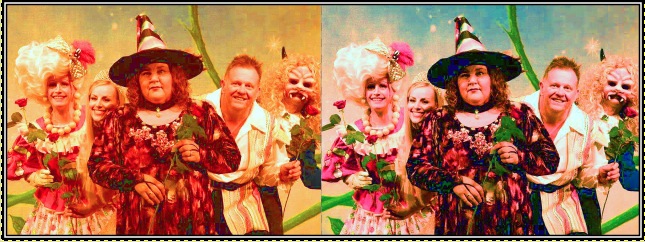
A friend took some photos with her new camera, and somehow got the settings wrong for color, so I tried out some filters to see if I could get better colors. Here is my results...I think G'MiC is absolutely amazing as all I did was use some of the filters under colors, and voilà, lifelike colors with very little knowledge or work. The original is on the left, the color enhanced on the right. Also, I was wondering what is everyone's favorite method of making colors "pop".
Image


Share on Facebook Share on Twitter Share on Orkut Share on Digg Share on MySpace Share on Delicious Share on Technorati
Top
 Post subject: Re: color enhancements
PostPosted: Fri Sep 26, 2014 2:00 am  (#2) 
Offline
Global Moderator
User avatar

Joined: Apr 01, 2012
Posts: 8457
Location: On the other side of your screen
Don't have any 1 actual method.
I usually use curves with hue/saturation - changing the saturation of each colour separately until I get what I want. Then contrast if needed.

_________________
Image
Free Fun Photo Editing & resources
Poems from the Lord
Gimp Newby
Gimp version 3.2.4 and GMIC-Qt 4.0.2 OS :- Windows 10 Home 64


Top
 Post subject: Re: color enhancements
PostPosted: Fri Sep 26, 2014 5:01 am  (#3) 
Offline
GimpChat Member
User avatar

Joined: Mar 01, 2014
Posts: 14128
Location: Spain, Aragón
2 Ton, I think you got a good improvement. Anyway, I tried this. Duplicated layer - desaturated - and Layer Mode. I tried to reduce the red tone.


Attachments:
147_Issa.jpg
147_Issa.jpg [ 95.67 KiB | Viewed 5828 times ]

_________________
Image

Gimp 2.10.30(samj) portable _ OS Windows 10 Home_ 64bits
Don’t be afraid to start over. It’s a new chance to rebuild what you want.
Top
 Post subject: Re: color enhancements
PostPosted: Fri Sep 26, 2014 9:13 pm  (#4) 
Offline
GimpChat Member
User avatar

Joined: Apr 08, 2010
Posts: 5420
Location: Northwest Ohio
very nice Isabella. I would now like to be able to make the colors more vibrant, but when I try, the skin gets too 'vibrant', also.


Top
 Post subject: Re: color enhancements
PostPosted: Sat Sep 27, 2014 1:09 am  (#5) 
Offline
GimpChat Member
User avatar

Joined: Nov 15, 2012
Posts: 949
Location: Mesa, AZ
I like to use layer masks and the airbrush tool to get areas included or excluded from certain layer effects. That with a little gaussian blur can make for some nice soft transitions that look natural. Like if you are trying to enhance red, but not the skin color of your subjects.

_________________
Image

I now have a Tumblr, check it out!


Top
 Post subject: Re: color enhancements
PostPosted: Sat Sep 27, 2014 3:16 am  (#6) 
Offline
GimpChat Member
User avatar

Joined: Mar 01, 2014
Posts: 14128
Location: Spain, Aragón
Trying to improve it, 2-Ton. Thank you for your advice ek22. Let me know if it's a little better.


Attachments:
147_Issa-mended.jpg
147_Issa-mended.jpg [ 106.11 KiB | Viewed 5697 times ]

_________________
Image

Gimp 2.10.30(samj) portable _ OS Windows 10 Home_ 64bits
Don’t be afraid to start over. It’s a new chance to rebuild what you want.
Top
Post new topic Reply to topic  [ 6 posts ] 

All times are UTC - 5 hours [ DST ]


cron

* Login  


Powered by phpBB3 © phpBB Group