It is currently Wed Aug 05, 2026 2:51 pm


All times are UTC - 5 hours [ DST ]


Post new topic Reply to topic  [ 4 posts ] 
Author Message
 Post subject: How can I resharpen a moved photo
PostPosted: Fri Aug 25, 2023 2:55 pm  (#1) 
Offline
New Member

Joined: Aug 25, 2023
Posts: 1
I have to read data from some very unfocused and moved images and I was hoping you guys could show me how to improve their quality.

I found an old gimp plugin, refocus-it, that seems like it could have helped, but it doesn't work now. I downloaded G'MIC and there are several things that look promising, but I am a bit overwhelmed with all the different options and I am not sure if what I am trying to do is even possible. Can you give me a hand?
This is a sample of the pictures I have to work with:
Attachment:
pump.png
pump.png [ 421.72 KiB | Viewed 4461 times ]


Share on Facebook Share on Twitter Share on Orkut Share on Digg Share on MySpace Share on Delicious Share on Technorati
Top
 Post subject: Re: How can I resharpen a moved photo
PostPosted: Fri Aug 25, 2023 10:57 pm  (#2) 
Offline
GimpChat Member
User avatar

Joined: May 24, 2021
Posts: 859
Location: SEA - South East Asia
When it's FUBAR, it's FUBAR, re-do the pictures!
The problem here is that it's not only blur radially but it looks like 2 pictures superimposed with blur in between, no script, no plugin, no "re-focus" will get it back.

But if it's only to try to read it, let's try something :mrgreen:

First of all measure the distance of that "blur" and the direction as well, pick the Measurement Tool and measure, note those numbers
Image

Duplicate the layer, put that duplicated layer in a group, re-duplicate that layer in a group and invert the color of the one on top (Colors > Invert) and put the one on top in "Vivid Light" mode, and put the Group in "Overlay" mode
You should come with something like this:
Image

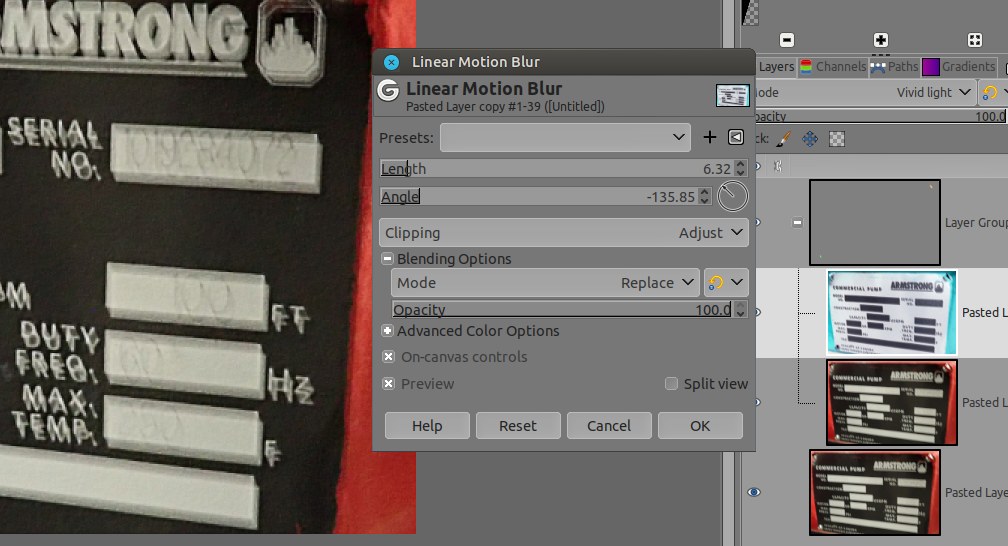
Now select the one which is color inverted and go to Filters > Blur > Linear Motion Blur... a window opens, the numbers you've noted are just a base, play with them in the filter... or the opposites of those angles
Image
Image

What you can also do is before to mount all those layers is to give more contrast or extend the blacks something like Filters > Distorts > Value Propagate...
Then duplicate -> and so on -> make the layers system with increased black
Image

In the end the best I can read is the right part (left is totally FUBAR)
Serial: 1019284078 ( last is 2or 8?)
USGPM: 100 FT
Duty Freq 60 Hz (strange that SI number in the middle of all imperials...)
Max Temp 250 F (or 350?)

Instead of the Linear motion blur you can try the Median Blur, or both (Filters > Blur > Median Blur)
Attachment:
screenshot_20230826-115400.jpg
screenshot_20230826-115400.jpg [ 121.89 KiB | Viewed 4439 times ]


Last but not least, don't be the only one to "guess" the numbers, ask people what they think the numbers are, as we are always influenced depending the side of the bed we did woke up :hehe

Also once knowing the serial number, a search on internet (on the brand website for example or sending them an email) can gives a better result for all remaining number... Just a thought.

_________________
Patrice


Top
 Post subject: Re: How can I resharpen a moved photo
PostPosted: Sat Aug 26, 2023 3:17 am  (#3) 
Offline
Script Coder
User avatar

Joined: Oct 25, 2010
Posts: 4812
PixLab wrote:
When it's FUBAR, it's FUBAR, re-do the pictures!
The problem here is that it's not only blur radially but it looks like 2 pictures superimposed with blur in between


The problem here is that it seems the pictures are taken on a running and therefore vibrating machine. So everything in the picture has a sinusoidal movement and the two "sharp" pictures are just the extremums of the sine.

_________________
Image


Top
 Post subject: Re: How can I resharpen a moved photo
PostPosted: Sat Aug 26, 2023 12:03 pm  (#4) 
Offline
GimpChat Member
User avatar

Joined: May 24, 2021
Posts: 859
Location: SEA - South East Asia
ofnuts wrote:
PixLab wrote:
When it's FUBAR, it's FUBAR, re-do the pictures!
The problem here is that it's not only blur radially but it looks like 2 pictures superimposed with blur in between


The problem here is that it seems the pictures are taken on a running and therefore vibrating machine. So everything in the picture has a sinusoidal movement and the two "sharp" pictures are just the extremums of the sine.


That makes a lot of sense and explain a lot! :bigthup Thanks Ofnuts.
Anyway the person who took that picture should be :2gun on sight :mrgreen:

_________________
Patrice


Top
Post new topic Reply to topic  [ 4 posts ] 

All times are UTC - 5 hours [ DST ]


* Login  


Powered by phpBB3 © phpBB Group