It is currently Sun Sep 27, 2026 6:32 am


All times are UTC - 5 hours [ DST ]


Post new topic Reply to topic  [ 14 posts ] 
Author Message
 Post subject: the jubilee picture
PostPosted: Tue Jul 30, 2013 2:44 pm  (#1) 
Offline
GimpChat Member
User avatar

Joined: Aug 16, 2012
Posts: 4271
Location: Göteborg, Sweden
i wasn't sure where this post fitted best, but i did enhance the photo a bit, so i guess it fits in best here.
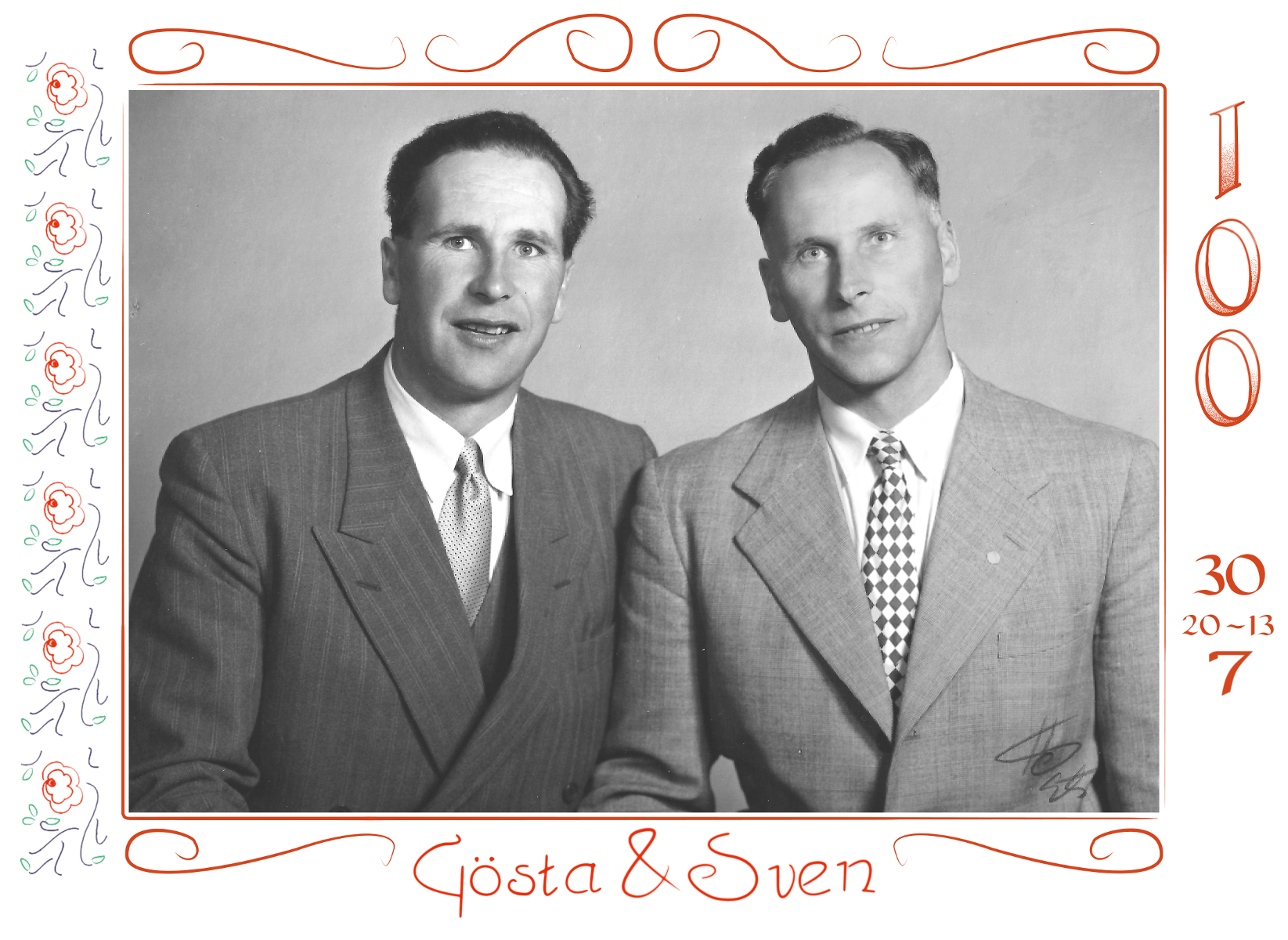
if my maternal grandfather and his twin brother had been alive they would have been one hundred years today. some of the family on my mum's side gathered at my parents' house today for a sort of "jubilee coffee" and my mum gave me a task: i got a scanned in copy of a photo from the year they both turned fifty and i was supposed to touch it up a little and then make some sort of border and write their names.
my grandfather did calligraphy and was great at making decorative brithday cards and posters. so i looked at the birthday card he made for my grandmother's 40th birthday and tried to replicate some details from it using the path and ink tools and a lot of patience. i used a font called carolingia for the digits, but i tweaked the paths a bit til it looked more like grandfather would have written them. the names were made "by hand" using the path tool and i got lots of praise for how accurately i had caught my grandfather's handwriting :). the flower border was made in two steps: first, i drew up an accurate replicate with the path tool of a flower from a border handdrawn by grandfather on the birthday card - it took three different paths to get leaves, stems and flower in separate colours - then i made a brush of the resulting image and painted out the border with one long stroke. the swirls and straight, fading border were also details used by grandfather on the birthday card, i replicated them the same way. long story - here is the picture :)!

original (slightly low on contrasts, a bit too much white reflexes):
Image

finished jubilee picture:
Image

_________________


Share on Facebook Share on Twitter Share on Orkut Share on Digg Share on MySpace Share on Delicious Share on Technorati
Top
 Post subject: Re: the jubilee picture
PostPosted: Tue Jul 30, 2013 3:05 pm  (#2) 
Offline
GimpChat Member
User avatar

Joined: Apr 08, 2010
Posts: 5420
Location: Northwest Ohio
Beautiful job! Your paths are very flowing, I always end up with kinks in my paths.


Top
 Post subject: Re: the jubilee picture
PostPosted: Tue Jul 30, 2013 7:47 pm  (#3) 
Offline
GimpChat Member
User avatar

Joined: Jan 10, 2013
Posts: 863
Nice job AnMal! When small details are more than enough.

_________________
bbbbbbbbbbbImage
bbbbbbbbbbb Be patient, English is not my language.


Top
 Post subject: Re: the jubilee picture
PostPosted: Wed Jul 31, 2013 5:33 am  (#4) 
Offline
GimpChat Member
User avatar

Joined: Aug 16, 2012
Posts: 4271
Location: Göteborg, Sweden
2-ton: thank you! i've practiced a lot with the paths tool, but i get those kinks too now and then. i had to be very careful how i moved the handles around when i made this because i was trying to replicate my grandfathers beautifully flowing strokes.
akros: thank you! yes, for this picture all that was asked of me was to make some minor enhancing of the photo and a simple border with the names and this came out well enough, looks a lot like one of the cards my grandfather used to make.

_________________


Top
 Post subject: Re: the jubilee picture
PostPosted: Wed Jul 31, 2013 9:56 am  (#5) 
Offline
Global Moderator
User avatar

Joined: Apr 01, 2012
Posts: 8472
Location: On the other side of your screen
Lovely job Anmal.

_________________
Image
Free Fun Photo Editing & resources
Poems from the Lord
Gimp Newby
Gimp version 3.2.4 and GMIC-Qt 4.0.2 OS :- Windows 10 Home 64


Top
 Post subject: Re: the jubilee picture
PostPosted: Wed Jul 31, 2013 10:59 am  (#6) 
Offline
GimpChat Member
User avatar

Joined: Jun 24, 2010
Posts: 504
Location: Western Vic Australia
Hi Anmal , lovely job of the calligraphy border. I noticed you stretched the blacks a bit. There is a bit of black stretch left if you look at the color picker tool (313131 your darkest), but I think that you did wise not to go any further with the darks. The photo looks very natural for a 60's black and white. Very Nice

_________________
Image


Top
 Post subject: Re: the jubilee picture
PostPosted: Wed Jul 31, 2013 12:35 pm  (#7) 
Offline
GimpChat Member
User avatar

Joined: Mar 23, 2012
Posts: 7388
Location: Göteborg at last!
You did a beautiful job on this AnMal. Nice work. :)


Top
 Post subject: Re: the jubilee picture
PostPosted: Wed Jul 31, 2013 12:57 pm  (#8) 
Offline
GimpChat Member
User avatar

Joined: Aug 28, 2012
Posts: 3060
Location: Idk where I am.
Nice job! I never use the path-tool, when I say I use pathing I mean I used the selection tool or one of the shapes and stroked it. xD

A very nice memorial. :>

_________________
Image
Reality is a lovely place...But I wouldn't wanna live there.


Top
 Post subject: Re: the jubilee picture
PostPosted: Wed Jul 31, 2013 1:38 pm  (#9) 
Offline
GimpChat Member

Joined: Dec 27, 2012
Posts: 393
Location: England
It looks good, but I did notice that some of the scrolls at the top are a bit jagged as they curve. I've always had the same problem with the path tool, that's it too easy not to get a smooth curve. One trick I found recently was to make the shape I want in Gimp then right click on the path in the path dialogue and there's an option to export the path. I send them to the desktop and then open using inkscape.
I'm still trying to get to grips with inkscape but the way the path tool works there appears to much more refined and accurate than it is in Gimp.
Off course you may already know this but I thought it worth a mention.

_________________
Image

DeviantArt gallery


Top
 Post subject: Re: the jubilee picture
PostPosted: Sun Aug 04, 2013 6:46 am  (#10) 
Offline
GimpChat Member
User avatar

Joined: Aug 16, 2012
Posts: 4271
Location: Göteborg, Sweden
wow! i thought this thread died after the first two replies. nice surprise to see it didn't :).

sallyanne: thank you!
wbool63: thanks for taking the time to comment - i know you're really good at these things. do you have any advice for me on how to get the real black without getting the whole picture too dark?
erisian: thank you :)! B.P.F.H.
mokonafan: thanks! i'd be really lost without the paths tool, i'm hopeless at drawing smooth lines with a mouse and only a little bit better when i use my touchpad, so i've learned to love the paths tool though it took me while :).
caz: thank you :)! i often switch between gimp and inkscape when i make knotwork paths and i really agree with you, the inkscape tool is a lot more refined. now that i've learned to use it i'm really happy with it. but i don't really recognise the problem with jagged edges and the gimp paths tool? i sometimes get kinks in my paths, but the jagged edges in this case come from a dramatic scaling down of the image - the original was a4 size at 600 ppi and there were no jagged edges in that one. the whole point with the border was to make it look like something my grandfather would have drawn, so jagged edges was out of the question because you don't get those with real pen and ink. what really bugs me is something else: i wanted the shading inside the 1 and the two 0s to look inked as well, but there just wasn't enough time. in retrospect i don't think i should have shaded them at all, but grandfather would have, so i cheated and used a gradient set to dissolve - which of course doesn't look handdrawn at all!

_________________


Top
 Post subject: Re: the jubilee picture
PostPosted: Sun Aug 04, 2013 8:20 am  (#11) 
Offline
GimpChat Member

Joined: Dec 27, 2012
Posts: 393
Location: England
AnMal wrote:
but i don't really recognise the problem with jagged edges and the gimp paths tool?


Sorry my mistake. What I meant was the kinks you refer to.

_________________
Image

DeviantArt gallery


Top
 Post subject: Re: the jubilee picture
PostPosted: Sun Aug 04, 2013 9:41 am  (#12) 
Offline
GimpChat Member
User avatar

Joined: Jun 24, 2010
Posts: 504
Location: Western Vic Australia
AnMal wrote:
wow! i thought this thread died after the first two replies. nice surprise to see it didn't :).

sallyanne: thank you!
wbool63: thanks for taking the time to comment - i know you're really good at these things. do you have any advice for me on how to get the real black without getting the whole picture too dark?
erisian: thank you :)! B.P.F.H.
mokonafan: thanks! i'd be really lost without the paths tool, i'm hopeless at drawing smooth lines with a mouse and only a little bit better when i use my touchpad, so i've learned to love the paths tool though it took me while :).
caz: thank you :)! i often switch between gimp and inkscape when i make knotwork paths and i really agree with you, the inkscape tool is a lot more refined. now that i've learned to use it i'm really happy with it. but i don't really recognise the problem with jagged edges and the gimp paths tool? i sometimes get kinks in my paths, but the jagged edges in this case come from a dramatic scaling down of the image - the original was a4 size at 600 ppi and there were no jagged edges in that one. the whole point with the border was to make it look like something my grandfather would have drawn, so jagged edges was out of the question because you don't get those with real pen and ink. what really bugs me is something else: i wanted the shading inside the 1 and the two 0s to look inked as well, but there just wasn't enough time. in retrospect i don't think i should have shaded them at all, but grandfather would have, so i cheated and used a gradient set to dissolve - which of course doesn't look handdrawn at all!


Thanks AnMal for your flattering comment. A simple way to extend the blacks without making the whole picture go much darker is to grayscale copy layermask and invert it. That way you can play with the darks on the image (white bordered, not the layermask). See my inset. I have overdone this just to show. I prefer a softer (not so dark) image to have a more natural feel. Note I used a simple contrast filter but using a curves filter you can refine the blacks much better. You can also work on the layermask to refine the darks and lights gradation. Hope this helps.
Cheers Wbool63
Image

_________________
Image


Top
 Post subject: Re: the jubilee picture
PostPosted: Sun Aug 04, 2013 2:34 pm  (#13) 
Offline
GimpChat Member
User avatar

Joined: Apr 07, 2010
Posts: 14182
Nice job wooble

_________________
Image


Top
 Post subject: Re: the jubilee picture
PostPosted: Sat Aug 10, 2013 6:54 am  (#14) 
Offline
GimpChat Member
User avatar

Joined: Aug 16, 2012
Posts: 4271
Location: Göteborg, Sweden
wbool63: oh, a greyscale copy layermask - why didn't i think of that at once?!! thanks, that's really helpful :).

caz: yeah, it is easy to get your paths kinked with the gimp paths tool. i like that auto smoothing thing that inkscape has.

_________________


Top
Post new topic Reply to topic  [ 14 posts ] 

All times are UTC - 5 hours [ DST ]


* Login  


Powered by phpBB3 © phpBB Group