It is currently Thu Oct 08, 2026 5:52 am


All times are UTC - 5 hours [ DST ]


Post new topic Reply to topic  [ 31 posts ]  Go to page Previous  1, 2
Author Message
 Post subject: Re: Tutorial: Paint with a Gradient
PostPosted: Mon Oct 20, 2014 3:21 pm  (#21) 
Offline
GimpChat Member
User avatar

Joined: Mar 10, 2014
Posts: 845
why not try...Thank O
Image


Top
 Post subject: Re: Tutorial: Paint with a Gradient
PostPosted: Mon Oct 20, 2014 5:44 pm  (#22) 
Offline
Retired Staff
User avatar

Joined: May 22, 2008
Posts: 6946
Location: Somewhere in GIMP
Very nice, Marcello. I love that background.

_________________
Image
World War IV will be fought with sticks and stones. - Albert Einstein


Top
 Post subject: Re: Tutorial: Paint with a Gradient
PostPosted: Mon Oct 20, 2014 11:06 pm  (#23) 
Offline
Script Coder
User avatar

Joined: Feb 18, 2011
Posts: 4826
Location: Bendigo Vic. Australia
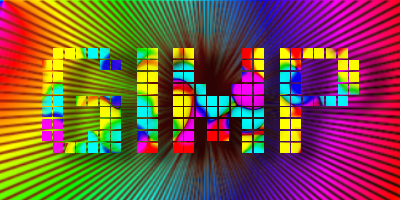
'O' I only wish I could set repeat via the PDF to do these images
Image

_________________
Image
No matter how much you push the envelope, it'll still be stationery.


Top
 Post subject: Re: Tutorial: Paint with a Gradient
PostPosted: Mon Oct 20, 2014 11:07 pm  (#24) 
Offline
Retired Staff
User avatar

Joined: May 22, 2008
Posts: 6946
Location: Somewhere in GIMP
:rofl Nice job, Graechan. I'm sorry that the pdf is not very accommodating.

_________________
Image
World War IV will be fought with sticks and stones. - Albert Einstein


Top
 Post subject: Re: Tutorial: Paint with a Gradient
PostPosted: Mon Oct 20, 2014 11:54 pm  (#25) 
Offline
GimpChat Member
User avatar

Joined: Jun 02, 2013
Posts: 2090
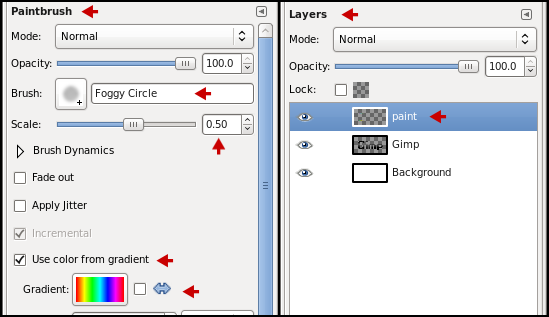
This might sound dumb, but I don't see the option on mine to "use color from gradient".

Image

Image

I'm sure I'm missing something here.

_________________
Image


Top
 Post subject: Re: Tutorial: Paint with a Gradient
PostPosted: Tue Oct 21, 2014 12:12 am  (#26) 
Offline
Script Coder
User avatar

Joined: Feb 18, 2011
Posts: 4826
Location: Bendigo Vic. Australia
The original tute was done with 2.6 in 2.8 it shifted to the dynamics tab
Image

_________________
Image
No matter how much you push the envelope, it'll still be stationery.


Top
 Post subject: Re: Tutorial: Paint with a Gradient
PostPosted: Tue Oct 21, 2014 12:18 am  (#27) 
Offline
GimpChat Member
User avatar

Joined: Jun 02, 2013
Posts: 2090
Graechan wrote:
The original tute was done with 2.6 in 2.8 it shifted to the dynamics tab
[ Image ]

Thanks Graechan, I was just watching a video about it: https://www.youtube.com/watch?v=6i3ds3DnF_E

_________________
Image


Top
 Post subject: Re: Tutorial: Paint with a Gradient
PostPosted: Sat Nov 08, 2014 6:01 pm  (#28) 
Offline
GimpChat Member
User avatar

Joined: Oct 29, 2014
Posts: 28
Location: Vancouver Island, BC Canada
Thanks for the tutorial and comments. I've just begun playing with gradients and I'm discovering how amazing they can be. Right now, I'm concentrating on the basics but I hope to progress well over the winter.

_________________
"I have learned that the ambition of those who follow selfish precepts is no more than chaotic waste, a finite gain that must be followed by infinite loss. For there is indeed a harmony in the universe, a concordant singing of common weal. To join that song, one must find inner harmony, must find the notes that ring true.

There is one other point to be made about that truth: Evil creatures cannot sing."

~ Drizzt Do Urden (Sojourn)


Top
 Post subject: Re: Tutorial: Paint with a Gradient
PostPosted: Sat Nov 08, 2014 11:34 pm  (#29) 
Offline
GimpChat Member
User avatar

Joined: Dec 08, 2013
Posts: 1088
A very rough dragon, made from a modified painted with gradient.d cobra head an


Attachments:
DragonRough2.jpg
DragonRough2.jpg [ 352.11 KiB | Viewed 2600 times ]

_________________
Image
Top
 Post subject: Re: Tutorial: Paint with a Gradient
PostPosted: Sun Nov 09, 2014 4:26 am  (#30) 
Offline
Global Moderator
User avatar

Joined: May 16, 2010
Posts: 16197
You can do some cool stuff with color from gradient. :)

Image


Top
 Post subject: Re: Tutorial: Paint with a Gradient
PostPosted: Sun Nov 09, 2014 6:17 pm  (#31) 
Offline
Global Moderator
User avatar

Joined: Oct 02, 2014
Posts: 5063
Location: Sydney Australia
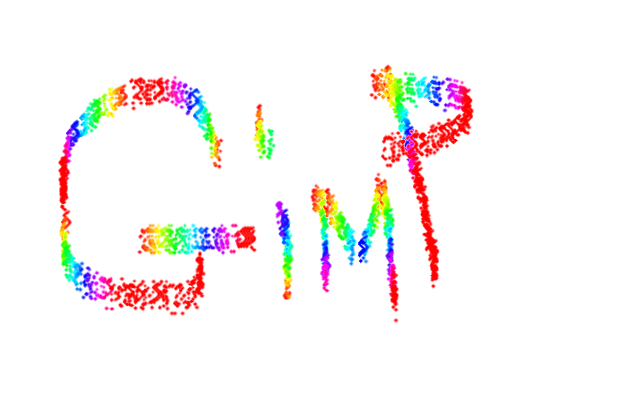
I thought I would give this tut a try, but very quickly fell foul of the difference between GIMP versions being the 2.6 the PDF represents and my system 2.8! No way could I get a brush size of 0.50; so I just kept increasing the size until I got some colour ... but by holding down the left mouse button as directed all I got was red! So eventually I learned that short strokes with the button held then release the button achieved all colours in the gradient.

Image

Gimp certainly keeps its neophytes on their toes especially re brush settings .. probably a very good thing!

_________________
Image

Respect should be offered freely but hard earned


Top
Post new topic Reply to topic  [ 31 posts ]  Go to page Previous  1, 2

All times are UTC - 5 hours [ DST ]


* Login  


Powered by phpBB3 © phpBB Group