It is currently Sun Oct 04, 2026 12:37 am


All times are UTC - 5 hours [ DST ]


Post new topic Reply to topic  [ 123 posts ]  Go to page Previous  1 ... 3, 4, 5, 6, 7  Next
Author Message
 Post subject: Re: "Interlacing Text" Tutorial
PostPosted: Mon Apr 07, 2014 12:21 pm  (#101) 
Offline
GimpChat Member
User avatar

Joined: Jun 02, 2013
Posts: 2090
Nice work Molly. You're welcome.

_________________
Image


Top
 Post subject: Re: "Interlacing Text" Tutorial
PostPosted: Mon Apr 07, 2014 12:21 pm  (#102) 
Offline
GimpChat Member
User avatar

Joined: Jun 02, 2013
Posts: 2090
Very cool Kellyman.

_________________
Image


Top
 Post subject: Re: "Interlacing Text" Tutorial
PostPosted: Sat Apr 19, 2014 12:51 am  (#103) 
Offline
GimpChat Member
User avatar

Joined: Jun 25, 2013
Posts: 142
Location: Wyoming, Michigan
Thanks
Image

_________________
Image
http://tonysteeleebw.deviantart.com/


Top
 Post subject: Re: "Interlacing Text" Tutorial
PostPosted: Sat Apr 19, 2014 4:04 am  (#104) 
Offline
GimpChat Member
User avatar

Joined: Apr 07, 2010
Posts: 14182
Very cool Kellyman and Tony.
Kellyman, I love the font you used for your gimp, suits that layout.
Tony I love the background you used on yours

_________________
Image


Top
 Post subject: Re: "Interlacing Text" Tutorial
PostPosted: Sat Apr 19, 2014 6:53 am  (#105) 
Offline
GimpChat Member
User avatar

Joined: Jun 02, 2013
Posts: 2090
Nice work Tony.

_________________
Image


Top
 Post subject: Re: "Interlacing Text" Tutorial
PostPosted: Sat Apr 19, 2014 11:54 am  (#106) 
Offline
GimpChat Member
User avatar

Joined: Dec 10, 2013
Posts: 1004
tony love everything you do and this is just another example of your work. :clap We all do our own creativity slants for a personal reason but I wondered how it would look with "Tony" in a color and "Steele" in a metal.


_________________
Image
Macbook Air - MacOS Sierra 10.12
McGimp 2.8.14
G'mic 1.6.5


Top
 Post subject: Re: "Interlacing Text" Tutorial
PostPosted: Sat Apr 19, 2014 5:24 pm  (#107) 
Offline
GimpChat Member
User avatar

Joined: Mar 10, 2014
Posts: 845
I add my thanks to THE WARRIOR for this great exercise

Image


Top
 Post subject: Re: "Interlacing Text" Tutorial
PostPosted: Sat Apr 19, 2014 6:09 pm  (#108) 
Offline
GimpChat Member
User avatar

Joined: Jun 02, 2013
Posts: 2090
Marcello wrote:
I add my thanks to THE WARRIOR for this great exercise

[ Image ]

Looks good, and you're welcome Marcello, glad to do it.

_________________
Image


Top
 Post subject: Re: "Interlacing Text" Tutorial
PostPosted: Sat May 14, 2016 1:27 pm  (#109) 
Offline
GimpChat Member
User avatar

Joined: Apr 09, 2016
Posts: 580
Location: Sheffield UK
Image

Does what it says on the can, dig your tuts Warrior, thanx - in Peace, RJKD

_________________
Image


Top
 Post subject: Re: "Interlacing Text" Tutorial
PostPosted: Sat May 14, 2016 1:46 pm  (#110) 
Offline
GimpChat Member
User avatar

Joined: Apr 07, 2010
Posts: 14182
Very cool RKGD

_________________
Image


Top
 Post subject: Re: "Interlacing Text" Tutorial
PostPosted: Sat May 14, 2016 11:25 pm  (#111) 
Offline
GimpChat Member

Joined: Dec 29, 2015
Posts: 223
Hi There,

This tutorial works fine even with urdu fonts.
Interlaced words have similar meaning.

Infact Urdu text is witten from Right to Left which is contrary to English.

Order of Urdu Words:
3rd Word should be first in Urdu text.
2nd should be 2nd in Urdu text.
Ist should be the 3rd in Urdu text.


Attachments:
Interlaced Text.png
Interlaced Text.png [ 641.64 KiB | Viewed 2461 times ]
Top
 Post subject: Re: "Interlacing Text" Tutorial
PostPosted: Mon May 16, 2016 12:21 pm  (#112) 
Offline
GimpChat Member
User avatar

Joined: Apr 09, 2016
Posts: 580
Location: Sheffield UK
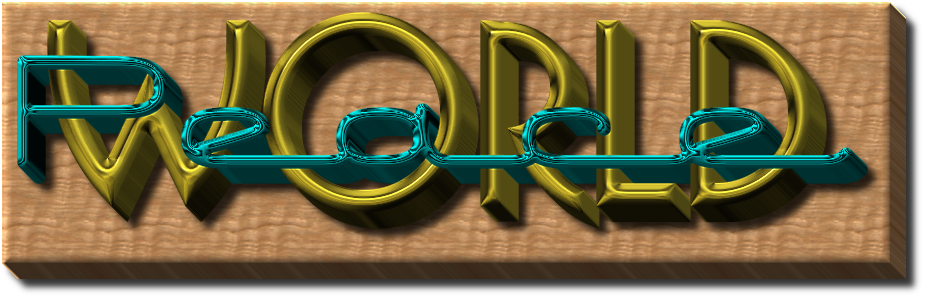
Simply can't figure out how to 3D the background layer, I'm using >filter>render>3D extrusion (tried every which way) on a patterned filled white layer, can anyone help please? - in Peace RJKD

_________________
Image


Top
 Post subject: Re: "Interlacing Text" Tutorial
PostPosted: Mon May 16, 2016 1:27 pm  (#113) 
Offline
Administrator
User avatar

Joined: Aug 10, 2012
Posts: 14227
Location: Native to NYC living in Arizona, Gimp 2.8 - 3.0, Win 11 PC.
RJKD wrote:
Simply can't figure out how to 3D the background layer,
I'm using >filter>render>3D extrusion (tried every which way) on a patterned filled white layer,
can anyone help please? - in Peace RJKD

What do you mean by "3D the background layer",
can you explain?

_________________
Image
"A wise man learns more from a foolish question than a fool can learn from a wise answer"
Image


Top
 Post subject: Re: "Interlacing Text" Tutorial
PostPosted: Mon May 16, 2016 2:10 pm  (#114) 
Offline
GimpChat Member
User avatar

Joined: Apr 09, 2016
Posts: 580
Location: Sheffield UK
layerImage
"EDIT: It looks like this if you 3D the Background layer, and add a drop shadow to it:"

I hope this helps you help me Wallace - in Peace RJKD

_________________
Image


Top
 Post subject: Re: "Interlacing Text" Tutorial
PostPosted: Mon May 16, 2016 2:47 pm  (#115) 
Offline
GimpChat Member
User avatar

Joined: Jun 02, 2013
Posts: 2090
RJKD wrote:
layer[ Image ]
"EDIT: It looks like this if you 3D the Background layer, and add a drop shadow to it:"

I hope this helps you help me Wallace - in Peace RJKD

3D it just like you did the world peace layer.

_________________
Image


Top
 Post subject: Re: "Interlacing Text" Tutorial
PostPosted: Mon May 16, 2016 3:45 pm  (#116) 
Offline
Administrator
User avatar

Joined: Aug 10, 2012
Posts: 14227
Location: Native to NYC living in Arizona, Gimp 2.8 - 3.0, Win 11 PC.
The Warrior wrote:
3D it just like you did the world peace layer.

Image

_________________
Image
"A wise man learns more from a foolish question than a fool can learn from a wise answer"
Image


Top
 Post subject: Re: "Interlacing Text" Tutorial
PostPosted: Mon May 16, 2016 4:26 pm  (#117) 
Offline
GimpChat Member
User avatar

Joined: Apr 09, 2016
Posts: 580
Location: Sheffield UK
I know I can be hard work, however I think my 3D extrusion may not be working? I followed Warriors tut -
16. With the "Visible" layer still selected, go to "Script-Fu>3Dtext>make>3d and select it. (works perfectly)
I can't 3D anything other than text, I may be using the 3D extrude wrong somehow but I've tried all ways I can think of, I get either a black or transparent layer added to the stack? - in Peace RJKD

_________________
Image


Top
 Post subject: Re: "Interlacing Text" Tutorial
PostPosted: Mon May 16, 2016 4:37 pm  (#118) 
Offline
Administrator
User avatar

Joined: Aug 10, 2012
Posts: 14227
Location: Native to NYC living in Arizona, Gimp 2.8 - 3.0, Win 11 PC.
RJKD wrote:
I know I can be hard work, however I think my 3D extrusion may not be working? I followed Warriors tut -
16. With the "Visible" layer still selected, go to "Script-Fu>3Dtext>make>3d and select it. (works perfectly)
I can't 3D anything other than text, I may be using the 3D extrude wrong somehow but I've tried all ways I can think of, I get either a black or transparent layer added to the stack? - in Peace RJKD

The 3d extrusion script that you want to use,
is under Filters>Render>3D extrusion,
if you have it installed.

_________________
Image
"A wise man learns more from a foolish question than a fool can learn from a wise answer"
Image


Top
 Post subject: Re: "Interlacing Text" Tutorial
PostPosted: Mon May 16, 2016 4:52 pm  (#119) 
Offline
GimpChat Member
User avatar

Joined: Jun 02, 2013
Posts: 2090
Go to "Image>Canvas Size", and make the canvas larger. That's the problem. There's not enough room to extrude.

_________________
Image


Top
 Post subject: Re: "Interlacing Text" Tutorial
PostPosted: Mon May 16, 2016 4:54 pm  (#120) 
Offline
GimpChat Member
User avatar

Joined: Mar 12, 2016
Posts: 198
Location: Illinois, USA
Nice tutorial !
I only had one question.
What is it that happens when click edit>clear, it get select none but I have seen this mentioned before. I just don't know what it does.


Attachments:
Fancy writing.jpg
Fancy writing.jpg [ 237.69 KiB | Viewed 2445 times ]

_________________
Image
Top
Post new topic Reply to topic  [ 123 posts ]  Go to page Previous  1 ... 3, 4, 5, 6, 7  Next

All times are UTC - 5 hours [ DST ]


* Login  


Powered by phpBB3 © phpBB Group