It is currently Wed Sep 23, 2026 12:14 pm


All times are UTC - 5 hours [ DST ]


Post new topic Reply to topic  [ 34 posts ]  Go to page Previous  1, 2
Author Message
 Post subject: Re: VIDEO - Layer Masks and Layer Modes
PostPosted: Tue Sep 06, 2011 6:48 pm  (#21) 
Offline
GimpChat Member
User avatar

Joined: Sep 06, 2011
Posts: 368
Location: US, Ohio
Oregonian wrote:
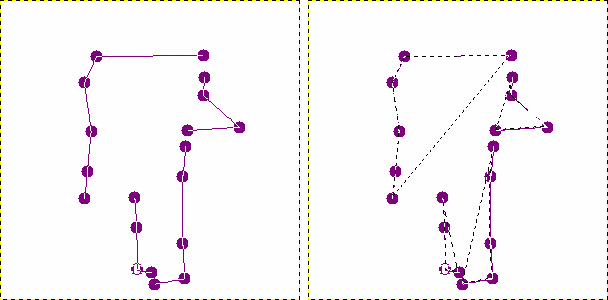
One thing I do take exception to is breaking the path with the Shift key. It starts a new path in the same path window rather than making a sharp corner. You may be able to get by with one break in the path, but not more than that.

This shows a path I broke in several places with the Shift key. Then, when the path is activated, there are separate areas that will fill with color, rather than one large area.

Image


I beg to differ, perhaps my phrasing was poor in how I said it. If drag out a path, hold in the shift key while dragging, and then release shift (while still holding in the mouse button) it will break the tangency of the curve at the point you clicked.


Top
 Post subject: Re: VIDEO - Layer Masks and Layer Modes
PostPosted: Tue Sep 06, 2011 7:11 pm  (#22) 
Offline
Retired Staff
User avatar

Joined: May 22, 2008
Posts: 6946
Location: Somewhere in GIMP
I must not be understanding what you are saying. If I hold in the shift key, drag the mouse, let out the shift key before releasing the mouse button, I get a hole in my path.

_________________
Image
World War IV will be fought with sticks and stones. - Albert Einstein


Top
 Post subject: Re: VIDEO - Layer Masks and Layer Modes
PostPosted: Tue Sep 06, 2011 7:20 pm  (#23) 
Offline
GimpChat Member
User avatar

Joined: Sep 06, 2011
Posts: 368
Location: US, Ohio
Oregonian wrote:
I must not be understanding what you are saying. If I hold in the shift key, drag the mouse, let out the shift key before releasing the mouse button, I get a hole in my path.


That's so strange. I went ahead and uploaded a quick video of exactly what I'm doing. I hope this helps.

www.youtube.com Video from : www.youtube.com


Top
 Post subject: Re: VIDEO - Layer Masks and Layer Modes
PostPosted: Tue Sep 06, 2011 7:39 pm  (#24) 
Offline
Retired Staff
User avatar

Joined: May 22, 2008
Posts: 6946
Location: Somewhere in GIMP
*sigh* This is making me crazy. Thank you for taking the time to try and explain/show the process. I think I'll go away and leave it alone for awhile, then come back to it. I get either curves or holes, but no sharp corner.

_________________
Image
World War IV will be fought with sticks and stones. - Albert Einstein


Top
 Post subject: Re: VIDEO - Layer Masks and Layer Modes
PostPosted: Wed Sep 07, 2011 1:36 am  (#25) 
Offline
GimpChat Member
User avatar

Joined: Oct 06, 2010
Posts: 4050
My experience with sharp corners using Paths requires just pressing the SHIFT key while dragging out handles, not holding down the SHIFT key. If I tap the SHIFT key while dragging the handles on a path, it goes from curved path to angled, but if I want angled to be reverted back to curved, I have to hold the SHIFT key while dragging the handles.

_________________
"In order to attain the impossible, one must attempt the absurd."
~ Miguel de Cervantes


Top
 Post subject: Re: VIDEO - Layer Masks and Layer Modes
PostPosted: Wed Sep 07, 2011 4:55 am  (#26) 
Offline
GimpChat Member

Joined: Mar 04, 2011
Posts: 2615
Looking at the 'path' bit of the video, it looks to be (originally) a path of straight lines. Why not use the path tool in polygonal mode, no problems with corners there. If you need to introduce a curve anywhere, turn off polygonal and go into edit mode.

Thankfully Gimp is wonderfully versatile and there are many ways to do most operations.


Top
 Post subject: Re: VIDEO - Layer Masks and Layer Modes
PostPosted: Wed Sep 07, 2011 6:44 am  (#27) 
Offline
GimpChat Member
User avatar

Joined: Sep 06, 2011
Posts: 368
Location: US, Ohio
mahvin wrote:
My experience with sharp corners using Paths requires just pressing the SHIFT key while dragging out handles, not holding down the SHIFT key. If I tap the SHIFT key while dragging the handles on a path, it goes from curved path to angled, but if I want angled to be reverted back to curved, I have to hold the SHIFT key while dragging the handles.


In my experience, pressing the shift key does work, but it only registers if the mouse is moving while the key is pressed. This is why I say to hold in the shift key, move the mouse, and release the shift key.


Top
 Post subject: Re: VIDEO - Layer Masks and Layer Modes
PostPosted: Wed Sep 07, 2011 6:45 am  (#28) 
Offline
GimpChat Member
User avatar

Joined: Sep 06, 2011
Posts: 368
Location: US, Ohio
rich2005 wrote:
Looking at the 'path' bit of the video, it looks to be (originally) a path of straight lines.


I don't think I understand what you're talking about here. None of the paths in either tutorial were ever straight lines.


Top
 Post subject: Re: VIDEO - Layer Masks and Layer Modes
PostPosted: Wed Sep 07, 2011 9:15 am  (#29) 
Offline
Script Coder
User avatar

Joined: Oct 25, 2010
Posts: 4812
tstandiford wrote:
rich2005 wrote:
Looking at the 'path' bit of the video, it looks to be (originally) a path of straight lines.


I don't think I understand what you're talking about here. None of the paths in either tutorial were ever straight lines.
Actually this method works, but it seems to require a bit of additional fiddling (looks like you have to "shake" the control point a bit...). Personally, I use another method, I click for straight lines, and then Ctrl-shift-drag the points where I want a tangent. Unnecessary handles are disposed of by shift-clicking them.

_________________
Image


Top
 Post subject: Re: VIDEO - Layer Masks and Layer Modes
PostPosted: Wed Sep 07, 2011 9:21 am  (#30) 
Offline
GimpChat Member
User avatar

Joined: Sep 06, 2011
Posts: 368
Location: US, Ohio
ofnuts wrote:
tstandiford wrote:
rich2005 wrote:
Looking at the 'path' bit of the video, it looks to be (originally) a path of straight lines.


I don't think I understand what you're talking about here. None of the paths in either tutorial were ever straight lines.
Actually this method works, but it seems to require a bit of additional fiddling (looks like you have to "shake" the control point a bit...). Personally, I use another method, I click for straight lines, and then Ctrl-shift-drag the points where I want a tangent. Unnecessary handles are disposed of by shift-clicking them.


What happens when you have an "m shape?" The point in the center of the m would require V-shaped tangency lines to get the best fit, right?


Top
 Post subject: Re: VIDEO - Layer Masks and Layer Modes
PostPosted: Wed Sep 07, 2011 12:49 pm  (#31) 
Offline
GimpChat Member

Joined: Mar 04, 2011
Posts: 2615
probably the first and last time I will do a letter 'm'

http://www.youtube.com/watch?v=ckxtzEkhzRs

all of 2 minutes, real time. Admitted not the most graceful way but works.


Top
 Post subject: Re: VIDEO - Layer Masks and Layer Modes
PostPosted: Wed Sep 07, 2011 12:55 pm  (#32) 
Offline
GimpChat Member
User avatar

Joined: Sep 06, 2011
Posts: 368
Location: US, Ohio
rich2005 wrote:
probably the first and last time I will do a letter 'm'

http://www.youtube.com/watch?v=ckxtzEkhzRs

all of 2 minutes, real time. Admitted not the most graceful way but works.


Light bulb. :mrgreen:

I now understand what you mean. Thank god for YouTube. You say Tomato I say Tomato (Hmm...that phrase really doesn't work when you type it.)


Top
 Post subject: Re: VIDEO - Layer Masks and Layer Modes
PostPosted: Tue Sep 13, 2011 7:42 pm  (#33) 
Offline
GimpChat Member

Joined: Sep 13, 2011
Posts: 77
Cool to see people sharing their knowledge. This method you show is definitely the best method in terms of maintenance.

_________________
Using Windows Vista 32 bits, 3GBRAM, Intel core 2 Quad Q6600 2.4Ghz, Radeon HD 3450 graphics card, Lambda Lexicon USB audio interface.


Top
 Post subject: Re: VIDEO - Layer Masks and Layer Modes
PostPosted: Tue Sep 13, 2011 8:27 pm  (#34) 
Offline
Global Moderator
User avatar

Joined: May 16, 2010
Posts: 16173
PhotoComix wrote:
@ tstandiford excellent tutorial.very clear

Rod i don't find the info on layer modes in gimp help overwelming, on the contrary are even a bit incomplete :
Maybe clear for who has a very mathematical mind but for other know the mode math formula doesn't help much to imagine the results
For that are needed visual examples...several not just one (as example i seldom saw a example of what i found a very interesting use of several modes as overlay ,multiply ,grain merge , that is merge over a duplicate )


Where exactly did i say that :lol

_________________
Image


Top
Post new topic Reply to topic  [ 34 posts ]  Go to page Previous  1, 2

All times are UTC - 5 hours [ DST ]


* Login  


Powered by phpBB3 © phpBB Group