It is currently Fri Aug 07, 2026 6:01 pm


All times are UTC - 5 hours [ DST ]


Post new topic Reply to topic  [ 23 posts ]  Go to page Previous  1, 2
Author Message
 Post subject: Re: Just one problem with animations..
PostPosted: Sun Jan 15, 2017 7:52 am  (#21) 
Offline
GimpChat Member

Joined: Mar 04, 2011
Posts: 2610
Looking more-and-more like a problem with something in Zero01 Windows installation. From previous post plenty of resources available, more than my linux laptop which has 8 GB mem with storage linux ext4 filesystem.

The attached is the layers listing (orig.txt - remember to unzip it) from the frx.xcf file . That shows as 2,148,562,803 bytes as downloaded.

The list starts at layer 115 and goes to layer 866 so there could be 0 to 114 missing in that file. Do not know, might have been removed elsewhere.

I have a feeling that the old run-length-encoding (RLE) compression is a problem with very large files, Supposedly this was made more robust recently. Might be better when Gimp 2.10 comes around, The dev 2.9.x uses zlib by default with rle as a legacy option.

The only sensible solution is use multiple smaller files, even if just as a backup.

Python plugins, either anitools.py or Ofnuts plugins, or anything.py. These go in your Gimp profile plugins folder
C:\Users\"yourname"\.gimp-2.8\plug-ins They can end up in various menu locations. Generally, use Help menu -> Plug-In Browser, put part of the name in the search, right side shows the menu location.


Attachments:
orig.txt.zip [2.82 KiB]
Downloaded 158 times
Top
 Post subject: Re: Just one problem with animations..
PostPosted: Sun Jan 15, 2017 11:00 am  (#22) 
Offline
GimpChat Member

Joined: Mar 04, 2011
Posts: 2610
Nothing to do with the truncated file problem but a bit of an experiment using your 751 layer frx.xcf file

It is possible to generate a video as described earlier, using some utility (anitools) to write the layers to individual files then generate a short (2 or 3 frame) video from each using ffmpeg. The problem is trying to get some frame timing using ffmpeg, you might want a 2 frame video but you are more likely to get 1 frame or 3 frames.

However as an example: https://dl.dropboxusercontent.com/u/10581986/final.avi 21 MB with some very strange effect in the middle for those small layers.

Attachment:
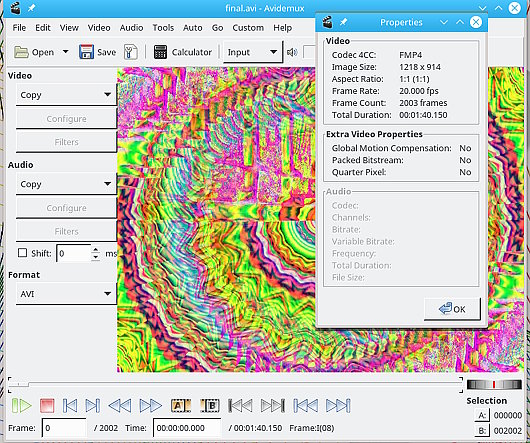
from-pngs.jpg
from-pngs.jpg [ 104.92 KiB | Viewed 2450 times ]

The 751 xcf layers becomes 2002 video frames @ 20 fps = 1min 40 sec duration, a little longer than an equivalent .gif run. You can easily change the duration by changing the frame rate, say 15 to make the video longer or 25 to make it shorter. The number of frames remains the same.

Just a comment on the image size. 1218 x 914 is not a standard video size. For avi, width and height should be multiples of 8. For YouTube, they will re-encode your work at the drop-of-a-hat if it varies from their requirements and wreck it. Stick with 1280 x 720, for audio - mp3 is ok.


Top
 Post subject: Re: Just one problem with animations..
PostPosted: Sun Jan 15, 2017 11:19 am  (#23) 
Offline
GimpChat Member
User avatar

Joined: Jan 06, 2017
Posts: 204
OK .. well I got the anitools to work didn't realise it was as simple as that (although I've dropped plenty of plug-ins in that folder before just none that were ostensibly text files - you live and learn..)

Ofnuts - sounds about right.

Well I'm going to look into re-installing GIMP and see what happens, I've always put extra scripts in the share/gimp/2.0/scripts folder, but I saw somewhere that they should go in the User/*name*/.gimp2.8 folder - so I may try that. (Edit: Just realised that scripts folder doesn't exist, maybe I should create it(?))

Well since this all started I have done as people have been saying and doing smaller pieces, saving them then creating new files (all in this case 1024x768) and eventually made them all individual avi's (using GAP) then stitching them all together (in this case with "Shotcut" video editor) and adding music, the final result of which can be seen here:
https://www.youtube.com/watch?v=qpIneXXqUgU

Sorry if you don't like the music, I'll be doing another soon with music by The Fall (early stuff) ... right I'm off for a cuppa.. cheers.


Top
Post new topic Reply to topic  [ 23 posts ]  Go to page Previous  1, 2

All times are UTC - 5 hours [ DST ]


* Login  


Powered by phpBB3 © phpBB Group