It is currently Fri Aug 07, 2026 9:41 am


All times are UTC - 5 hours [ DST ]


Post new topic Reply to topic  [ 2 posts ] 
Author Message
 Post subject: The Gimp Animation Player Is Not What It Seems
PostPosted: Tue Mar 13, 2018 6:49 pm  (#1) 
Offline
GimpChat Member
User avatar

Joined: Nov 04, 2015
Posts: 1461
Anyone who has done animation with Gimp knows how useful the animation player is.
I had noticed that animation player was filtering-out the backgrounds on transparent layers.
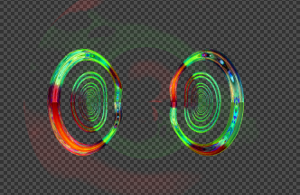
Image
This is how the layer appeared in Gimp 2.8.22
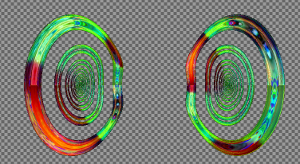
Image
How animation player showed the same layer.

Animation player reduces all pixels below 30% to transparent.
I wanted to use this effect on all layers but Animation player does not apply it to layers.
I asked a question about it on another Gimp forum and as a result rich2005 wrote a python plugin with a variable slider that works perfectly.
It's called 'clear_alpha.py' and it appears under the 'Layer' menu. The plugin extracts the foreground from transparent layers.
I've found that 26 or 27% works well.
Attachment:
clear_alpha.py.zip [420 Bytes]
Downloaded 472 times


Share on Facebook Share on Twitter Share on Orkut Share on Digg Share on MySpace Share on Delicious Share on Technorati
Top
 Post subject: Re: The Gimp Animation Player Is Not What It Seems
PostPosted: Tue Mar 13, 2018 9:46 pm  (#2) 
Offline
Administrator
User avatar

Joined: Aug 10, 2012
Posts: 14145
Location: Native to NYC living in Arizona, Gimp 2.8 - 3.0, Win 11 PC.
This will be great for people that do a lot of animation.
Thanks Tas_mania for posting the .py file.
Also a thank you goes out to rich2005 of the Gimp forum and of Gimp Chat for creating it.

_________________
Image
"A wise man learns more from a foolish question than a fool can learn from a wise answer"
Image


Top
Post new topic Reply to topic  [ 2 posts ] 

All times are UTC - 5 hours [ DST ]


* Login  


Powered by phpBB3 © phpBB Group

