It is currently Fri Aug 07, 2026 5:34 pm


All times are UTC - 5 hours [ DST ]


Post new topic Reply to topic  [ 14 posts ] 
Author Message
 Post subject: A Visit To An Animation Gallery
PostPosted: Tue Jul 25, 2017 8:16 pm  (#1) 
Offline
GimpChat Member
User avatar

Joined: Nov 04, 2015
Posts: 1461
Image


Description
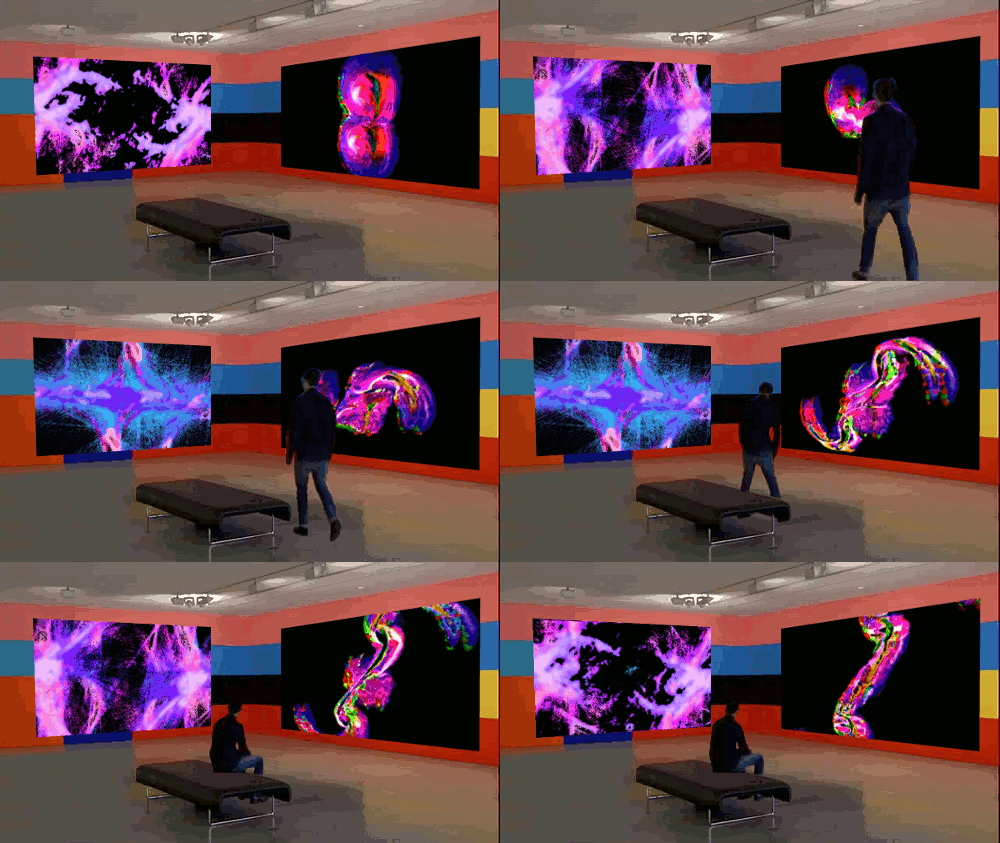
I merged 2 previously made animated GIFs onto the walls of an art gallery. The guy walking across the room was done one frame at a time using an undocumented component of Gimp-Gap (Layer>Transparency>Foreground Extract Via Selection). The animations on the walls were made with a range of Gimp plugins and scripts including Gmic-qt, gimp-gap and were aligned with the perspective tool. The 3 animations were merged with 'Wills Script Pack animation merge'. Merging is quite easy if you work from a base animation and add new ones with an alpha channel on every layer. Made entirely in Gimp.


Share on Facebook Share on Twitter Share on Orkut Share on Digg Share on MySpace Share on Delicious Share on Technorati
Top
 Post subject: Re: A Visit To An Animation Gallery
PostPosted: Tue Jul 25, 2017 8:59 pm  (#2) 
Offline
GimpChat Member

Joined: May 12, 2015
Posts: 4693
Wow! That sounds very involved. How long did it take to do all of that?


Top
 Post subject: Re: A Visit To An Animation Gallery
PostPosted: Wed Jul 26, 2017 5:23 am  (#3) 
Offline
GimpChat Member
User avatar

Joined: Dec 26, 2014
Posts: 205
A stunning creation :bigthup


Top
 Post subject: Re: A Visit To An Animation Gallery
PostPosted: Wed Jul 26, 2017 6:07 am  (#4) 
Offline
GimpChat Member
User avatar

Joined: Nov 04, 2015
Posts: 1461
Thanks Pat625 and Steve.
Steve, I was going to use your script if the animation merge script didn't work. I'm yet to learn the difference in the scripts. It appears Wills animation merge preserves the timing of individual animations. I think the LHS animation is going faster than the one on the RHS. That was unexpected.

Time taken. I try to use elements as components so don't know how long in total. I had a clear idea to start with that was also a comment on 'modern art'. Steve showed how animations could run in front or on top of each other. PhotoMaster showed us how to build an animation layer by layer. I get inspiration from racer-x and you guys. I feel my work has improved since I joined Gimp Chat. :gimp


Top
 Post subject: Re: A Visit To An Animation Gallery
PostPosted: Wed Jul 26, 2017 8:04 am  (#5) 
Offline
GimpChat Member

Joined: Oct 30, 2016
Posts: 145
Image


Top
 Post subject: Re: A Visit To An Animation Gallery
PostPosted: Wed Jul 26, 2017 11:14 am  (#6) 
Offline
GimpChat Member
User avatar

Joined: Dec 26, 2014
Posts: 205
Tas_mania wrote:
Thanks Pat625 and Steve.
Steve, I was going to use your script if the animation merge script didn't work. I'm yet to learn the difference in the scripts. It appears Wills animation merge preserves the timing of individual animations. I think the LHS animation is going faster than the one on the RHS. That was unexpected.

If Wills animation merge script is giving the results you want then that's the one to use

The difference between Wills script and mine, is Wills merges two gifs into one, mine will merge numerous gifs into one so long as the rules are followed.

I designed it so that if I was working on say a space animation scene with 20 different objects each having 15 layers, I can work on and save each object as a stand alone gif. I can then stack all, some or a combination of the stand alone gifs in gimp and run my script to shuffle and merge them into one gif. If I disliked how one of the objects looked I could easily rerun the script minus that one object.

As to preserving the timing of individual animations, my script is designed only to stack, shuffle and merge gifs, I don't think it alters any of the layer timings but I can't be sure of this, perhaps someone who is more knowledgable on how gifs work could throw some light on this


Top
 Post subject: Re: A Visit To An Animation Gallery
PostPosted: Wed Jul 26, 2017 11:58 am  (#7) 
Offline
GimpChat Member
User avatar

Joined: Jul 04, 2010
Posts: 2253
Location: Retired Moderator Slowly Returning to the Living.
This is extremely impressive! Gives me some great ideas!

_________________
Artists aren't crazy! We're eccentric! ~G.M. Ross

Image

My Sigs = My Photos
Check out my work at http://www.flickr.com/photos/photomastergreg.


Top
 Post subject: Re: A Visit To An Animation Gallery
PostPosted: Wed Jul 26, 2017 6:54 pm  (#8) 
Offline
GimpChat Member
User avatar

Joined: Apr 15, 2017
Posts: 1837
Pretty good, considering you went the very long way to do this.

I would've done something like this in Aviutl (free) in about 10 minutes total time. Here's an interesting animation I did when I first started learning Aviutl:

Attachment:
3D_theater.gif
3D_theater.gif [ 2.26 MiB | Viewed 7553 times ]

I had to decimate the frames to lower file size, so it's not as smooth as it really is in full 1080p resolution.


Top
 Post subject: Re: A Visit To An Animation Gallery
PostPosted: Wed Jul 26, 2017 8:54 pm  (#9) 
Offline
GimpChat Member
User avatar

Joined: Nov 04, 2015
Posts: 1461
Thanks for the thumbs-up TimeLord and PhotoMaster.

Hi racer-x. Panning across the screen in that clip is very good. Running an animation in front of another animation
is a different process.
http://gimpchat.com/viewtopic.php?f=25&t=15700&p=217388&hilit=Steve+animation+merge#p217388
It maybe harder to have the planet in Steve's animation pass in front of the asteroid :)
I would like to do a comparison of the animation merge scripts.

racer - have you found that fade-outs don't really work in GIFs?


Top
 Post subject: Re: A Visit To An Animation Gallery
PostPosted: Thu Jul 27, 2017 12:26 am  (#10) 
Offline
Global Moderator
User avatar

Joined: Oct 02, 2014
Posts: 5012
Location: Sydney Australia
Tas_mania - just want to say that I am so impressed with this animation combination, just brilliant. I think you should offer it to the MONA in Hobart, it would go down very well in that gallery. :jumpclap

_________________
Image

Respect should be offered freely but hard earned


Top
 Post subject: Re: A Visit To An Animation Gallery
PostPosted: Thu Jul 27, 2017 1:49 am  (#11) 
Offline
GimpChat Member
User avatar

Joined: Dec 26, 2014
Posts: 205
Tas_mania wrote:
Thanks for the thumbs-up TimeLord and PhotoMaster.

Hi racer-x. Panning across the screen in that clip is very good. Running an animation in front of another animation
is a different process.
http://gimpchat.com/viewtopic.php?f=25&t=15700&p=217388&hilit=Steve+animation+merge#p217388
It maybe harder to have the planet in Steve's animation pass in front of the asteroid :)
I would like to do a comparison of the animation merge scripts.

It took less than 2 minutes to create this second version with the planet in front

In the original gif the three .xcf files were opened in the order of asteroid, planet and background, in this second version the order was changed to planet, asteroid then background.
Attachment:
optimized.gif
optimized.gif [ 390.82 KiB | Viewed 4582 times ]


Top
 Post subject: Re: A Visit To An Animation Gallery
PostPosted: Thu Jul 27, 2017 4:48 am  (#12) 
Offline
GimpChat Member
User avatar

Joined: Apr 09, 2016
Posts: 580
Location: Sheffield UK
Awesome Tas_mania and a great subject, thankyou.

_________________
Image


Top
 Post subject: Re: A Visit To An Animation Gallery
PostPosted: Mon Jul 31, 2017 6:55 am  (#13) 
Offline
GimpChat Member
User avatar

Joined: Nov 04, 2015
Posts: 1461
Thanks OMG and RJKD.

Steve I was using the shuffle and merge script today and wanted to ask if the 2nd and 3rd animations have to be smaller than the background animation?
I have adopted a technique where the the merged animations share the same canvas size as the background, except
they have an alpha channel switched on. That way you know exactly where they will appear in the finished 'canvas'.


Top
 Post subject: Re: A Visit To An Animation Gallery
PostPosted: Mon Jul 31, 2017 5:24 pm  (#14) 
Offline
GimpChat Member
User avatar

Joined: Dec 26, 2014
Posts: 205
Tas_mania wrote:
Thanks OMG and RJKD.

Steve I was using the shuffle and merge script today and wanted to ask if the 2nd and 3rd animations have to be smaller than the background animation?
I have adopted a technique where the the merged animations share the same canvas size as the background, except
they have an alpha channel switched on. That way you know exactly where they will appear in the finished 'canvas'.

Same size is best, as you say, you know exactly where they will appear in the finished 'canvas'. I used smaller image sizes in my example to keep the file size down, it worked in my example because I wanted the planet and asteroid in the centre, which is where they are positioned if they are smaller than the canvas


Top
Post new topic Reply to topic  [ 14 posts ] 

All times are UTC - 5 hours [ DST ]


cron

* Login  


Powered by phpBB3 © phpBB Group