It is currently Mon Aug 10, 2026 12:54 pm


All times are UTC - 5 hours [ DST ]


Post new topic Reply to topic  [ 42 posts ]  Go to page Previous  1, 2, 3
Author Message
 Post subject: Re: gmic filters search
PostPosted: Sun Dec 08, 2013 11:39 pm  (#41) 
Offline
Script Coder
User avatar

Joined: Feb 18, 2011
Posts: 4826
Location: Bendigo Vic. Australia
Thanks for this incredibly useful script works fine in Firefox, :yes

Menu location suits me but maybe should have been Filters [Gmic's default location] or in the Help menu

It's also a pity David didn't put the Alphabetical listing first or on it's own link [as its the more useful list for the user]

_________________
Image
No matter how much you push the envelope, it'll still be stationery.


Top
 Post subject: Re: gmic filters search
PostPosted: Mon Dec 09, 2013 9:25 am  (#42) 
Offline
Global Moderator
User avatar

Joined: May 16, 2010
Posts: 16153
Graechan wrote:
Thanks for this incredibly useful script works fine in Firefox, :yes

Menu location suits me but maybe should have been Filters [Gmic's default location] or in the Help menu

It's also a pity David didn't put the Alphabetical listing first or on it's own link [as its the more useful list for the user]

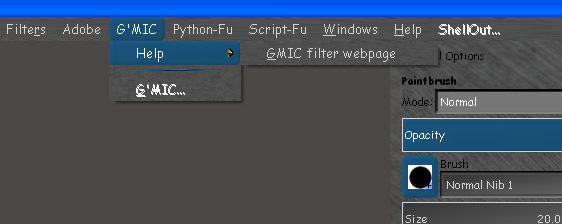
The only reason i decided on the Image window as the menu location was because that is where i have G'MIC filters located so it was convenient for me. It kept everything together in the G'MIC listing which made more sense in my case. You can change it to whatever suits you though. :)

Image

I know you already know how to change the script to reflect that but for the sake of those who do not look for this line in the script.
<Image>/G'MIC/Help


And change it to
<Image>/Filters/G'MIC/Help


If you want to place the menu link under the Gimp Help menu use this code instead.
<Image>/Help/G'MIC/Help

_________________
Image


Top
Post new topic Reply to topic  [ 42 posts ]  Go to page Previous  1, 2, 3

All times are UTC - 5 hours [ DST ]


* Login  


Powered by phpBB3 © phpBB Group