It is currently Tue Aug 11, 2026 3:09 am


All times are UTC - 5 hours [ DST ]


Post new topic Reply to topic  [ 10 posts ] 
Author Message
 Post subject: G'MIC pencil portrait filter
PostPosted: Fri May 17, 2013 7:15 am  (#1) 
Offline
GimpChat Member
User avatar

Joined: Mar 23, 2012
Posts: 7388
Location: Göteborg at last!
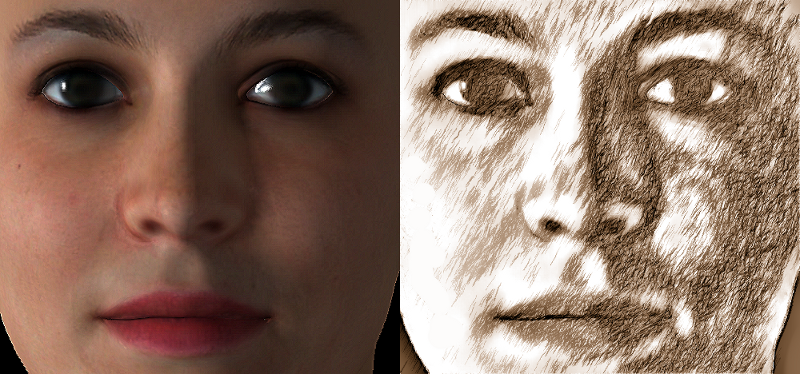
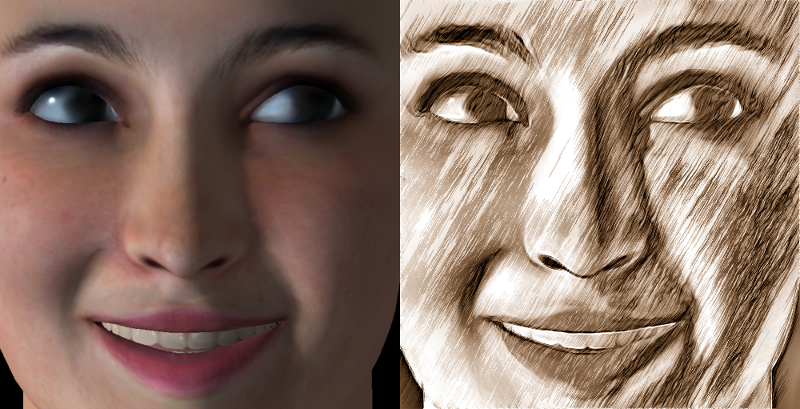
Three cheers for Ramon and David for this one.

FaceGen Model

Image

Image

Photo

Image

on a duplicate layer which was put into hard light mode

Image


Share on Facebook Share on Twitter Share on Orkut Share on Digg Share on MySpace Share on Delicious Share on Technorati
Top
 Post subject: Re: G'MIC pencil portrait filter
PostPosted: Fri May 17, 2013 7:57 am  (#2) 
Offline
Global Moderator
User avatar

Joined: Apr 01, 2012
Posts: 8455
Location: On the other side of your screen
Erisian is this already in GMIC?

_________________
Image
Free Fun Photo Editing & resources
Poems from the Lord
Gimp Newby
Gimp version 3.2.4 and GMIC-Qt 4.0.2 OS :- Windows 10 Home 64


Top
 Post subject: Re: G'MIC pencil portrait filter
PostPosted: Fri May 17, 2013 8:26 am  (#3) 
Offline
Retired Staff
User avatar

Joined: May 22, 2008
Posts: 6946
Location: Somewhere in GIMP
sallyanne wrote:
Erisian is this already in GMIC?
I found it in G'MIC > Black & white > Pencil portrait, sallyanne.

I moved this to the G'MIC Discussions forum.

_________________
Image
World War IV will be fought with sticks and stones. - Albert Einstein


Top
 Post subject: Re: G'MIC pencil portrait filter
PostPosted: Fri May 17, 2013 4:19 pm  (#4) 
Offline
Global Moderator
User avatar

Joined: May 16, 2010
Posts: 16155
G'MIC is like Gimp. I really haven't used all the filters it contains. :)
Both are full of surprises.

_________________
Image


Top
 Post subject: Re: G'MIC pencil portrait filter
PostPosted: Fri May 17, 2013 4:57 pm  (#5) 
Offline
GimpChat Member
User avatar

Joined: Dec 02, 2012
Posts: 203
Location: Cantabria, Spain
I think that there is a mistake about Ramón and me.

_________________
Image


My Gimp rides on Antergos (Arch), Linux Mint, Debian and Fedora


Top
 Post subject: Re: G'MIC pencil portrait filter
PostPosted: Sat May 18, 2013 1:57 am  (#6) 
Offline
Global Moderator
User avatar

Joined: Apr 01, 2012
Posts: 8455
Location: On the other side of your screen
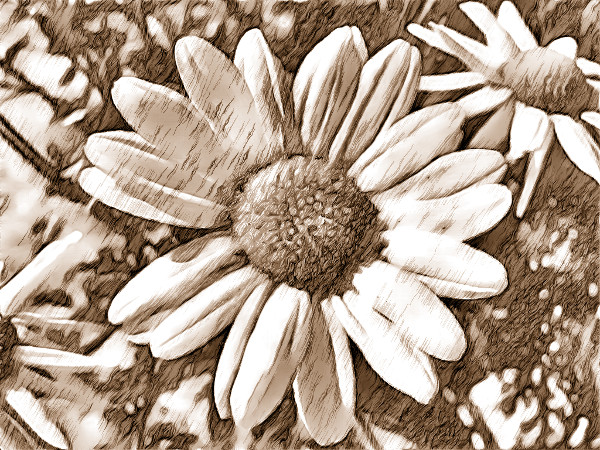
Thanks Oregonian

Image

Erisian how do you get all the colours to stay in the picture?

_________________
Image
Free Fun Photo Editing & resources
Poems from the Lord
Gimp Newby
Gimp version 3.2.4 and GMIC-Qt 4.0.2 OS :- Windows 10 Home 64


Top
 Post subject: Re: G'MIC pencil portrait filter
PostPosted: Sat May 18, 2013 4:04 am  (#7) 
Offline
GimpChat Member
User avatar

Joined: Mar 23, 2012
Posts: 7388
Location: Göteborg at last!
jamac4k wrote:
I think that there is a mistake about Ramón and me.


We are talking about a different David here jamac4k. Yours is an interesting technique though. It's usually a good idea to understand how to do things manually because it gives you more control over the outcome.

sallyanne - Start by duplicating your photo layer and run the filter on the duplicate layer. Put the duplicate layer into either hard light or grain merge mode.


Top
 Post subject: Re: G'MIC pencil portrait filter
PostPosted: Sat May 18, 2013 4:08 am  (#8) 
Offline
GimpChat Member
User avatar

Joined: Aug 16, 2012
Posts: 4271
Location: Göteborg, Sweden
erisian: nice work :)! looks like fake painting is a great use for face gen (i always thought stuff like that looks spooky, a bit like some people react to wax figures). like the result where you put the pencil layer in hard light mode too, looks lovely! and you don't have to ninja me like that! :hoh

sallyanne: nice flowers.

_________________


Top
 Post subject: Re: G'MIC pencil portrait filter
PostPosted: Sat May 18, 2013 4:11 am  (#9) 
Offline
GimpChat Member
User avatar

Joined: Mar 23, 2012
Posts: 7388
Location: Göteborg at last!
AnMal wrote:
and you don't have to ninja me like that! :hoh


It's the coffee AnMal. :hehe


Top
 Post subject: Re: G'MIC pencil portrait filter
PostPosted: Sat May 18, 2013 4:13 am  (#10) 
Offline
GimpChat Member
User avatar

Joined: Aug 16, 2012
Posts: 4271
Location: Göteborg, Sweden
erisian: of course. i always knew coffee is dangerous. no matter how nice knots you make in the future you'll never get any more carte noire from me!

_________________


Top
Post new topic Reply to topic  [ 10 posts ] 

All times are UTC - 5 hours [ DST ]


* Login  


Powered by phpBB3 © phpBB Group