It is currently Tue Aug 11, 2026 6:56 am


All times are UTC - 5 hours [ DST ]


Post new topic Reply to topic  [ 40 posts ]  Go to page Previous  1, 2
Author Message
 Post subject: Re: Couleurs Metalliques : filter for G'MIC/Gimp
PostPosted: Fri Sep 28, 2012 10:26 am  (#21) 
Offline
GimpChat Member
User avatar

Joined: Aug 16, 2012
Posts: 4271
Location: Göteborg, Sweden
wow! you must have ninja'd me to, i didn't see those before. the effect looks lovely, would be great if it could be automatized.

_________________


Top
 Post subject: Re: Couleurs Metalliques : filter for G'MIC/Gimp
PostPosted: Fri Sep 28, 2012 10:52 am  (#22) 
Offline
GimpChat Member

Joined: Apr 12, 2010
Posts: 5870
AnMal wrote:
wow! you must have ninja'd me to, i didn't see those before. the effect looks lovely, would be great if it could be automatized.


It could be and the pencil filter has only 2 relevant controls , Size and Amplitude (the others are no needed) so would not add much complexity to the interface.

Hum...Thinking better it would be needed also yet another slider to control the opacity of the merging , but the merging mode may be harcoded in multiply:

just for reference here the pencil layer i used

Edit oppss...accidentally merged down sorry


and the command -gimp_pencilbw 0.606061,3.0303,0,0,0 (similar commands may be used also by the Gmic plugin from
Various / custom code

_________________
My 3D Gallery on Deviantart http://photocomix2.deviantart.com/
Main gallery http://www.flickriver.com/photos/photocomix-mandala/
Mandala and simmetry http://www.flickriver.com/photos/photocomix_mandala/

Image

Mrs Wilbress


Top
 Post subject: Re: Couleurs Metalliques : filter for G'MIC/Gimp
PostPosted: Fri Sep 28, 2012 4:16 pm  (#23) 
Offline
GimpChat Member

Joined: May 09, 2012
Posts: 914
Bonjour,

I add the functions offered by Photocomix in the next version :)


Top
 Post subject: Re: Couleurs Metalliques : filter for G'MIC/Gimp
PostPosted: Fri Sep 28, 2012 11:53 pm  (#24) 
Offline
GimpChat Member
User avatar

Joined: Apr 09, 2011
Posts: 1764
Love It!!


Attachments:
turtle.jpg
turtle.jpg [ 131.62 KiB | Viewed 2030 times ]
duck.jpg
duck.jpg [ 132.97 KiB | Viewed 2030 times ]
Top
 Post subject: Re: Couleurs Metalliques : filter for G'MIC/Gimp
PostPosted: Sat Sep 29, 2012 12:32 am  (#25) 
Offline
Retired Staff
User avatar

Joined: May 22, 2008
Posts: 6946
Location: Somewhere in GIMP
Akky, those are wonderful! :yes

_________________
Image
World War IV will be fought with sticks and stones. - Albert Einstein


Top
 Post subject: Re: Couleurs Metalliques : filter for G'MIC/Gimp
PostPosted: Sat Sep 29, 2012 12:54 am  (#26) 
Offline
Script Coder
User avatar

Joined: Feb 18, 2011
Posts: 4826
Location: Bendigo Vic. Australia
Samj this filter is fun to use :clap

Image

Image

Image

Image

_________________
Image
No matter how much you push the envelope, it'll still be stationery.


Top
 Post subject: Re: Couleurs Metalliques : filter for G'MIC/Gimp
PostPosted: Sat Sep 29, 2012 5:52 am  (#27) 
Offline
GimpChat Member

Joined: May 09, 2012
Posts: 914
Bonjour,

Thank you Akky, thank you Graechan :)


Top
 Post subject: Re: Couleurs Metalliques : filter for G'MIC/Gimp
PostPosted: Sat Sep 29, 2012 6:47 pm  (#28) 
Offline
GimpChat Member

Joined: May 09, 2012
Posts: 914
Bonjour,

I just added "Options PhotoComix".

2 fanarts :


Attachments:
Fanart1.jpg
Fanart1.jpg [ 225.09 KiB | Viewed 2009 times ]
Fanart2.jpg
Fanart2.jpg [ 229.17 KiB | Viewed 2009 times ]
Top
 Post subject: Re: Couleurs Metalliques : filter for G'MIC/Gimp
PostPosted: Sun Sep 30, 2012 12:04 am  (#29) 
Offline
GimpChat Member

Joined: Apr 12, 2010
Posts: 5870
:jumpclap :clap :tyspin

Image


Reference http://pixabay.com/en/musician-music-pe ... lay-13713/

_________________
My 3D Gallery on Deviantart http://photocomix2.deviantart.com/
Main gallery http://www.flickriver.com/photos/photocomix-mandala/
Mandala and simmetry http://www.flickriver.com/photos/photocomix_mandala/

Image

Mrs Wilbress


Top
 Post subject: Re: Couleurs Metalliques : filter for G'MIC/Gimp
PostPosted: Sun Sep 30, 2012 12:44 pm  (#30) 
Offline
GimpChat Member

Joined: Apr 12, 2010
Posts: 5870
PS for the last optional step ("Pencil") i would suggest to invert the default for Size and Amplitude,
or anyway lower quite a bit "Amplitude" but increasing "Size"

Of course that should anyway be adapted to the image but i believe could be a better starting point

_________________
My 3D Gallery on Deviantart http://photocomix2.deviantart.com/
Main gallery http://www.flickriver.com/photos/photocomix-mandala/
Mandala and simmetry http://www.flickriver.com/photos/photocomix_mandala/

Image

Mrs Wilbress


Top
 Post subject: Re: Couleurs Metalliques : filter for G'MIC/Gimp
PostPosted: Sun Sep 30, 2012 1:49 pm  (#31) 
Offline
GimpChat Member

Joined: Apr 12, 2010
Posts: 5870
A maybe unexpected but very interesting effect of the filter

Image
samj lileyk22_000003 by PhotoComiX, on Flickr

to get this from the original the command is
-Couleurs_Metalliques 1,0,32.0819,0,0,1,20.0683,11,8.46416,20,1,0,0 ,1,1.91126,10.2389,1,1,0

Now is only needed the magic of anisotropic smoothing:
on the same layer

PhotoComiX smoothing :
-gimp_anisotropic_smoothing 60,0.16,0.555556,1.35802,2.35,0.8,30,2,0,1,1, 0,1


Image
samj lileyk22_000007 by PhotoComiX, on Flickr

_________________
My 3D Gallery on Deviantart http://photocomix2.deviantart.com/
Main gallery http://www.flickriver.com/photos/photocomix-mandala/
Mandala and simmetry http://www.flickriver.com/photos/photocomix_mandala/

Image

Mrs Wilbress


Top
 Post subject: Re: Couleurs Metalliques : filter for G'MIC/Gimp
PostPosted: Sun Sep 30, 2012 3:47 pm  (#32) 
Offline
GimpChat Member
User avatar

Joined: Aug 16, 2012
Posts: 4271
Location: Göteborg, Sweden
photo comix and samj: beautiful, beautiful pictures!i'm having fun playing with the new settings right now, may post some results if i like them enough :)

(that is one beautiful instrument that guy is playing, btw. wonder what exactly it is - zither? kantele?)

_________________


Top
 Post subject: Re: Couleurs Metalliques : filter for G'MIC/Gimp
PostPosted: Sun Sep 30, 2012 5:48 pm  (#33) 
Offline
GimpChat Member

Joined: Apr 12, 2010
Posts: 5870
other combinations

1 gmic output New Layers

2 now Couleurs Metalliques , something as this will be fine

Image
samj lileyk22_000004 by PhotoComiX, on Flickr

setting i used here
[G'MIC] Couleurs Metalliques : -Couleurs_Metalliques 1,0,32.0819,0,0,1,20.0683,11,8.46416,20,1,0,0,1,1.91126,10.2389,1,0,0

Click apply not okay (the focus should remain on the original image ) now use Lylejk Pencil

My command was
[G'MIC] Lylejk's stencil :
-gimp_lylejk_stencil 2,13.8587,1.63043,

Image
samj lileyk22_000009 by PhotoComiX, on Flickr

This BW layer should be on top,now change layer mode in darken only

and :drum :wow 3 and DONE !

Image
darken only by PhotoComiX, on Flickr

----------------------------------------------------------------------------------

And a nice variation

as before till the new " Lyleik pencil layer "
then on that top layer apply the Photocomix Smoothing preset , result should be

[G'MIC] PhotoComiX smoothing :
-gimp_anisotropic_smoothing 60,0.308642,0.555556,1.04938,2.35,0.8,30,2,0,1,1,0,1

Image
samj lileyk22_000012 by PhotoComiX, on Flickr

and now instead then change layer mode in Darken Only, change in Lighten Only

DONE !

Image
samj lileyk22_000013 by PhotoComiX, on Flickr

_________________
My 3D Gallery on Deviantart http://photocomix2.deviantart.com/
Main gallery http://www.flickriver.com/photos/photocomix-mandala/
Mandala and simmetry http://www.flickriver.com/photos/photocomix_mandala/

Image

Mrs Wilbress


Last edited by PhotoComix on Sun Sep 30, 2012 6:05 pm, edited 1 time in total.

Top
 Post subject: Re: Couleurs Metalliques : filter for G'MIC/Gimp
PostPosted: Sun Sep 30, 2012 6:03 pm  (#34) 
Offline
GimpChat Member
User avatar

Joined: Apr 30, 2010
Posts: 1937
Location: Missouri
Worked well on Benny.

_________________
Image
The last time I kept an open mind,
my brain fell out and the dog grabbed it.
Now it's full of dirt, toothmarks, and dog slobber.
No more open minds or dogs for me.


Top
 Post subject: Re: Couleurs Metalliques : filter for G'MIC/Gimp
PostPosted: Tue Oct 02, 2012 8:12 am  (#35) 
Offline
GimpChat Member

Joined: Apr 12, 2010
Posts: 5870
about this

PhotoComix wrote:
other combinations

1 gmic output New Layers

2 now Couleurs Metalliques , something as this will be fine

Image
samj lileyk22_000004 by PhotoComiX, on Flickr

setting i used here
[G'MIC] Couleurs Metalliques : -Couleurs_Metalliques 1,0,32.0819,0,0,1,20.0683,11,8.46416,20,1,0,0,1,1.91126,10.2389,1,0,0

Click apply not okay (the focus should remain on the original image ) now use Lylejk Pencil

My command was
[G'MIC] Lylejk's stencil :
-gimp_lylejk_stencil 2,13.8587,1.63043,

Image
samj lileyk22_000009 by PhotoComiX, on Flickr

This BW layer should be on top,now change layer mode in darken only

and :drum :wow 3 and DONE !

Image
darken only by PhotoComiX, on Flickr

----------------------------------------------------------------------------------

And a nice variation

as before till the new " Lyleik pencil layer "
then on that top layer apply the Photocomix Smoothing preset , result should be

[G'MIC] PhotoComiX smoothing :
-gimp_anisotropic_smoothing 60,0.308642,0.555556,1.04938,2.35,0.8,30,2,0,1,1,0,1

Image
samj lileyk22_000012 by PhotoComiX, on Flickr

and now instead then change layer mode in Darken Only, change in Lighten Only

DONE !

Image
samj lileyk22_000013 by PhotoComiX, on Flickr


also Hard Light would give different but interesting results

_________________
My 3D Gallery on Deviantart http://photocomix2.deviantart.com/
Main gallery http://www.flickriver.com/photos/photocomix-mandala/
Mandala and simmetry http://www.flickriver.com/photos/photocomix_mandala/

Image

Mrs Wilbress


Top
 Post subject: Re: Couleurs Metalliques : filter for G'MIC/Gimp
PostPosted: Sat Jun 08, 2013 9:35 am  (#36) 
Offline
GimpChat Member

Joined: May 09, 2012
Posts: 914
Bonjour,

A composition with a mapping (Hard sketch XY).

image : http://fontplay.com/freephotos/seventee ... 610-02.jpg


Attachments:
test_map.jpg
test_map.jpg [ 440.12 KiB | Viewed 2355 times ]
Top
 Post subject: Re: Couleurs Metalliques : filter for G'MIC/Gimp
PostPosted: Sat Jun 08, 2013 5:35 pm  (#37) 
Offline
Retired Staff
User avatar

Joined: May 22, 2008
Posts: 6946
Location: Somewhere in GIMP
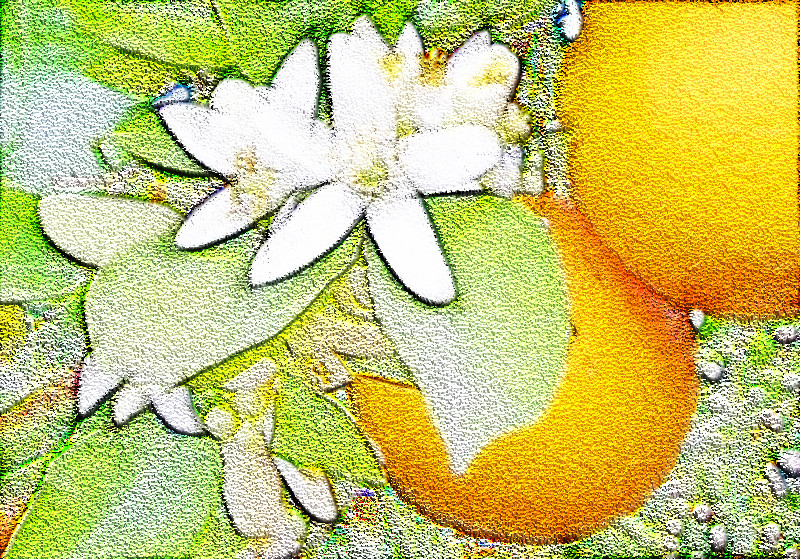
Your clown lady is so excellent samj. Beautiful. I tried metallique couleurs with hard sketch and my oranges and blossoms didn't come out nearly as striking but it was fun. :bigthup

Image

_________________
Image
World War IV will be fought with sticks and stones. - Albert Einstein


Top
 Post subject: Re: Couleurs Metalliques : filter for G'MIC/Gimp
PostPosted: Sun Jun 09, 2013 4:15 pm  (#38) 
Offline
GimpChat Member
User avatar

Joined: Nov 15, 2012
Posts: 949
Location: Mesa, AZ
Colored this manga panel from Trinity Blood and added that filter to the final result. I'm in awe how nice it turned out. Thisn's a keeper.

Image

_________________
Image

I now have a Tumblr, check it out!


Top
 Post subject: Re: Couleurs Metalliques : filter for G'MIC/Gimp
PostPosted: Sun Jun 09, 2013 5:45 pm  (#39) 
Offline
GimpChat Member

Joined: May 09, 2012
Posts: 914
Thank you all for the beautiful illustrations :tyspin

*****

PhotoComix created two filters (Gimp G'MIC) using this algorithm :
Testing > PhotoComix > Metallic Grain
Testing > PhotoComix > Metallic Stencils

I like the simplicity and rendering of "Metallic Grain" :)


Top
 Post subject: Re: Couleurs Metalliques : filter for G'MIC/Gimp
PostPosted: Mon Jun 10, 2013 2:07 pm  (#40) 
Offline
GimpChat Member
User avatar

Joined: Apr 07, 2010
Posts: 14182
Oregonian wrote:
Your clown lady is so excellent samj. Beautiful. I tried metallique couleurs with hard sketch and my oranges and blossoms didn't come out nearly as striking but it was fun. :bigthup

Very pretty O

_________________
Image


Top
Post new topic Reply to topic  [ 40 posts ]  Go to page Previous  1, 2

All times are UTC - 5 hours [ DST ]


cron

* Login  


Powered by phpBB3 © phpBB Group