It is currently Fri Aug 14, 2026 11:31 am


All times are UTC - 5 hours [ DST ]


Post new topic Reply to topic  [ 8 posts ] 
Author Message
 Post subject: Gimp+G'MIC : sharing outcomes on photo enhancements
PostPosted: Tue Nov 11, 2014 8:02 am  (#1) 
Offline
GimpChat Member
User avatar

Joined: Jan 20, 2013
Posts: 14831
Location: roma, italy
This is my first contribution.
The original photo is courtesy of Issabella:

Attachment:
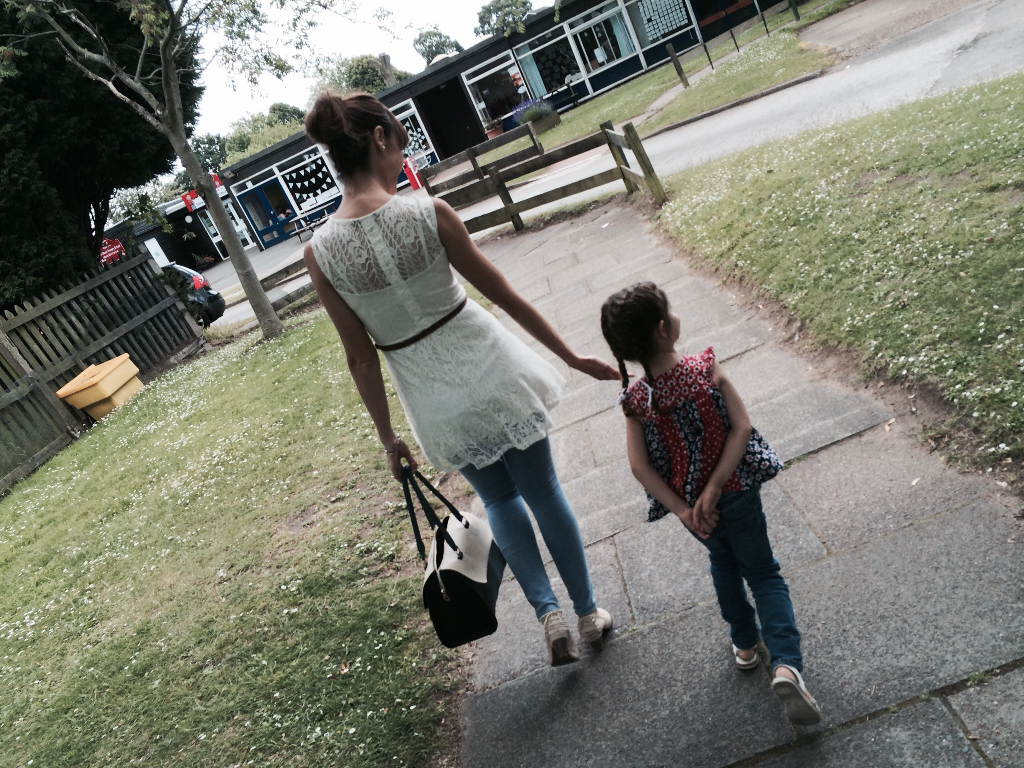
Alicia&María.png
Alicia&María.png [ 1.46 MiB | Viewed 3868 times ]


My outcome is the following:

Attachment:
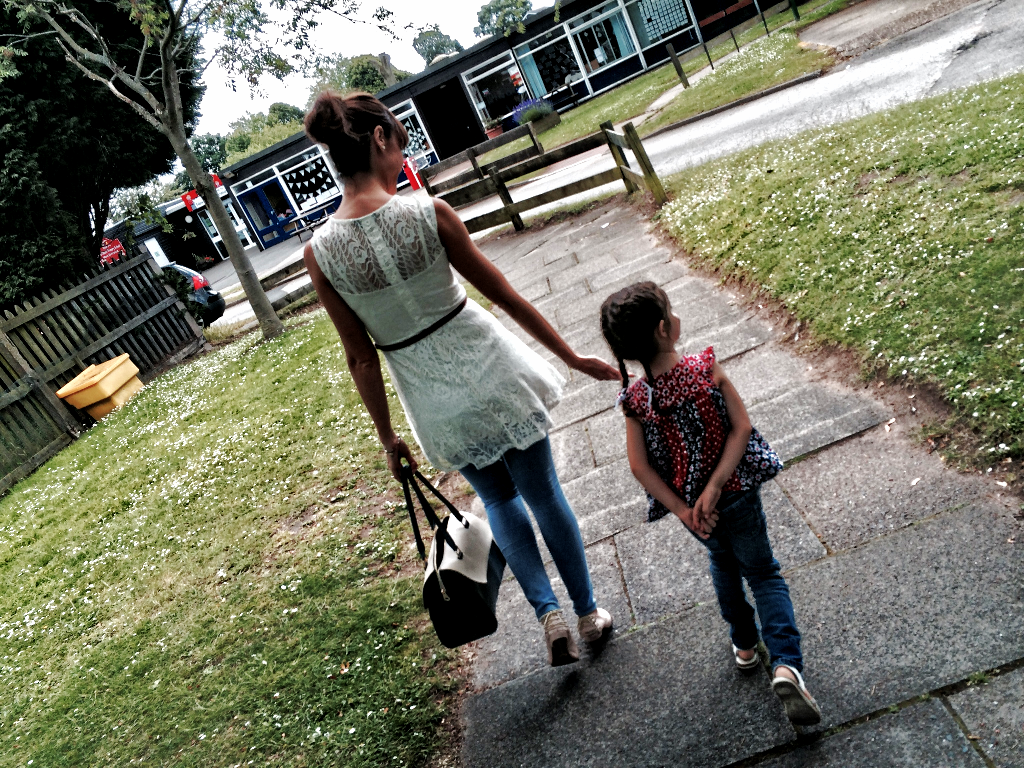
Alicia&María_GMICsharpenenhance.png
Alicia&María_GMICsharpenenhance.png [ 1.67 MiB | Viewed 3868 times ]


This result has been obtained by:
1-calling the garagecoder's filter gcd_sharpen_tones with the parameters: 2 and 100
2-calling the filter orientation to create a new layer, then normalizing the result and blending it (overlay, 0.6 opacity) with the output of GC filter
3-applying a gamma modification taking into account the average value and the goal value (in my case 100), then normalizing again
I stored the (small) series of steps in a personal filter called sharpenenhance , which I will send to GC, once the winter will start and he will switch from music to Gimp-chat again, to let him tune it and -if considered acceptable- to release as a modified version of his filter.

_________________
"Where am I ?"


Share on Facebook Share on Twitter Share on Orkut Share on Digg Share on MySpace Share on Delicious Share on Technorati
Top
 Post subject: Re: Gimp+G'MIC : sharing outcomes on photo enhancements
PostPosted: Tue Nov 11, 2014 10:11 am  (#2) 
Offline
GimpChat Member
User avatar

Joined: Jan 20, 2013
Posts: 14831
Location: roma, italy
My second contribution:

original (one of my summer photos):

Attachment:
DSCF0733.png
DSCF0733.png [ 2.69 MiB | Viewed 3816 times ]


enhanced outcome:

Attachment:
DSCF0733_GMICwarmvintagetwice.png
DSCF0733_GMICwarmvintagetwice.png [ 2.91 MiB | Viewed 3816 times ]


obtained by:
- applying Iain's filter Tone Presets Warm Vintage on a new layer
- modifying layer mode to Overlay 100%
- duplicating this layer
- changing layer mode to Multiply

_________________
"Where am I ?"


Top
 Post subject: Re: Gimp+G'MIC : sharing outcomes on photo enhancements
PostPosted: Tue Nov 11, 2014 12:01 pm  (#3) 
Offline
GimpChat Member
User avatar

Joined: Mar 01, 2014
Posts: 14128
Location: Spain, Aragón
Great improvement in both photos Dinasset, I keep the first one, I love it! :) :coolthup

_________________
Image

Gimp 2.10.30(samj) portable _ OS Windows 10 Home_ 64bits
Don’t be afraid to start over. It’s a new chance to rebuild what you want.


Top
 Post subject: Re: Gimp+G'MIC : sharing outcomes on photo enhancements
PostPosted: Tue Nov 11, 2014 12:24 pm  (#4) 
Offline
GimpChat Member
User avatar

Joined: Jan 20, 2013
Posts: 14831
Location: roma, italy
Welcome back, Issabella!
I missed you (as well as many other here around, I'm sure)
Thanks for your appreciation.

_________________
"Where am I ?"


Top
 Post subject: Re: Gimp+G'MIC : sharing outcomes on photo enhancements
PostPosted: Thu Nov 20, 2014 8:13 am  (#5) 
Offline
GimpChat Member
User avatar

Joined: Jan 20, 2013
Posts: 14831
Location: roma, italy
by walking over G'MIC filters, I noticed that some photos can be enhanced by using filters more specifically devoted to "transform" them, better than to enhance them.
Here an example:
original
Attachment:
IMGP0633.JPG
IMGP0633.JPG [ 2.17 MiB | Viewed 3674 times ]


enhanced by using wild-cartoonizer (after perspective adjustment)
Attachment:
IMGP0633_GMICcartoonizer.JPG
IMGP0633_GMICcartoonizer.JPG [ 2.64 MiB | Viewed 3674 times ]


I like how the details have been improved

_________________
"Where am I ?"


Top
 Post subject: Re: Gimp+G'MIC : sharing outcomes on photo enhancements
PostPosted: Thu Nov 20, 2014 8:19 am  (#6) 
Offline
GimpChat Member
User avatar

Joined: Jan 20, 2013
Posts: 14831
Location: roma, italy
using another filter on the same base image, local orientation, but -while in the previous example I just took the output of cartoonizer as it was- in this case the output of the filter has been overlayed on the base

Attachment:
IMGP0633_GMICloc-orient-overlay.JPG
IMGP0633_GMICloc-orient-overlay.JPG [ 4.34 MiB | Viewed 3672 times ]

_________________
"Where am I ?"


Top
 Post subject: Re: Gimp+G'MIC : sharing outcomes on photo enhancements
PostPosted: Thu Nov 20, 2014 8:32 am  (#7) 
Offline
GimpChat Member
User avatar

Joined: Mar 01, 2014
Posts: 14128
Location: Spain, Aragón
Good investigation, Dinasset. I take note about your founds. Notable improvement. :clap

_________________
Image

Gimp 2.10.30(samj) portable _ OS Windows 10 Home_ 64bits
Don’t be afraid to start over. It’s a new chance to rebuild what you want.


Top
 Post subject: Re: Gimp+G'MIC : sharing outcomes on photo enhancements
PostPosted: Thu Nov 20, 2014 9:23 am  (#8) 
Offline
GimpChat Member
User avatar

Joined: Jan 20, 2013
Posts: 14831
Location: roma, italy
gracias, mi amiga de Espana!
sometimes one should abandon the well known roads and try other paths...
it happens you find something interesting...

_________________
"Where am I ?"


Top
Post new topic Reply to topic  [ 8 posts ] 

All times are UTC - 5 hours [ DST ]


* Login  


Powered by phpBB3 © phpBB Group
