It is currently Thu Oct 01, 2026 4:44 am


All times are UTC - 5 hours [ DST ]


Post new topic Reply to topic  [ 54 posts ]  Go to page 1, 2, 3  Next
Author Message
 Post subject: Compiling Knotter For Linux - new compiles-32 and 64 bit
PostPosted: Sat Aug 18, 2012 5:09 pm  (#1) 
Offline
Global Moderator
User avatar

Joined: May 16, 2010
Posts: 16175
How do i compile software.
I downloaded knotter and want to check it out. :)
http://libregraphicsworld.org/blog/entr ... design-app

EDIT: Both 32 and 64 bit versions now compiled.Read on for further information.


Share on Facebook Share on Twitter Share on Orkut Share on Digg Share on MySpace Share on Delicious Share on Technorati
Top
 Post subject: Re: So here i am using Fedora 17 :)
PostPosted: Sat Aug 18, 2012 6:19 pm  (#2) 
Offline
Global Moderator
User avatar

Joined: May 16, 2010
Posts: 16175
I also downloaded the online-installer run file but Fedora tells me there is no application to open the file?


Top
 Post subject: Re: So here i am using Fedora 17 :)
PostPosted: Sat Aug 18, 2012 7:22 pm  (#3) 
Offline
GimpChat Member
User avatar

Joined: Nov 09, 2011
Posts: 726
Knotter has to "Qt Framework" as a dependency. You need first install basic build tools for compiling in Fedora, then "qmake" and Qt4 development tools.
You tell me where you downloaded the .run file, so I can see how to install it.
By the way, you can try to run the file from the terminal. First make sure it is executable, or else make it executable: "chmod +x file.run"
Then run it with (if it requires root privileges): "sudo ./file.run"

_________________
Image
Be patient, English is not my language.


Top
 Post subject: Re: So here i am using Fedora 17 :)
PostPosted: Sat Aug 18, 2012 7:33 pm  (#4) 
Offline
Global Moderator
User avatar

Joined: May 16, 2010
Posts: 16175
Thanks Yafu, you can get the run file here
http://qt-project.org/downloads


Top
 Post subject: Re: So here i am using Fedora 17 :)
PostPosted: Sat Aug 18, 2012 7:40 pm  (#5) 
Offline
Global Moderator
User avatar

Joined: May 16, 2010
Posts: 16175
This works
yum install qt-devel qt-config


now i should be able to compile the src files. ;)


Top
 Post subject: Re: So here i am using Fedora 17 :)
PostPosted: Sat Aug 18, 2012 7:45 pm  (#6) 
Offline
GimpChat Member
User avatar

Joined: Nov 09, 2011
Posts: 726
Rod wrote:
Thanks Yafu, you can get the run file here
http://qt-project.org/downloads

I thought you were referring to an installer for Knotter :mrgreen:

Great that you could find the packages for Fedora :yes

_________________
Image
Be patient, English is not my language.


Top
 Post subject: Re: So here i am using Fedora 17 :)
PostPosted: Sat Aug 18, 2012 9:04 pm  (#7) 
Offline
Global Moderator
User avatar

Joined: May 16, 2010
Posts: 16175
I had to fix the makefile
i still get errors though. Any ideas?

[rod@rod knotter-0.4.0]$ make
g++ -c -pipe -Werror -g -Wall -W -D_REENTRANT -DVERSION=\"0.4.0\" -DQT_SVG_LIB -DQT_XML_LIB -DQT_GUI_LIB -DQT_CORE_LIB -DQT_SHARED -I/usr/lib/qt4/mkspecs/linux-g++ -I. -I/usr/include/QtCore -I/usr/include/QtGui -I/usr/include/QtXml -I/usr/include/QtSvg -I/usr/include -Isrc/dialogs -Iinclude -Isrc/generated -Isrc/generated -o knot_curve_style.o src/graphics/knot_curve_style.cpp
src/graphics/knot_curve_style.cpp: In destructor ‘knot_curve_styler::~knot_curve_styler()’:
src/graphics/knot_curve_style.cpp:232:16: error: deleting object of abstract class type ‘knot_curve_style’ which has non-virtual destructor will cause undefined behaviour [-Werror=delete-non-virtual-dtor]
cc1plus: all warnings being treated as errors
make: *** [knot_curve_style.o] Error 1
[rod@rod knotter-0.4.0]$


Makefile attached
Attachment:
Knotter_Makefile_RD.tar.gz [3.35 KiB]
Downloaded 632 times


Top
 Post subject: Re: So here i am using Fedora 17 :)
PostPosted: Sat Aug 18, 2012 9:29 pm  (#8) 
Offline
GimpChat Member
User avatar

Joined: Nov 09, 2011
Posts: 726
Rod wrote:
src/graphics/knot_curve_style.cpp:232:16: error: deleting object of abstract class type ‘knot_curve_style’ which has non-virtual destructor will cause undefined behaviour [-Werror=delete-non-virtual-dtor]
cc1plus: all warnings being treated as errors
make: *** [knot_curve_style.o] Error 1


It seems to be something wrong with the line 232 of file src/graphics/knot_curve_style.cpp.
I think it should be reported to the developer. Or maybe someone who knows programming can know how to correct that lines.

_________________
Image
Be patient, English is not my language.


Top
 Post subject: Re: So here i am using Fedora 17 :)
PostPosted: Sat Aug 18, 2012 9:31 pm  (#9) 
Offline
Global Moderator
User avatar

Joined: May 16, 2010
Posts: 16175
I reported it at Libre graphics. :)


Top
 Post subject: Re: So here i am using Fedora 17 :)
PostPosted: Sat Aug 18, 2012 9:59 pm  (#10) 
Offline
GimpChat Member
User avatar

Joined: Nov 09, 2011
Posts: 726
Did you tried with the latest code from Git?
Install git from Fedora repo, and:
git clone git://git.code.sf.net/p/knotter/code knotter-code

Enter to the directory "knotter-code" (Open the terminal on that path), and try to compile.

Edit: I could compile and install from git. But when you run the program (executing "knotter" binary) it goes into what seems an infinite loop and collapses my system (64bit)
Edit again: I was able to compile the 0.4.0 version. Maybe your problem is with the version of qt devel tools? (mine is 4.8.1). Likewise I have the same problem with the git (today) version.

_________________
Image
Be patient, English is not my language.


Top
 Post subject: Re: So here i am using Fedora 17 :)
PostPosted: Sun Aug 19, 2012 7:28 am  (#11) 
Offline
GimpChat Member
User avatar

Joined: Nov 09, 2011
Posts: 726
As Mattia says in the LibreGraphic, RAM problem is fixed.
Here I share the 64-bit binary:
http://www.fileswap.com/dl/6f0onqzfnt/K ... ts.7z.html

_________________
Image
Be patient, English is not my language.


Top
 Post subject: Re: So here i am using Fedora 17 :)
PostPosted: Sun Aug 19, 2012 11:58 am  (#12) 
Offline
Global Moderator
User avatar

Joined: May 16, 2010
Posts: 16175
YAFU wrote:
As Mattia says in the LibreGraphic, RAM problem is fixed.
Here I share the 64-bit binary:
http://www.fileswap.com/dl/6f0onqzfnt/K ... ts.7z.html


I am using 32 bit Linux though. :(


Top
 Post subject: Re: So here i am using Fedora 17 :)
PostPosted: Sun Aug 19, 2012 12:15 pm  (#13) 
Offline
Global Moderator
User avatar

Joined: May 16, 2010
Posts: 16175
I get this error on compile now with Fedora.
Almost there. :)
***************************

knot_window.o: In function `Knot_Window::Knot_Window(QWidget*)’:
/home/rod/src/knotter-0.4.5/src/dialogs/knot_window.cpp:36: undefined reference to `Export_Dialog::Export_Dialog(QWidget*)’
/home/rod/src/knotter-0.4.5/src/dialogs/knot_window.cpp:40: undefined reference to `Export_Dialog::set_knot_view(KnotView*)’
knot_window.o: In function `Knot_Window::export_image()’:
/home/rod/src/knotter-0.4.5/src/dialogs/knot_window.cpp:342: undefined reference to `Export_Dialog::reset_size()’
knot_window.o: In function `Export_Dialog::~Export_Dialog()’:
/home/rod/src/knotter-0.4.5/src/dialogs/export_dialog.hpp:7: undefined reference to `vtable for Export_Dialog’
collect2: error: ld returned 1 exit status
make: *** [knotter] Error 1

Its been reported to the author. :)

I am going to try the GIT clone once.


Top
 Post subject: Re: So here i am using Fedora 17 :)
PostPosted: Sun Aug 19, 2012 12:35 pm  (#14) 
Offline
Global Moderator
User avatar

Joined: May 16, 2010
Posts: 16175
Yes ... success with the git clone.
Thanks Yafu.
i will have the upload available for 32 bit Linux soon.


Top
 Post subject: Re: So here i am using Fedora 17 :)
PostPosted: Sun Aug 19, 2012 12:51 pm  (#15) 
Offline
Global Moderator
User avatar

Joined: May 16, 2010
Posts: 16175
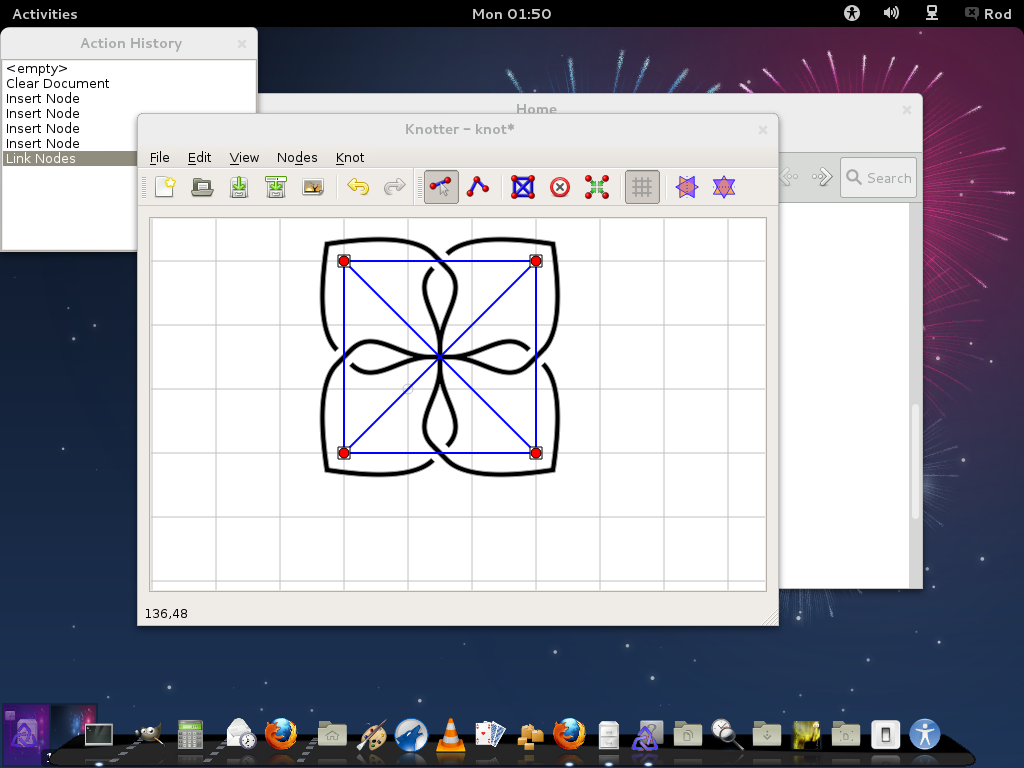
Image


Top
 Post subject: Re: So here i am using Fedora 17 :)
PostPosted: Sun Aug 19, 2012 1:04 pm  (#16) 
Offline
GimpChat Member
User avatar

Joined: Nov 09, 2011
Posts: 726
You've exported as svg?
What kind of error you get? Copy the error message here.
I've been able to export to Inkskape

_________________
Image
Be patient, English is not my language.


Top
 Post subject: Re: So here i am using Fedora 17 :)
PostPosted: Sun Aug 19, 2012 1:13 pm  (#17) 
Offline
Global Moderator
User avatar

Joined: May 16, 2010
Posts: 16175
No i have Cairo Dock and i cant get this app or Inkscape to dock there.
I can export to SVG fine.
I did get an error and crash after doing something in the software but i cant duplicate it so i didn't report it.If it happens again i will. :)

If anyone is interested in the 32 bit binary for Fedora let me know and i will upload it otherwise i will save the room on my server.


Top
 Post subject: Re: Compiling Knotter For Linux
PostPosted: Sun Aug 19, 2012 6:07 pm  (#18) 
Offline
GimpChat Founder
User avatar

Joined: May 22, 2008
Posts: 5241
Location: Gimpville
You are welcome to post it here, Rod. We have plenty of server space.

_________________
“If you reach for the stars, you just might land on a decently sized hill.” - Stuart Hill


Top
 Post subject: Re: Compiling Knotter For Linux
PostPosted: Sun Aug 19, 2012 7:03 pm  (#19) 
Offline
Global Moderator
User avatar

Joined: May 16, 2010
Posts: 16175
Thanks Tux i added the program to another topic. :)


Top
 Post subject: Re: Compiling Knotter For Linux
PostPosted: Wed Aug 22, 2012 5:15 pm  (#20) 
Offline
Global Moderator
User avatar

Joined: May 16, 2010
Posts: 16175
Yafu have you compiled 5.0 yet? :)
Are there any significant changes to the tools?


Top
Post new topic Reply to topic  [ 54 posts ]  Go to page 1, 2, 3  Next

All times are UTC - 5 hours [ DST ]


* Login  


Powered by phpBB3 © phpBB Group