It is currently Wed Aug 19, 2026 4:54 am


All times are UTC - 5 hours [ DST ]


Post new topic Reply to topic  [ 20 posts ] 
Author Message
 Post subject: Grunge Brushes
PostPosted: Tue Oct 23, 2012 10:23 am  (#1) 
Offline
GimpChat Member
User avatar

Joined: Jul 17, 2012
Posts: 2769
it seems to me, there a ton of grunge brushes out there

i have a lot in my brushes folder, but feel they are all very much the same, which makes me wonder why there are so many available

thing is, i rarely use them, they always seem wrong
too much texture
if you use them on a small scale you get this carpet of thick grunge, if you use them on a large scale the blotches are too big

i like text that has corroded edges, you know, bits of the edges that are missing....but it seems you cant do that with your typical grunge brush either

so are there any other grunge brushes out there, i dont know of ?
for example one with geometric shapes instead of blotches ?

EDIT: i guess we need an example
this has those corroded edge im talking about, you cant really do that with a round brush, can you ?
Attachment:
mmi band pic 2008 widescreen.jpg
mmi band pic 2008 widescreen.jpg [ 359.27 KiB | Viewed 4456 times ]


Last edited by Esper on Tue Oct 23, 2012 8:20 pm, edited 1 time in total.

Share on Facebook Share on Twitter Share on Orkut Share on Digg Share on MySpace Share on Delicious Share on Technorati
Top
 Post subject: Re: Grunge Brushes
PostPosted: Tue Oct 23, 2012 10:54 am  (#2) 
Offline
GimpChat Member
User avatar

Joined: Apr 07, 2010
Posts: 14182
I have never tried this but what about using a grunge brush as an eraser tool and dab around the edges with your brush to see if that would work.

_________________
Image


Top
 Post subject: Re: Grunge Brushes
PostPosted: Tue Oct 23, 2012 11:23 am  (#3) 
Offline
GimpChat Member
User avatar

Joined: Aug 30, 2012
Posts: 2174
The best I can suggest is to make a selection from your text and then play with the selection>Distort option possibly try lowering the threshold.

_________________
Image


Top
 Post subject: Re: Grunge Brushes
PostPosted: Tue Oct 23, 2012 11:45 am  (#4) 
Offline
GimpChat Member

Joined: Oct 02, 2012
Posts: 84
Location: Germany
molly wrote:
I have never tried this but what about using a grunge brush as an eraser tool and dab around the edges with your brush to see if that would work.


That' s what I' d recommend to achieve the effect Esper was asking about.
I use ALOT of grunge brushes in my works but I really only have like 1 or 2 sets. I don' t need any more than that. Just find one you like and that works for you. Deviantart has alot of cool ones.


Top
 Post subject: Re: Grunge Brushes
PostPosted: Tue Oct 23, 2012 12:42 pm  (#5) 
Offline
GimpChat Member
User avatar

Joined: Aug 16, 2012
Posts: 4271
Location: Göteborg, Sweden
i have that problem too, i never seem to get the right kind of grunge with any brushes or textures or pattern fills. and i want to grunge my text unevenly, like it was completely randomly done, but still get a balanced effect - which means i can't just do it randomly. this seems almost impossible to achieve :( .

_________________


Top
 Post subject: Re: Grunge Brushes
PostPosted: Tue Oct 23, 2012 2:56 pm  (#6) 
Offline
GimpChat Member
User avatar

Joined: Aug 30, 2012
Posts: 2174
Had to have a play - done as I posted earlier and went selection distort to create the rough edged text, actually done to distortions one smoother than the other and merged them together, then I followed this tutorial Worn Text.

Here are my results

Image

_________________
Image


Top
 Post subject: Re: Grunge Brushes
PostPosted: Tue Oct 23, 2012 3:36 pm  (#7) 
Offline
GimpChat Member

Joined: Aug 27, 2010
Posts: 491
Image


Top
 Post subject: Re: Grunge Brushes
PostPosted: Tue Oct 23, 2012 4:13 pm  (#8) 
Offline
GimpChat Member
User avatar

Joined: Jul 17, 2012
Posts: 2769
molly wrote:
I have never tried this but what about using a grunge brush as an eraser tool and dab around the edges with your brush to see if that would work.
thats what i thought would be the first method to achieve this effect, but so far it never looked good when i tried it
same problem AnMal talked about

he4rty wrote:
The best I can suggest is to make a selection from your text and then play with the selection>Distort option possibly try lowering the threshold.
yes, i had the same idea after i saw the pic i googled
you always come with good advice, thank you !

SkyRoma wrote:
Deviantart has alot of cool ones.
indeed, i think i got the majority of my grunge brushes from DA

@Mike you did that with the layermode on Dissolve ? i use that technique all the time in my pictures, but im looking for a different effect


Top
 Post subject: Re: Grunge Brushes
PostPosted: Tue Oct 23, 2012 4:39 pm  (#9) 
Offline
GimpChat Member
User avatar

Joined: Aug 16, 2012
Posts: 4271
Location: Göteborg, Sweden
he4rty: a great tutorial you found, looks like it could really be useful! i never tried selection - distort, maybe i should.

esper:
Mike wrote:
@Mike you did that with the layermode on Dissolve ? i use that technique all the time in my pictures, but im looking for a different effect
hah! i never tried that, but now i think i know the answer to something that's been bugging me for a long time - something to do with fuzzy and glittery edges that needed to be less fuzzy but still glittery *runs off to try at once*

_________________


Top
 Post subject: Re: Grunge Brushes
PostPosted: Tue Oct 23, 2012 4:47 pm  (#10) 
Offline
GimpChat Member
User avatar

Joined: Jul 17, 2012
Posts: 2769
AnMal wrote:
hah! i never tried that, but now i think i know the answer to something that's been bugging me for a long time - something to do with fuzzy and glittery edges that needed to be less fuzzy but still glittery *runs off to try at once*
huh ? but AnMal, thats the bit you didnt like about my "winter"diamondstar picture, the one i gave you the xcf of...
viewtopic.php?f=11&t=5454


Top
 Post subject: Re: Grunge Brushes
PostPosted: Tue Oct 23, 2012 5:32 pm  (#11) 
Offline
GimpChat Member
User avatar

Joined: Apr 07, 2010
Posts: 14182
Well Esper I tried it by using a couple different brushes in the eraser mode and it didn't work out the way I thought it would. I took the colors out but when you get the white bg it doesn't look the same. Anyway, I tried
Image

_________________
Image


Top
 Post subject: Re: Grunge Brushes
PostPosted: Tue Oct 23, 2012 6:00 pm  (#12) 
Offline
GimpChat Member
User avatar

Joined: Aug 16, 2012
Posts: 4271
Location: Göteborg, Sweden
molly: you made a good try, but this shows the problem, i think :(. it just doesn't look right.
esper: tried it and failed :gaah yes, i was talking about those bits i didn't like. i just suddenly thought of how to change those edges so they were sharper and still keep the glitter effect - an idea i got when you mentioned the dissolve mode, but it didn't work of course.

_________________


Top
 Post subject: Re: Grunge Brushes
PostPosted: Wed Oct 24, 2012 7:40 am  (#13) 
Offline
GimpChat Member
User avatar

Joined: Jul 17, 2012
Posts: 2769
i did a bit of experimentation yesterday

i think what is needed is a different tool for the job: i made a brush dynamic, so that the brush rotates the angle randomly
and used that with a five pointed star brush (you could also make any other number of points with the Shape Path script) to destroy the edges

next i used one of the techniques from the blog he4rty posted and made a scratches brush, again with the random angle dynamic
Attachment:
Scratches.png
Scratches.png [ 2.46 KiB | Viewed 3003 times ]

one could also use gear shaped brushes to get an interesting cut edge
Attachment:
Kratzer.png
Kratzer.png [ 141.81 KiB | Viewed 3003 times ]


Attachments:
Kratzer.gbr [70.19 KiB]
Downloaded 135 times
Top
 Post subject: Re: Grunge Brushes
PostPosted: Wed Oct 24, 2012 8:55 am  (#14) 
Offline
GimpChat Member
User avatar

Joined: Apr 07, 2010
Posts: 14182
Very good, you are getting there Esper.

_________________
Image


Top
 Post subject: Re: Grunge Brushes
PostPosted: Wed Oct 24, 2012 9:12 am  (#15) 
Offline
GimpChat Member
User avatar

Joined: Aug 30, 2012
Posts: 2174
Nice effect you have got there Esper.

_________________
Image


Top
 Post subject: Re: Grunge Brushes
PostPosted: Wed Oct 24, 2012 1:38 pm  (#16) 
Offline
GimpChat Member
User avatar

Joined: Aug 24, 2011
Posts: 1785
Location: Dallas, TX
Esper - Took me a while to find it but I ran across a video tutorial a while back on making realistic looking metal. I think there is a lot to learn from this guy about making your own grunge textures. He shows how to use different grunge brushes, in different ways, sometimes at low opacity, sometimes as an eraser and sometimes on a layer mask. Several layers later ( 10 or 15) he completes a very subtle grunge efffect for a base metal texture that can easily be adapted for any purpose.

http://cg.tutsplus.com/tutorials/photos ... -textures/

Download the video and look at it whenever you want. Even though it is for PS, you can still use the same techniques in GIMP with no problem. Take what you want from it.

_________________
Image


Top
 Post subject: Re: Grunge Brushes
PostPosted: Wed Oct 24, 2012 4:41 pm  (#17) 
Offline
GimpChat Member
User avatar

Joined: Jul 17, 2012
Posts: 2769
thanks Draconian !

thats a lot to digest, watched it once, but will have to re-watch it several times
lots of interesting techniques and results !


Top
 Post subject: Re: Grunge Brushes
PostPosted: Wed Oct 24, 2012 4:44 pm  (#18) 
Offline
GimpChat Member
User avatar

Joined: Aug 16, 2012
Posts: 4271
Location: Göteborg, Sweden
draconian: didn't have time to see much of that tutorial right now, but it's saved in my bookmarks - looks like a really useful find, so thank you for sharing.

esper: oh, i missed your post - but nice job, brother! not sure i like the efffect from the gear brush, but maybe if the gear was a bit differently shaped.

_________________


Top
 Post subject: Re: Grunge Brushes
PostPosted: Wed Oct 24, 2012 5:03 pm  (#19) 
Offline
GimpChat Member
User avatar

Joined: Aug 24, 2011
Posts: 1785
Location: Dallas, TX
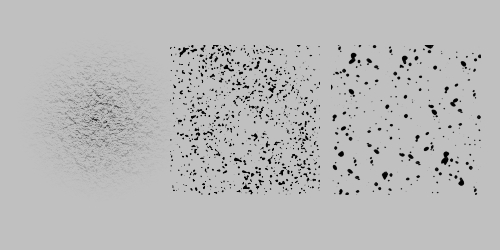
Yeah, that guy is pretty good at it. Of course you need an arsenal of scratch brushes and good ones are not easy to find. I'm still building my collection, got plenty of grunge brushes. The splatter brushes work the best. I finally broke down and made a couple of my own based on density. You guys are welcome to 'em.

Image


Attachments:
Brushes.7z [339.5 KiB]
Downloaded 148 times

_________________
Image
Top
 Post subject: Re: Grunge Brushes
PostPosted: Thu Oct 25, 2012 5:15 pm  (#20) 
Offline
GimpChat Member
User avatar

Joined: Jul 17, 2012
Posts: 2769
ok i watched the video twice and tried the basic technique

what this guy is doing is starting with a layer in mid gray, then putting a transparent layer on top of it and filling it with any grunge brush
THEN he adds a layermask, and with the same brush paints the mask, so that the grunge effect becomes less extreme
he repeats that process on several layers with different brushes, turns down the opacity and plays with contrast and brightness

there are others techniques in this video, but i didnt try them yet


Top
Post new topic Reply to topic  [ 20 posts ] 

All times are UTC - 5 hours [ DST ]


* Login  


Powered by phpBB3 © phpBB Group