It is currently Fri Jun 26, 2026 3:30 am


All times are UTC - 5 hours [ DST ]


Post new topic Reply to topic  [ 11 posts ] 
Author Message
 Post subject: Tutorial Question
PostPosted: Sun Oct 28, 2018 1:10 pm  (#1) 
Offline
GimpChat Member
User avatar

Joined: May 13, 2018
Posts: 270
Location: Oregon, USA
Does anyone know of a good tutorial to make this kind of castle image that is not a "speed" video?

https://www.deviantart.com/snowskadi/ar ... -291717844

https://www.deviantart.com/snowskadi/ar ... -643940438

I'm intensely interested in the making of this type of art.

Thanks in advance.

_________________
Image


Share on Facebook Share on Twitter Share on Orkut Share on Digg Share on MySpace Share on Delicious Share on Technorati
Top
 Post subject: Re: Tutorial Question
PostPosted: Sun Oct 28, 2018 2:52 pm  (#2) 
Offline
Script Coder
User avatar

Joined: Oct 25, 2010
Posts: 4812
IMHO more a problem of artisitic talent/skill than a mere Gimp technique.

_________________
Image


Top
 Post subject: Re: Tutorial Question
PostPosted: Sun Oct 28, 2018 8:12 pm  (#3) 
Offline
GimpChat Member
User avatar

Joined: Nov 04, 2015
Posts: 1450
Agree with ofnuts, individual styles are not readily mass-produced.

Suggestion. Why not start with a photo of a castle/monastery/cathedral and scale-distort the architecture in a uniform way. Then throw every lighting effect and filter at it until it looks really Halloween/Harry Potter etc etc.


Top
 Post subject: Re: Tutorial Question
PostPosted: Sun Oct 28, 2018 8:22 pm  (#4) 
Offline
GimpChat Member
User avatar

Joined: May 13, 2018
Posts: 270
Location: Oregon, USA
I agree with ofnuts and thanks for the tip Tas-mania.
Here's a process that really interests me.
It's Photoshop but I like the way he uses the selection tools.
I think I'm gonna try to experiment with this.

https://www.youtube.com/watch?v=5gcFvaak9u4

Any suggestions are greatly appreciated.

_________________
Image


Top
 Post subject: Re: Tutorial Question
PostPosted: Mon Oct 29, 2018 9:18 am  (#5) 
Offline
GimpChat Member

Joined: Sep 20, 2016
Posts: 293
The tutor is not really working with selections. At least not in the beginning of the video.
The Pen Tool in Photoshop has a "Shape" option which gives paths a fill and a stroke, without the need to rasterize the vectorshape.
You can not really do that in Gimp, because paths are just outlines and once a selection is filled its not editable like a vector.

Next textures from real live images are transformed to fit and added with a clipping mask.

On top of that painting with special brushes. Unlike Gimp, a brush dynamic is linked to a PS brush, which means a brush does not only have a texture but also a certain painting behaviour (size jitter, angle rotation, spread, etc.).

Basically this is advanced digital painting, making use of all the advantages this medium provides.
Still requires talent and a ton of knowledge (composition, lighting, perspective, etc).


Top
 Post subject: Re: Tutorial Question
PostPosted: Mon Oct 29, 2018 4:59 pm  (#6) 
Offline
GimpChat Member
User avatar

Joined: Apr 27, 2010
Posts: 1506
Location: Sweden
Quote:
On top of that painting with special brushes. Unlike Gimp, a brush dynamic is linked to a PS brush, which means a brush does not only have a texture but also a certain painting behaviour (size jitter, angle rotation, spread, etc.).


You can certainly link brush dynamics to brushes in GIMP, this is not a unique Photoshop feature. You do generally need a graphics tablet to really make full use of it though (same as in PS). You can use a mouse too of course, it's just generally slower.

Over the years I've made a series of tutorials on using GIMP for artistic painting. They tend to be for a slightly older version of GIMP, but the principles should be useful still: https://www.deviantart.com/griatch-art/ ... -237116359

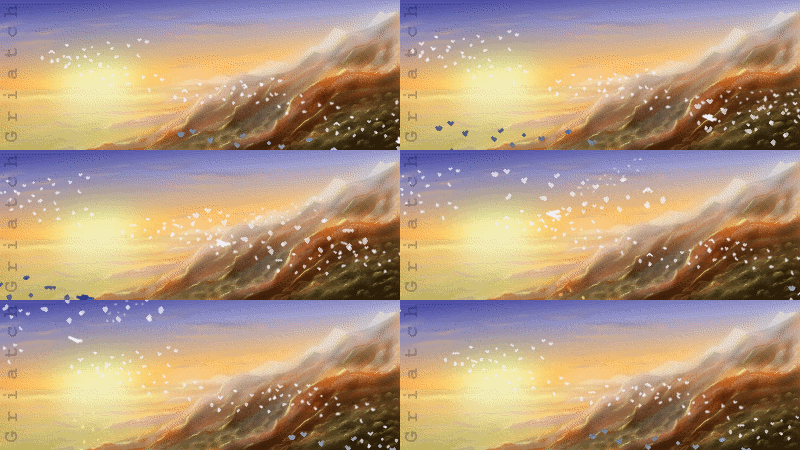
The cityscape tutorial can be useful for your uses; it's pretty simple to start with and introduces a range of different techniques:

Image
(click for link)
.
Griatch

_________________


Top
 Post subject: Re: Tutorial Question
PostPosted: Mon Oct 29, 2018 5:05 pm  (#7) 
Offline
GimpChat Member

Joined: Sep 20, 2016
Posts: 293
Griatch wrote:
You can certainly link brush dynamics to brushes in GIMP, this is not a unique Photoshop feature.

orly

upload a Gimp brush that has an embedded dynamic


Top
 Post subject: Re: Tutorial Question
PostPosted: Mon Oct 29, 2018 11:57 pm  (#8) 
Offline
GimpChat Member
User avatar

Joined: May 13, 2018
Posts: 270
Location: Oregon, USA
I want to thank everyone who commented in this thread. It is all very helpful.
Griatch: I will definitely check out your tutorial. That is definitely the kind of
thing I'm looking for. I've been "watching" your art at deviantART.

Again, thanks to everyone.

_________________
Image


Top
 Post subject: Re: Tutorial Question
PostPosted: Tue Oct 30, 2018 11:48 am  (#9) 
Offline
GimpChat Member
User avatar

Joined: May 10, 2013
Posts: 1430
Location: FInland
Konstantin wrote:
Griatch wrote:
You can certainly link brush dynamics to brushes in GIMP, this is not a unique Photoshop feature.

orly

upload a Gimp brush that has an embedded dynamic


Did you try this? Not embedded in the brush, but technically same thing.
And lot faster if PS hasn't changed for the better from what I remember.

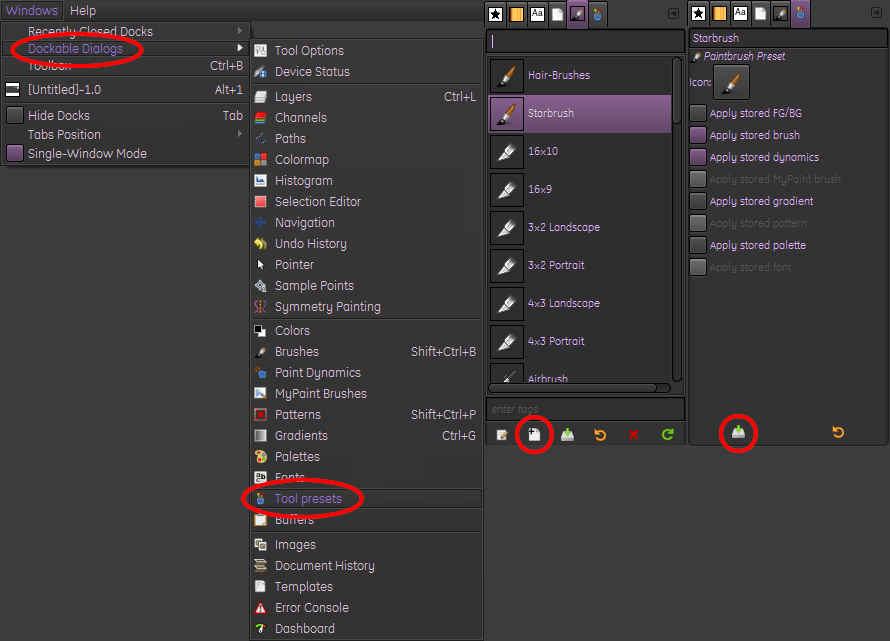
1. Select the brush you want to modify.
2. Change its dynamics and dynamic options.
3. Open tool presets. Windows/dockable dialogs/Tool presets
4. Create a new tool preset.
5. Select what you wish to save, dynamics, fg/bg, gradient and palette can be saved with brush.
6. Click "save the active tool.....button"

Image


Top
 Post subject: Re: Tutorial Question
PostPosted: Tue Oct 30, 2018 1:48 pm  (#10) 
Offline
GimpChat Member

Joined: Sep 20, 2016
Posts: 293
Nidhogg wrote:
Did you try this? Not embedded in the brush, but technically same thing.
And lot faster if PS hasn't changed for the better from what I remember.

The point of my post was to explain the workflow of the video to the OP.
Understanding that a PS brush can have a behaviour tied to it, is essential when trying to imitate the technique.

I recently downloaded a set of PS brushes and they made barely any sense without the Brush Dynamic which of course got lost in Gimp.

Most of the techniques in the video can be replicated in Gimp, but a custom brush is seperate from a Brush Dynamic.
So if you wanted to share a certain brusheffect, you'd have to upload more than just the brush (be it a Dynamic, or as you showed a Tool Preset).

Whether Gimp does things better or worse than PS is none of my concern. These are merely tools.


Top
 Post subject: Re: Tutorial Question
PostPosted: Tue Oct 30, 2018 4:36 pm  (#11) 
Offline
GimpChat Member
User avatar

Joined: Apr 27, 2010
Posts: 1506
Location: Sweden
@Konstantin

The GIMP brush does not embed the dynamic as far as I know, that is correct - from your original wording it sounded (to me) like you meant GIMP did not support any brush dynamics, which was what I was objecting to. So fair enough, from the perspective of wanting to reproduce a PS video exactly, that will indeed require a different work flow in GIMP.
.
Griatch

_________________


Top
Post new topic Reply to topic  [ 11 posts ] 

All times are UTC - 5 hours [ DST ]


* Login  


Powered by phpBB3 © phpBB Group