It is currently Thu Jun 25, 2026 7:58 pm


All times are UTC - 5 hours [ DST ]


Post new topic Reply to topic  [ 8 posts ] 
Author Message
 Post subject: filter "map / spinning according to a map"
PostPosted: Fri Dec 28, 2018 9:41 am  (#1) 
Offline
GimpChat Member

Joined: Apr 09, 2018
Posts: 1888
Location: France
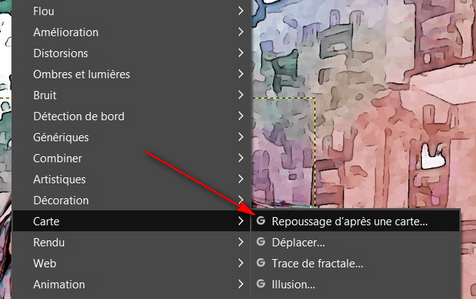
This filter:
Image

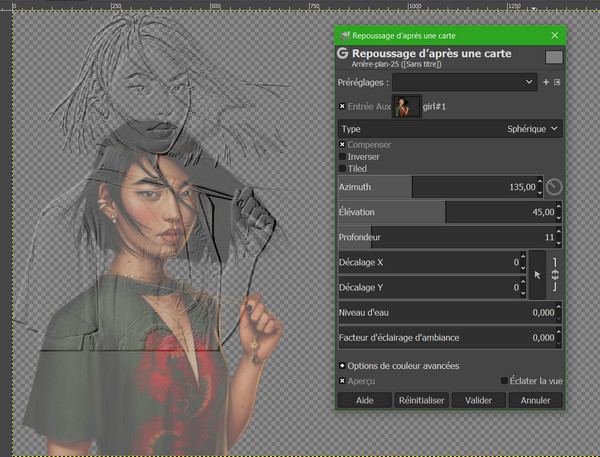
The embossed object is not above the original object.
Image
how to set so that it is automatically in the same position as the initial object, because too long to move pixel by pixel with the cursor "Offset Y"? :(

_________________
Les parfums, les couleurs et les sons se répondent.Baudelaire (Les fleurs du mal)
2.10.36/(Samj) Gimp 2.10.38 OS Windows 10 Home 64 bits


Share on Facebook Share on Twitter Share on Orkut Share on Digg Share on MySpace Share on Delicious Share on Technorati
Top
 Post subject: Re: filter "map / spinning according to a map"
PostPosted: Fri Dec 28, 2018 10:05 am  (#2) 
Offline
GimpChat Member
User avatar

Joined: May 10, 2013
Posts: 1430
Location: FInland
Works okay for me.
Did you try to reset (reinitialiser) and select the aux input (Entrée Aux) again?


Top
 Post subject: Re: filter "map / spinning according to a map"
PostPosted: Fri Dec 28, 2018 10:25 am  (#3) 
Offline
GimpChat Member

Joined: Apr 09, 2018
Posts: 1888
Location: France
Nidhogg wrote:
Works okay for me.
Did you try to reset (reinitialiser) and select the aux input (Entrée Aux) again?


Nidhogg Image

After reset,it's the same.

_________________
Les parfums, les couleurs et les sons se répondent.Baudelaire (Les fleurs du mal)
2.10.36/(Samj) Gimp 2.10.38 OS Windows 10 Home 64 bits


Top
 Post subject: Re: filter "map / spinning according to a map"
PostPosted: Fri Dec 28, 2018 10:44 am  (#4) 
Offline
GimpChat Member
User avatar

Joined: Sep 27, 2016
Posts: 345
Location: Germany, BW
Do you have a selection active?
This is what I come up with when there is a selection active.
Go to selection/ none ... and it works … at least for me.

_________________
Regards
nelo

(Gimp 2.10 on Linux Mint MATE 20.1)


Top
 Post subject: Re: filter "map / spinning according to a map"
PostPosted: Fri Dec 28, 2018 10:54 am  (#5) 
Offline
GimpChat Member

Joined: Apr 09, 2018
Posts: 1888
Location: France
nelo Image
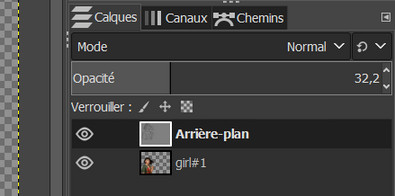
no selection and just 2 layers
Image

_________________
Les parfums, les couleurs et les sons se répondent.Baudelaire (Les fleurs du mal)
2.10.36/(Samj) Gimp 2.10.38 OS Windows 10 Home 64 bits


Top
 Post subject: Re: filter "map / spinning according to a map"
PostPosted: Fri Dec 28, 2018 11:42 am  (#6) 
Offline
GimpChat Member

Joined: Mar 04, 2011
Posts: 2604
level_0 wrote:
how to set so that it is automatically in the same position as the initial object, because too long to move pixel by pixel with the cursor "Offset Y"? :(


The offset is because the layer (or a selection)used as the bump map is a different size to the layer that is bump mapped.

example - two layers the X for the bump map smaller than the canvas

Image

Apply a bump map and the X is set top-left-corner (offset X / Y = 0)

Image

To keep it in position:

Either apply an offset (which you do not want to do ;) )

or more usually resize the bump map layer to the same size as the bumped layer.

Image


Top
 Post subject: Re: filter "map / spinning according to a map"
PostPosted: Fri Dec 28, 2018 12:18 pm  (#7) 
Offline
GimpChat Member
User avatar

Joined: Nov 28, 2018
Posts: 41
Location: Brazil
Go to Layer > Layer to image size and apply it in both layers (the bumpmap layer and the layer receiving the bumpmap).
This should fix the problem; As rich2005 said, the offset is caused because the filters take input from the individual layers and not the whole image.


Top
 Post subject: Re: filter "map / spinning according to a map"
PostPosted: Fri Dec 28, 2018 1:07 pm  (#8) 
Offline
GimpChat Member

Joined: Apr 09, 2018
Posts: 1888
Location: France
rich2005 Image and Dionisio Image

that's it :bigthup :bigthup :bigthup :bigthup

_________________
Les parfums, les couleurs et les sons se répondent.Baudelaire (Les fleurs du mal)
2.10.36/(Samj) Gimp 2.10.38 OS Windows 10 Home 64 bits


Top
Post new topic Reply to topic  [ 8 posts ] 

All times are UTC - 5 hours [ DST ]


* Login  


Powered by phpBB3 © phpBB Group