It is currently Wed Oct 14, 2026 2:37 pm


All times are UTC - 5 hours [ DST ]


Post new topic Reply to topic  [ 77 posts ]  Go to page Previous  1, 2, 3, 4
Author Message
 Post subject: Re: How do you make a bevel without a script ?
PostPosted: Tue Jan 22, 2013 7:34 pm  (#61) 
Offline
GimpChat Member
User avatar

Joined: Jul 17, 2012
Posts: 2769
no Akros, we are using the Emboss filter, no need to download anything new, as its already there

Filters -> Distorts -> Emboss


Top
 Post subject: Re: How do you make a bevel without a script ?
PostPosted: Tue Jan 22, 2013 7:53 pm  (#62) 
Offline
GimpChat Member
User avatar

Joined: Jan 10, 2013
Posts: 863
:yes
Image :hi5

_________________
bbbbbbbbbbbImage
bbbbbbbbbbb Be patient, English is not my language.


Top
 Post subject: Re: How do you make a bevel without a script ?
PostPosted: Tue Jan 22, 2013 7:57 pm  (#63) 
Offline
GimpChat Member
User avatar

Joined: Jul 17, 2012
Posts: 2769
looks awesome Akros ! :bigthup


Top
 Post subject: Re: How do you make a bevel without a script ?
PostPosted: Tue Jan 22, 2013 7:58 pm  (#64) 
Offline
GimpChat Member
User avatar

Joined: Apr 08, 2010
Posts: 5420
Location: Northwest Ohio
THat turned out beautiful, Akros!


Top
 Post subject: Re: How do you make a bevel without a script ?
PostPosted: Tue Jan 22, 2013 8:01 pm  (#65) 
Offline
GimpChat Member
User avatar

Joined: Apr 07, 2010
Posts: 14182
Woo hoo, I knew you could do it :bigthup . great. :clap

_________________
Image


Top
 Post subject: Re: How do you make a bevel without a script ?
PostPosted: Tue Jan 22, 2013 8:20 pm  (#66) 
Offline
GimpChat Member
User avatar

Joined: Apr 08, 2010
Posts: 5420
Location: Northwest Ohio
tried it out...not as snazzy as I wanted, but I managed to get it on the first try, thanks to reading all the other's efforts and the helpful hints.

Image


Top
 Post subject: Re: How do you make a bevel without a script ?
PostPosted: Tue Jan 22, 2013 8:57 pm  (#67) 
Offline
GimpChat Member
User avatar

Joined: Jan 10, 2013
Posts: 863
I'm liking the results I'm seeing with this technique!
Image
Very good!
2-ton this image reminds me a key!

:otb :seeya :nite :zzz

_________________
bbbbbbbbbbbImage
bbbbbbbbbbb Be patient, English is not my language.


Top
 Post subject: Re: How do you make a bevel without a script ?
PostPosted: Wed Jan 23, 2013 5:02 am  (#68) 
Offline
Script Coder

Joined: Apr 10, 2011
Posts: 532
Incidentally, btw, this is (pretty much) the same method that my old Selection Bevel python script uses. The script is available on the plugin repository, and it works ok - it has some slight bugs, like crashing if you try to do a 1px wide bevel. I've been meaning to rewrite it for a long time, but I can't seem to find the time to do so...


Top
 Post subject: Re: How do you make a bevel without a script ?
PostPosted: Thu Jan 31, 2013 6:47 am  (#69) 
Offline
GimpChat Member
User avatar

Joined: Aug 30, 2012
Posts: 2174
I have been playing around with the tutorial created by Esper from DD instructions, you can find it here.

So what I basically tried is this,

I created the bump map layer with the feathered text on it.
Then created a new layer which contained a texture, in this case a copper metal effect, then made sure this layer was selected.
I used the filter>Light and shadow>Lighting effects and set the bump map tab to the bump map image already created. I then adjusted the light settings so I have one directional white light coming from the top left and a red point light coming from the middle right of image.
Finally used the original text layer to create a layer mask for the textured layer.

Image

Just tried another with amarble texture and a more intense blue light

Image

I am pleased with the results and with the ability to adjust the light settings it does give a lot of freedom in the design.

_________________
Image


Top
 Post subject: Re: How do you make a bevel without a script ?
PostPosted: Thu Jan 31, 2013 7:04 am  (#70) 
Offline
GimpChat Member
User avatar

Joined: Apr 07, 2010
Posts: 14182
That is very cool he4rty. I must give that a try. nice job.

_________________
Image


Top
 Post subject: Re: How do you make a bevel without a script ?
PostPosted: Thu Jan 31, 2013 8:18 am  (#71) 
Offline
GimpChat Member
User avatar

Joined: Jul 17, 2012
Posts: 2769
very nice he4rty

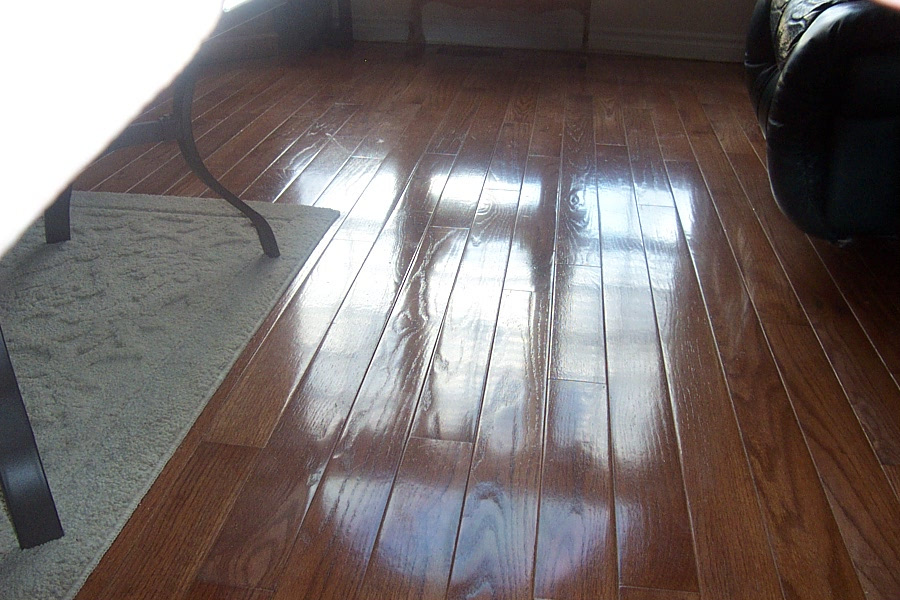
i think the wood is a bit too shiny to be believable but apart from that its great

the marble is cool too
admired that texture already on your chess piece


Top
 Post subject: Re: How do you make a bevel without a script ?
PostPosted: Thu Jan 31, 2013 8:33 am  (#72) 
Offline
GimpChat Member
User avatar

Joined: Apr 07, 2010
Posts: 14182
I tend to disagree on whether the wood is believable. I just took a pic of my hardwood floor and it can be very shiny. :yes

Image

_________________
Image


Top
 Post subject: Re: How do you make a bevel without a script ?
PostPosted: Thu Jan 31, 2013 8:36 am  (#73) 
Offline
GimpChat Member
User avatar

Joined: Aug 30, 2012
Posts: 2174
The first image is actually copper not wood, so here is a wooden one for you all.

Image

_________________
Image


Top
 Post subject: Re: How do you make a bevel without a script ?
PostPosted: Thu Jan 31, 2013 8:37 am  (#74) 
Offline
GimpChat Member
User avatar

Joined: Apr 07, 2010
Posts: 14182
cool, I love it

_________________
Image


Top
 Post subject: Re: How do you make a bevel without a script ?
PostPosted: Thu Jan 31, 2013 8:47 am  (#75) 
Offline
GimpChat Member
User avatar

Joined: Jul 17, 2012
Posts: 2769
oh im stupid, you even wrote copper, not wood, sorry he4rty


Top
 Post subject: Re: How do you make a bevel without a script ?
PostPosted: Thu Jan 31, 2013 4:43 pm  (#76) 
Offline
GimpChat Member
User avatar

Joined: Jan 10, 2013
Posts: 863
he4rty wrote:
I have been playing around with the tutorial created by Esper from DD instructions, you can find it here.

So what I basically tried is this,

I created the bump map layer with the feathered text on it.
Then created a new layer which contained a texture, in this case a copper metal effect, then made sure this layer was selected.
I used the filter>Light and shadow>Lighting effects and set the bump map tab to the bump map image already created. I then adjusted the light settings so I have one directional white light coming from the top left and a red point light coming from the middle right of image.
Finally used the original text layer to create a layer mask for the textured layer.

I am pleased with the results and with the ability to adjust the light settings it does give a lot of freedom in the design.


Very good he4rty!

I would like try this! The results was interessants!

_________________
bbbbbbbbbbbImage
bbbbbbbbbbb Be patient, English is not my language.


Top
 Post subject: Re: How do you make a bevel without a script ?
PostPosted: Fri Feb 01, 2013 6:29 am  (#77) 
Offline
GimpChat Member
User avatar

Joined: Aug 16, 2012
Posts: 4271
Location: Göteborg, Sweden
he4rty: wow, that's really nice looking copper! and i'm fussy about metals. i liked the wood too, but the copper was lovely.

_________________


Top
Post new topic Reply to topic  [ 77 posts ]  Go to page Previous  1, 2, 3, 4

All times are UTC - 5 hours [ DST ]


* Login  


Powered by phpBB3 © phpBB Group