It is currently Thu Jun 25, 2026 5:24 am


All times are UTC - 5 hours [ DST ]


Post new topic Reply to topic  [ 4 posts ] 
Author Message
 Post subject: palettes
PostPosted: Tue May 14, 2019 5:42 am  (#1) 
Offline
GimpChat Member

Joined: Apr 09, 2018
Posts: 1888
Location: France
:wvy
On GC, there are currently 2 topics regarding palettes
Until now I use those installed by default in Gimp, or I make temporary from the colors of an image, but I play with Gimp and I understand that a professional needs very nuanced palettes.

What are your criteria of choice?

_________________
Les parfums, les couleurs et les sons se répondent.Baudelaire (Les fleurs du mal)
2.10.36/(Samj) Gimp 2.10.38 OS Windows 10 Home 64 bits


Share on Facebook Share on Twitter Share on Orkut Share on Digg Share on MySpace Share on Delicious Share on Technorati
Top
 Post subject: Re: palettes
PostPosted: Tue May 14, 2019 6:44 am  (#2) 
Offline
Global Moderator
User avatar

Joined: Apr 01, 2012
Posts: 8394
Location: On the other side of your screen
Depends what you are using them for. eg. Painting (as in a house), artistry painting, comics, colourising photos. I am sure there are many others.
I have made a few for skin tones, eye and hair for colourising. I did these from coloured photos so had a proper reference.
The ones I did recently were house paint colours and did these from paint swatches.
I actually have more use for gradients but like to make resources occaisionally.

_________________
Image
Free Fun Photo Editing & resources
Poems from the Lord
Gimp Newby
Gimp version 3.2.0 and GMIC-Qt 3.7.5 OS :- Windows 10 Home 64


Top
 Post subject: Re: palettes
PostPosted: Tue May 14, 2019 8:05 am  (#3) 
Offline
GimpChat Member

Joined: Apr 09, 2018
Posts: 1888
Location: France
sallyanne wrote:
I actually have more use for gradients but like to make resources occaisionally.


Thank you sallyanne for your answer.
I saw that you made a gradient in this subject:
http://gimpchat.com/viewtopic.php?f=12&t=17421#p239315
and I wondered what benefit you found using a gradient rather than those colors.

_________________
Les parfums, les couleurs et les sons se répondent.Baudelaire (Les fleurs du mal)
2.10.36/(Samj) Gimp 2.10.38 OS Windows 10 Home 64 bits


Top
 Post subject: Re: palettes
PostPosted: Thu May 16, 2019 5:59 am  (#4) 
Offline
Global Moderator
User avatar

Joined: Apr 01, 2012
Posts: 8394
Location: On the other side of your screen
Palettes are more beneficial to painters. Gradients can colour things more quickly and depending on the gradients you can do more or less colours at a time.
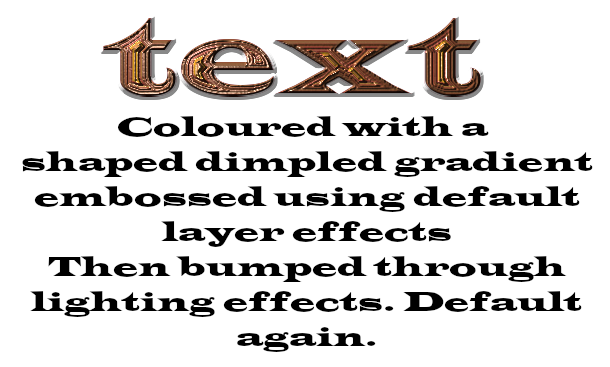
I use the more for background or for text I have found that using a shape - (shaped dimpled) then embossing or bumping it will give many of the effects that most will do.
Image

_________________
Image
Free Fun Photo Editing & resources
Poems from the Lord
Gimp Newby
Gimp version 3.2.0 and GMIC-Qt 3.7.5 OS :- Windows 10 Home 64


Top
Post new topic Reply to topic  [ 4 posts ] 

All times are UTC - 5 hours [ DST ]


* Login  


Powered by phpBB3 © phpBB Group