It is currently Sat Aug 15, 2026 5:31 pm


All times are UTC - 5 hours [ DST ]


Post new topic Reply to topic  [ 8 posts ] 
Author Message
 Post subject: Eye coloring
PostPosted: Thu Jun 16, 2011 8:55 am  (#1) 
Offline
GimpChat Member
User avatar

Joined: Apr 30, 2010
Posts: 1937
Location: Missouri
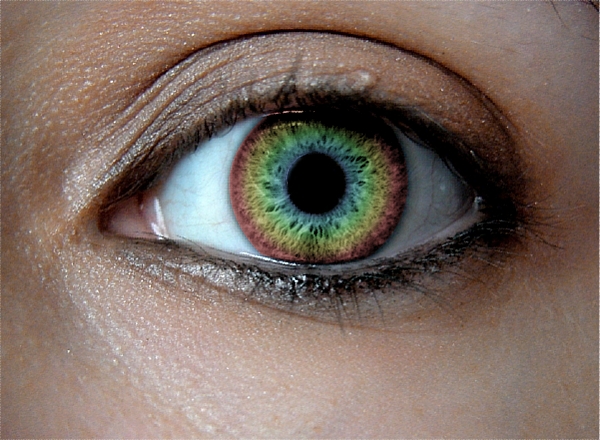
Recoloring eyes seems to be a favorite thing to do for a lot of people. I wonder how many ways there are to do it, it seems like everybody has their own way. It seems like there are several hundred ways. Personally, I like to make a new layer, zoom in really close so the iris fills the screen, take a fuzzy edge round brush and color the iris then set the mode to overlay or sometimes hard light. I've had people tell me that's dead wrong but I don't think there is a right or wrong way, just what works and what doesn't.

_________________
Image
The last time I kept an open mind,
my brain fell out and the dog grabbed it.
Now it's full of dirt, toothmarks, and dog slobber.
No more open minds or dogs for me.


Share on Facebook Share on Twitter Share on Orkut Share on Digg Share on MySpace Share on Delicious Share on Technorati
Top
 Post subject: Re: Eye coloring
PostPosted: Thu Jun 16, 2011 10:16 am  (#2) 
Offline
GimpChat Member
User avatar

Joined: Apr 07, 2010
Posts: 14182
You are very correct GMS9810. Whatever works is the right way. I also enlarge the selection so I can get a good up close of what has to be done..... I haven't tried the fuzzy brush yet tho. I will try that the next time...

_________________
Image


Top
 Post subject: Re: Eye coloring
PostPosted: Thu Jun 16, 2011 10:18 am  (#3) 
Offline
GimpChat Member
User avatar

Joined: Apr 30, 2010
Posts: 1937
Location: Missouri
It seems to me that the fuzzy round brush gives the best results. A hard edge never looks good in cases like that.

_________________
Image
The last time I kept an open mind,
my brain fell out and the dog grabbed it.
Now it's full of dirt, toothmarks, and dog slobber.
No more open minds or dogs for me.


Top
 Post subject: Re: Eye coloring
PostPosted: Thu Jun 16, 2011 11:42 am  (#4) 
Offline
GimpChat Member

Joined: Jun 07, 2011
Posts: 46
Another way I found useful was to take and Alpha To Selection your image and click the Ellipse Select Tool. Then click Feather Edges and of course make a selection around the eye. So with that being done I clicked Select, Invert and then go to Colors, Color Balance. There you should be able to change the eye color.

As long as you Feather the Edges around the eye and the selection is precise it turns out pretty good too. :) :bigthup

Oh yeah I almost forgot, before you color in the selection make a new layer then change the color balance. That way you can erase the access if needed in the new eye color layer. Sorry about that.


Top
 Post subject: Re: Eye coloring
PostPosted: Thu Jun 16, 2011 12:03 pm  (#5) 
Offline
GimpChat Member
User avatar

Joined: Apr 07, 2010
Posts: 14182
Very good wyatt. I like the feathering idea....

_________________
Image


Top
 Post subject: Re: Eye coloring
PostPosted: Sun Jun 19, 2011 12:58 am  (#6) 
Offline
GimpChat Member
User avatar

Joined: Feb 13, 2011
Posts: 83
Location: It's Cold in Wisco!
i found a good way to do it and with changing the color of really anything (hair color, skin color, etc.). Duplicate layer and on the bottom go to colorize and find a good color (go hue/saturation if you want to brighten the color more.). Then use eraser on the top layer with a fuzzy brush of course and erase most of the iris and then merge down.

I made one a while ago, not using this method but just felt like sharing it

Image

_________________
Image


Top
 Post subject: Re: Eye coloring
PostPosted: Sun Jun 19, 2011 8:23 am  (#7) 
Offline
Global Moderator
User avatar

Joined: May 16, 2010
Posts: 16158
Any way you do it the best results come from just taking your time and getting up close as possible to the edited pixels. :)

_________________
Image


Top
 Post subject: Re: Eye coloring
PostPosted: Sun Jun 19, 2011 4:36 pm  (#8) 
Offline
GimpChat Member
User avatar

Joined: Apr 30, 2010
Posts: 1937
Location: Missouri
Rod wrote:
Any way you do it the best results come from just taking your time and getting up close as possible to the edited pixels. :)
Yes i agree completely. the more time you take and more care you use the better the result. That applies to a lot of things.

_________________
Image
The last time I kept an open mind,
my brain fell out and the dog grabbed it.
Now it's full of dirt, toothmarks, and dog slobber.
No more open minds or dogs for me.


Top
Post new topic Reply to topic  [ 8 posts ] 

All times are UTC - 5 hours [ DST ]


* Login  


Powered by phpBB3 © phpBB Group