It is currently Sat Jun 13, 2026 7:15 am


All times are UTC - 5 hours [ DST ]


Post new topic Reply to topic  [ 4 posts ] 
Author Message
 Post subject: How to configure CMYK Profiles for A3 printing (Profiles not appearing
PostPosted: Sat Oct 18, 2025 9:02 pm  (#1) 
Offline
GimpChat Member

Joined: Oct 11, 2025
Posts: 12
Hello everyone!
I have a question about how to correctly prepare a file for graphic printing in GIMP and would really appreciate it if you could guide me.
My Scenario: I originally created a design for the web, sized 1024px x 1024px at 72 ppi (dpi).
My Need: The client has now asked me to change this work so it can be printed in A3 format (297mm x 420mm).
What I have done so far:
I created a new canvas (a new file) in GIMP with the A3 size (297mm x 420mm).
I changed the X and Y resolution to 300 ppi (dpi), which is the standard for printing.
My Problem (The CMYK issue): I need to configure the CMYK color profile for the client, but I'm unable to.
When I go to Edit > Preferences > Color Management, all the profile items ("Working RGB Profile," "CMYK Profile," etc.) are set to "None".
When I click the arrow to try and choose a profile, the only option that appears is "Select color profile from disk...".
I thought GIMP would come with standard profiles, but I can't find any.
My Questions:
Is this normal? I'm using GIMP 3.0.6.
I am using Zorin OS 18 (which is based on Ubuntu 24.04 LTS).
How do I solve this CMYK profile issue?
Do I need to download and install a specific file?

Thanks for the help!


Share on Facebook Share on Twitter Share on Orkut Share on Digg Share on MySpace Share on Delicious Share on Technorati
Top
 Post subject: Re: How to configure CMYK Profiles for A3 printing (Profiles not appea
PostPosted: Sat Oct 18, 2025 9:19 pm  (#2) 
Offline
Global Moderator
User avatar

Joined: Apr 01, 2012
Posts: 8364
Location: On the other side of your screen
Maybe change the mode of your picture to Indexed?
Image - mode - index.
Otherwise if you have the plugin GMIC it may be able to help you with CMYK
As for profiles - in gimp you have to make them yourself I think - I do not use them so do not have any

_________________
Image
Free Fun Photo Editing & resources
Poems from the Lord
Gimp Newby
Gimp version 3.2.0 and GMIC-Qt 3.7.5 OS :- Windows 10 Home 64


Top
 Post subject: Re: How to configure CMYK Profiles for A3 printing (Profiles not appea
PostPosted: Sun Oct 19, 2025 3:08 am  (#3) 
Offline
GimpChat Member

Joined: Mar 04, 2011
Posts: 2603
dunham wrote:
Hello everyone!
....snip.....
I thought GIMP would come with standard profiles, but I can't find any.
My Questions:
Is this normal? I'm using GIMP 3.0.6.
I am using Zorin OS 18 (which is based on Ubuntu 24.04 LTS).
How do I solve this CMYK profile issue?
Do I need to download and install a specific file?


No CMYK profile is normal. Gimp is a RGB editor and the only built-in profile is the Gimp sRGB.icc

You do need to ask the client which profile to use, you can often find here: https://www.color.org/registry/index.xalter otherwise for special purposes the printing co provides.

Gimp can export a CMYK file in certain formats - JPEG / TIFF / PSD

In pictures, set up a "soft-proofing" profile

Attachment:
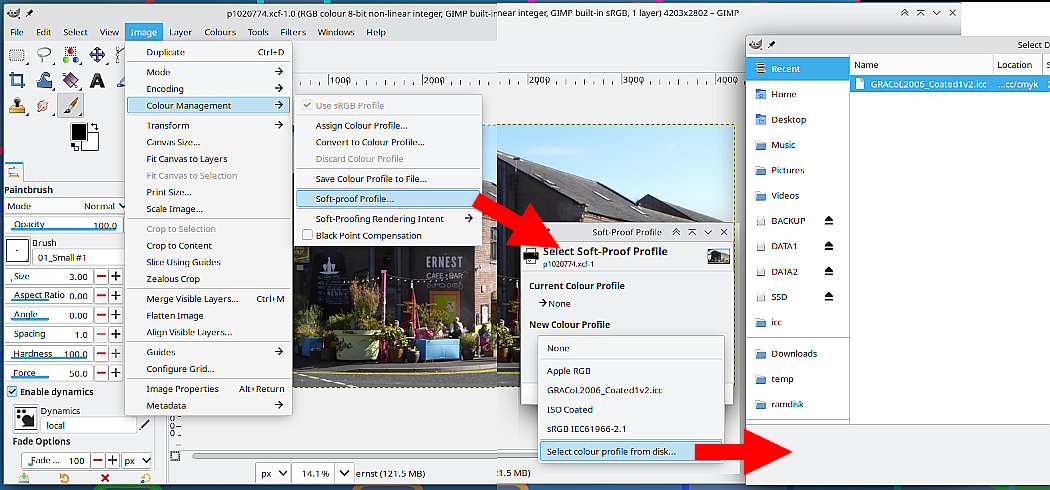
01-profile.jpg
01-profile.jpg [ 132.6 KiB | Viewed 2538 times ]


For printing enable the cmyk option.

Attachment:
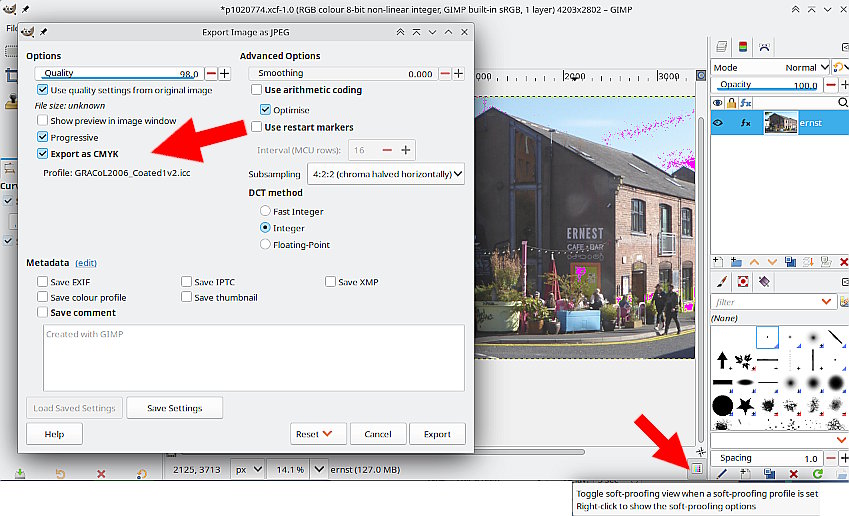
02-profile.jpg
02-profile.jpg [ 106.48 KiB | Viewed 2538 times ]


Just a comment on Gimp 3.0.6 A nice little addition where you can toggle softproofing on and off. With soft proofing on - lots of magenta - too many out of gamut bright colours, your design is not going to print very well.

Alternative. Krita can convert / work in CMYK and comes with some icc profiles.


Top
 Post subject: Re: How to configure CMYK Profiles for A3 printing (Profiles not appea
PostPosted: Sun Oct 19, 2025 9:53 am  (#4) 
Offline
GimpChat Member

Joined: Oct 11, 2025
Posts: 12
Hello
Okay, I understand perfectly.
Thank you for the lesson.


Top
Post new topic Reply to topic  [ 4 posts ] 

All times are UTC - 5 hours [ DST ]


* Login  


Powered by phpBB3 © phpBB Group
