dunham wrote:
Hello everyone!
....snip.....
I thought GIMP would come with standard profiles, but I can't find any.
My Questions:
Is this normal? I'm using GIMP 3.0.6.
I am using Zorin OS 18 (which is based on Ubuntu 24.04 LTS).
How do I solve this CMYK profile issue?
Do I need to download and install a specific file?
No CMYK profile is normal. Gimp is a RGB editor and the only built-in profile is the Gimp sRGB.icc
You do need to ask the client which profile to use, you can often find here:
https://www.color.org/registry/index.xalter otherwise for special purposes the printing co provides.
Gimp can export a CMYK file in certain formats - JPEG / TIFF / PSD
In pictures, set up a "soft-proofing" profile
Attachment:
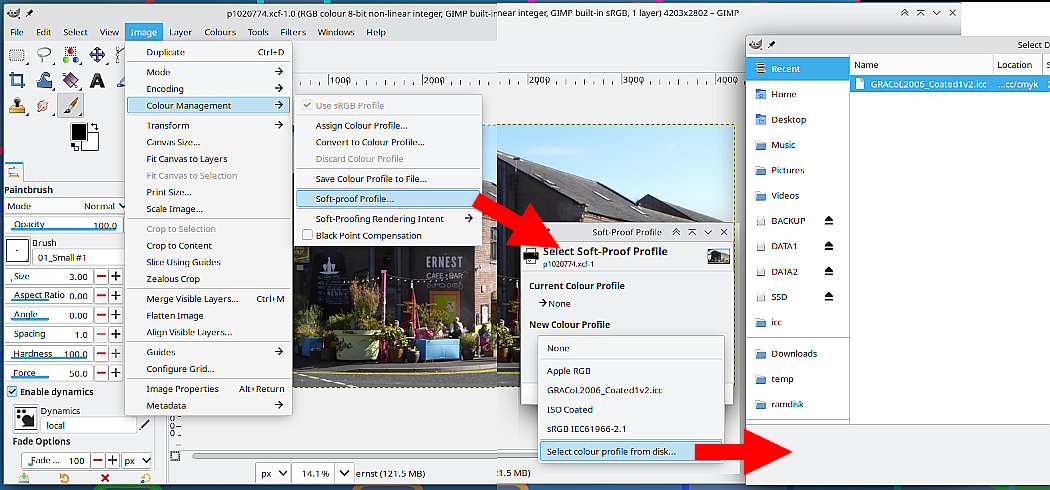 01-profile.jpg [ 132.6 KiB | Viewed 4596 times ]
For printing enable the cmyk option.
Attachment:
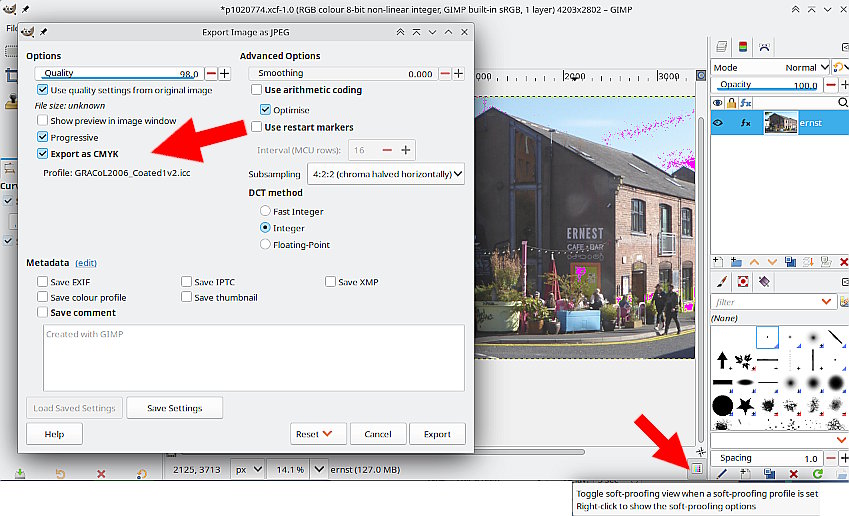 02-profile.jpg [ 106.48 KiB | Viewed 4596 times ]
Just a comment on Gimp 3.0.6 A nice little addition where you can toggle softproofing on and off. With soft proofing on - lots of magenta - too many out of gamut bright colours, your design is not going to print very well.
Alternative. Krita can convert / work in CMYK and comes with some icc profiles.
 Login
Login Register
 Tweets
 FAQ
FAQ Advanced Search


