You've probably seen what are called "curly quotes" and "smart quotes" in your word processors. They are technically named,
typographic quotes. What you may not know is that they are mapped quotes in fonts that are available using Unicode or ANSI codes. They can be used not only in word processors, they can also be used in GIMP.
The keyboard quotes that you simply type are not usually pretty like the typographic quotes.
In most fonts they are present and can be accessed using Unicode and ANSI codes.
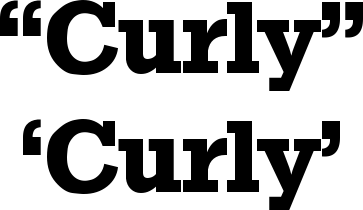
Unicode is available to Linux users and ANSI codes are available to Windows users. I've used a larger font because the regular size in here doesn't show them well.
These are examples of the double and single quotes:
"double keyboard," “double typographic.”
'single keyboard,' ‘single typographic.’Accessing the quotes is done this way.
Windows users use the Alt + Numpad combo. Hold down the Alt key and type in the numbers on the number pad (the numbers across the top of the keyboard won't work). Make sure the NumLock key is on.
Left double quotes: Alt + 0147
Right double quotes: Alt + 0148
Left single quote: Alt + 0145
Right single quote: Alt + 0146
Linux users must use Unicode. That is accessed by typing Ctrl + Shift + U and results in a small, underlined u. Type the unicode numbers/letters and press Enter.
Left double quotes: 201c
Right double quotes: 201d
Left single quote: 2018
Right single quote: 2019
These were done in GIMP.
Perhaps of possible additional interest, here are some links.
Here is a link to some of the Unicode and ANSI codes.
http://alanwood.net/demos/ansi.htmlThis is a link to the ITC Zapf Dingbats that have more mapped characters. I'm not sure if you have to have the ITC Zapf Dinbats to use the codes. The codes work with other fonts for me.
http://en.wikipedia.org/wiki/Miscellaneous_Symbols Login
Login Register
 Tweets
 FAQ
FAQ Advanced Search





