It is currently Wed Aug 19, 2026 5:18 pm


All times are UTC - 5 hours [ DST ]


Post new topic Reply to topic  [ 40 posts ]  Go to page 1, 2  Next
Author Message
 Post subject: Gauntlet Throwdown
PostPosted: Mon May 21, 2012 6:28 am  (#1) 
Offline
GimpChat Member
User avatar

Joined: Aug 24, 2011
Posts: 1785
Location: Dallas, TX
This might actually be something that could come up once a month or so as a sort of contest. Folks could submit something and others could vote on it and decide which one is the most appealing as something to accept as a challenge or something they would like to know how to do.

Here's the thing. I've been Gimping for about a year now and not trying to sound egocentric, I have acquired at least what I would call Intermediate skills. There are a few things that still elude me such as the image below. For whatever the reason, I just cannot replicate this. There are lots of folks here with skills that far surpass mine and I wish to engage them in this particular challenge. The recent post regarding Rust by wbool63 was most excellent and far surpasses anything I have ever created from scratch. This is the kind of realism I really like to see and learn how to make.

If enough people were interested and took the time, I believe we could immulate anything PS has to offer as far as filters, i.e. Chrome, Glass or Water, or be able to recreate with a respectable degree of realism like the Rust that wbool63 made.

Anyone care to tackle this steel cable? Anyone have another image that they wish they knew how to recreate?


Attachments:
steelcable.jpg
steelcable.jpg [ 15.82 KiB | Viewed 2844 times ]

_________________
Image
Share on Facebook Share on Twitter Share on Orkut Share on Digg Share on MySpace Share on Delicious Share on Technorati
Top
 Post subject: Re: Gauntlet Throwdown
PostPosted: Mon May 21, 2012 8:03 am  (#2) 
Offline
GimpChat Member
User avatar

Joined: Apr 07, 2010
Posts: 14182
This is all I could think of so far Drac. Just made your cable grungy...lol
Image

_________________
Image


Top
 Post subject: Re: Gauntlet Throwdown
PostPosted: Mon May 21, 2012 8:17 am  (#3) 
Offline
GimpChat Member
User avatar

Joined: Aug 24, 2011
Posts: 1785
Location: Dallas, TX
:rofl Yeah, that's about all I can do too. What I really want to know is how to make the cable from scratch.

_________________
Image


Top
 Post subject: Re: Gauntlet Throwdown
PostPosted: Mon May 21, 2012 8:53 am  (#4) 
Offline
GimpChat Member
User avatar

Joined: Apr 30, 2010
Posts: 1937
Location: Missouri
It would be pretty easy in inkscape, but the point is to make it in gimp. I always wished they would integrate the two.

_________________
Image
The last time I kept an open mind,
my brain fell out and the dog grabbed it.
Now it's full of dirt, toothmarks, and dog slobber.
No more open minds or dogs for me.


Top
 Post subject: Re: Gauntlet Throwdown
PostPosted: Mon May 21, 2012 8:57 am  (#5) 
Offline
GimpChat Member
User avatar

Joined: Apr 07, 2010
Posts: 14182
K, Drac. I thought you did make that one, and I just rustified it. lol

_________________
Image


Top
 Post subject: Re: Gauntlet Throwdown
PostPosted: Mon May 21, 2012 12:19 pm  (#6) 
Offline
GimpChat Member
User avatar

Joined: Jan 20, 2012
Posts: 583
I have an idea on how to make that, I just need your metal gradients, a pipe pattern i have, and I have to remember how to make spiraled confetti.....

_________________


"In the face of adversity, there's three things: fly, freeze or fight; We're choosing to fight..."- Guy Boucher, Tampa Bay Lighting Head Coach


Top
 Post subject: Re: Gauntlet Throwdown
PostPosted: Mon May 21, 2012 1:55 pm  (#7) 
Offline
GimpChat Member
User avatar

Joined: Jan 20, 2012
Posts: 583
Alright, I need a few things. Does anyone know of a way to map a line to a sine curve?

_________________


"In the face of adversity, there's three things: fly, freeze or fight; We're choosing to fight..."- Guy Boucher, Tampa Bay Lighting Head Coach


Top
 Post subject: Re: Gauntlet Throwdown
PostPosted: Mon May 21, 2012 2:54 pm  (#8) 
Offline
Script Coder
User avatar

Joined: Oct 25, 2010
Posts: 4812
ZWard117 wrote:
Alright, I need a few things. Does anyone know of a way to map a line to a sine curve?
Filter/Distorts/Curve

Otherwise I can't help notice that the cable is mathematically a set of sines and I have a script to produce these. It will even split them in over/under parts...

_________________
Image


Top
 Post subject: Re: Gauntlet Throwdown
PostPosted: Mon May 21, 2012 2:59 pm  (#9) 
Offline
GimpChat Member
User avatar

Joined: Aug 24, 2011
Posts: 1785
Location: Dallas, TX
ofnuts wrote:
ZWard117 wrote:
Alright, I need a few things. Does anyone know of a way to map a line to a sine curve?
Filter/Distorts/Curve

Otherwise I can't help notice that the cable is mathematically a set of sines and I have a script to produce these. It will even split them in over/under parts...


Gimme have dat, pleeeezzzz!

zward117 - All the metallic gradients are in the zip folder attached to the tutorial I did.

viewtopic.php?f=23&t=4097&p=50500#p50500

_________________
Image


Top
 Post subject: Re: Gauntlet Throwdown
PostPosted: Mon May 21, 2012 3:42 pm  (#10) 
Offline
GimpChat Member
User avatar

Joined: Jan 20, 2012
Posts: 583
I found them. Also, I am almost done with preliminary test of my theory. Currently I used B & P's vector path plugin for the sine waves.

_________________


"In the face of adversity, there's three things: fly, freeze or fight; We're choosing to fight..."- Guy Boucher, Tampa Bay Lighting Head Coach


Top
 Post subject: Re: Gauntlet Throwdown
PostPosted: Mon May 21, 2012 6:04 pm  (#11) 
Offline
GimpChat Member
User avatar

Joined: Jan 20, 2012
Posts: 583
Let me know what you think. Here is first run. Used your gradients and brushed metal looks drac. Than ran some curves from the vector path plugin. Anywho this is what I got so far.


_________________


"In the face of adversity, there's three things: fly, freeze or fight; We're choosing to fight..."- Guy Boucher, Tampa Bay Lighting Head Coach


Top
 Post subject: Re: Gauntlet Throwdown
PostPosted: Mon May 21, 2012 6:11 pm  (#12) 
Offline
GimpChat Member
User avatar

Joined: Apr 07, 2010
Posts: 14182
That is very cool Zward. Nice job.

_________________
Image


Top
 Post subject: Re: Gauntlet Throwdown
PostPosted: Mon May 21, 2012 6:16 pm  (#13) 
Offline
GimpChat Member
User avatar

Joined: Mar 23, 2012
Posts: 7388
Location: Göteborg at last!
Nice going ZWard.


Top
 Post subject: Re: Gauntlet Throwdown
PostPosted: Mon May 21, 2012 6:40 pm  (#14) 
Offline
GimpChat Member
User avatar

Joined: Apr 27, 2010
Posts: 1506
Location: Sweden
This shouldn't be too hard to paint with a normal hard brush? Must it be made by some sort of filter, script or plugin?
.
Griatch

_________________


Top
 Post subject: Re: Gauntlet Throwdown
PostPosted: Mon May 21, 2012 7:25 pm  (#15) 
Offline
GimpChat Member
User avatar

Joined: Sep 24, 2010
Posts: 12833
I tried modifying a rope brush (basically rotating spheres) but I just couldn't coax it to create metallic rope Drac. Oh well. Maybe a guru will create a metal rope brush that can be used for this one. :)

_________________
Lyle

Psalm 109:8

Image


Top
 Post subject: Re: Gauntlet Throwdown
PostPosted: Mon May 21, 2012 9:34 pm  (#16) 
Offline
GimpChat Member
User avatar

Joined: Jan 20, 2012
Posts: 583
To make it metallic and realistic (and the fact that I am a filter guy [lazy filter guy]) it was the only way I could figure it out.

_________________


"In the face of adversity, there's three things: fly, freeze or fight; We're choosing to fight..."- Guy Boucher, Tampa Bay Lighting Head Coach


Top
 Post subject: Re: Gauntlet Throwdown
PostPosted: Mon May 21, 2012 11:22 pm  (#17) 
Offline
Global Moderator
User avatar

Joined: May 16, 2010
Posts: 16164
You really need to create an image of a thread and then copy it 4-6 times and figure out a way to twine them.
I got this far now you twine them. :lol

Image

_________________
Image


Top
 Post subject: Re: Gauntlet Throwdown
PostPosted: Mon May 21, 2012 11:27 pm  (#18) 
Offline
Global Moderator
User avatar

Joined: May 16, 2010
Posts: 16164
Or perhaps you could take part of that cable i made and create a brush (stroke along path)
Here is the xcf if you are interested.

Attachment:
Cable.xcf [1.09 MiB]
Downloaded 167 times


some of the settings for noise
Image

Image

My own gradient creations
Attachment:
SteelCable_RD.ggr [1.06 KiB]
Downloaded 765 times

Attachment:
SteelCable2_RD.ggr [1.06 KiB]
Downloaded 702 times

_________________
Image


Top
 Post subject: Re: Gauntlet Throwdown
PostPosted: Tue May 22, 2012 12:16 am  (#19) 
Offline
Global Moderator
User avatar

Joined: May 16, 2010
Posts: 16164
With Theirs>Pan Bow i got an interesting result at 45 degrees. :)
Image

_________________
Image


Top
 Post subject: Re: Gauntlet Throwdown
PostPosted: Tue May 22, 2012 12:52 am  (#20) 
Offline
Global Moderator
User avatar

Joined: May 16, 2010
Posts: 16164
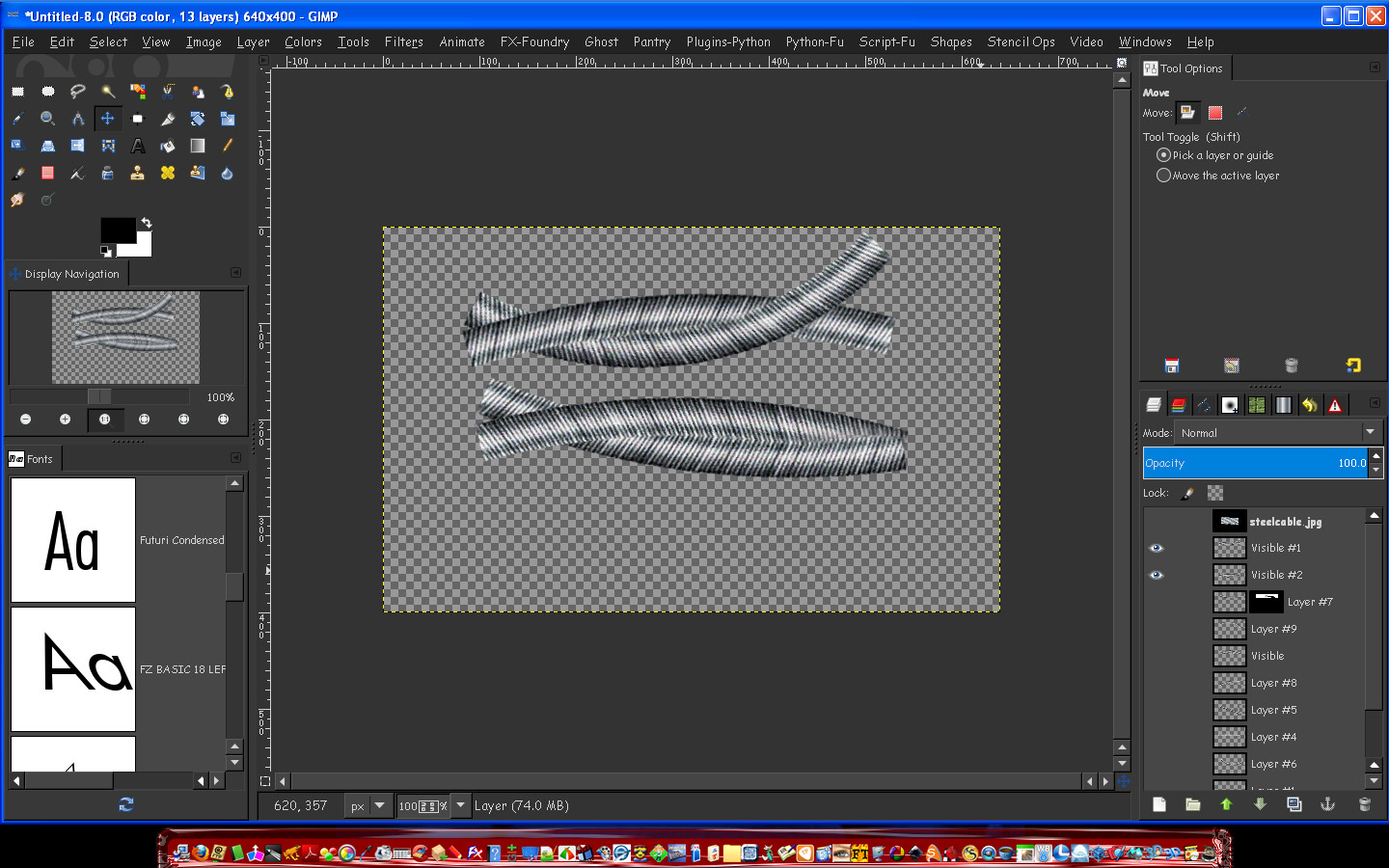
You can see with the below example that Pan 2 Bow could work if the cables were intertwined correctly.
Probably 2 to 3 different type of bends would most likely suffice. :)
And of course adding the layer masks.

Image

The trick is getting the correct polar bends with Pan 2 Bow.
I tried twist and curve bend.I also tried bend between curves.

My next thought is perhaps a pattern fill?
Create 6 curves to match the sine and then fill with a pattern.

I am at any rate getting closer. ;)

_________________
Image


Top
Post new topic Reply to topic  [ 40 posts ]  Go to page 1, 2  Next

All times are UTC - 5 hours [ DST ]


* Login  


Powered by phpBB3 © phpBB Group