It is currently Sat Aug 15, 2026 5:30 pm


All times are UTC - 5 hours [ DST ]


Post new topic Reply to topic  [ 18 posts ] 
Author Message
 Post subject: Inkscape???
PostPosted: Wed Dec 01, 2010 10:56 am  (#1) 
Offline
GimpChat Member

Joined: Oct 28, 2010
Posts: 166
What is it and what can I do with it?

Micki


Share on Facebook Share on Twitter Share on Orkut Share on Digg Share on MySpace Share on Delicious Share on Technorati
Top
 Post subject: Re: Inkscape???
PostPosted: Wed Dec 01, 2010 11:03 am  (#2) 
Offline
Retired Staff
User avatar

Joined: May 22, 2008
Posts: 6946
Location: Somewhere in GIMP
You can read about it and download it here.

It is free open source software aka FOSS.

_________________
Image
World War IV will be fought with sticks and stones. - Albert Einstein


Top
 Post subject: Re: Inkscape???
PostPosted: Wed Dec 01, 2010 11:25 am  (#3) 
Offline
Global Moderator
User avatar

Joined: May 16, 2010
Posts: 16158
Inkscape is probably one of the best SVG (scalable vector art), development tools out there.
Vector can be scaled to any size without image destruction. (It can also be used as math expressions to create images).. like say as a website logo.
Even SVG images can be converted to bitmap and look much clearer.
Here is a crow i created with it. Of course it is converted to PNG format.
Image
You can create real nice Icons with it - i create all my Rocketdock icons with it.
It's basically a really nice packed to the gills paths editor. =)

Downfalls - you can not open EPS files with it yet. I'm sure that will come soon though.
Here is a Halloween thingy in InkScape.
viewtopic.php?f=22&t=557

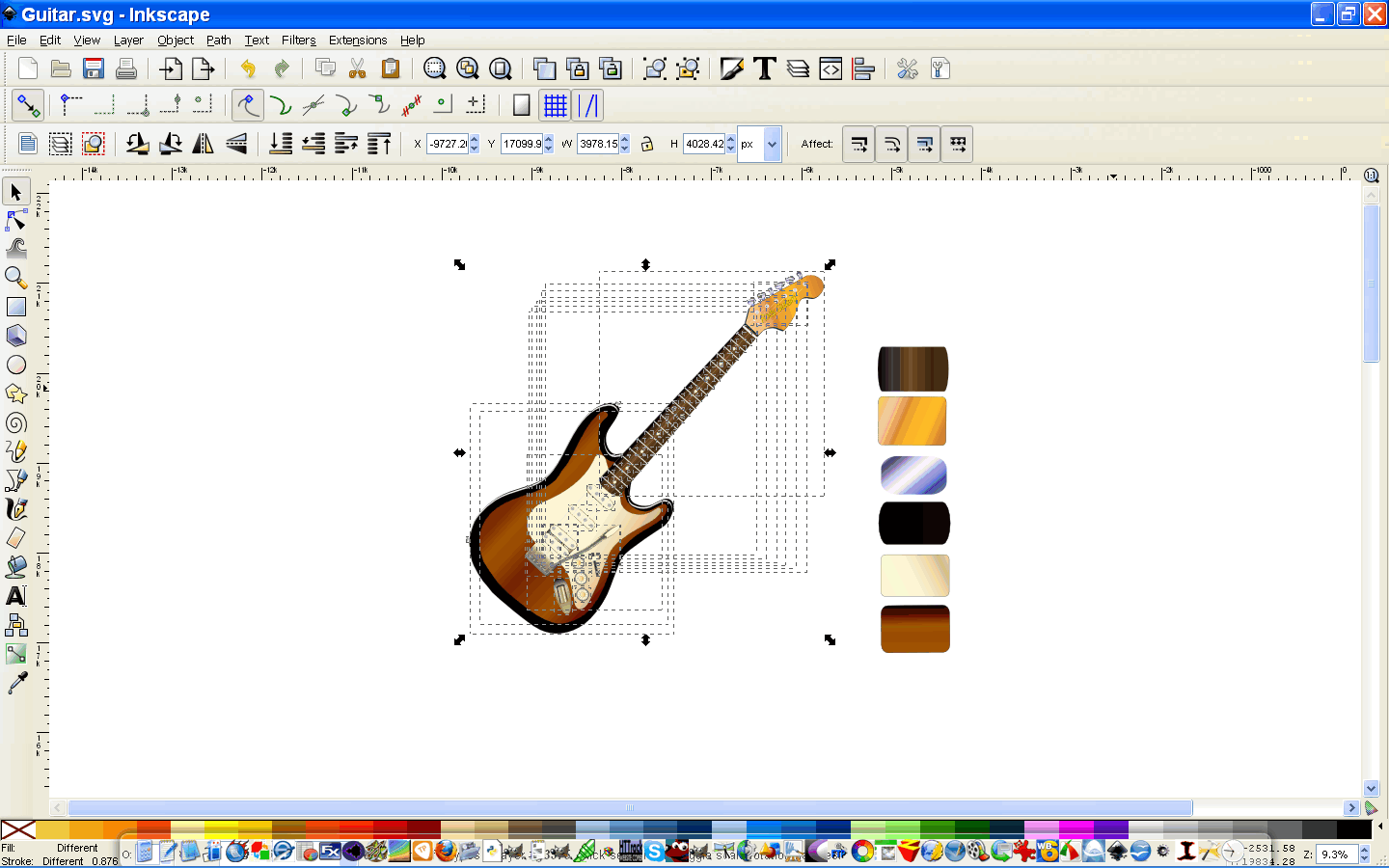
A guitar ..
Image

It's great fun and FREE!
Here are some tutorials you may like..
http://screencasters.heathenx.org/

_________________
Image


Top
 Post subject: Re: Inkscape???
PostPosted: Wed Dec 01, 2010 1:27 pm  (#4) 
Offline
Retired Staff
User avatar

Joined: May 22, 2008
Posts: 6946
Location: Somewhere in GIMP
Thanks for the link to the tutorials. I have a very hard time with Inkscape. Hopefully some of those tutorials are beginner tutorials.

_________________
Image
World War IV will be fought with sticks and stones. - Albert Einstein


Top
 Post subject: Re: Inkscape???
PostPosted: Wed Dec 01, 2010 3:48 pm  (#5) 
Offline
Former Member
User avatar

Joined: Nov 17, 2010
Posts: 618
Location: Rockford, IL
I'm terrible at Inkscape all I can really do in it, is design buttons, and logos lol. When it comes to actually creating objects, or characters I'm probably the worst person to ask about that lol, but I got the basics down at least.


Top
 Post subject: Re: Inkscape???
PostPosted: Wed Dec 01, 2010 7:44 pm  (#6) 
Offline
GimpChat Member
User avatar

Joined: Oct 19, 2010
Posts: 376
Location: North Central Ohio, USA
I found out a very cool way to use Inkscape. I had a piece of scanned lineart that I wanted enlarged to incorporate into a personal wallpaper. My best fiddling with scaling naturally pixellated the art to the point of uselessness. Then it hit me that I could clean up the lineart in Gimp and save it as a bitmap, then import the bitmap into Inkscape and convert it to paths. Once the art was paths, I could scale it however large I wanted and it would remain smooth, and then be exported back as a bitmap of the size I wanted for additional editing into the final image.

The hitch in the process is that the Trace Bitmap option in Inkscape generally produces paths that seem illogical and overly complicated in the way they overlap to produce the image. This is probably why people who regularly vectorize bitmaps suggest a different method ;) . Also, after completing the trace, I would sometimes get the whole image as one path with a mega-ton of points but the points were not sequential even if they were adjacent on a path, which made additional editing very challenging. (It's partly my fault for thinking raster when working vector.) In retrospect, more image prep in Gimp would have made the conversion much better in Inkscape.

_________________
Life Truth: #12
My cat is a worst typist than I am.


Top
 Post subject: Re: Inkscape???
PostPosted: Wed Dec 01, 2010 10:07 pm  (#7) 
Offline
GimpChat Member
User avatar

Joined: Apr 30, 2010
Posts: 1937
Location: Missouri
It's kind of the opposite of gimp. Gimp makes/edits bitmaps and Inkscape makes/edits vectors.

_________________
Image
The last time I kept an open mind,
my brain fell out and the dog grabbed it.
Now it's full of dirt, toothmarks, and dog slobber.
No more open minds or dogs for me.


Top
 Post subject: Re: Inkscape???
PostPosted: Thu Dec 02, 2010 8:25 am  (#8) 
Offline
GimpChat Member
User avatar

Joined: Oct 06, 2010
Posts: 4050
You think like I do, Bob. I do the exact same thing. It's my way of speeding things up. :)

_________________
"In order to attain the impossible, one must attempt the absurd."
~ Miguel de Cervantes


Top
 Post subject: Re: Inkscape???
PostPosted: Thu Dec 02, 2010 8:35 am  (#9) 
Offline
GimpChat Member
User avatar

Joined: Oct 19, 2010
Posts: 376
Location: North Central Ohio, USA
mahvin wrote:
You think like I do, Bob. I do the exact same thing. It's my way of speeding things up. :)

Computers and their software are supposed to help us and make us more productive, right? :clap

_________________
Life Truth: #12
My cat is a worst typist than I am.


Top
 Post subject: Re: Inkscape???
PostPosted: Thu Dec 02, 2010 8:51 am  (#10) 
Offline
GimpChat Member
User avatar

Joined: Oct 06, 2010
Posts: 4050
I also use it to prepare my screens for screen printing. It's not "perfect", but good enough for me.

_________________
"In order to attain the impossible, one must attempt the absurd."
~ Miguel de Cervantes


Top
 Post subject: Re: Inkscape???
PostPosted: Thu Dec 02, 2010 2:02 pm  (#11) 
Offline
Global Moderator
User avatar

Joined: May 16, 2010
Posts: 16158
I kind of do it differently. I like to copy other images and save them as vector.
What i do is open an image and using the path tools in Inkscape, i duplicate each shape.Then i add the colors.
As you can see in the guitar image, i created all the gradients first.

The guitar is about ohhh ... 200 separate shapes .. lol
There is a man who does this with Harley Davidson Motor Cycles, and sells his work.
I forget his name though. Here is another great tutorial site.This is where i got my guitar tutorial.
http://speckyboy.com/2009/04/28/35-tuto ... -inkscape/

_________________
Image


Top
 Post subject: Re: Inkscape???
PostPosted: Thu Dec 02, 2010 3:10 pm  (#12) 
Offline
GimpChat Member
User avatar

Joined: Oct 19, 2010
Posts: 376
Location: North Central Ohio, USA
@Rod,
Yep, that's the other method I was referring to. Sometimes it as much a PITA to do it that way as to let Trace Bitmap run - for me anyway. I've also tried Vector Magic, but it is nearly identical to Inkscape's Trace Bitmap.

If I was to do a wishlist for Inkscape's Trace Bitmap, I'd ask for each path/shape to end up on its own layer, but I don't think it is possible with the way Trace Bitmap works on an image.

_________________
Life Truth: #12
My cat is a worst typist than I am.


Top
 Post subject: Re: Inkscape???
PostPosted: Mon Mar 28, 2011 4:48 pm  (#13) 
Offline
GimpChat Member

Joined: Mar 24, 2011
Posts: 43
Is there a good website for inkscape tutorials for beginers?

_________________
I always wanted to be a procrastinist... never got around to it.
Image


Top
 Post subject: Re: Inkscape???
PostPosted: Mon Mar 28, 2011 5:00 pm  (#14) 
Offline
Retired Staff
User avatar

Joined: May 22, 2008
Posts: 6946
Location: Somewhere in GIMP
Take a look here. There are tutorials and a guide. You may want to do a Google search also for Inkscape guides.

http://inkscapetutorials.wordpress.com/suggest-a-tutorial/tutorial-list/

_________________
Image
World War IV will be fought with sticks and stones. - Albert Einstein


Top
 Post subject: Re: Inkscape???
PostPosted: Mon Mar 28, 2011 5:08 pm  (#15) 
Offline
GimpChat Member

Joined: Mar 24, 2011
Posts: 43
Oh thanks. Inkscape isn't as natural to me as Gimp was.

_________________
I always wanted to be a procrastinist... never got around to it.
Image


Top
 Post subject: Re: Inkscape???
PostPosted: Tue Mar 29, 2011 3:09 pm  (#16) 
Offline
Script Coder
User avatar

Joined: Jul 14, 2010
Posts: 697
http://screencasters.heathenx.org/

Best series of inkscape webcasts, FTW!

-Rob A>

_________________
Image
Fantasy Cartography and Mapping by RobA


Top
 Post subject: Re: Inkscape???
PostPosted: Wed Mar 30, 2011 5:28 am  (#17) 
Offline
GimpChat Member
User avatar

Joined: Apr 27, 2010
Posts: 1506
Location: Sweden
I use Inkscape as part of my workflow when creating comics, among other things, as outlined in the tutorial here: http://www.gimptalk.com/index.php?/topi ... -inkscape/
.
Griatch

_________________


Top
 Post subject: Re: Inkscape???
PostPosted: Wed Mar 30, 2011 7:39 am  (#18) 
Offline
GimpChat Member
User avatar

Joined: Apr 30, 2010
Posts: 1937
Location: Missouri
Inkscape is very friendly when you get used to it. Different from Gimp but just as useful and easier to work with. You need to find a good explanation of bitmaps and vectors to understand the difference between Gimp and Inkscape. I used to have one online but I just checked and it's gone. I'm sure you can google the difference between the two formats. A bitmap is like filling spaces in a grid with color, looks nice until you try to resize it then it crushes. A vector is a mathematical instruction, which will stay the same regardless of how big or little you scale it to. That's a very simple explanation.

_________________
Image
The last time I kept an open mind,
my brain fell out and the dog grabbed it.
Now it's full of dirt, toothmarks, and dog slobber.
No more open minds or dogs for me.


Top
Post new topic Reply to topic  [ 18 posts ] 

All times are UTC - 5 hours [ DST ]


* Login  


Powered by phpBB3 © phpBB Group