It is currently Fri Aug 14, 2026 6:45 pm


All times are UTC - 5 hours [ DST ]


Post new topic Reply to topic  [ 30 posts ]  Go to page Previous  1, 2
Author Message
 Post subject: Re: Bottom layer invisible & I am stuck
PostPosted: Sun Dec 06, 2015 10:19 pm  (#21) 
Offline
GimpChat Member
User avatar

Joined: Apr 08, 2010
Posts: 5420
Location: Northwest Ohio
I don't see an attachment.


Top
 Post subject: Re: Bottom layer invisible & I am stuck
PostPosted: Sun Dec 06, 2015 10:38 pm  (#22) 
Offline
GimpChat Member

Joined: Dec 04, 2015
Posts: 13
Here's the attachment: :tyspin


Attachments:
SAM_1677.JPG
SAM_1677.JPG [ 3.89 MiB | Viewed 1635 times ]
Top
 Post subject: Re: Bottom layer invisible & I am stuck
PostPosted: Sun Dec 06, 2015 10:44 pm  (#23) 
Offline
GimpChat Member

Joined: Dec 04, 2015
Posts: 13
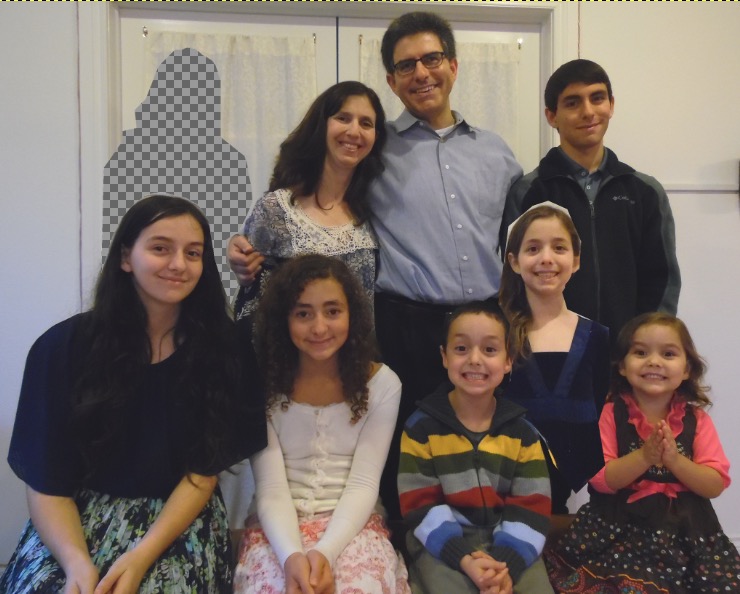
As you can see, there were two people I had to edit into the picture! Now, just want to have the one daughter show and not have a white "mask".
The option to add a mask, as well as alpha channel is not clickable. Merge and Stack also not clickable... Clicking the eye on/off does not make her face show.


Top
 Post subject: Re: Bottom layer invisible & I am stuck
PostPosted: Sun Dec 06, 2015 11:03 pm  (#24) 
Offline
GimpChat Member
User avatar

Joined: Apr 08, 2010
Posts: 5420
Location: Northwest Ohio
IT is because your picture is a jpg. You have to re-export it as a .png. Then you can add the alpha channel and make the white space transparent. I did it but my internet is going bonkers tonight and cannot upload it. I'll try tomorrow.


Top
 Post subject: Re: Bottom layer invisible & I am stuck
PostPosted: Sun Dec 06, 2015 11:20 pm  (#25) 
Offline
Administrator
User avatar

Joined: Aug 10, 2012
Posts: 14155
Location: Native to NYC living in Arizona, Gimp 2.8 - 3.0, Win 11 PC.
Any image format can be used.
You only need to upload the images needed to make the edit, by placing the person into the image.
So that would be 2 images, one of the person to be added and the image to place the person into.

_________________
Image
"A wise man learns more from a foolish question than a fool can learn from a wise answer"
Image


Top
 Post subject: Re: Bottom layer invisible & I am stuck
PostPosted: Sun Dec 06, 2015 11:35 pm  (#26) 
Offline
GimpChat Member
User avatar

Joined: Apr 08, 2010
Posts: 5420
Location: Northwest Ohio
Is this what you are wanting so you can stick the other picture underneath to show through the transparent space?

Image


Top
 Post subject: Re: Bottom layer invisible & I am stuck
PostPosted: Mon Dec 07, 2015 6:31 am  (#27) 
Offline
Global Moderator
User avatar

Joined: May 16, 2010
Posts: 16158
I think you need to resize her just big enough so the face sizes match in the back row then that will look great Conbagui. :)
She just looks a little smaller than she should.

_________________
Image


Top
 Post subject: Re: Bottom layer invisible & I am stuck
PostPosted: Mon Dec 07, 2015 7:29 am  (#28) 
Offline
GimpChat Member

Joined: Mar 04, 2011
Posts: 2612
...and pay attention to the lighting. There are plenty highlights on the main image.

a quicky..

Attachment:
lighting.jpg
lighting.jpg [ 1.15 MiB | Viewed 1603 times ]


Top
 Post subject: Re: Bottom layer invisible & I am stuck
PostPosted: Mon Dec 07, 2015 11:44 pm  (#29) 
Offline
GimpChat Member

Joined: Dec 04, 2015
Posts: 13
Awesome! Combagui & rich2005 - these look great. My daughter's skin tone and hair (without the zig-zag I did) is more like the tone Combagui accomplished, but she does need to be scaled a bit larger. I think I could take it from here...Is there a way for me to obtain the file from you as an xcf to make some final adjustments? I'm happy to send the amazon card to you Combagui, as promised, if you provide me with a way to get it to you. Thank you so much!


Top
 Post subject: Re: Bottom layer invisible & I am stuck
PostPosted: Tue Dec 08, 2015 8:13 am  (#30) 
Offline
GimpChat Member

Joined: Dec 04, 2015
Posts: 13
@ 2ton, Yes, thank you. Although I am such a novice that I wouldn't know how to get her face to show without a tutorial. If you would like to pass it along to me I'll gratefully take it.


Top
Post new topic Reply to topic  [ 30 posts ]  Go to page Previous  1, 2

All times are UTC - 5 hours [ DST ]


* Login  


Powered by phpBB3 © phpBB Group