It is currently Tue Aug 11, 2026 4:29 am


All times are UTC - 5 hours [ DST ]


Post new topic Reply to topic  [ 8 posts ] 
Author Message
 Post subject: Hello
PostPosted: Thu Mar 03, 2011 3:48 pm  (#1) 
Offline
New Member

Joined: Mar 03, 2011
Posts: 4
Hi

I'm TC and I'm brand new to GIMP (and any other image processing software for that matter). I am trying to make a book of drawings for my brother's 60th birthday from my old sketchbooks by scanning them and then composing them in ones and twos onto each page of the book (after cutting out illegible captions and other bits and pieces). I want the images to look as if they were drawn directly onto the page, but I can't work out how to do that in GIMP. ie I can't match the colour of the scanned images (which are grey) to the rest of the GIMP image. I guess I need some sort of feathering or colour matching tool?

I've no idea if anyone can help or if I'm in the wrong place altogether, but if not perhaps someone can advise me if there is a GIMP consultancy service operating in UK? I'm sure if I could sit down with an experienced user for half an hour I could solve the problem.

The birthday's not till July so I've got a bit of time.....!

Apologies if this is an inappropriate request for this august forum of experts, but I'd appreciate any advice

Thanks


Share on Facebook Share on Twitter Share on Orkut Share on Digg Share on MySpace Share on Delicious Share on Technorati
Top
 Post subject: Re: Hello
PostPosted: Thu Mar 03, 2011 3:53 pm  (#2) 
Offline
GimpChat Member
User avatar

Joined: Mar 02, 2011
Posts: 1850
Location: Michigan
Welcome to the forum. I am sorry but I do not know how to help you. Although I can say, that is a really cool idea =D

I am Willy, and also new to this forum.

_________________
Image
I'm back I think


Top
 Post subject: Re: Hello
PostPosted: Thu Mar 03, 2011 4:08 pm  (#3) 
Offline
Retired Staff
User avatar

Joined: May 22, 2008
Posts: 6946
Location: Somewhere in GIMP
:welcome to Gimp Chat, TC. We have a lot of talented people in here who are more than happy to help.

All questions are important to us and we want to encourage anyone who uses or wants to use GIMP and has questions about it. :gimp.

_________________
Image
World War IV will be fought with sticks and stones. - Albert Einstein


Top
 Post subject: Re: Hello
PostPosted: Thu Mar 03, 2011 6:40 pm  (#4) 
Offline
Script Coder
User avatar

Joined: Oct 25, 2010
Posts: 4812
tclc wrote:
I've no idea if anyone can help or if I'm in the wrong place altogether, but if not perhaps someone can advise me if there is a GIMP consultancy service operating in UK? I'm sure if I could sit down with an experienced user for half an hour I could solve the problem.

The birthday's not till July so I've got a bit of time.....!

Apologies if this is an inappropriate request for this august forum of experts, but I'd appreciate any advice

Would you have sample images (what you scanned...) and where you want to put them (of instance a photograph of a book page)?

_________________
Image


Top
 Post subject: Re: Hello
PostPosted: Thu Mar 03, 2011 7:09 pm  (#5) 
Offline
GimpChat Member
User avatar

Joined: Jul 04, 2010
Posts: 2253
Location: Retired Moderator Slowly Returning to the Living.
Welcome TC! You will definitely pick up loads of ideas here.

As Ofnuts said, posting a couple of images will certainly help us to understand what you have to work with and what you're looking to do. We look forward to being able to help!

Greg

_________________
Artists aren't crazy! We're eccentric! ~G.M. Ross

Image

My Sigs = My Photos
Check out my work at http://www.flickr.com/photos/photomastergreg.


Top
 Post subject: Re: Hello
PostPosted: Thu Mar 03, 2011 7:31 pm  (#6) 
Offline
GimpChat Member
User avatar

Joined: Sep 24, 2010
Posts: 12829
I'm noticed that on some of the items that I scan, I can improved the quality a lot by dup then set Top layer to burn. For Sketches, this tip might be of help to you. Don't envy you if you have a lot of them though; lot's of work, but it's done out of love so don't think it will be too bad for you because of that. A big welcome to you from me and a hope a very cool birthday for your brother too. :)

_________________
Lyle

Psalm 109:8

Image


Top
 Post subject: Re: Hello
PostPosted: Fri Mar 04, 2011 3:22 am  (#7) 
Offline
Former Member
User avatar

Joined: Nov 17, 2010
Posts: 618
Location: Rockford, IL
Welcome to GimpChat, hope you enjoy it here! We're all a big happy family :D


Top
 Post subject: Re: Hello
PostPosted: Fri Mar 04, 2011 5:26 am  (#8) 
Offline
Global Moderator
User avatar

Joined: May 16, 2010
Posts: 16155
Welcome to Gimp Chat tclc!
Try this too -
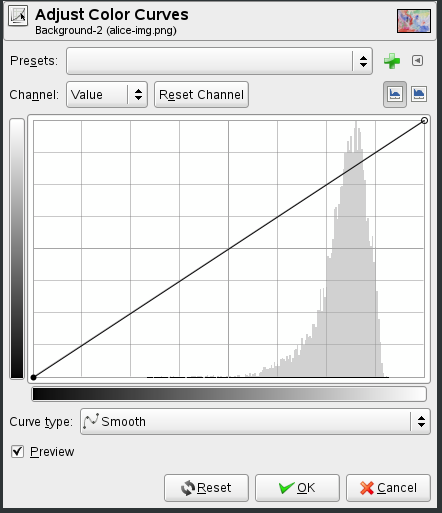
Open your sketch in Gimp - duplicate the layer
Go to colors/curves - a dialog with a diagonal line will pop up.

Image

Using your mouse move the line around up and down and see if that gets you the color you need.

_________________
Image


Top
Post new topic Reply to topic  [ 8 posts ] 

All times are UTC - 5 hours [ DST ]


* Login  


Powered by phpBB3 © phpBB Group