It is currently Thu Aug 13, 2026 5:25 pm


All times are UTC - 5 hours [ DST ]


Post new topic Reply to topic  [ 9 posts ] 
Author Message
 Post subject: Newbie Needs Help
PostPosted: Fri Oct 14, 2016 10:10 am  (#1) 
Offline
New Member

Joined: Oct 14, 2016
Posts: 2
Hello All. I am just learning to work with GIMP, and I notice a problem In all the video tutorials I see (on Youtube for example) whenever the Text tool is selected, another dialogue box "Text" or "Text Options" opens right under it in the small left pane.

I am have a PC running Win7 64 bit and I have v. 2.8.18 of GIMP. Why am I not getting the Text or Text Options box when I select the Text Tool?

Thanks in advance for your help! :)


Share on Facebook Share on Twitter Share on Orkut Share on Digg Share on MySpace Share on Delicious Share on Technorati
Top
 Post subject: Re: Newbie Needs Help
PostPosted: Fri Oct 14, 2016 10:17 am  (#2) 
Offline
GimpChat Member
User avatar

Joined: Apr 09, 2016
Posts: 580
Location: Sheffield UK
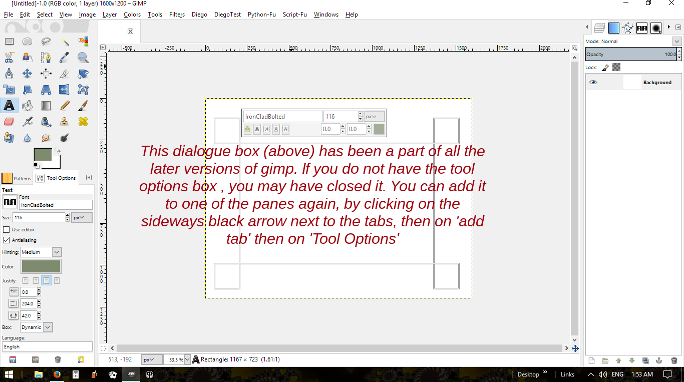
Try going to windows (in the top horizontal menu) choose 'Dockable Dialogs' then 'Tool Options'
I hope this helps.

_________________
Image


Top
 Post subject: Re: Newbie Needs Help
PostPosted: Fri Oct 14, 2016 10:42 am  (#3) 
Offline
Global Moderator
User avatar

Joined: Apr 01, 2012
Posts: 8457
Location: On the other side of your screen
Welcome to Gimp Chat :)
Here is another way
When you click on that arrow you will see a drop down menu.
Image

_________________
Image
Free Fun Photo Editing & resources
Poems from the Lord
Gimp Newby
Gimp version 3.2.4 and GMIC-Qt 4.0.2 OS :- Windows 10 Home 64


Top
 Post subject: Re: Newbie Needs Help
PostPosted: Fri Oct 14, 2016 11:12 am  (#4) 
Offline
New Member

Joined: Oct 14, 2016
Posts: 2
RJKD and Sallyanne, thanks for your suggestions. I tried them both, and I did get the Text Options box to show up, as you said RJKD. However, when I tried to drag it under the other tools showing in Toolbox, it would not dock there. Thats despit the dialoge that says "you can drop dockable dialogs here". (See screen shot below)

Suzanne, I tried your suggestion, but the text box still does not show up as it shows in the screenshot of your post. Notice the difference between yours & mine in the screenshot below:

Well, I assumed I could paste a screen shot here, but even THAT is not working! This is REALLY frustrating!!!


Top
 Post subject: Re: Newbie Needs Help
PostPosted: Fri Oct 14, 2016 12:36 pm  (#5) 
Offline
Retired Staff
User avatar

Joined: May 22, 2008
Posts: 6946
Location: Somewhere in GIMP
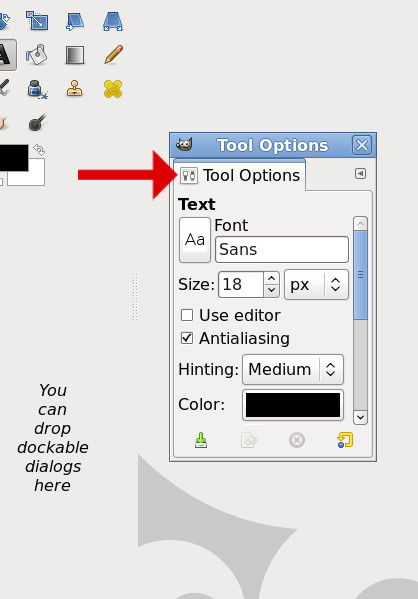
Welcome to Gimp Chat, txbbq! Here is a screen shot of what to do. The little box the arrow is pointing to is the place you drag it with your mouse to the area that says to drop there. As you drag it over, the area will turn blue. Just drop it there.
Image

_________________
Image
World War IV will be fought with sticks and stones. - Albert Einstein


Top
 Post subject: Re: Newbie Needs Help
PostPosted: Fri Oct 14, 2016 1:19 pm  (#6) 
Offline
Administrator
User avatar

Joined: Aug 10, 2012
Posts: 14154
Location: Native to NYC living in Arizona, Gimp 2.8 - 3.0, Win 11 PC.
In addition to what Oregonian and the others have explained.
I've made a video tutorial on adding,
removing and restoring Dockable Dialogs in Gimp.
Which may explain it further by following the links below.

Gimp Chat Link

YouTube Link

_________________
Image
"A wise man learns more from a foolish question than a fool can learn from a wise answer"
Image


Top
 Post subject: Re: Newbie Needs Help
PostPosted: Sat Oct 15, 2016 2:49 pm  (#7) 
Offline
GimpChat Member
User avatar

Joined: Mar 01, 2014
Posts: 14125
Location: Spain, Aragón
Hello txbbq, Welcome to Gimp Chat. I hope you to have solved the problem with text tool. :)


Attachments:
Welcome.JPG
Welcome.JPG [ 244.43 KiB | Viewed 2154 times ]

_________________
Image

Gimp 2.10.30(samj) portable _ OS Windows 10 Home_ 64bits
Don’t be afraid to start over. It’s a new chance to rebuild what you want.
Top
 Post subject: Re: Newbie Needs Help
PostPosted: Sat Oct 15, 2016 4:40 pm  (#8) 
Offline
Global Moderator
User avatar

Joined: May 16, 2010
Posts: 16158
Looks like you have enough help! :) Welcome to Gimp Chat by the way.

_________________
Image


Top
 Post subject: Re: Newbie Needs Help
PostPosted: Sat Oct 15, 2016 4:58 pm  (#9) 
Offline
Script Coder
User avatar

Joined: May 07, 2014
Posts: 4527
Location: Canada
Attachment:
Welcome_To_GIMPCHAT_Rods_Jeans.png
Welcome_To_GIMPCHAT_Rods_Jeans.png [ 133.62 KiB | Viewed 2136 times ]

_________________
TinT


Top
Post new topic Reply to topic  [ 9 posts ] 

All times are UTC - 5 hours [ DST ]


cron

* Login  


Powered by phpBB3 © phpBB Group