It is currently Thu Aug 06, 2026 8:16 pm


All times are UTC - 5 hours [ DST ]


Post new topic Reply to topic  [ 5 posts ] 
Author Message
 Post subject: Hi & why
PostPosted: Sun Feb 22, 2026 8:39 pm  (#1) 
Offline
New Member

Joined: Feb 22, 2026
Posts: 3
Hi All,

I'm a US-based scientist, and I've been using GIMP badly for many years, and signed up because I have some questions, which led to other questions.

The motivating Q is "How do I de-activate the color picker inside the foreground/background color setter?" My frustration is that I'll go to set the foreground color, then choose the color picker, pick a color, and then pick OK, and it changes the color to the color of the OK button, or if I try the cancel, close window buttons or even try to close the app, it chooses the colors of the button. Sometimes I'm lucky and I happen to exit the mode, but I'm not sure how I do it.

That led to the Help Documents on color picker, (url of gimp doc removed bc too spammy) gimp-tool-color-picker.html which doesn't seem to work quite like the one in the foreground/background color setter, and had nothing on de-activating the picking. I think the page should document this differently working other color picker tool.

Then I found this forum, which looked like it might have an answer, but the search box doesn't seem to exist unless you sign up, which seems to make it unnecessarily difficult for casual users like me to find prior answers. (see image below) I think this forum's search tool should be available to non-logged in users. Trying https://gimpchat.com/ right now in a Chrome Incognito Window, there is a fairly simple page, with some recent posts and links to register and to a Faq that talks about how to search: faq.php#f7r0 which assumes there is a search box. Either the search box should open for non-logged in folks, or the FAQ on search should say Search is only open for logged in members.

So those are my current frustrations with GIMP, and I look forward to finding answers in the chats.


Attachments:
File comment: Screenshot of non-logged-in-user seeing no search box
junk.jpg
junk.jpg [ 440.43 KiB | Viewed 7208 times ]
Share on Facebook Share on Twitter Share on Orkut Share on Digg Share on MySpace Share on Delicious Share on Technorati
Top
 Post subject: Re: Hi & why
PostPosted: Sun Feb 22, 2026 10:22 pm  (#2) 
Offline
Global Moderator
User avatar

Joined: Apr 01, 2012
Posts: 8448
Location: On the other side of your screen
Welcome to Gimp Chat Dave.
Don't think there are many people here who actually create the gimp program, so this might be the wrong place for that kind of feedback.
We are mostly users.
But there are some here who can answer questions - let you know if what you experience is a bug or not / are more well versed in the gimp program.
As for trying to search you can do that in google and it just might refer you back to a topic here.
Also you need to make 5 posts before you can post links or pictures (rule was to try to stop spammers)

When you do ask a question ask in the 'gimp help' forum of this site, state your OS and gimp version. You will be asked all of those things when you open a post there anyhow.
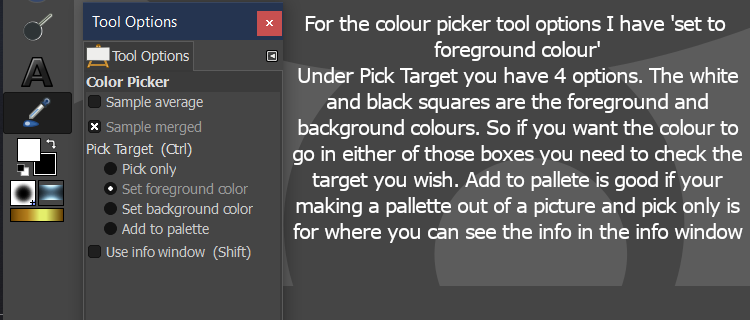
By the way there is in the tool options box for colour picker to set foreground or background colour - did that not work for you?
Image
Glad you worked out the problem you had and hope to see what you can do in gimp

_________________
Image
Free Fun Photo Editing & resources
Poems from the Lord
Gimp Newby
Gimp version 3.2.4 and GMIC-Qt 4.0.2 OS :- Windows 10 Home 64


Top
 Post subject: Re: Hi & why
PostPosted: Mon Feb 23, 2026 5:51 am  (#3) 
Offline
GimpChat Member

Joined: Mar 14, 2023
Posts: 608
Location: Turkiye
First, you need to read what these two are used for.

:bucket
https://docs.gimp.org/2.10/en/gimp-tool-bucket-fill.html

:colpick
https://docs.gimp.org/3.0/en/gimp-tool-color-picker.html


Top
 Post subject: Re: Hi & why
PostPosted: Mon Feb 23, 2026 9:22 am  (#4) 
Offline
GimpChat Member

Joined: Apr 11, 2024
Posts: 306
Quote:
Then I found this forum, which looked like it might have an answer, but the search box doesn't seem to exist unless you sign up, which seems to make it unnecessarily difficult for casual users like me to find prior answers.


I guess it's thanks to all those spammers and ai-bots.


Top
 Post subject: Re: Hi & why
PostPosted: Mon Feb 23, 2026 10:02 am  (#5) 
Offline
Administrator
User avatar

Joined: Aug 10, 2012
Posts: 14145
Location: Native to NYC living in Arizona, Gimp 2.8 - 3.0, Win 11 PC.
Hello DaveX
Welcome to Gimp Chat.
:jumpclap :clap :jumpclap

After selecting your color,
press Esc (or switch tools) to exit picker mode before clicking OK.

If you click OK while it’s still active,
it samples the button color.
This seems to be the issue you’re seeing.

Yes,
the search function on Gimp Chat has only been available for logged-in users.
Your suggestion to have the search function available to guests has been implemented.

_________________
Image
"A wise man learns more from a foolish question than a fool can learn from a wise answer"
Image


Top
Post new topic Reply to topic  [ 5 posts ] 

All times are UTC - 5 hours [ DST ]


* Login  


Powered by phpBB3 © phpBB Group